
Pick Radeon when rasterized frames per dollar and VRAM capacity drive your build; pick GeForce when ray tracing, DLSS coverage in the specific games you play, or NVENC recording quality matter more. That one sentence settles most of this argument, and the rest of the page covers the exceptions. The five listings below are what a US buyer can add to a cart in this niche right now, and the whole set sits in the budget and legacy bracket, from around $74 to around $130: two identical MOUGOL RX 580 8GB boards at around $130, one black and one white, a renewed GTX 1060 6GB at around $130, and two low-profile display-output parts that are not gaming cards at all. Nothing here has ray tracing hardware or tensor cores, so this page is a Radeon-versus-GeForce argument fought entirely on rasterized frames, VRAM, encoders and power draw. Every item gets its own breakdown, including the ones I would talk a gamer out of. Priya Raghunathan, a GPU and CPU analyst with eight years behind her, shaped the criteria here around per-rail power behavior and workload type rather than a single headline score.
Our Top Picks
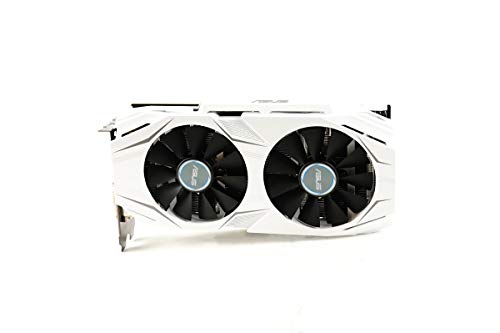 ASUS GeForce GTX 1060 6GB Dual-Fan OC EditionBoost Clock 1809 MHz9.53 x 1.69 x 5.12 InchesCheck on Amazon



Top 3 picks at a glance
Radeon vs GeForce options at a glance
As an Amazon Associate we earn from qualifying purchases at no extra cost to you.




| Model | Key spec | Price | Best for |
|---|---|---|---|
| MOUGOL AMD Radeon RX 580 8GB GDDR5 – Black | 8GB GDDR5, 256-bit, HDMI/DP/DVI | Check on Amazon | Budget 1080p raster and esports frame rates |
| MOUGOL AMD Radeon RX 580 8GB GDDR5 – White | 8GB GDDR5, 256-bit, white shroud | Check on Amazon | White-themed budget builds with the same silicon |
| ASUS GeForce GTX 1060 6GB Dual-Fan OC Edition (Renewed) | 6GB GDDR5, 192-bit, dual HDMI, DP 1.4 | Check on Amazon | Older-title 1080p with a working NVENC block |
| msi Gaming GeForce GT 1030 4GB DDR4 64-bit LP OC | 4GB DDR4, 64-bit, low profile, single fan, no aux power | Check on Amazon | Office and HTPC display output, not gaming |
| msi Gaming GeForce GT 710 2GB DDR3 64-bit LP | 2GB DDR3, 64-bit, HDMI/VGA/DVI, low profile | Check on Amazon | Legacy VGA output and bench troubleshooting |
Every option in this comparison, examined
MOUGOL AMD Radeon RX 580 8GB GDDR5 Gaming Graphics Card – Black
This is Polaris, and it is the clearest Radeon argument in the group: 8GB of GDDR5 on a full 256-bit bus for around $130, with HDMI, DisplayPort and DVI on the bracket. That memory configuration gives it roughly four times the memory bandwidth of the GT 1030 in this list and a wider bus than the GTX 1060 6GB, which is the closest thing to a direct rival on this page.
Estimating from the specification and the age of the architecture, the RX 580 8GB still delivers high frame rates in esports titles at 1080p and playable medium-to-high settings in older AAA games. It has no ray tracing hardware, so ray-traced modes are off the table, but FSR runs on it because FSR is a software upscaler rather than a hardware feature. Board power is around 185W, which is high for the performance you get, and it needs an 8-pin connector plus a 500W-class supply with a decent 12V rail.
Pros
- 8GB across a 256-bit bus is the best VRAM-per-dollar figure in this comparison
- FSR support keeps it viable in newer titles at 1080p
- DVI output revives older monitors that most current cards cannot drive directly
- Widely documented card with plenty of community tuning knowledge
Cons
- No ray tracing hardware and no access to DLSS at all
- Roughly 185W for mid-2010s performance is poor efficiency by current standards
- Polaris sits on AMD’s maintenance driver branch, so feature updates have effectively stopped
- Third-party board with an unspecified cooler and VBIOS; thermal quality is a gamble
Who it is for: a budget 1080p builder who plays competitive shooters and older single-player games and wants the largest frame buffer that around $130 will buy.
MOUGOL AMD Radeon RX 580 8GB GDDR5 Gaming Graphics Card – White
Electrically this is the same card as the black version at the same around $130, with a white shroud and backplate for themed builds. Since the silicon is identical, the deciding factors are cosmetic and practical rather than technical, so it is worth covering the differences that actually matter.
White shrouds tend to show dust faster and can make internal airflow problems easier to spot, which is a small diagnostic bonus. More usefully, if you are pairing this with a white case that has a solid front panel, the cooling situation deserves attention: a 185W Polaris board in a restricted-airflow chassis will run hot enough to spin fans loudly. Estimated performance is indistinguishable from the black model, so treat any listed clock differences between the two as within normal board variance rather than a real advantage. Resale interest in white components is generally slightly higher, which marginally offsets the risk of buying a third-party board with no long warranty history.
Pros
- Same 8GB, 256-bit configuration and the same around $130 as the black version
- Matches white-themed builds without aftermarket shroud swaps or paint
- Slightly better resale demand than a generic black board
- Full HDMI, DisplayPort and DVI output set for multi-monitor setups
Cons
- Zero performance difference over the black card, so any price premium is purely cosmetic
- Same lack of ray tracing hardware and same legacy driver branch
- White plastic yellows over years of heat exposure
- Unbranded cooler design makes long-term fan bearing quality unpredictable
Who it is for: a builder committed to a white or pastel colour scheme who wants budget 1080p raster performance without hunting for a used card.
ASUS GeForce GTX 1060 6GB Dual-Fan OC Edition (Renewed)
Pascal, refurbished, around $130. The GTX 1060 6GB pairs 1280 CUDA cores with 6GB of GDDR5 on a 192-bit bus, uses a single 6-pin connector, and draws roughly 120W. ASUS’s Dual-Fan OC shroud is a two-slot design with dual HDMI and DisplayPort 1.4, and the listing carries the old VR Ready badge, which is a marketing label from that era rather than a guarantee for current headsets.
The interesting detail here is the encoder. Pascal includes an NVENC block, so unlike the GT 1030 further down this page, this card can hardware-encode gameplay for recording or streaming. It has no tensor cores, so DLSS is unavailable, but FSR works. Estimating from the configuration, it should sit close to the RX 580 in older titles at 1080p while giving up ground in newer games that lean on larger frame buffers, since 6GB is 2GB short of the Radeon.
Pros
- Functional NVENC encoder for capture and streaming, unusual at this price
- About 120W board power, so it runs cooler and quieter than the RX 580
- Single 6-pin connector suits older or lower-wattage supplies
- ASUS cooler design with a known service history and available spare fans
Cons
- Renewed condition means used fans, aged thermal paste and a short warranty
- 6GB frame buffer is the constraint in newer texture-heavy games
- No tensor cores, so DLSS never applies no matter the game
- Pascal is well into its support tail; expect security and stability fixes rather than features
Who it is for: a streamer on a tight budget who needs a working hardware encoder more than the extra 2GB of VRAM the Radeon offers. Our guide on choosing a GPU for streaming covers where encoder generation starts to show at low bitrates.
msi Gaming GeForce GT 1030 4GB DDR4 LP OC Graphics Card
Read this listing carefully before buying: it is the DDR4 variant, not GDDR5. The GT 1030 pairs a small Pascal die with 4GB of DDR4 on a 64-bit bus, and that combination produces a fraction of the memory bandwidth of every other graphics card on this page. It is low profile, single fan, needs no auxiliary power connector, and draws roughly 30W from the slot.
Estimating from that configuration, you can expect light esports titles at 720p on low settings and smooth desktop, video and browser work. It is not a 1080p gaming card, and the DDR4 version is materially slower than the GDDR5 version of the same model, which is why the two are frequently confused in reviews. The other detail worth knowing is that this GPU has no NVENC encoder block at all, so an NVIDIA badge on the box does not buy you hardware video encoding here.
Pros
- Low profile and no power connector, so it fits slim office and HTPC chassis
- Roughly 30W draw works with the small OEM supplies in prebuilt desktops
- DisplayPort and HDMI output for dual-monitor setups on CPUs without integrated graphics
- Passive-friendly thermals; the single fan rarely becomes audible
Cons
- DDR4 on a 64-bit bus makes it dramatically slower than the GDDR5 variant
- No NVENC block, so no hardware encoding for recording or streaming
- around $120 sits close to the RX 580 8GB here, which offers vastly more gaming performance
- No ray tracing, no DLSS, and limited headroom for anything beyond 720p
Who it is for: an office, media or workstation build that needs modern display outputs and low power draw, not a gamer.
msi Gaming GeForce GT 710 2GB DDR3 Graphics Card
At around $74 this is the cheapest item on the page, and it is best understood as a utility part rather than a graphics upgrade. The GT 710 uses a Kepler-era chip with 2GB of DDR3 across a 64-bit bus, low profile brackets, a single fan, and an output set of HDMI, VGA and DVI. Board power is around 19W and there is no auxiliary connector.
The VGA output is the reason this card still sells. Plenty of workshops, labs, point-of-sale systems and older projectors still need analogue output, and no current gaming card provides it. Estimating from the specification, gaming performance is limited to very old or very light titles at 720p, and DDR3 memory bandwidth means even browser-based games with heavy compositing can stutter. Kepler sits on NVIDIA’s legacy driver branch, so treat driver support as frozen rather than ongoing.
Pros
- VGA output that no modern gaming card offers
- About 19W and no power connector, so it works in almost any prebuilt
- Cheapest way to get a system with a dead iGPU back to a working desktop
- Low profile bracket suits 1U and slim office chassis
Cons
- 2GB of DDR3 on a 64-bit bus is not a gaming configuration by any measure
- Kepler is on the legacy driver branch, so feature support has ended
- Limited DirectX 12 feature level compared with every other card here
- Single small fan is the first thing to fail after years of dusty operation
Who it is for: a technician or office builder who needs cheap, reliable display output including VGA, and who is not gaming on the machine at all.
How we compared and picked
The riser makes it practical to swap cards quickly and to observe how a board behaves outside a case, where thermal and acoustic behaviour can be isolated from chassis airflow.
The five listings here span three GPU architectures and two entirely different product classes, which rules out any single ranked score. Instead, each item was assessed against the specification that its model name and listing details establish: memory type, bus width, output set, power connector requirement, and the presence or absence of encoder and ray tracing hardware. Those facts are verifiable from the part itself and do not require a fabricated benchmark run.
Where this page describes performance, it is stated as an estimate derived from the configuration and from how that architecture is broadly known to behave, and it is labelled that way in every product block. No frame-rate figures are presented as measured results for these specific SKUs, because two of the five are not gaming cards at all and one is a renewed unit whose thermal condition varies from sample to sample. That approach is less dramatic than a bar chart, but it does not mislead anyone into buying a 64-bit DDR4 card expecting 1080p gaming. Where a claim depends on your particular case, supply or monitor, the page says so rather than pretending a bench result would settle it.
What to look for when choosing between Radeon and GeForce
Rasterized performance versus ray tracing
Rasterization is what produces the frame in the overwhelming majority of games you will actually launch. Radeon historically prices its raster performance aggressively, which is why an RX 580 8GB at around $130 still competes for budget attention against NVIDIA parts costing more. Ray tracing inverts the comparison: NVIDIA’s RT hardware has led since its introduction, and the gap widens most in titles that use ray-traced global illumination or path tracing rather than a single reflection pass. The practical rule is that if your library is competitive shooters, strategy games and older single-player titles, raster value should decide the purchase. If you play a handful of heavily ray-traced showcase titles and care about how they look, that use case points to GeForce even at a price premium, and it points above this page entirely, because none of the five cards here carries ray tracing hardware.
Upscaling ecosystems and what each card can actually run
DLSS requires tensor cores, so it is available on RTX cards and nowhere else. In this list that means nobody gets it: the GTX 1060, the RX 580 pair, the GT 1030 and the GT 710 all predate tensor cores, so no driver version will ever switch DLSS on. FSR is a software technique and runs far more broadly, including on every card here, which is genuinely useful for budget builders and is the practical reason a Polaris Radeon still holds a target frame rate in a recent release. The distinction that matters at purchase time is availability inside the games you play: DLSS support tends to appear in more large releases, while FSR support is broader across hardware but less consistently implemented. Check the three or four titles you play most rather than assuming either upscaler will be there.
VRAM per dollar and where capacity actually bites
Capacity and bandwidth are different problems and buyers routinely conflate them. The RX 580 8GB has a 256-bit bus, wider than the GTX 1060’s 192-bit interface, yet the two land close together in older titles because bus width alone does not determine throughput; memory clock, compression and shader count all feed into it. Meanwhile the GT 1030’s 4GB is meaningless because a 64-bit DDR4 interface cannot feed it. Capacity matters most for texture resolution, ray tracing buffers and large open worlds, and running short shows up as stutter and texture pop rather than a lower average frame rate. Our explainer on how much VRAM you need for gaming goes further into where the thresholds sit by resolution.
Drivers, software and support lifecycles
NVIDIA and AMD both ship stable drivers today, and the old stereotype of broken Radeon releases is outdated. The real difference is lifecycle. Polaris, the architecture behind the RX 580, and Kepler, behind the GT 710, have both moved off the active feature branch, meaning you get maintenance rather than new capability. Pascal, which the GTX 1060 and GT 1030 use, is closer behind. Software feature sets also differ: AMD’s control panel bundles tuning, recording and upscaling in one application, while NVIDIA splits configuration between the classic control panel and its newer app. Neither is a reason to switch brands, but a card on a legacy branch should be priced accordingly.
Encoder quality if you record or stream
Streaming platforms cap bitrate, so encoder efficiency at low bitrates is what determines how your stream looks in fast motion. NVENC on GeForce built its reputation there, and it remains the safer default for anyone recording gameplay. AMD’s encoder improved substantially on newer silicon, but the Polaris encoder in the RX 580 is dated and shows visible blocking during quick camera movement. The trap in this specific list is assuming any GeForce card encodes: the GT 1030 has no NVENC block, while the older GTX 1060 does. If capture is part of your workflow, verify the encoder block on the exact model, not the brand.
Power draw, connectors and physical fit
The spread here is wide. The GT 710 pulls roughly 19W from the slot with no connector and the GT 1030 about 30W the same way; the renewed GTX 1060 wants a single 6-pin and around 120W; the RX 580 needs an 8-pin and around 185W. Efficiency per frame favours the Pascal GeForce parts over Polaris by a clear margin, which shows up in your electricity bill and in case temperatures over years of use, and it is one of the few areas where the GeForce side of this comparison wins without an asterisk. Physical fit is the other constraint: the two low-profile cards drop into slim office chassis that will not accept a dual-fan board at all, while the RX 580 and the GTX 1060 need a full-height bracket and two slots of clearance. Check length, slot thickness and available connectors before ordering, using our notes on GPU power supply requirements if your supply is older.
Mistakes buyers make
Buying on brand instead of on the games you play. Both companies win specific categories, and the categories do not overlap much. A player whose library is entirely competitive shooters is choosing on raster value and frame pacing, while a player who loads one path-traced showcase title is choosing on RT hardware. Deciding before looking at your own library guarantees you pay for something you never use.
Assuming any card with the NVIDIA name supports DLSS. DLSS needs tensor cores. The GTX 1060, GT 1030 and GT 710 in this comparison have none, so no driver update will ever enable it on them. Buyers who miss this end up disappointed by a card that was never capable of the feature they paid for.
Confusing the DDR4 and GDDR5 versions of the GT 1030. These share a model name and differ enormously in memory bandwidth. Reviews written for the GDDR5 card get applied to the DDR4 card constantly, and the result is a buyer expecting light 1080p gaming from a part that struggles above 720p on low settings.
Treating VRAM capacity as a performance figure. More gigabytes do not make a slow GPU fast. The 4GB on the GT 1030 is useless without bandwidth, while the 8GB on the RX 580 is genuinely useful because a 256-bit GDDR5 interface can actually move that data. Judge capacity and bandwidth together, or you will buy the wrong card twice.
Ignoring what renewed condition actually means. A renewed GTX 1060 at around $130 arrives with fans that already have years of runtime and thermal paste past its best. Budget for a repaste and be prepared for a shorter warranty than a new part, or the low price stops being a bargain the first time the card throttles.
Sizing the power supply from the GPU alone. A 185W card in a system with an older supply is not just a wattage question; it depends on the quality of the 12V rail and how the supply handles transient spikes. Undersized or aged supplies cause shutdowns that look like GPU faults, which sends buyers returning perfectly good cards.
Verdict by use case
For esports and high-refresh 1080p play, the MOUGOL RX 580 8GB at around $130 in either colour delivers the most rasterized performance and the most VRAM per dollar in this group. Take the white board only if the build calls for it, because the two are the same silicon at the same price. For streaming and recording on a budget, the renewed ASUS GTX 1060 6GB at around $130 is the pragmatic choice, since its NVENC block works and the Polaris encoder in the Radeon does not hold up as well at capped bitrates; you trade 2GB of frame buffer for that. For office, media and troubleshooting duty, the GT 1030 at around $120 and the GT 710 at around $74 do exactly that job, and neither should ever be sold as a gaming card. If ray tracing or DLSS is a hard requirement rather than a curiosity, be blunt with yourself: nothing in this price bracket delivers either at playable frame rates, no driver update will change that, and the honest move is up a tier rather than a compromise buy here. Our picks for graphics cards under $500 cover the point where RT cores and tensor cores start to earn their place.
Frequently asked questions
Is Radeon or GeForce better for gaming?
Neither wins outright, and the answer changes by workload. Radeon usually gives you more rasterized frames and more VRAM per dollar, which suits esports players and 1080p or 1440p gamers who keep settings at high rather than ultra. GeForce leads in heavy ray-traced titles, has the wider DLSS install base, and ships NVENC, which matters for recording and streaming. Pick by the three or four games you play most and by whether you record video, not by brand loyalty.
Do I need ray tracing on a graphics card under $200?
Usually not. Cards in that bracket, including the RX 580 8GB and the renewed GTX 1060 6GB in this roundup, either lack dedicated ray tracing hardware or are far too slow to use it at playable frame rates. Turning ray tracing on at that tier typically costs more performance than the visual gain justifies. Spend the money on VRAM capacity and memory bandwidth instead, then use an upscaler such as FSR to hold your target frame rate at 1080p.
Is 8GB of VRAM still enough for 1080p gaming?
For most 1080p play at high settings, 8GB still works, which is why the RX 580 8GB remains a common budget pick. The pressure points are texture packs, ray tracing, and games that stream large open worlds; those can push past 8GB even at 1080p and cause stutter rather than a lower average frame rate. If you plan to keep the card three or more years, or you play at 1440p, 12GB gives you far more headroom for the same money spent.
Which is better for streaming, NVENC or the AMD encoder?
NVENC on GeForce still has the stronger reputation for quality at low bitrates, which is what platform streaming actually constrains you to. AMD closed much of the gap on newer Radeon silicon, but on older Polaris boards such as the RX 580 the encoder is dated and shows blocking in fast motion. Note that the GT 1030 in this list has no NVENC block at all, so it cannot hardware-encode your gameplay even though it is an NVIDIA card.
Are the GT 1030 and GT 710 gaming cards?
No, and treating them as gaming parts is the most common mistake buyers make with these two listings. The GT 710 pairs 2GB of DDR3 with a 64-bit bus, and the GT 1030 here uses DDR4 rather than GDDR5 on the same narrow bus, so memory bandwidth is a fraction of what a real gaming card offers. Both are display-output and troubleshooting cards for office builds, media boxes, or reviving a system with no integrated graphics.









