Our Short List of 3

- Best for: A gaming PC that needs one fast drive for the operating system and the whole library.
- 2TB capacity, M.2 2280 form factor
- PCIe 4.0 x4 NVMe interface
- Sequential reads up to 7,450 MB/s, writes up to 6,900 MB/s
- 2GB LPDDR4 DRAM cache, 176-layer V-NAND TLC
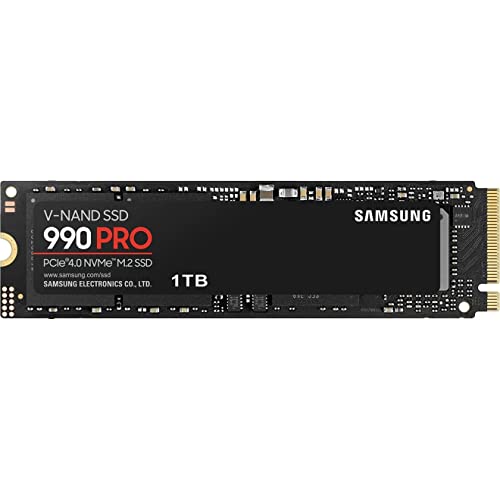
- Best for: A fast boot drive when a second drive already holds the game library.
- 1TB capacity, M.2 2280 form factor
- PCIe 4.0 x4 NVMe interface
- Sequential reads up to 7,450 MB/s, writes up to 6,900 MB/s
- 1GB LPDDR4 DRAM cache

- Best for: Creators and gamers who move large files and want DRAM-backed sustained speed.
- 2TB capacity, M.2 2280 form factor
- PCIe Gen4 x4 NVMe interface
- Sequential reads up to 7,400 MB/s, writes up to 7,000 MB/s
- TLC NAND with 2GB LPDDR4 DRAM cache
All 5 Picks at a Glance
| Product | Specs | Action |
|---|---|---|
| Samsung 990 PRO 2TB |
| Check price on Amazon |
| Samsung 990 PRO 1TB |
| Check price on Amazon |
| Crucial T500 2TB |
| Check price on Amazon |
 Crucial P3 Plus 2TB |
| Check price on Amazon |
 Samsung 980 PRO 1TB |
| Check price on Amazon |
Cyber Monday is when many PC builders finally buy the NVMe SSD their rig has been waiting for, but the right choice is rarely the fastest drive on the page. Capacity, generation, endurance and the slot in your own motherboard all change the answer, and the figure shown on a listing can move while you are still comparing tabs. Before you commit, open the Amazon listing, check the current price, confirm the seller and the exact model number, and only then decide whether the deal in front of you is worth taking.
This roundup is for gamers expanding a library, creators moving large video files, and anyone replacing a slow boot drive before the holidays. Every drive below is an NVMe M.2 SSD picked from the name and specifications on its Amazon product page, all of them Gen4, all of them still listed for sale on Amazon US.
Our Top Picks
Top 3 picks at a glance
Quick Picks
As an Amazon Associate we earn from qualifying purchases
| Product | Best for | Key spec from title |
|---|---|---|
| Samsung 990 PRO 2TB | Fastest all-round gaming drive | 2TB, PCIe 4.0, up to 7,450 MB/s read |
| Samsung 990 PRO 1TB | Flagship speed in a smaller capacity | 1TB, PCIe 4.0, up to 7,450 MB/s read |
| Crucial T500 2TB | Near-flagship speed with DRAM cache | 2TB, PCIe 4.0, up to 7,400 MB/s read |
| Crucial P3 Plus 2TB | Large capacity on a tighter budget | 2TB, PCIe 4.0, up to 5,000 MB/s read |
| Samsung 980 PRO 1TB | Proven Gen4 drive for boot and games | 1TB, PCIe 4.0, up to 7,000 MB/s read |
How to Choose
Match the generation to your motherboard slot
Every drive in this roundup runs on PCIe 4.0, which is the generation most gaming PCs built in the last few years actually support. A Gen4 drive drops into a Gen4 M.2 slot and runs at full speed, but the same drive in a Gen3 slot is capped at Gen3 speeds, so the headline figure on the listing never tells the whole story. Gen5 drives are faster still, yet they need a Gen5 slot and a board that supports it, and they cost more for a gain most games never show. Open your motherboard manual, confirm which generation your free M.2 slot supports, and buy the generation that matches it.
Read the deal, not the headline
A large crossed-out figure next to a drive means very little on its own. Storage prices move with NAND supply, so a drive can look heavily reduced against a list figure it rarely sold at, while the same model sits at a similar figure on other days of the year. The check that matters is the live listing: open it, look at the current figure, note who the seller is and whether Amazon fulfils the order, and confirm the exact model number and capacity, since a heatsink version and a bare drive often share a page. If the seller is unfamiliar or the listing shows a used or renewed variant, walk away and wait for a cleaner offer.
Capacity first, speed second
Modern games regularly pass 100 GB each, so a 1TB drive that looked generous two years ago can fill up after a handful of installs. For a gaming library, 2TB is the comfortable middle ground in this roundup: room for the games you actually play plus the next few releases, without paying for capacity you will not touch. Creators face the same maths with footage and project files, where a full drive slows everything down. The gap between a 5,000 MB/s drive and a 7,450 MB/s drive is real, but it matters far less in daily use than having enough room left when the next big install lands.
Buy inside the window, and re-check on the day
Cyber Monday falls on Monday, November 30, 2026, and the deals around it run through Cyber Monday week, which sounds generous until a listing changes under you. A drive that shows a strong figure in the morning can show a different one by the evening, and a listing that had stock can run out while you are still deciding between two models. Treat every figure here as a starting point, not a promise: open the Amazon listing on the day you plan to buy, confirm the current figure, the seller and the model number again, and check the return terms before checkout. If the listing no longer matches what you expected, wait for the next window rather than settling.
The 5 Best Options
Samsung 990 PRO 2TB
- Best for: A gaming PC that needs one fast drive for the operating system and the whole library.
- 2TB capacity, M.2 2280 form factor
- PCIe 4.0 x4 NVMe interface
- Sequential reads up to 7,450 MB/s, writes up to 6,900 MB/s
- 2GB LPDDR4 DRAM cache, 176-layer V-NAND TLC
A gaming PC that needs one fast drive for the operating system and the whole library.
Confirm the bare-drive model number, since the heatsink version is a separate listing.
The 990 PRO 2TB is the drive to beat in this roundup, pairing the fastest sequential speeds here with a DRAM cache and an endurance rating built for heavy use. It suits a gaming PC where the SSD holds the operating system, the game library and the apps you open every day, and it stays quick when the drive fills up, which cheaper DRAM-less drives do not. Samsung’s Magician software makes cloning an old drive straightforward, and the five-year warranty gives the purchase a long horizon. Check the listing for the bare M.2 version, since a heatsink variant is sold separately under a different model number.
Watch out for: Confirm the bare-drive model number, since the heatsink version is a separate listing.
Samsung 990 PRO 1TB
- Best for: A fast boot drive when a second drive already holds the game library.
- 1TB capacity, M.2 2280 form factor
- PCIe 4.0 x4 NVMe interface
- Sequential reads up to 7,450 MB/s, writes up to 6,900 MB/s
- 1GB LPDDR4 DRAM cache
A fast boot drive when a second drive already holds the game library.
1TB fills quickly with modern games, so plan a second drive.
The 1TB 990 PRO carries the same headline speeds as its 2TB sibling, so it is the right call when the budget or the build only needs a fast boot drive and a handful of games. It runs the operating system and the titles you play most, loads them quickly, and leaves a second slot free for a larger, slower drive later. The trade-off is capacity: modern games eat space fast, and this drive will need managing sooner than a 2TB model. If your library lives on another drive already, the 1TB 990 PRO is the fastest way to make the machine feel new.
Watch out for: 1TB fills quickly with modern games, so plan a second drive.
Crucial T500 2TB
- Best for: Creators and gamers who move large files and want DRAM-backed sustained speed.
- 2TB capacity, M.2 2280 form factor
- PCIe Gen4 x4 NVMe interface
- Sequential reads up to 7,400 MB/s, writes up to 7,000 MB/s
- TLC NAND with 2GB LPDDR4 DRAM cache
Creators and gamers who move large files and want DRAM-backed sustained speed.
The current Amazon offer comes from a marketplace seller, so check the seller and fulfilment before buying.
The T500 2TB is the quiet overachiever of this roundup, matching the flagship drives on sequential speed while adding a DRAM cache and DirectStorage support that keep large transfers and game loads smooth. It is built for creators as much as gamers: moving raw footage, scrubbing timelines and exporting projects all lean on sustained write speed, and the T500 holds up where DRAM-less drives fade. The listing includes a month of Adobe Creative Cloud, which suits a creative workflow. Note the seller on the listing before buying, since the current offer comes from a marketplace seller rather than Amazon itself.
Watch out for: The current Amazon offer comes from a marketplace seller, so check the seller and fulfilment before buying.
Crucial P3 Plus 2TB
- Best for: Expanding game storage on a tighter budget with room for a full library.
- 2TB capacity, M.2 2280 form factor
- PCIe Gen4 NVMe interface
- Sequential reads up to 5,000 MB/s, writes up to 4,200 MB/s
- QLC 3D NAND
Expanding game storage on a tighter budget with room for a full library.
Write speeds drop when copying very large files in one go.
The P3 Plus 2TB is the capacity pick of this roundup: two terabytes of Gen4 storage for the buyer who wants room for a whole library without chasing flagship speeds. Its read speed is strong enough that games load quickly, and the drive works as a second game drive or a laptop upgrade where the old drive was smaller and slower. The compromise is the QLC NAND and the slower write speed, which show up when copying very large files or filling the drive in one go. For storing and playing games rather than constant heavy writes, that trade is easy to live with.
Watch out for: Write speeds drop when copying very large files in one go.
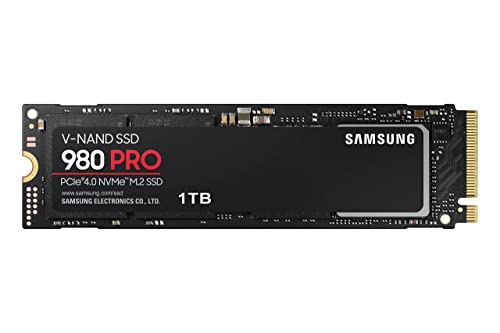
Samsung 980 PRO 1TB
- Best for: A first NVMe upgrade from SATA storage or a reliable boot drive.
- 1TB capacity, M.2 2280 form factor
- PCIe 4.0 NVMe interface
- Sequential reads up to 7,000 MB/s, writes up to 5,000 MB/s
- AES 256-bit hardware encryption, Samsung V-NAND
A first NVMe upgrade from SATA storage or a reliable boot drive.
1TB capacity only, and confirm the bare-drive model number on the listing.
The 980 PRO 1TB is the proven older flagship in this roundup, and it still earns its place as a boot drive or a first NVMe upgrade for a PC that has been running on SATA storage. Its read speed sits just below the 990 PRO, which is a gap you will rarely feel in games or daily use, and its hardware encryption and five-year warranty have a long track record behind them. The 1TB capacity is the limit here, so pair it with a larger drive if your library is big. Confirm the bare-drive model number on the listing, since a heatsink version is sold separately.
Watch out for: 1TB capacity only, and confirm the bare-drive model number on the listing.
Which One Fits Your Situation
Building a new gaming PC
When the build is new and the SSD will hold the operating system, the game library and everyday apps, the Samsung 990 PRO 2TB is the straightforward pick. Its speed, DRAM cache and endurance cover every job a gaming PC asks of storage, and 2TB means the library has room to grow. Buy it once, clone nothing later, and keep the second M.2 slot free for the future.
Upgrading a laptop or an older desktop
For a laptop or an older desktop with a single free M.2 slot, capacity and compatibility matter more than headline speed. The Samsung 980 PRO 1TB makes a quick boot drive, while the Crucial P3 Plus 2TB gives a laptop a full library in one drive. Check the slot generation and the physical clearance first, since some laptops only take single-sided drives.
Editing video and moving big project files
Video editing, photo libraries and large project files punish drives without a DRAM cache, which is where the Crucial T500 2TB earns its place. Its sustained write speed keeps exports and file moves steady, and 2TB holds a working project without constant shuffling to external storage. Remember to check the seller on the listing, since the current offer is not fulfilled by Amazon itself.
Adding storage to a PS5
A PS5 takes Gen4 NVMe drives in its expansion bay, and the Samsung 990 PRO 2TB is a strong fit once a compatible heatsink is added, since the bare drive ships without one. Check Sony’s size and speed requirements and measure the bay clearance before ordering, and confirm the exact model number on the listing. The Crucial P3 Plus 2TB is the roomier alternative when the console mainly needs space for more games.
Common Mistakes
- Judging a deal by the size of the crossed-out figure alone, instead of checking the current figure and the seller on the live listing.
- Buying a Gen5 drive for a board with only a Gen3 slot, then wondering why the headline speed never appears.
- Picking 1TB for a gaming library, then shuffling installs every time a new release lands.
- Ordering the wrong variant, heatsink or bare, 1TB or 2TB, because the model number was never checked.
- Assuming a Cyber Monday figure will still be there tomorrow, instead of re-checking the listing on the day you buy.
Frequently Asked Questions
Do I need a Gen5 SSD for gaming?
Not yet. Current games load well on a Gen4 drive, and the fastest Gen4 models here already exceed what most titles ask for. A Gen5 drive only makes sense with a Gen5 slot and a board that supports it, so check your motherboard first and spend the difference on capacity instead.
How do I check the current price before buying?
Open the Amazon listing on the day you plan to buy and look at the current figure, the seller name and whether Amazon fulfils the order. Confirm the exact model number and capacity match the drive you want, since variants share pages. If anything looks different from what you expected, wait rather than checking out.
When do the Cyber Monday deals end?
Cyber Monday is Monday, November 30, 2026, and deals run through Cyber Monday week, but there is no single end moment shared by every listing. Figures and stock can change during the week, so the listing you checked yesterday may look different today. If a drive matters to you, check it on the day you buy.
Will these SSDs work in a PS5?
Yes, with conditions. The PS5 expansion bay takes Gen4 NVMe M.2 2280 drives that meet Sony’s speed requirement, and every drive here meets it, but the bare drives need a compatible heatsink fitted before they go in. Check Sony’s current requirements, confirm the model number on the listing, and measure the clearance before ordering.
Related guides
More from Amazon
Programs that pair well with the guide above. Offers and eligibility are set by Amazon and may change.
Send a Prime gift membership to someone who would use free shipping and Prime Video.
Gift Amazon PrimeGive audiobooks to someone who loves to listen. Plans and prices are set by Amazon.
Gift AudibleA free business account with business pricing and bulk-buying tools for work, shop or home office.
Create a business accountFree shipping on eligible items, Prime Video and more. Eligible new members can start with a free trial.
Start a Prime free trialAs an Amazon Associate we earn from qualifying purchases.