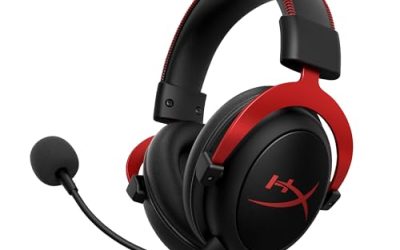
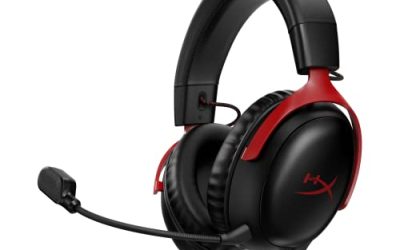
Our Short List of 3

- Best for: Xbox players who want the simplest, most reliable setup with official support.

- Best for: Players who game on Xbox, PC, and mobile and want one headset for all of them.

- Best for: Players who want detailed sound and a high-quality detachable microphone.
All 4 Picks at a Glance
| Product | Specs | Action |
|---|---|---|
| 1. Xbox Wireless Headset (2024 Model) — Best Overall for Xbox Players |
| Check price on Amazon |
| 2. SteelSeries Arctis Nova 7X Wireless — Best for Multi-Platform Play |
| Check price on Amazon |
| 3. Razer Kaira Pro for Xbox — Best Sound and Microphone |
| Check price on Amazon |
 4. Turtle Beach Stealth 700 Gen 2 MAX — Best Battery Life and Comfort |
| Check price on Amazon |
The best Bluetooth headsets for Xbox solve a problem that catches many players by surprise: Xbox consoles do not support Bluetooth audio directly. You cannot pair a standard Bluetooth headset to an Xbox Series X, Series S, or Xbox One the way you would pair earbuds to a phone. The headsets in this guide work around that limit in a smart way. Each one connects to the console through Xbox Wireless or a low-latency wireless dongle, and each one also offers Bluetooth for a phone, tablet, or PC. That dual connection is what makes them genuinely useful, because you can hear game audio from the console while taking a call, listening to music, or chatting on Discord from your phone at the same time.
That distinction matters more than any single specification on the box. A headset that is only Bluetooth will not give you game audio on Xbox at all. A headset built for Xbox, with Bluetooth as a second connection, gives you the best of both worlds. The four picks below all meet that test, with comfortable cushions, clear microphones, long battery life, and controls you can reach without pausing the game.
Our Top Picks
Top 3 picks at a glance
How Bluetooth Works With Xbox
Xbox consoles use a proprietary wireless protocol called Xbox Wireless for controllers and headsets. It is a low-latency radio connection, separate from Bluetooth, and it is the reason officially licensed Xbox headsets can pair directly to the console with no dongle. Bluetooth, by contrast, is the standard used by phones, tablets, laptops, and many PCs. The two systems do different jobs, and the best headsets for Xbox use both.
On the mobile side, Bluetooth connects the same headset to your phone. Many models can hold both connections at once, mixing the two audio streams so you can hear a Discord call over your game, or lower the game volume to answer a phone call without taking the headset off.
There is one setup worth avoiding. Some players buy a generic Bluetooth headset, discover it will not pair with the console, and then try a Bluetooth transmitter plugged into the controller or television. That can produce sound, but it usually adds noticeable delay, loses microphone support, and removes chat mixing. Choose a headset with native Xbox Wireless support and treat Bluetooth as the bonus connection it is meant to be.
How to Choose a Bluetooth Headset for Xbox
Check Xbox compatibility first
Look for clear Xbox branding on the box and in the product listing: phrases such as Designed for Xbox, Xbox Series X and S, and Xbox One. That branding means the headset has been tested with the console and pairs through Xbox Wireless. Check the model name carefully, because many headsets come in separate Xbox and PlayStation versions that look almost identical. Buying the wrong version is one of the most common mistakes in this category.
Look for simultaneous dual wireless
The most useful feature in this category is the ability to stay connected to the console and to a phone at the same time. Headsets that support this let you mix Bluetooth audio from your phone with game audio from the console, and they usually let you adjust the balance between the two. If a headset only lets you use one connection at a time, you will have to choose between game audio and your phone, which defeats much of the point of buying a Bluetooth headset for Xbox.
Battery life matters more than you think
Look for at least 20 hours of battery life as a minimum, and treat 30 hours or more as comfortable. Battery claims are usually measured at moderate volume, so real-world use at higher volume will be a little shorter. USB-C charging is a plus, because it charges faster and uses the same cable as many phones and controllers.
Comfort decides whether you keep it
Over-ear headsets press on your head and ears for hours, so weight, clamping force, and ear cushion material all matter. Lighter headsets, generally under 350 grams, are easier to wear for long sessions. Memory foam ear cushions with a breathable fabric cover tend to stay comfortable longer than stiff synthetic leather, especially in warm rooms. If you wear glasses, look for cushions described as glasses-friendly, with a softer seal that does not press the arms of your glasses into your head.
Microphone quality and chat controls
Voice chat is half the point of a gaming headset. A good microphone should pick up your voice clearly without also picking up every keyboard click and background noise in the room. Look for a retractable or detachable boom microphone, noise-cancelling or voice-isolation features, and a clear mute control you can find by touch. On-ear controls for game and chat balance are also valuable: being able to turn down a loud teammate or turn up game audio without opening a menu keeps you in the game.
Top Picks
1. Xbox Wireless Headset (2024 Model) — Best Overall for Xbox Players
- Best for: Xbox players who want the simplest, most reliable setup with official support.
Xbox players who want the simplest, most reliable setup with official support.
The official Xbox Wireless Headset is the simplest choice in this guide, and for many players it is the right one. It pairs directly to the console through Xbox Wireless with no dongle, it supports Bluetooth 5.3 for phones and PCs, and it can stay connected to both at once. The 2024 model improves on the original with longer battery life, rated at up to 20 hours, and an upgraded microphone with better auto-mute and voice isolation. It also includes Dolby Atmos support, so spatial audio works without a separate purchase.
The design is deliberately simple. Rotating earcup dials control game and chat volume, so you can adjust the mix by touch during play. The headset is light and adjustable, with a flexible headband that suits a wide range of head sizes. The microphone is built in rather than a separate boom, which keeps the look clean, and the auto-mute feature reduces background noise when you are not speaking. For players who want a headset that just works with their console, with no setup friction and no compatibility questions, this is the natural first pick.
There are trade-offs. The drivers are 40mm, smaller than the 50mm drivers in some premium rivals, so the sound is clean and balanced rather than thunderous. The built-in microphone is convenient but will not match a dedicated boom microphone in a noisy room, and 20 hours of battery life is shorter than the 38 hours or more offered by some competitors.
2. SteelSeries Arctis Nova 7X Wireless — Best for Multi-Platform Play
- Best for: Players who game on Xbox, PC, and mobile and want one headset for all of them.
Players who game on Xbox, PC, and mobile and want one headset for all of them.
The SteelSeries Arctis Nova 7X is built for players who do not live on one platform. It connects to Xbox through a compact USB-C wireless transmitter, and it also offers Bluetooth for phones, tablets, and PCs. The two connections can run at the same time, so you can mix mobile audio with game audio and adjust the balance in the SteelSeries app. The headset is designed for Xbox Series X and S, Xbox One, PC, PlayStation 5, Switch, and mobile, which makes it the most versatile pick in this guide.
Battery life is a strong point, rated at up to 38 hours on a single charge, with USB-C fast charging for quick top-ups. The drivers are neodymium magnetic drivers, tuned for clear highs and punchy bass, and the retractable ClearCast Gen 2 microphone uses AI-assisted noise cancellation to keep your voice clear while reducing background sound. The signature ski-goggle headband spreads weight evenly across the top of your head, and at around 325 grams the headset stays comfortable through long sessions.
The main thing to watch is the model name. SteelSeries sells very similar Nova 7, Nova 7P, and Nova 7X versions, and only the 7X includes the Xbox-compatible transmitter, so confirm the listing says 7X and mentions Xbox before you order. The transmitter also takes up a USB port on the console, which is a small trade-off compared with the direct pairing of the official headset.
3. Razer Kaira Pro for Xbox — Best Sound and Microphone
- Best for: Players who want detailed sound and a high-quality detachable microphone.
Players who want detailed sound and a high-quality detachable microphone.
The Razer Kaira Pro for Xbox is the pick for players who care most about audio detail and voice quality. It uses Razer TriForce Titanium 50mm drivers, which split the sound into separate highs, mids, and lows for clearer detail across the range. The HyperClear supercardioid microphone is detachable, focuses on your voice, and rejects sound from the sides and behind, which helps in shared rooms. A second, dedicated mobile microphone is built in for calls on the go, so you can use the headset with your phone without attaching the boom mic.
Connectivity covers both sides of the Xbox Bluetooth story. The headset pairs to the console through Xbox Wireless, and it also offers Bluetooth 5.0 for mobile devices, so you can take calls and listen to music from your phone while you play. FlowKnit memory foam ear cushions keep the fit comfortable, and the on-earcup controls include an EQ toggle that lets you switch sound presets without opening an app. The headset is officially licensed for Xbox and works with Xbox Series X and S, Xbox One, and Windows 10 and 11 PCs.
The Kaira Pro is a slightly older design than the other picks. It is often available at a lower cost than newer premium models, which makes it good value if you prioritise sound over the latest features. Its Bluetooth version is 5.0 rather than the newer 5.3 found on the official headset, and its battery life does not match the 38-hour rating of the Arctis Nova 7X.
4. Turtle Beach Stealth 700 Gen 2 MAX — Best Battery Life and Comfort
- Best for: Long-session players who want the longest battery life and a comfortable, glasses-friendly fit.
Long-session players who want the longest battery life and a comfortable, glasses-friendly fit.
The Turtle Beach Stealth 700 Gen 2 MAX is the endurance pick in this guide, with battery life rated at more than 40 hours on a single charge. That is enough for a full week of evening sessions without plugging in, and it is the longest battery life of the four headsets here. The headset connects to Xbox through a USB transmitter and also offers Bluetooth, so you can pair a phone at the same time and mix the two audio sources. It is officially licensed for Xbox and also works with PlayStation, PC, Nintendo Switch, and mobile, which makes it a strong multi-platform option.
Sound comes from 50mm Nanoclear speakers, tuned for clear dialogue and strong bass, with support for surround sound on compatible platforms. The flip-to-mute microphone is a practical touch: flip it up to mute instantly, flip it down to talk, with no button to hunt for in the dark. The metal-reinforced headband and gel-infused ear cushions are designed for comfort, and the cushions are described as glasses-friendly, which matters if you wear glasses during long sessions. App-based audio customisation lets you adjust the sound profile and set up custom presets for different games.
One caveat applies to this model. It is an older generation, and availability can vary between sellers, so check the listing carefully and confirm the model name, Stealth 700 Gen 2 MAX, and the Xbox version before ordering. Turtle Beach has also released a newer Stealth 700 model, so make sure you are buying the generation you want.
Comparison Table
| Headset | Console Connection | Bluetooth | Battery Life | Drivers | Microphone |
|---|---|---|---|---|---|
| Xbox Wireless Headset (2024) | Xbox Wireless, direct | Bluetooth 5.3 | Up to 20 hours | 40mm | Built-in, auto-mute |
| SteelSeries Arctis Nova 7X | Xbox Wireless via USB-C transmitter | Simultaneous Bluetooth | Up to 38 hours | Neodymium magnetic | Retractable, AI noise cancelling |
| Razer Kaira Pro for Xbox | Xbox Wireless, direct | Bluetooth 5.0 | Long sessions, shorter than rivals | 50mm TriForce Titanium | Detachable supercardioid |
| Turtle Beach Stealth 700 Gen 2 MAX | Xbox Wireless via USB transmitter | Bluetooth, simultaneous | More than 40 hours | 50mm Nanoclear | Flip-to-mute boom |
Frequently Asked Questions
Can you use a Bluetooth headset with Xbox?
Yes, but with an important qualification. Xbox consoles do not support Bluetooth audio directly, so a standard Bluetooth-only headset will not pair with the console for game audio. The headsets in this guide work because they connect to the console through Xbox Wireless, either directly or through a USB transmitter, and use Bluetooth only for a second device such as a phone or tablet. That dual approach gives you console game audio plus Bluetooth calls and music at the same time.
Do Bluetooth headsets for Xbox work with Xbox Series X and Series S?
Yes, all four headsets in this guide are designed for Xbox Series X and Series S, and they also work with Xbox One. The official Xbox Wireless Headset and the Razer Kaira Pro pair directly to the console, while the SteelSeries Arctis Nova 7X and the Turtle Beach Stealth 700 Gen 2 MAX use a small USB transmitter. Either method gives you low-latency wireless audio on the current consoles.
Can I use these headsets on PC and mobile too?
Yes. All four support Bluetooth for phones and tablets, and all four work on Windows PCs, either through Bluetooth, a USB connection, or the wireless transmitter. The SteelSeries Arctis Nova 7X and the Turtle Beach Stealth 700 Gen 2 MAX are the most versatile, with support for PlayStation and Switch as well. Check the exact model and listing before you buy, because some headsets come in separate Xbox and PlayStation versions.
How do I pair a Bluetooth headset to my Xbox?
Pairing depends on the model. Headsets with direct Xbox Wireless pairing, such as the official Xbox Wireless Headset, pair by holding the pairing button on the headset and on the console, much like pairing a controller. Headsets that use a USB transmitter pair automatically once the transmitter is plugged into the console. Bluetooth pairing is separate: put the headset into Bluetooth pairing mode and select it in your phone’s Bluetooth settings. The headset can then hold both connections at once.
Conclusion
The best Bluetooth headsets for Xbox are not really Bluetooth headsets at all, at least not on the console side. They are Xbox Wireless headsets that also offer Bluetooth, and that distinction is what makes them work. The official Xbox Wireless Headset is the simplest choice, with direct pairing, Bluetooth 5.3, and Dolby Atmos in a light package. The SteelSeries Arctis Nova 7X is the best choice for multi-platform players, with simultaneous dual wireless and 38 hours of battery life. The Razer Kaira Pro for Xbox suits players who prioritise sound detail and microphone quality, with 50mm TriForce drivers and a detachable supercardioid mic. The Turtle Beach Stealth 700 Gen 2 MAX is the endurance pick, with more than 40 hours of battery life and a glasses-friendly fit.
Whichever you choose, confirm the Xbox version before you order and check that the listing mentions both Xbox Wireless and Bluetooth. If you want to mix Discord or phone calls with game audio, simultaneous dual wireless is the feature to prioritise. If you mostly play alone on the console, the official headset will cover you with the least fuss.
Disclosure: As an Amazon Associate, we earn from qualifying purchases.
Related guides
More from Amazon
Programs that pair well with the guide above. Offers and eligibility are set by Amazon and may change.
A free business account with business pricing and bulk-buying tools for work, shop or home office.
Create a business accountFree shipping on eligible items, Prime Video and more. Eligible new members can start with a free trial.
Start a Prime free trialAudiobooks and podcasts to listen to on the go. Eligible new members can start with a free trial.
Try Audible freeAd-free music streaming. Eligible new subscribers can start with a free trial.
Try Music Unlimited freeAs an Amazon Associate we earn from qualifying purchases.