Teaching online puts your voice at the centre of every lesson, so the headset you choose shapes how clearly your students hear you for hours at a time. A laptop microphone picks up keyboard taps, room echo and household noise, while a weak earpiece leaves you straining to catch quiet answers from younger learners. The right headset solves both sides of that exchange: a boom microphone that sits close to your mouth, ear cushions that stay comfortable through a full timetable, and controls that let you mute in a single motion when a lesson pauses.


This shortlist covers full-time tutors, classroom teachers running hybrid lessons and language coaches who talk all day. Each pick below is a wired USB headset with a noise-cancelling microphone, chosen from its Amazon listing for voice clarity, wearing comfort and controls a teacher can reach without looking away from the class.
Quick Picks
As an Amazon Associate we earn from qualifying purchases
| Product | Best for | Key spec from title |
|---|---|---|
| Logitech H390 Wired USB-A Headset | A simple plug-and-play desk setup | USB-A, noise-cancelling microphone, in-line controls |
| Jabra Evolve2 30 UC Stereo USB-A Headset | A light professional headset for back-to-back lessons | USB-A, stereo, 2 built-in microphones |
| Poly Blackwire 3220 USB-C Headset | A modern USB-C laptop with a USB-A fallback | USB-C with USB-C to USB-A adapter, noise-cancelling mic |
How to Choose
Microphone clarity comes first
Your students judge a lesson by what they hear, so put the microphone ahead of music quality when you compare headsets. A boom microphone that sits near your mouth captures speech at a steady level even when you turn toward a whiteboard or lean back in your chair, while a microphone built into an ear cup drifts further from your voice with every move. Noise-cancelling microphones help here too, since they cut the hum of a fan or the clatter of keys before it reaches the class. Check the listing for a boom design, a microphone you can position, and wording that names noise cancelling rather than a generic microphone label.
Comfort across a full teaching day
A headset that feels fine for twenty minutes can become a burden by the fourth lesson, so weight and ear cushions deserve the same attention as sound. Light headsets with soft padding spread pressure across the head instead of pressing on one spot, and on-ear cushions breathe better than sealed cups in a warm room. An adjustable headband matters when several people share one headset or when you wear glasses, since a fixed band can press frames into your temples. Look for the listed weight, the cushion material named on the listing, and a headband you can adjust with one hand between lessons.
Connection type and mute control
Teaching runs on video platforms that expect a headset to work the moment you plug it in, so a wired USB connection is the safest match for most desks. USB headsets carry their own audio processing, which means the microphone and earpieces work without extra software, and a wired link never runs out of charge halfway through a lesson. Check whether your laptop has USB-A ports or only USB-C, since a mismatch means hunting for an adapter on a school morning. A physical mute button or inline control matters just as much, because you need to silence your microphone instantly when a student speaks or a doorbell rings.
Hearing your students without the room
Clear incoming audio is half the job, because you need to hear soft voices, accented speech and questions asked away from the microphone. Stereo earpieces help you separate a student voice from background noise in the room behind you, while a closed fit keeps your own lesson audio from leaking back into the microphone. Mono headsets leave one ear open to the room, which suits teachers who want to hear a door knock or a child calling, but they ask more of your concentration in a noisy house. Match the earpiece style to your room: stereo and closed cups for shared homes, mono when you must stay aware of sounds around you.
The 3 Best Options
Logitech H390 Wired USB-A Headset
The H390 is the plain, dependable pick for teachers who want a headset that works the moment it is plugged in. Its rotating boom microphone carries noise cancelling, so your voice stays at the front of the mix while fan hum and keyboard taps fade behind it, and the inline controls put volume and mute within easy reach during a lesson. Leatherette ear cushions and a padded headband keep it comfortable across a morning of classes, and the long cable gives you room to lean back or reach for notes without pulling the plug. No battery, pairing or software stands between you and the next lesson.
Specs
- Connection: wired USB-A, plug-and-play
- Microphone: rotating noise-cancelling boom microphone
- Controls: in-line volume and mute
- Cable: 6.23 ft (1.9 m)
- Ear cushions: leatherette
- Weight: 6.9 ounces
- Model: 981-000014
- Compatibility: works with Chromebook
Best for: A simple plug-and-play desk setup on a USB-A laptop.
Watch out for: The Rose colourway sells under a different listing code, so choose the black USB-A single headset and check the model number before buying.
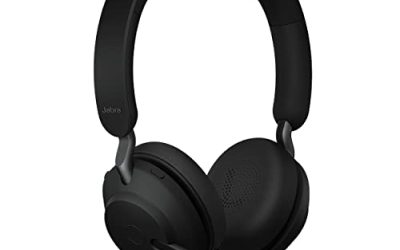
Jabra Evolve2 30 UC Stereo USB-A Headset
The Evolve2 30 is the lightest professional pick in this shortlist, built for teachers who wear a headset through back-to-back lessons. Its two built-in microphones focus on your voice while softening the room around you, and the stereo earpieces keep student voices distinct from household noise. A soft pouch comes in the box, so the headset packs away neatly between sessions or travels with you to a tutoring centre, and the UC tuning means it works across the video platforms schools use. The on-ear fit stays light on the head, though teachers who prefer a sealed cup around the ear may want the larger model in this family instead.
Specs
- Connection: wired USB-A, stereo
- Microphones: 2 built-in microphones
- Speakers: 28 mm drivers
- Included: soft pouch, warranty and warning leaflets
- Model: 23089-989-979
- Fit: lightweight, portable on-ear design
- Compatibility: UC-optimized for video meeting platforms
Best for: A light professional headset for back-to-back lessons.
Watch out for: The Evolve2 30 also sells in mono, USB-C and Microsoft Teams versions under nearby listing codes, so confirm the stereo USB-A UC version before buying.
Poly Blackwire 3220 USB-C Headset
The Blackwire 3220 is the pick for teachers whose laptop has moved to USB-C, since it connects through USB-C and includes a USB-C to USB-A adapter for older machines. Its noise-cancelling boom microphone and inline call controls put answer, volume and mute at your fingertips, so you can manage a lesson without reaching for the screen. A lightweight metal headband keeps the headset steady at 118 g, and the stereo design with dynamic EQ keeps voices warm and easy to follow through long explanations. Hearing protection is built into the design, which suits teachers who spend hours with the volume up while younger students speak softly.
Specs
- Connection: USB-C with USB-C to USB-A adapter
- Microphone: noise-cancelling boom microphone
- Controls: inline call controls for answer, volume and mute
- Headband: lightweight metal headband
- Weight: 118 g
- Audio: stereo design with Dynamic EQ and Hi-Fi stereo sound
- Compatibility: works with Teams and Zoom
- Model: 2-209749-333
Best for: A modern USB-C laptop that still needs a USB-A fallback.
Watch out for: Several Blackwire 3220 versions share the same name, including an older USB-A-only model, so confirm the USB-C with USB-C to USB-A adapter version before buying.
Which One Fits Your Situation
You teach full days from one desk
Pick the Logitech H390 when your lessons run back to back from a fixed desk. Its wired USB-A link never needs charging, the rotating microphone stays put once you position it, and the inline mute lets you silence yourself between classes without touching the computer. The long cable covers a desk with a whiteboard behind it, and the simple plug-and-play setup suits shared computers where installing software is not allowed.
You stand, move or teach from different rooms
Choose the Jabra Evolve2 30 when your lessons take you away from the desk. Its light on-ear build and included pouch make it easy to carry between rooms or to a tutoring centre, and the two-microphone design keeps your voice clear even when you turn to face a board. The USB-A connection works with most school laptops, so you can plug in and begin without pairing or charging.
Your laptop only has USB-C ports
Take the Poly Blackwire 3220 when your laptop has dropped USB-A ports. The USB-C connection plugs straight into a modern machine, and the included adapter covers older laptops and shared classroom computers, so one headset serves every device you teach on. Inline call controls keep mute and volume at hand, which matters when a lesson moves fast and you cannot spare a glance at the screen.
You teach young learners or language classes
Go with the Blackwire 3220 or the Evolve2 30 when your students are young or learning a new language, since both keep voices warm and distinct enough for learners to catch every sound. A noise-cancelling microphone matters most here, because small voices and new words are easily lost under household noise. Keep the volume moderate and the microphone close to your mouth, and your students will hear clear speech rather than a distant, echoing room.
Common Mistakes
- Buying a headset with a 3.5 mm plug for a laptop that only has a single combined jack, then finding the microphone does not work.
- Choosing a mono headset for music-heavy lessons, then missing the stereo separation that helps students follow recorded audio.
- Picking a wireless headset for all-day teaching without checking how long its battery lasts between charges.
- Placing the boom microphone too far from your mouth, which lets room noise compete with your voice.
- Skipping a mute check before the first lesson, then discovering mid-class that the mute button sits somewhere you cannot reach quickly.
Frequently Asked Questions
Do I need a USB headset, or will a 3.5 mm headset work for teaching?
A 3.5 mm headset can work, but it depends on your laptop jack. Many modern laptops use one combined jack for headphones and microphone, and a headset with separate plugs will not connect without an adapter. A USB headset avoids that problem entirely, since it carries its own audio connection and works as soon as you plug it in. For teaching, the simpler connection is usually the safer choice.
Is a wireless headset better for teaching online?
Wireless suits teachers who move around the room, since no cable limits how far you can walk from the desk. The trade is battery life: a headset that runs flat mid-lesson leaves you silent until it charges, and Bluetooth can add a delay or a pairing hiccup. If you teach from one desk, a wired USB headset removes both worries. Pick wireless only when moving matters more.
Can I use a built-in laptop microphone instead of a headset?
You can, but your students will hear the difference. A built-in microphone sits far from your mouth and picks up every sound in the room, from keyboard taps to a fan, while your voice fades whenever you turn away. A headset microphone stays close and steady, so your volume stays even across a lesson. For calls the built-in microphone copes, but for teaching a headset serves your students better.
How do I stop household noise from reaching my students?
Position the boom microphone close to your mouth and use its noise-cancelling design to cut background sound before it reaches the class. Close the door to your teaching room, move the microphone away from fans and keyboards, and mute yourself during silent work or breakout time. A sound check with a colleague before the first lesson catches problems early, so you can fix the setup before class begins.
Related guides
More from Amazon
Programs that pair well with the guide above. Offers and eligibility are set by Amazon and may change.
A free business account with business pricing and bulk-buying tools for work, shop or home office.
Create a business accountFree shipping on eligible items, Prime Video and more. Eligible new members can start with a free trial.
Start a Prime free trialAudiobooks and podcasts to listen to on the go. Eligible new members can start with a free trial.
Try Audible freeAd-free music streaming. Eligible new subscribers can start with a free trial.
Try Music Unlimited freeAs an Amazon Associate we earn from qualifying purchases.