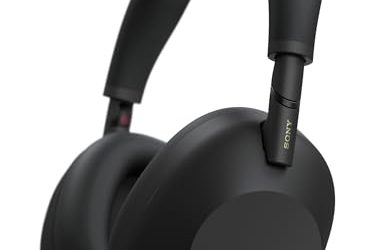
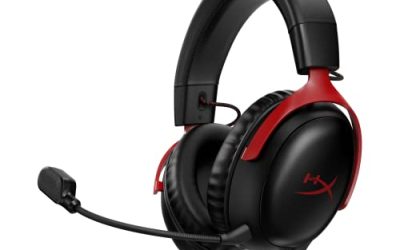
Our Short List of 3

- Best for: PC players who want surround sound and a detachable microphone for long sessions.
- Drivers: 53mm dynamic drivers with neodymium magnets
- Microphone: Detachable electret condenser microphone, cardioid pattern
- Connection: 3.5mm jack, plus USB audio control box with virtual 7.1 surround sound
- Impedance: 60 ohm per system

- Best for: Players who want the lightest headset here and a microphone that disappears when not needed.
- Drivers: 40mm neodymium drivers, Nova Acoustic System
- Microphone: Retractable ClearCast Gen 2 microphone, bidirectional noise cancelling
- Connection: USB-C, plus USB-A adapter and 3.5mm analog cable
- Frequency response: 20 Hz to 22,000 Hz

- Best for: Players who want a personal sound profile and a flip-to-mute microphone.
- Drivers: Custom-tuned 50mm neodymium drivers
- Microphone: Omni-directional boom microphone, flip-to-mute, Discord Certified
- Connection: 3.5mm cable and USB adapter
- Frequency range: 20 Hz to 20,000 Hz
All 3 Picks at a Glance
| Product | Specs | Action |
|---|---|---|
| HyperX Cloud II |
| Check price on Amazon |
| SteelSeries Arctis Nova 3 |
| Check price on Amazon |
| Corsair HS65 Surround |
| Check price on Amazon |
A wired headset with a microphone asks you to settle three things at once: how clearly your teammates hear you, how much of the game you can hear, and how long the headset stays comfortable. A headset that sounds excellent but presses on your ears after an hour will sit unused, while a comfortable headset with a muddy microphone will frustrate everyone on the other end of the call. The cable itself is part of the decision too, because it decides which devices you can plug into and whether the microphone works the same way everywhere.
This guide is for PC gamers who play team games most evenings, console players who want one headset for several systems, streamers who need a dependable microphone without a separate setup, and anyone who works from the same desk they game at. Each headset below was chosen from its Amazon listing, using the driver size, microphone type, connection, weight, and included accessories stated there.
Our Top Picks
Top 3 picks at a glance
Quick Picks
As an Amazon Associate we earn from qualifying purchases.
| Product | Best for | Key spec from title |
|---|---|---|
| HyperX Cloud II | Long team sessions with surround sound on PC | 53mm drivers with USB surround sound control box |
| Logitech G Pro X | Clear voice chat with software-tuned microphone filters | Detachable Blue VO!CE boom microphone |
| SteelSeries Arctis Nova 3 | Lightweight multi-platform play over USB-C | Retractable ClearCast Gen 2 microphone |
| Corsair HS65 Surround | Personalised sound profiles over a USB adapter | 50mm neodymium drivers with Dolby Atmos |
How to Choose
Driver Size and Sound Direction
Driver size tells you something useful, but only as one part of the sound picture. Larger drivers often move more air and can give footsteps, explosions, and low tones more presence, yet a well-tuned smaller driver can still place sounds clearly around you. Look at the driver size alongside the frequency range and the surround processing the listing describes, because those three together shape whether you can tell where a sound came from. Open the listing and check whether surround sound works through the included adapter only, or through the plain cable as well, since that changes what you hear on a console.
Microphone Design and Mute Control
The microphone decides how your voice reaches your team, so read its type before anything else. A detachable boom microphone can be removed when you only want to listen, a retractable microphone slides away into the earcup, and a flip-to-mute microphone silences you with one movement. Check whether the listing states a cardioid or unidirectional pattern, which focuses on your voice and rejects sound from the sides, and look for a clear mute control you can find without looking down. A microphone with an LED mute indicator removes the guesswork during a match, and a wind screen or pop filter helps when you speak loudly.
Connection and Platform Compatibility
A wired headset is only as flexible as its cable and adapter, so match the connection to every device you own. A 3.5mm plug works with most controllers, handhelds, and laptops, while a USB adapter or USB-C cable unlocks surround processing and software controls on a PC. Some adapters work only on Windows, which means the headset falls back to plain stereo on a console or a phone, and that is worth knowing before you buy. Count the cables in the box as well, because a headset that includes a separate mobile cable and a splitter for separate headphone and microphone jacks will fit more setups without extra purchases.
Comfort, Weight, and Build
Comfort is decided by weight, clamping force, ear cushion material, and headband padding working together, not by any one figure alone. A headset near 250 grams usually feels lighter across a long evening than one near 320 grams, although a well-balanced heavier frame with deep memory foam cushions can still disappear once you settle in. Look for an adjustable headband, earcups that rotate or tilt to match your head, and cushions made from memory foam with a soft fabric or leatherette surface. An aluminum frame or reinforced headband adds durability where the headset flexes most, while a mostly plastic frame keeps the weight down.
The 4 Best Options
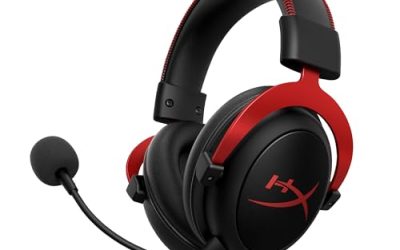
HyperX Cloud II
- Best for: PC players who want surround sound and a detachable microphone for long sessions.
- Drivers: 53mm dynamic drivers with neodymium magnets
- Microphone: Detachable electret condenser microphone, cardioid pattern
- Connection: 3.5mm jack, plus USB audio control box with virtual 7.1 surround sound
- Impedance: 60 ohm per system
PC players who want surround sound and a detachable microphone for long sessions.
Surround sound works through the USB control box, so consoles and mobile devices get stereo through the plain cable.
The HyperX Cloud II suits players who want a proven wired headset for long team sessions and who play on PC often enough to use its USB control box. Its large drivers and virtual surround processing help place footsteps and gunfire around you, while the detachable microphone comes off quickly when you switch to music or a film. Memory foam cushions and an aluminum frame give it a solid, comfortable feel, and the control box puts volume, microphone level, and surround switching within easy reach during a match.
Watch out for: Surround sound works through the USB control box, so consoles and mobile devices get stereo through the plain cable.
Logitech G Pro X
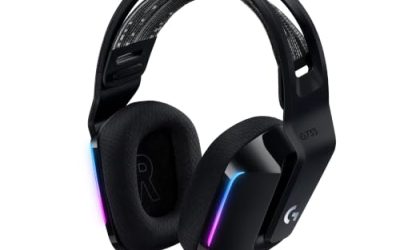
The Logitech G Pro X fits players who care most about how their voice sounds to teammates and who are happy to tune that voice with software. Its detachable boom microphone works with Blue VO!CE filters that reduce noise and shape the tone of your voice, and the included USB sound card adds DTS surround processing on a PC. Two sets of memory foam ear pads come in the box, so you can choose leatherette for isolation or cloth for breathability, and the steel headband with aluminum forks feels built to survive daily use and travel in its carry bag.
Specs
- Drivers: PRO-G 50mm neodymium drivers, hybrid mesh construction
- Microphone: Detachable 6mm boom microphone with Blue VO!CE filters, cardioid pattern
- Connection: 3.5mm jack, plus USB external sound card with DTS Headphone:X 2.0
- Impedance: 35 ohm
- Frequency response: 20 Hz to 20 kHz
- Weight: 320g
- Cable: 2m PC cable with inline volume and mute, 1.5m mobile cable, Y splitter
Best for: Competitive players who want a tunable microphone and two ear pad options.
Watch out for: The Blue VO!CE filters need the USB sound card, a Windows PC, and Logitech G Hub software, so they do not apply over a plain 3.5mm connection.
SteelSeries Arctis Nova 3
- Best for: Players who want the lightest headset here and a microphone that disappears when not needed.
- Drivers: 40mm neodymium drivers, Nova Acoustic System
- Microphone: Retractable ClearCast Gen 2 microphone, bidirectional noise cancelling
- Connection: USB-C, plus USB-A adapter and 3.5mm analog cable
- Frequency response: 20 Hz to 22,000 Hz
Players who want the lightest headset here and a microphone that disappears when not needed.
The RGB lighting works over USB-C only, so it stays off when you use the 3.5mm cable, and the short cables suit a desk better than a distant console.
The SteelSeries Arctis Nova 3 is the lightest headset in this guide, and that lightness shows during long sessions when a heavier frame would start to press. Its retractable ClearCast Gen 2 microphone slides fully into the earcup when you do not need it, which keeps the headset tidy for travel and for listening without voice chat. USB-C is the main connection, with adapters for USB-A and 3.5mm in the box, and the software adds a parametric equalizer and spatial audio on PC for players who enjoy shaping their sound.
Watch out for: The RGB lighting works over USB-C only, so it stays off when you use the 3.5mm cable, and the short cables suit a desk better than a distant console.
Corsair HS65 Surround
- Best for: Players who want a personal sound profile and a flip-to-mute microphone.
- Drivers: Custom-tuned 50mm neodymium drivers
- Microphone: Omni-directional boom microphone, flip-to-mute, Discord Certified
- Connection: 3.5mm cable and USB adapter
- Frequency range: 20 Hz to 20,000 Hz
Players who want a personal sound profile and a flip-to-mute microphone.
Dolby Atmos and SoundID work through the USB adapter, so the plain 3.5mm connection gives stereo sound without those features.
The Corsair HS65 Surround appeals to players who enjoy tuning their sound to their own hearing rather than accepting one fixed profile. Its USB adapter enables Dolby Atmos spatial audio and SonarWorks SoundID, which builds a personal sound profile from a short listening calibration on PC and Mac. The omni-directional boom microphone flips up to mute, which is quick and reliable mid-match, and the memory foam ear cushions pair leatherette on the outside with a soft microfiber surface where they touch your ears.
Watch out for: Dolby Atmos and SoundID work through the USB adapter, so the plain 3.5mm connection gives stereo sound without those features.
Which One Fits Your Situation
You Play Team Games on PC Most Evenings
Choose the Logitech G Pro X when your microphone matters as much as your hearing, because its detachable boom microphone and Blue VO!CE filters are built around clear team communication. The HyperX Cloud II is the alternative when you want surround sound and a physical control box for volume and microphone level during play. Either one handles long PC sessions well, so let the microphone tuning decide between them.
You Switch Between PC, Console, and Handheld
Choose the SteelSeries Arctis Nova 3 for its USB-C connection and the 3.5mm cable in the box, which together cover more devices without extra accessories. Its light frame also travels well between rooms and setups. The Corsair HS65 Surround is the backup choice here, since its 3.5mm connection works widely, although its USB features stay on PC and Mac.
You Want the Microphone Out of the Way Sometimes
Choose the SteelSeries Arctis Nova 3 when you often listen without talking, because its microphone retracts fully into the earcup and leaves nothing sticking out. The HyperX Cloud II and the Logitech G Pro X both let you remove the microphone entirely, which works just as well at a desk but leaves a small part to store. Avoid leaving a fixed microphone attached when you only want music.
You Play for Hours and Notice Weight First
Choose the SteelSeries Arctis Nova 3 at 253g, the lightest headset in this guide, when long sessions are your normal pattern and a heavy frame has bothered you before. The Corsair HS65 Surround at 282g is the next lightest and adds a different cushion feel with its microfiber contact surface. The HyperX Cloud II and Logitech G Pro X both weigh 320g, so try to judge their balance and cushion depth rather than the number alone.
Common Mistakes
- Buying a headset for its surround sound, then using only the plain 3.5mm cable on a console where that processing does not apply.
- Assuming every microphone works the same on every device, when software filters and USB features often need a Windows PC.
- Ignoring cable length and counting on a short cable to reach a console or a PC under a desk.
- Choosing by driver size alone, without checking the microphone pattern, the ear cushion material, and the weight together.
- Forgetting to check whether the microphone detaches or retracts, then leaving it attached for music and films when it could be out of the way.
Frequently Asked Questions
Do wired headsets with microphones work on consoles as well as PC?
Yes, most wired headsets in this guide work on consoles through the 3.5mm jack on a controller or the console itself. The difference is that USB features such as surround processing, microphone filters, and personal sound profiles usually work only on PC. Check the listing for which connection each feature needs, and expect plain stereo sound when you use the 3.5mm cable alone.
Is a detachable microphone better than a retractable one?
Neither design is better in every case, because they solve different problems. A detachable microphone removes completely, which suits players who switch between gaming and listening often. A retractable microphone stays attached and slides into the earcup, so there is nothing separate to lose. Choose the design that matches how often you talk and how much you travel with the headset.
Why does my microphone sound different on a console than on PC?
The microphone itself does not change, but the software around it does. On PC, a USB sound card or companion app can apply noise reduction, compression, and voice filters that shape what teammates hear. On a console, those tools are usually absent, so teammates hear the raw microphone signal. If voice clarity matters most, pick a headset whose microphone sounds good without software help.
How do I know if a wired headset will be comfortable for long sessions?
Look at the weight, the ear cushion material, and the headband padding together, and give the headset a full session before deciding. Memory foam cushions and an adjustable headband help, but clamping force matters too, and that varies with head size. A lighter frame with deep cushions is a good starting point, and a headset that lets you swap ear pads gives you another way to adjust the fit.
Related guides
More from Amazon
Programs that pair well with the guide above. Offers and eligibility are set by Amazon and may change.
A free business account with business pricing and bulk-buying tools for work, shop or home office.
Create a business accountFree shipping on eligible items, Prime Video and more. Eligible new members can start with a free trial.
Start a Prime free trialAudiobooks and podcasts to listen to on the go. Eligible new members can start with a free trial.
Try Audible freeAd-free music streaming. Eligible new subscribers can start with a free trial.
Try Music Unlimited freeAs an Amazon Associate we earn from qualifying purchases.