Our Short List of 3

- Best for: MacBook users whose calendar is mostly Teams or Zoom meetings and who want a USB-C dongle in the box.
- Battery life: up to 37 hours, with up to 8 hours from a 15-minute charge
- Speakers: 40mm leak-tolerant drivers
- Microphone: 3-microphone call technology
- Connectivity: Bluetooth 5.0, includes Jabra Link 380c USB-C adapter

- Best for: A fixed home-office desk where a boom mic, charge stand, and long wireless range matter most.
- Talk time: up to 24 hours
- Microphone: dual noise cancelling boom with Acoustic Fence technology
- Connectivity: Bluetooth 5.2, includes BT700 USB-A adapter
- Wireless range: up to 50 meters with the UC version

- Best for: Music-first MacBook users who still take calls daily and want the strongest noise cancelling here.
- Battery life: up to 24 hours, up to 18 hours with Immersive Audio
- Quick charge: 15 minutes for up to 2.5 hours of play time
- Noise control: active noise cancellation with Quiet, Aware, and Immersion modes
- Connectivity: Bluetooth 5.3, 30-foot range
All 4 Picks at a Glance
| Product | Specs | Action |
|---|---|---|
| Jabra Evolve2 65 MS Wireless Headphones with Link 380c |
| Check price on Amazon |
| Poly Voyager 4320 UC Wireless Headset with Charge Stand |
| Check price on Amazon |
| Bose QuietComfort Ultra Bluetooth Headphones |
| Check price on Amazon |
 JLab Go Work Gen 2 Wireless Headset with Microphone |
| Check price on Amazon |
A MacBook pairs with almost any Bluetooth headset in seconds, so the real decision is not whether a headset connects, but how your voice sounds on the other end of a call. Built-in laptop microphones pick up keyboard noise and room echo, while a headset with a proper boom microphone or beamforming array keeps your voice in front. Battery life, multipoint pairing with your phone, and whether a USB dongle is included matter just as much as sound.
This guide is for MacBook owners who split their day between video meetings, online classes, and focused work with music. The five picks below cover dedicated office headsets from Jabra, Poly, and JLab with boom microphones, plus noise cancelling over-ear models from Sony and Bose whose listings highlight call quality alongside music playback.
Our Top Picks
Top 3 picks at a glance
Quick Picks
As an Amazon Associate we earn from qualifying purchases
| Product | Best for | Key spec from title |
|---|---|---|
| Jabra Evolve2 65 MS Wireless Headphones with Link 380c | Teams meetings all day | Up to 37 hours of battery life |
| Poly Voyager 4320 UC Wireless Headset with Charge Stand | Boom mic clarity at a desk | Up to 24 hours of talk time |
| Sony WH-1000XM5 Wireless Noise Canceling Headphones | Quiet focus plus calls | Up to 30 hours of battery life |
| Bose QuietComfort Ultra Bluetooth Headphones | Premium noise cancelling | Up to 24 hours of playtime |
| JLab Go Work Gen 2 Wireless Headset with Microphone | Long battery on a budget | 55+ hours of playtime, dongle included |
How to Choose
Microphone design decides call quality
A boom microphone sits close to your mouth, so it captures your voice with less room noise than microphones buried in an earcup. The Poly and JLab picks below use flexible booms, and the Poly adds Acoustic Fence technology, which the listing says uses the dual microphones to block out background noise. Earcup designs from Sony and Bose rely on beamforming arrays and voice pickup processing instead. If most of your day is back-to-back calls, a boom is the safer choice; if calls are occasional, an earcup array is usually enough.
Dongle or direct Bluetooth pairing
Every MacBook has Bluetooth built in, so any headset here pairs directly through the macOS Bluetooth menu. A USB adapter can still help: the Jabra Link 380c and Poly BT700 adapters are pre-paired with their headsets, which gives a stable connection and enables some call controls in meeting apps. Check your ports before choosing. Newer MacBooks only have USB-C ports, so a USB-A adapter like the Poly BT700 needs a hub or adapter, while the Jabra Link 380c in this listing is USB-C and plugs straight in.
Battery life and charging speed
Talk time is the figure that matters for meeting-heavy days, and it is often shorter than listening time, so read the listing wording carefully. The picks below range from up to 24 hours of talk time on the Poly to a listed 55 plus hours of playtime on the JLab. Fast charging softens a short battery: the Jabra listing claims up to eight hours of use from a 15-minute charge, and the Sony listing claims three hours from three minutes with a USB-PD adapter. A charge stand, included with the Poly, removes the nightly cable routine entirely.
Fit, weight, and noise cancelling style
On-ear headsets like the Jabra and JLab sit on the ear and feel lighter during long wear, while over-ear models from Sony, Bose, and Poly surround the ear and isolate more sound. Active noise cancelling on the Sony and Bose reduces steady noise such as fans and traffic, which helps concentration in shared spaces. The Jabra takes a passive approach, using memory foam padding and an angled earcup design to block noise. Weight matters over a full workday: the Poly lists 162 grams, the Sony about 250 grams, and the Bose 252 grams.
The 5 Best Options
Jabra Evolve2 65 MS Wireless Headphones with Link 380c
- Best for: MacBook users whose calendar is mostly Teams or Zoom meetings and who want a USB-C dongle in the box.
- Battery life: up to 37 hours, with up to 8 hours from a 15-minute charge
- Speakers: 40mm leak-tolerant drivers
- Microphone: 3-microphone call technology
- Connectivity: Bluetooth 5.0, includes Jabra Link 380c USB-C adapter
MacBook users whose calendar is mostly Teams or Zoom meetings and who want a USB-C dongle in the box.
Noise cancelling is passive rather than active, so it softens nearby chatter instead of silencing steady low noise.
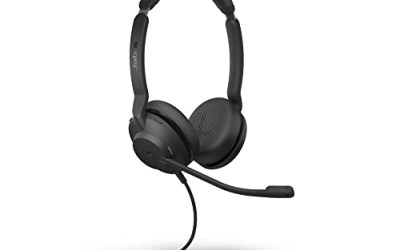
The Evolve2 65 is built around the meeting day: its listing highlights a three-microphone call system, a busylight that signals when you are on a call, and memory foam on-ear cushions shaped for long wear. It is optimized for Microsoft Teams and works with other leading UC platforms, and the included Link 380c adapter is USB-C, which suits current MacBooks without a hub. Battery life is the headline figure here, at up to 37 hours, with a short top-up charge adding hours more.
Poly Voyager 4320 UC Wireless Headset with Charge Stand
- Best for: A fixed home-office desk where a boom mic, charge stand, and long wireless range matter most.
- Talk time: up to 24 hours
- Microphone: dual noise cancelling boom with Acoustic Fence technology
- Connectivity: Bluetooth 5.2, includes BT700 USB-A adapter
- Wireless range: up to 50 meters with the UC version
A fixed home-office desk where a boom mic, charge stand, and long wireless range matter most.
The included adapter is USB-A, so a USB-C-only MacBook needs a hub or adapter before the dongle route works.
The Voyager 4320 UC is the classic desk headset formula: a flexible boom with dual noise cancelling microphones and Acoustic Fence technology, an online indicator light so people nearby can see you are busy, and a desktop charge stand that keeps the headset topped up between calls. It connects to a computer through the included BT700 USB-A Bluetooth adapter and to a phone directly over Bluetooth 5.2, and it can also run as a corded USB headset when the battery runs low.
Sony WH-1000XM5 Wireless Noise Canceling Headphones
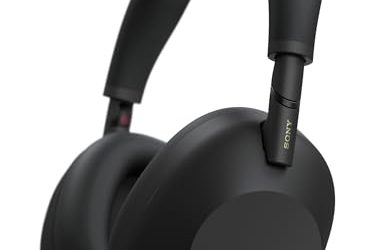
The WH-1000XM5 is the pick for MacBook owners who want one headset for deep focus and calls alike. Its listing centers on active noise cancelling with an Auto NC Optimizer that adjusts to wearing conditions, plus Precise Voice Pickup Technology with two beamforming microphones on each earcup for hands-free calling. Multipoint connection lets it stay paired with a MacBook and a phone at the same time, and the battery runs up to 30 hours, with a three-minute quick charge adding about three hours.
Specs
- Battery life: up to 30 hours; 3 hours from a 3-minute charge with USB-PD
- Noise control: active noise cancellation with Auto NC Optimizer
- Microphones: two beamforming microphones per earcup, Precise Voice Pickup
- Connectivity: Bluetooth 5.2 with multipoint connection
- Driver: 30mm dynamic driver
- Weight: 8.82 ounces
- Model number: XM5BK
Best for: Open-plan offices, cafes, and shared homes where silencing the room matters as much as being heard.
Watch out for: There is no boom microphone, so in a loud room your voice pickup depends on the beamforming array and processing.
ASIN: B09XS7JWHH
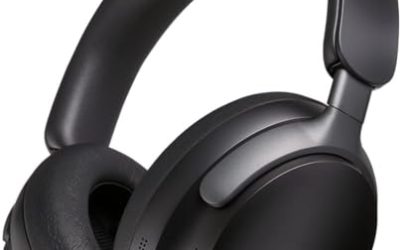
Bose QuietComfort Ultra Bluetooth Headphones
- Best for: Music-first MacBook users who still take calls daily and want the strongest noise cancelling here.
- Battery life: up to 24 hours, up to 18 hours with Immersive Audio
- Quick charge: 15 minutes for up to 2.5 hours of play time
- Noise control: active noise cancellation with Quiet, Aware, and Immersion modes
- Connectivity: Bluetooth 5.3, 30-foot range
Music-first MacBook users who still take calls daily and want the strongest noise cancelling here.
Immersive Audio shortens the battery figure, and there is no USB dongle for app-integrated call controls.
The QuietComfort Ultra is the premium listening option in this group, with a listing that leads on spatial audio, CustomTune sound shaping, and three noise cancelling modes: Quiet, Aware, and Immersion. For calls, Bose describes a microphone system that focuses on your voice and filters background noise. Bluetooth 5.3 keeps the connection to a MacBook within a listed 30-foot range, and touch controls on each earcup handle volume, tracks, calls, and mode changes without reaching for the keyboard.
JLab Go Work Gen 2 Wireless Headset with Microphone
- Best for: Students and remote workers who want a boom mic and an all-week battery without paying office-headset prices.
- Playtime: 55+ hours per the listing title
- Microphone: boom mic with quick mute LED indicator, dual ENC microphones
- Connectivity: Bluetooth multipoint, USB-C dongle, or wired USB-C cable
- Earcups: Cloud Foam on-ear cushions
Students and remote workers who want a boom mic and an all-week battery without paying office-headset prices.
It is an on-ear design with sound isolation rather than active noise cancelling, so busy rooms stay audible.
The Go Work Gen 2 covers the work basics at the accessible end of this list. Its listing highlights a rotating boom microphone with a red LED at the tip that shows when you are muted, dual microphones with C3 calling that separates your voice from environmental sounds, and three ways to connect: Bluetooth multipoint, the included USB-C dongle, or a wired USB-C cable. Playtime is listed at 55 plus hours, and on-ear controls handle play, pause, volume, mute, and switching between Work and Music EQ modes.
Which One Fits Your Situation
Your day is wall-to-wall video meetings
Choose between the Jabra Evolve2 65 and the Poly Voyager 4320. Both are purpose-built calling headsets with strong microphone systems and meeting-app support. The Jabra wins on battery life and plugs its USB-C dongle straight into a modern MacBook, while the Poly adds a boom with Acoustic Fence and a charge stand for a permanent desk setup.
You work in a noisy shared space
The Sony WH-1000XM5 and Bose QuietComfort Ultra are the two active noise cancelling picks, and both stay connected to your MacBook and phone through multipoint pairing. Pick the Sony for the longer battery and call-focused voice pickup, or the Bose if spatial audio and its three listening modes matter more for your music time between meetings.
You study or work from several spots
A light headset with a long battery suits library sessions, dorm rooms, and kitchen-table work. The JLab Go Work Gen 2 lists 55 plus hours of playtime and connects by dongle, Bluetooth, or cable, so it adapts to whatever seat you land in, and its boom mic keeps your voice clear in group project calls.
You present, teach, or record your voice often
When other people judge your audio, the boom microphone designs have the edge. The Poly Voyager 4320 places its dual microphones on a flexible boom with Acoustic Fence, and its online indicator warns people nearby that you are live. The Jabra busylight does a similar job if you prefer an on-ear fit without a separate stand.
Common Mistakes
- Assuming every Bluetooth headset sounds equally clear on calls, when microphone placement is the biggest difference between models.
- Buying a USB-A dongle headset for a USB-C-only MacBook without checking whether a hub or adapter is needed.
- Comparing listening-time battery figures against talk-time figures from another listing as if they measured the same thing.
- Expecting passive noise isolation to quiet a room the way active noise cancelling does on the Sony and Bose picks.
- Forgetting to set the headset as both the input and output device in macOS sound settings after pairing.
Frequently Asked Questions
Do these headsets pair with a MacBook without a dongle?
Yes. Every MacBook has built-in Bluetooth, and all five headsets pair directly through the macOS Bluetooth settings. The included dongles from Jabra, Poly, and JLab are optional extras that can add stability and meeting-app call controls. After pairing, open the sound settings and select the headset for both output and input so calls use its microphone.
Why does my voice sound worse over Bluetooth on a Mac?
When a MacBook switches a headset into call mode, it uses a lower-bandwidth hands-free profile so the microphone and speakers work at the same time. That is normal Bluetooth behavior, not a fault. A boom microphone close to your mouth, like the Poly or JLab designs, keeps your voice clearer within that limit than microphones built into an earcup.
Can one headset stay connected to my MacBook and phone together?
The Sony WH-1000XM5 lists multipoint connection, and the JLab Go Work Gen 2 lists Bluetooth multipoint, so both can hold a MacBook and a phone pairing at once and switch when a call arrives. The Jabra and Poly reach a similar result by combining their USB adapter on the computer with a direct Bluetooth link to the phone.
Which is better for long days, on-ear or over-ear?
On-ear models like the Jabra Evolve2 65 and JLab Go Work Gen 2 feel lighter and let in more air, which some people prefer across a full shift. Over-ear models spread pressure around the ear and isolate more noise, which suits shared spaces. Weight, cushion material, and clamping force matter more than the category label, so check the listed weight before deciding.
Related guides
More from Amazon
Programs that pair well with the guide above. Offers and eligibility are set by Amazon and may change.
A free business account with business pricing and bulk-buying tools for work, shop or home office.
Create a business accountFree shipping on eligible items, Prime Video and more. Eligible new members can start with a free trial.
Start a Prime free trialAudiobooks and podcasts to listen to on the go. Eligible new members can start with a free trial.
Try Audible freeAd-free music streaming. Eligible new subscribers can start with a free trial.
Try Music Unlimited freeAs an Amazon Associate we earn from qualifying purchases.