Our Short List of 3

- Best for: Everyday laptop backup with encryption and automatic backup software.
- Digital storage capacity: 2TB
- Hard disk interface: USB 3.1 and USB 3.0
- Hard disk description: Mechanical hard disk
- Dimensions: 4.22 x 2.95 x 0.44 inches

- Best for: Photo backup and creative work on Windows and Mac laptops.
- Digital storage capacity: 2TB
- Hard disk interface: USB 3.0
- Compatible devices: PC, notebook, and Mac
- Color: Silver

- Best for: Simple plug-and-play backup for buyers who use their operating system backup tool.
- Digital storage capacity: 2TB
- Hard disk description: Mechanical hard disk
- Hard disk interface: USB 3.0
- Color: Black
All 3 Picks at a Glance
| Product | Specs | Action |
|---|---|---|
| WD My Passport 2TB |
| Check price on Amazon |
| Seagate One Touch 2TB |
| Check price on Amazon |
| Toshiba Canvio Basics 2TB |
| Check price on Amazon |
A laptop carries the files you cannot afford to lose: work documents, family photos, school assignments, and years of music and messages. One failed drive, one stolen bag, or one spilled coffee can take all of it at once, and cloud storage alone is a slow way to restore hundreds of gigabytes after a failure. A portable backup hard drive gives you a second copy that sits in a drawer or a bag, ready whenever the laptop needs it. Plug it in, run a backup, and unplug it again.
The three drives below are all portable 2TB hard drives with USB 3.0, and each one suits a different kind of laptop owner. One adds password protection and backup software, one adds photo software for creative work, and one keeps things simple with plug-and-play storage. Pick the capacity you need first, then match the software and the connection to the way you back up.
Our Top Picks
- Toshiba Canvio Basics 2TB Portable External Hard Drive2TB4.3 x 3.1 x 0.55 inches0.3 poundsCheck on Amazon
Top 3 picks at a glance
Quick Picks
As an Amazon Associate we earn from qualifying purchases.
| Product | Best for | Key spec from title |
|---|---|---|
| WD My Passport 2TB | Everyday laptop backup with encryption | 2TB, USB 3.1 and USB 3.0, backup software, password protection |
| Seagate One Touch 2TB | Photo backup with creative software | 2TB, USB 3.0, 1-year MylioCreate, 4-month Adobe Creative Cloud Photography Plan |
| Toshiba Canvio Basics 2TB | Simple plug-and-play backup | 2TB, USB 3.0, mechanical hard disk, plug-and-play |
How to Choose
Capacity: How Much You Need to Back Up
A backup drive has to hold everything on the laptop, plus room for the next backup to grow. Add up the used space on the laptop first: documents and photos take little room, while video projects and game libraries fill a drive fast. A 2TB drive covers most laptops comfortably, holding the full contents of a 512GB or 1TB laptop with space left for older backups and extra files. If the laptop already holds close to 1TB of data, a 2TB drive still works, but it leaves little headroom for a second full copy. Buyers with a 2TB laptop or a large media library should step up to a larger capacity.
Connection and Speed: USB 3.0 and the Cable in the Box
Every drive in this roundup connects over USB 3.0, which moves files far faster than the older USB 2.0 standard and keeps a full laptop backup from taking all night. Check which port the laptop has before buying: most Windows laptops still carry a USB-A port, while many newer laptops carry only USB-C ports and need an adapter or a USB-C cable. The cable in the box matters too, since a drive with a short cable is awkward on a crowded desk. A portable drive draws its power from the USB port, so there is no separate power brick to carry, which is exactly what a backup drive for a laptop should do.
Backup Software: Automatic Copies Beat Good Intentions
A drive without software is just storage, and manual backups are the first thing people skip when life gets busy. The WD and Seagate drives in this roundup include backup software that can copy files on a schedule, so the backup happens while you work on something else. Set the software to run once a week, and the laptop stays protected without any daily effort. The Toshiba drive keeps things simpler with plug-and-play storage and no bundled backup suite, which suits buyers who already use the backup tool built into Windows or macOS. Either way, the software is only useful if it runs, so pick a setup you will actually leave switched on.
Security and Durability: Encryption and a Drive That Travels
A backup drive holds a complete copy of the laptop, so losing the drive can be as bad as losing the laptop itself. Password protection with hardware encryption locks the contents away from anyone who finds the drive, and the WD My Passport and the Seagate One Touch both include it. A portable drive also gets knocked around in bags and on desks, so a slim, light enclosure that slips into a laptop sleeve is worth more than a bulky case with extra features. Keep the backup drive somewhere separate from the laptop when you are not backing up, because a drive sitting next to the laptop shares the same risks from theft, fire, and spills.
The 3 Best Options
WD My Passport 2TB
- Best for: Everyday laptop backup with encryption and automatic backup software.
- Digital storage capacity: 2TB
- Hard disk interface: USB 3.1 and USB 3.0
- Hard disk description: Mechanical hard disk
- Dimensions: 4.22 x 2.95 x 0.44 inches
Everyday laptop backup with encryption and automatic backup software.
The drive uses a USB-A cable, so laptops with only USB-C ports need an adapter.
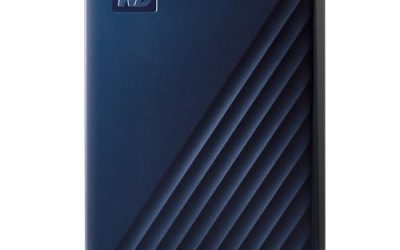
The WD My Passport 2TB is the most complete backup drive in this roundup, pairing 2TB of portable storage with backup software, password protection, and 256-bit AES hardware encryption. It connects over USB 3.1 and USB 3.0, measures 4.22 by 2.95 by 0.44 inches, and weighs 4.23 ounces, so it slips into a laptop bag without adding noticeable bulk. The included software handles device management and backups, and adds defense against ransomware, which is a thoughtful extra for a drive that holds a full copy of a laptop. With a 3-year limited warranty behind it, this is the default pick for most laptop owners.
Watch out for: The drive uses a USB-A cable, so laptops with only USB-C ports need an adapter.
Seagate One Touch 2TB
- Best for: Photo backup and creative work on Windows and Mac laptops.
- Digital storage capacity: 2TB
- Hard disk interface: USB 3.0
- Compatible devices: PC, notebook, and Mac
- Color: Silver
Photo backup and creative work on Windows and Mac laptops.
The bundled software plans run for a limited time, so the photo tools need a separate plan after they end.
The Seagate One Touch 2TB is the pick for laptop owners whose backups are mostly photos. It is a slim portable drive with 2TB of storage and a USB 3.0 connection that works with Windows and Mac, and it stands out through the software bundled with it: a 1-year MylioCreate plan for organising photos and a 4-month Adobe Creative Cloud Photography Plan for editing them. That makes it a natural fit for photographers and families with large photo libraries, where the backup drive doubles as the place the photo collection lives. The silver finish and brushed-metal look also set it apart from the plain black drives in this roundup.
Watch out for: The bundled software plans run for a limited time, so the photo tools need a separate plan after they end.
Toshiba Canvio Basics 2TB
- Best for: Simple plug-and-play backup for buyers who use their operating system backup tool.
- Digital storage capacity: 2TB
- Hard disk description: Mechanical hard disk
- Hard disk interface: USB 3.0
- Color: Black
Simple plug-and-play backup for buyers who use their operating system backup tool.
No backup software or password protection is included, so the laptop operating system has to handle both jobs.
The Toshiba Canvio Basics 2TB is the simplest drive here, and that is its appeal. It is a portable 2TB mechanical hard drive with a USB 3.0 connection, a black casing, and plug-and-play setup: connect it to the laptop and it is ready to use, with no bundled software to install or account to create. That suits buyers who already use the backup tool built into their operating system, or who simply want a second copy of their files without extra layers. It is a straightforward drive for a straightforward job, and its compact casing travels well in a laptop bag.
Watch out for: No backup software or password protection is included, so the laptop operating system has to handle both jobs.
Which One Fits Your Situation
Everyday Laptop Backup
For a work or school laptop, the WD My Passport 2TB is the safest default. Its backup software runs on a schedule, its hardware encryption protects the copy if the drive is lost, and 2TB holds a full laptop backup with room to spare. Set the backup to run weekly and the drive does the rest.
Photo Libraries and Creative Work
For photographers and families with large photo collections, the Seagate One Touch 2TB fits best. The bundled MylioCreate and Adobe Creative Cloud Photography plans help organise and edit photos, while the USB 3.0 connection moves large image folders without long waits. Keep the photo library on the drive and back it up again elsewhere.
A Simple Second Copy
For buyers who want the least fuss, the Toshiba Canvio Basics 2TB is the pick. Plug it in, copy the files, and unplug it again. It works well as a second copy kept away from the laptop, and it suits anyone who already trusts the backup tool built into Windows or macOS.
Mixed Windows and Mac Households
For a household with both Windows and Mac laptops, the Seagate One Touch 2TB and the WD My Passport 2TB both work across the two systems. Check the drive format before the first backup, since a drive formatted for one system may need reformatting to work fully on the other. Pick one drive per laptop to keep the backups separate.
Common Mistakes
- Buying a drive that is barely larger than the laptop storage, leaving no room for the backup to grow.
- Keeping the backup drive plugged in all the time, so a virus or a power surge can reach the backup too.
- Storing the backup drive next to the laptop, where theft, fire, or a spill can take both at once.
- Never checking that a backup actually worked until the laptop fails and the copy is needed.
- Choosing a drive with a cable that does not match the laptop ports, then discovering the mismatch on backup day.
Frequently Asked Questions
How much capacity do I need for a laptop backup?
A 2TB drive covers most laptops, holding a full copy of a 512GB or 1TB laptop with room for older backups and extra files. Check how much space the laptop already uses, then pick a drive with at least twice that amount so the backup has room to grow. Buyers with a 2TB laptop or a large video library should step up to a larger drive.
Can I use the same backup drive for Windows and Mac?
Yes, with care. Most portable drives work on both systems, but a drive formatted for Windows may need reformatting before a Mac can write to it fully, and reformatting erases the drive. Format the drive for the system you use most, or keep one drive per laptop to avoid the problem entirely.
How often should I back up my laptop?
Once a week is a sensible rhythm for most laptop owners, and daily backups suit anyone who creates new work every day. Automatic backup software makes the schedule easy to keep, since it copies new and changed files without any manual effort. The best schedule is the one that actually runs.
Is a portable hard drive enough on its own?
A portable hard drive is a strong first step, but one copy is never a complete backup plan. Keep the drive unplugged and stored away from the laptop, and consider a second copy in another location for files that cannot be replaced. Two copies in different places protect against the failures that take a laptop and its backup together.
Related guides
More from Amazon
Programs that pair well with the guide above. Offers and eligibility are set by Amazon and may change.
A free business account with business pricing and bulk-buying tools for work, shop or home office.
Create a business accountFree shipping on eligible items, Prime Video and more. Eligible new members can start with a free trial.
Start a Prime free trialAudiobooks and podcasts to listen to on the go. Eligible new members can start with a free trial.
Try Audible freeAd-free music streaming. Eligible new subscribers can start with a free trial.
Try Music Unlimited freeAs an Amazon Associate we earn from qualifying purchases.