Our Short List of 3

- Best for: Mac-only households and anyone who wants a 5TB backup or archive drive that works the day it arrives, with encryption available and both cable types in the box.

- Best for: Photographers, video shooters, and anyone whose 5TB archive travels, and USB-C Mac owners who want the cleanest cable run in this roundup.

- Best for: Mac owners who want hardware encryption and WD’s backup software at 5TB and are comfortable with a single reformat during setup.
All 5 Picks at a Glance
| Product | Specs | Action |
|---|---|---|
| WD My Passport for Mac 5TB |
| Check price on Amazon |
| LaCie Rugged USB-C 5TB |
| Check price on Amazon |
| WD My Passport 5TB |
| Check price on Amazon |
 Seagate Portable Drive 5TB |
| Check price on Amazon |
 Seagate Basic 5TB |
| Check price on Amazon |
As an Amazon Associate, we earn from qualifying purchases made through links on this page.
Five terabytes is the ceiling of the portable hard drive format, and for a Mac owner it is the capacity where a single pocket-size disk can hold a full photo library, a video archive, or several years of backup history with room to spare. The field is narrow by construction: only WD, Seagate, and Seagate’s LaCie brand still build a 5TB portable hard drive, and every model in this roundup is a spinning-platter drive, not an SSD. Capacity is fixed, and transfer pace is close across the class, so the differences that decide a purchase sit elsewhere. They sit in the state the drive is in when it leaves the box. One model below is formatted for macOS at the factory and can take a Time Machine backup the day it arrives. One is wrapped in a drop-resistant shell with a native USB-C socket. Three arrive formatted for Windows and need a short pass through Disk Utility before a Mac can write to them, and the honest cost of that step is stated in each section rather than buried. Every drive here is exactly 5TB, bus-powered, and documented by its maker for Mac use, with format and connector checked against the manufacturer’s own documentation.
Our Top Picks
Top 3 picks at a glance
What to look for in a 5TB external hard drive for Mac
Factory format decides your first ten minutes. A drive sold as a Mac model leaves the factory in a Mac file system, and Time Machine can adopt it at once. A drive formatted in exFAT can be written to by macOS and Windows alike, which suits a disk that commutes between platforms. A drive formatted in NTFS is read-only on a Mac until it is reformatted, and reformatting erases the disk, so that step belongs before any files are copied across. It is a setup fact, and the single biggest practical difference between the five drives below.
Match the connector to the ports your Mac actually has. Current MacBook, iMac, and Mac mini models carry USB-C ports only. Four of the five drives below use a USB Micro-B socket on the drive itself and ship with a USB-A cable, so a current Mac needs an adapter or a USB-C to Micro-B cable for them. One drive has a native USB-C socket and connects with a single cable. Interface speed is a non-issue in this class: every model is a USB 3.2 Gen 1 or USB 3.0 device, and the platters, not the port, set the pace.
Give a Time Machine disk the whole drive. On current macOS versions, Time Machine formats its disk to APFS when the disk is assigned, whatever format it arrived in. That makes the factory format irrelevant for a dedicated backup disk, and it makes sharing one disk between Time Machine and loose files a poor plan, because backup history grows into all the space it is given. Decide the role first: backup disk, cross-platform file disk, or Mac-only archive, and let that decision pick the format.
Settle the encryption question at setup time. Two drives below carry 256-bit AES hardware encryption with password protection managed through the maker’s software. Turning encryption on after an archive has been copied across can mean moving the data off and back again, and a forgotten password on a hardware-encrypted drive means the data is gone by design. Mac owners who skip hardware encryption can still protect a disk with an encrypted APFS volume or an encrypted disk image, at the cost of more setup work.
Read the recovery plan and the warranty before the drive fills up. Two of the Seagate-family drives below bundle a Rescue data recovery plan, which pays for in-lab recovery attempts if the drive fails mechanically. A 5TB archive concentrates years of files in one small enclosure, so the length of the warranty and the presence of a recovery plan are worth more here than they are on a small drive. Whatever you pick, one drive is one copy: pair it with a second copy of anything that matters, stored somewhere else.
WD My Passport for Mac 5TB
- Best for: Mac-only households and anyone who wants a 5TB backup or archive drive that works the day it arrives, with encryption available and both cable types in the box.
Mac-only households and anyone who wants a 5TB backup or archive drive that works the day it arrives, with encryption available and both cable types in the box.
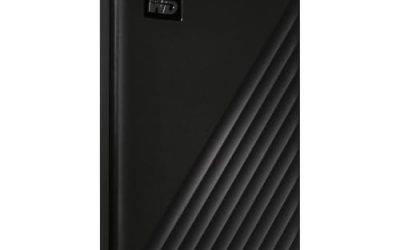
The My Passport for Mac is the one drive in this roundup built for the Mac side of the desk from the factory. WD formats it for macOS and documents it as Time Machine ready, so it can take its first backup without a detour through Disk Utility. WD also covers the connector problem properly: both USB-C and USB-A cabling come in the box, so the drive connects to a current MacBook and to an older USB-A machine with no adapter hunt. The socket on the drive itself is USB Micro-B, and the interface is USB 3.2 Gen 1.
The feature set is the fullest WD builds into this line. There is 256-bit AES hardware encryption with password protection, WD’s own drive-management and backup software for scheduled copies outside Time Machine, and a three-year limited warranty, the longest standard cover in this group. The enclosure measures about 4.22 by 2.95 by 0.75 inches and weighs roughly 0.46 pounds, in the navy finish that marks the Mac variant of the family.
Limitations: The Mac factory format means a Windows PC cannot write to the drive without added software, so it is a poor pick for a disk that must commute between platforms. The drive-end connector is Micro-B rather than USB-C, and like every drive here it moves data at platter pace, not SSD pace.
LaCie Rugged USB-C 5TB
- Best for: Photographers, video shooters, and anyone whose 5TB archive travels, and USB-C Mac owners who want the cleanest cable run in this roundup.
Photographers, video shooters, and anyone whose 5TB archive travels, and USB-C Mac owners who want the cleanest cable run in this roundup.
The Rugged USB-C is the travel build of the group. LaCie wraps the 5TB platter in its orange rubber sleeve over an aluminum shell and documents drop resistance to 1.2 meters, along with rain, dust, and shock resistance and a crush figure rated against a one-ton car. The socket on the drive is native USB-C, so it connects to a current MacBook, iMac, or Mac mini with the single included cable and no adapter anywhere in the chain. LaCie formats the drive in exFAT, so macOS and Windows can both write to it as delivered.
LaCie rates transfers at up to 130 MB/s over USB 3.2 Gen 1, in line with the rest of this class, and bundles its Rescue data recovery services with the drive, the cover that matters most on a disk that earns its keep in camera bags and location kits. The enclosure is the thickest here, about 86 by 135 by 26 millimeters and 400 grams, because the protective sleeve and the taller 5TB platter stack both take room.
Limitations: There is no hardware encryption, so protection has to come from macOS tools such as an encrypted APFS volume. The exFAT factory format means Time Machine will erase and reformat the disk when it is assigned, ending the cross-platform convenience for that disk, and the rugged shell makes this the bulkiest carry of the five.
WD My Passport 5TB
- Best for: Mac owners who want hardware encryption and WD’s backup software at 5TB and are comfortable with a single reformat during setup.
Mac owners who want hardware encryption and WD’s backup software at 5TB and are comfortable with a single reformat during setup.
The standard My Passport in black, model WDBPKJ0050BBK-WESN, is the same slim enclosure and the same core feature set as the Mac variant above, with one decisive difference: it leaves the factory formatted in NTFS for Windows, and WD’s documentation states plainly that reformatting is required for macOS use. That is a few minutes in Disk Utility, done once, before anything is stored on the disk. After that step the drive is a normal Mac external disk and can be formatted APFS, Mac OS Extended, or exFAT to suit the job.
What the reformat buys is the full WD software and security stack at this capacity: 256-bit AES hardware encryption with password protection, backup software with a defense layer against ransomware, and a three-year limited warranty. The connection is USB 3.2 Gen 1 through a Micro-B socket, with a USB-A cable in the box, so current Macs need an adapter or a USB-C to Micro-B cable. The enclosure matches its Mac sibling at about 4.22 by 2.95 by 0.75 inches and roughly 0.46 pounds.
Limitations: It is the joint-longest setup here for a Mac, because the NTFS format has to go before the first file lands. The included cable ends in USB-A, and there is no bundled recovery plan of the kind the Seagate-family drives carry.
Seagate Portable Drive 5TB
- Best for: Buyers who want the simplest possible 5TB disk for a Mac after one reformat, with a year of recovery cover and no software ecosystem attached.
Buyers who want the simplest possible 5TB disk for a Mac after one reformat, with a year of recovery cover and no software ecosystem attached.
Seagate’s Portable Drive, model STGX5000400, is the plain high-capacity option sold as an Amazon exclusive edition. Seagate documents it for Windows and Mac computers, and the factory format is NTFS, with the listing stating that the drive is reformat-compatible for Mac use. In practice that means the same one-time Disk Utility step as the My Passport above: erase, choose APFS or exFAT, and the drive then behaves like any other Mac disk. There is no software layer to install and nothing to configure beyond that.
The extras are thin but real. Seagate bundles a one-year Rescue data recovery plan, so a mechanical failure in the first year comes with an in-lab recovery attempt, and the drive is documented to work with game consoles as well as computers, which suits a disk that might split its life between a Mac and a living room. The connection is USB 3.0 through a Micro-B socket with an 18-inch USB-A cable in the box, and the enclosure uses the thicker shell this capacity requires across the Seagate portable lines.
Limitations: There is no hardware encryption, so a lost drive is an open drive. The Rescue cover runs one year, the shortest in this group, the warranty is a standard limited term rather than the three years WD gives its pair, and USB-C Macs need an adapter for the bundled cable.
Seagate Basic 5TB
- Best for: A second-copy or shuttle role, and buyers who deliberately want a 5TB drive with no software, no accounts, and no features to manage.
A second-copy or shuttle role, and buyers who deliberately want a 5TB drive with no software, no accounts, and no features to manage.
The Basic, model STJL5000400, is Seagate’s entry portable line, and it is the most stripped-down drive in this roundup. There is no bundled backup software, no encryption, and no recovery plan; the drive is a drag-and-drop disk and nothing else. Seagate’s listing text for the line states that it is formatted for Windows and must be reformatted for Mac use, so a Mac owner does the same one-time erase in Disk Utility as with the two drives above, then formats APFS for a Mac-only role or exFAT for a disk that will also visit Windows machines.
What the plainness returns is freedom from layers: nothing to install, nothing to license, and nothing between the Mac and the disk that can fall out of date. The connection is USB 3.0 through a Micro-B socket with a USB-A cable in the box, and the enclosure is a simple matte shell in the same size class as its Seagate sibling. For a second-copy disk or a handoff drive that carries project files between machines, that simplicity is the point.
Limitations: The missing extras cut both ways: no encryption for sensitive archives, no recovery plan if the drive fails, and no backup software, so copies have to be run by hand or by macOS tools. The NTFS factory format means it cannot be used with a Mac on the day it arrives.
Comparison table
| Drive | Factory format | Connector on drive | Hardware encryption | Recovery plan | Warranty |
|---|---|---|---|---|---|
| WD My Passport for Mac 5TB | Mac format, Time Machine ready | USB Micro-B (USB-C and USB-A cables included) | Yes, 256-bit AES | Not included | 3 years |
| LaCie Rugged USB-C 5TB | exFAT | USB-C | No | Rescue included | See listing |
| WD My Passport 5TB | NTFS, reformat for Mac | USB Micro-B | Yes, 256-bit AES | Not included | 3 years |
| Seagate Portable Drive 5TB | NTFS, reformat for Mac | USB Micro-B | No | Rescue, 1 year | Limited, see listing |
| Seagate Basic 5TB | NTFS, reformat for Mac | USB Micro-B | No | Not included | See listing |
Two further 5TB models deserve a mention without a link. LaCie’s Rugged Mini also ships in a 5TB size with an older USB 3.0 Micro-B connection, but the sources checked here pointed to more than one listing code for that model, so no link is attached until one listing can be confirmed. Toshiba’s portable hard drive lines currently stop below 5TB, and Samsung’s portable line is SSD only, so neither brand can appear here without breaking the capacity or the hard-drive requirement.
FAQ
Which of these drives can a Mac write to on the day they arrive?
Two. The My Passport for Mac is formatted for macOS at the factory, and the LaCie Rugged USB-C arrives in exFAT, which macOS writes to natively. The other three arrive in NTFS and need a one-time reformat in Disk Utility first, which erases the disk, so it has to happen before any files are copied across.
Can I use one of these drives for Time Machine?
Yes, any of them. Time Machine formats its assigned disk to APFS on current macOS versions, so the factory format stops mattering for a dedicated backup disk. The My Passport for Mac is simply the one that needs no preparation at all. Whichever drive you choose, give Time Machine the whole disk rather than sharing it with loose files.
My Mac only has USB-C ports. Which drives connect without an adapter?
The LaCie Rugged USB-C, through its native USB-C socket, and the My Passport for Mac, which includes USB-C cabling in the box. The other three ship with USB-A cables, so they need an adapter or a USB-C to Micro-B cable, which is a standard cable type and does not change transfer speed in this class.
Why are there no SSDs in this roundup?
The brief is 5TB hard drives for Mac. Portable SSDs at this capacity exist, but they are a different product class with a different cost structure, and the 5TB portable hard drive class itself is built only by WD, Seagate, and LaCie. Mixing the two classes would hide the format and setup differences this roundup exists to compare.
Is one 5TB drive a complete backup plan?
No. It is one copy of the archive, in one place, in a device with moving parts. Use any drive here as the working archive or the Time Machine disk, and keep a second copy of anything that matters somewhere else, whether that is another drive, a network volume, or a cloud service.
Conclusion
Pick by the state you want the drive in when it lands on the desk. Mac-only owners who want zero setup should take the My Passport for Mac: factory Mac format, Time Machine ready, encryption on board, and both cable types in the box. An archive that travels belongs in the LaCie Rugged USB-C, the one native USB-C drive here and the only one wrapped for drops and weather. Buyers who want WD’s encryption and backup software for less setup ceremony than the Basic, and who accept one reformat, are served by the standard My Passport. The Seagate Portable Drive is the simple middle path with a year of recovery cover, and the Seagate Basic is the honest bare disk for second copies and shuttling files. Every model here is a genuine 5TB hard drive with documented Mac support; what separates them is format, connector, and protection, and those are the things that decide whether a drive fits the way a given Mac is actually used.
Related guides
More from Amazon
Programs that pair well with the guide above. Offers and eligibility are set by Amazon and may change.
A free business account with business pricing and bulk-buying tools for work, shop or home office.
Create a business accountFree shipping on eligible items, Prime Video and more. Eligible new members can start with a free trial.
Start a Prime free trialAudiobooks and podcasts to listen to on the go. Eligible new members can start with a free trial.
Try Audible freeAd-free music streaming. Eligible new subscribers can start with a free trial.
Try Music Unlimited freeAs an Amazon Associate we earn from qualifying purchases.