Our Short List of 3

- Best for: Wired PC gaming sessions where surround positioning matters.
- 53mm drivers
- 7.1 virtual surround sound through the included USB sound card
- Memory foam ear pads in leatherette and velour
- Durable aluminium frame

- Best for: Players who want a light wired headset that moves between PC and console.
- 50mm TriForce drivers
- 7.1 surround sound
- HyperClear cardioid microphone
- Advanced passive noise cancellation

- Best for: Wireless gaming and calls without swapping headsets between devices.
- Neodymium magnetic drivers with Nova Acoustic System
- Simultaneous 2.4GHz wireless and Bluetooth
- 38-hour battery with USB-C fast charging
- Retractable ClearCast Gen 2 AI microphone
All 3 Picks at a Glance
| Product | Specs | Action |
|---|---|---|
| HyperX Cloud II |
| Check price on Amazon |
| Razer BlackShark V2 X |
| Check price on Amazon |
| SteelSeries Arctis Nova 7 |
| Check price on Amazon |
An over-ear headset with a microphone has to do two jobs at once: sound good to you, and make you sound clear to everyone else. That split is where most buying mistakes happen, because rich game audio means little if your microphone picks up every keystroke, and a clear microphone means little if the earcups clamp too hard for a long session. The right choice depends on where you will use it most — at a desk, on a console, or moving between calls and music — and whether a cable bothers you or a battery worries you more.
This guide compares three over-ear headsets with a built-in microphone, chosen from their Amazon titles and listed specifications. The HyperX Cloud II suits wired PC gaming with surround sound. The Razer BlackShark V2 X suits players who want a light headset that works across platforms. The SteelSeries Arctis Nova 7 suits people who want wireless freedom for gaming and calls.
Our Top Picks
- Razer BlackShark V2 X Wired Gaming Headset with3.5 mm7.6 x 6.76 x 3.86 inches0.5 poundsCheck on Amazon
Top 3 picks at a glance
Quick Picks
As an Amazon Associate we earn from qualifying purchases.
| Product | Best for | Key spec from title |
|---|---|---|
| HyperX Cloud II | Wired PC gaming with surround sound | 7.1 surround sound, 53mm drivers |
| Razer BlackShark V2 X | Lightweight multi-platform gaming | 50mm TriForce drivers, HyperClear cardioid mic |
| SteelSeries Arctis Nova 7 | Wireless gaming and calls | 2.4GHz plus Bluetooth, 38-hour battery |
How to Choose
Microphone design and placement
The microphone decides how you sound, so look at its shape before anything else. A boom microphone sits close to your mouth and usually captures your voice with less room noise than a microphone built into an earcup. Detachable microphones come off when you only want to listen to music, retractable microphones slide away into the earcup, and flip-to-mute microphones silence you the moment you raise the boom. Check where the mute control lives as well: a button on the cable, a switch on the earcup, or the flip action itself. If you take calls all day, a microphone you can mute without thinking about it matters more than any extra audio mode.
Fit, weight, and earcup seal
Over-ear means the earcups enclose your ears completely, and the seal they form shapes both comfort and sound. A firm seal keeps bass in and room noise out, but too much clamp force turns into a headache after an hour. Weight matters just as much: the headsets in this guide range from 240 grams to 275 grams, and that difference is easy to feel across a long evening. Memory foam cushions mould around glasses frames better than stiff pads, and a padded headband spreads the weight so no single spot takes the pressure. Try to match the headset to your longest session, not your shortest one.
Wired or wireless connection
A wired headset never needs charging and never drops its connection, which is why the two wired picks in this guide still make sense. A 3.5mm jack works with almost any PC, console, controller, or handheld, while a USB sound card or USB adapter unlocks surround processing on a PC. Wireless headsets trade that simplicity for freedom: a 2.4GHz dongle keeps latency low for games, Bluetooth handles phones and laptops, and a headset that runs both at once can mix game audio with a call. Count the battery hours honestly against your week, and remember that a wireless headset still needs a cable in the box for the day you forget to charge it.
Sound tuning and surround processing
Driver size is the number buyers quote most, and it is also the least useful number on its own. A 50mm driver and a 53mm driver can sound nothing alike, because tuning, earcup volume, and the seal around your ears decide how bass, dialogue, and footsteps come through. Virtual surround sound adds a sense of direction, but it usually depends on the included USB hardware or PC software, so a headset that promises surround on the box may only deliver stereo through a plain 3.5mm connection. Decide what you listen to most — competitive games, story games, music, or calls — and pick the headset whose tuning matches that habit.
The 3 Best Options
HyperX Cloud II
- Best for: Wired PC gaming sessions where surround positioning matters.
- 53mm drivers
- 7.1 virtual surround sound through the included USB sound card
- Memory foam ear pads in leatherette and velour
- Durable aluminium frame
Wired PC gaming sessions where surround positioning matters.
7.1 surround works through the USB sound card on PC, Mac, and PS4, so consoles connected by 3.5mm get stereo sound.
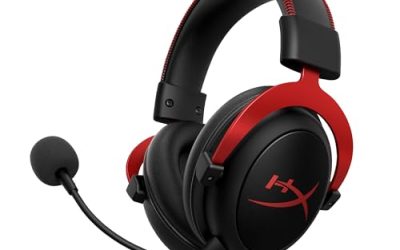
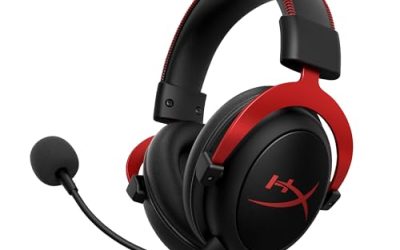
The Cloud II is the long-running wired pick in this group, built around a USB sound card that adds 7.1 virtual surround sound on a PC. Its 53mm drivers give games a full, warm presentation, and the memory foam ear pads come in leatherette and velour so you can choose the texture that suits long sessions. The aluminium frame keeps the headset rigid without adding bulk, and the detachable microphone lifts away when you only want to listen. It connects through the USB sound card or a 3.5mm jack, which keeps it usable across PC, PlayStation, and Xbox hardware.
Watch out for: 7.1 surround works through the USB sound card on PC, Mac, and PS4, so consoles connected by 3.5mm get stereo sound.
Razer BlackShark V2 X
- Best for: Players who want a light wired headset that moves between PC and console.
- 50mm TriForce drivers
- 7.1 surround sound
- HyperClear cardioid microphone
- Advanced passive noise cancellation
Players who want a light wired headset that moves between PC and console.
Surround sound needs software support on PC, and the headset has no wireless mode.
The BlackShark V2 X is the lightest headset in this guide at 240 grams, and that lightness shows in how it disappears during long sessions. Its 50mm TriForce drivers split the sound into separate highs, mids, and lows, while the HyperClear cardioid microphone focuses on your voice and leaves background noise behind. Advanced passive noise cancellation comes from the closed earcups and memory foam cushions rather than powered processing, so nothing about the headset needs a battery. A single 3.5mm cable connects it to PC, PlayStation, and Switch hardware without adapters or dongles.
Watch out for: Surround sound needs software support on PC, and the headset has no wireless mode.
SteelSeries Arctis Nova 7
- Best for: Wireless gaming and calls without swapping headsets between devices.
- Neodymium magnetic drivers with Nova Acoustic System
- Simultaneous 2.4GHz wireless and Bluetooth
- 38-hour battery with USB-C fast charging
- Retractable ClearCast Gen 2 AI microphone
Wireless gaming and calls without swapping headsets between devices.
The headset needs charging, and console support depends on the USB-C dongle rather than a plain 3.5mm cable.
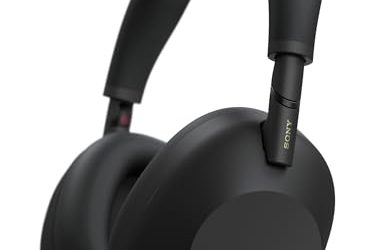
The Arctis Nova 7 is the wireless pick in this guide, running 2.4GHz wireless and Bluetooth at the same time so game audio and a phone call can share one headset. Its battery runs for 38 hours and charges over USB-C, and the retractable ClearCast Gen 2 microphone slides out of the earcup when you need it and away when you do not. The Nova Acoustic System and neodymium magnetic drivers shape a clear, spacious sound, while the ChatMix dial balances game audio against chat without opening any settings. It works with PC, PlayStation, Switch, VR hardware, and mobile devices.
Watch out for: The headset needs charging, and console support depends on the USB-C dongle rather than a plain 3.5mm cable.
Which One Fits Your Situation
Long PC gaming sessions at a desk
The HyperX Cloud II fits a desk setup where the headset rarely leaves the room. Its wired connection never needs charging, the USB sound card adds surround positioning for PC games, and the memory foam pads stay comfortable through long evenings. The detachable microphone means the headset doubles as plain headphones for music between matches. Keep the USB sound card plugged into the PC and the 3.5mm cable spare for anything else.
Console and handheld play across platforms
The Razer BlackShark V2 X fits players who switch between PC, PlayStation, and Switch in the same week. Its 3.5mm cable plugs straight into a controller or handheld, its 240-gram frame stays comfortable during handheld sessions, and its cardioid microphone keeps voice chat clear without any software. There is nothing to charge and nothing to pair, so the headset is ready the moment you pick it up.
Work calls plus music without a cable
The SteelSeries Arctis Nova 7 fits a day that mixes calls, music, and games. Bluetooth connects to a phone or laptop while the 2.4GHz link carries game audio, and the retractable microphone hides away when a call ends. The 38-hour battery covers a full working week of calls for most people, and USB-C fast charging tops it up quickly when the battery runs low.
A first headset for mixed gaming and chatting
The Razer BlackShark V2 X fits a first headset because it asks for nothing extra. There is no battery to manage, no software to install for basic use, and no dongle to lose. The 3.5mm cable works with the devices a new player already owns, the microphone mutes by unplugging it or through the in-line controls, and the light frame suits younger players as well as adults.
Common Mistakes
- Buying an on-ear model when you wanted over-ear: check the ear placement in the listing before you buy, since the two shapes look alike in photos.
- Assuming virtual surround works everywhere: surround usually needs the included USB hardware or PC software, and a plain 3.5mm connection gives stereo sound.
- Ignoring the mute control: know whether the microphone mutes by flipping, detaching, retracting, or pressing a button before your first call.
- Judging a headset by driver size alone: tuning, earcup volume, and the seal around your ears shape the sound more than millimetres do.
- Forgetting the connection your device needs: a 3.5mm jack, a USB port, or a Bluetooth radio must match the headset you choose.
Frequently Asked Questions
Do over-ear headsets with a mic work for work calls as well as gaming?
Yes, and the microphone type decides how well. A boom or retractable microphone sits near your mouth, so colleagues hear your voice rather than your keyboard. Wireless models add Bluetooth for phones and laptops, which makes one headset cover both games and meetings. If calls dominate your day, favour microphone placement and mute controls over surround modes, and check that the headset works with the calling apps you already use.
Is a detachable microphone better than a fixed one?
It depends on how you use the headset away from games. A detachable microphone comes off completely, so the headset looks and feels like ordinary headphones for music or travel. A retractable microphone hides inside the earcup with nothing to lose, while a flip-to-mute microphone silences you fastest in the middle of a game. None of the three is better in every situation, so match the design to your habits.
Can I use a wired gaming headset with a phone?
Yes, if the connection matches. A headset with a 3.5mm jack plugs into any phone that still has a headphone socket, and phones without one need a USB-C or Lightning adapter. The microphone usually works for calls through the same jack. Wireless headsets connect over Bluetooth instead, which is simpler on a phone but adds a battery to keep charged.
How long do ear cushions last before they need replacing?
It depends on hours of use, heat, and the cushion material. Leatherette pads can flake or flatten after a year or two of use, while velour pads compress and lose their seal more gradually. Wiping the pads after sessions and storing the headset flat instead of hanging it by the headband slows the wear. Replace the pads when the foam stops springing back or the seal no longer feels even.
Related guides
More from Amazon
Programs that pair well with the guide above. Offers and eligibility are set by Amazon and may change.
A free business account with business pricing and bulk-buying tools for work, shop or home office.
Create a business accountFree shipping on eligible items, Prime Video and more. Eligible new members can start with a free trial.
Start a Prime free trialAudiobooks and podcasts to listen to on the go. Eligible new members can start with a free trial.
Try Audible freeAd-free music streaming. Eligible new subscribers can start with a free trial.
Try Music Unlimited freeAs an Amazon Associate we earn from qualifying purchases.