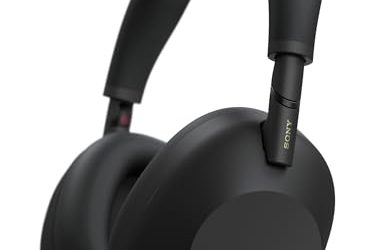
In a tight FPS round, a footstep often reaches your ears before anything shows on screen. A quiet step on wood, a shuffle behind a wall, a sprint across an open lane — each one carries direction and distance, and the player who reads those cues first usually wins the exchange. A headset that smears those sounds into a muddy wash leaves you guessing, while one with clean imaging turns the same audio into a map you can act on.


The three headsets below were picked for how they handle that exact job. Each one renders small positional cues clearly, keeps speech intelligible over gunfire, and stays comfortable through long sessions. One is wired and straightforward, one is a wireless esports pick with FPS-tuned profiles, and one mixes console and PC play with simultaneous wireless connections. Read the guide, then match a pick to the way you play.
Our Top Picks
- Razer BlackShark V2 Pro Wireless Gaming HeadsetStandard6.47 x 3.9 x 7.5 inches0.73 poundsCheck on Amazon
Pros & cons
- Up to 70 hours of battery life per charge
- 2.4GHz HyperSpeed wireless aims for low-latency audio sync
- Memory foam earcups aid noise isolation during play
- Heavier build than many wireless headsets at 0.73 pounds
- USB-C charging cable length is not specified in the listing
Quick Picks
As an Amazon Associate we earn from qualifying purchases
| Product | Best for | Key spec from title |
|---|---|---|
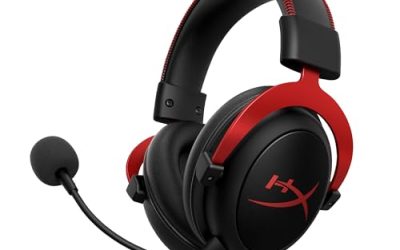
| HyperX Cloud II Gaming Headset | Wired footstep clarity on a modest setup | 7.1 surround sound with 53mm drivers |
| Razer BlackShark V2 Pro (2023) Wireless Gaming Headset | Competitive FPS audio profiles | Pro-tuned FPS profiles with THX spatial sound |
| SteelSeries Arctis Nova 7 Wireless Multi-Platform Gaming Headset | Wireless footstep detail across platforms | 360-degree spatial audio with simultaneous 2.4GHz and Bluetooth |
How to Choose
Prioritise imaging over bass
Footsteps live in the middle and upper frequencies, not in deep bass. A headset tuned for heavy low end can bury a soft step under every explosion and reload, which is the opposite of what an FPS player needs. Look instead for a clear midrange, restrained bass, and a soundstage wide enough to separate a step to your left from one behind you. Large drivers help, but tuning matters more than diameter alone. A 50mm driver with a balanced profile will place sounds more reliably than a bigger driver tuned for rumble. If a listing mentions footsteps, positional audio, or FPS profiles, that is a useful sign, though your own ears remain the final judge.
Decide between wired and wireless first
A wired headset removes battery anxiety and latency questions entirely, and it usually costs less for the same driver quality. That makes it a strong default for a desk-bound PC player who never moves far from the tower. Wireless brings freedom to stand, stretch, and step away between rounds, and modern 2.4GHz links keep delay low enough for competitive play. Bluetooth alone is a different story: it suits music and calls, but it can lag behind the action in a fast match. If you go wireless, check that the headset uses a dedicated 2.4GHz dongle for game audio, and confirm the battery lasts through your longest session with room to spare.
Treat spatial audio as a tool, not magic
Virtual surround and spatial processing can stretch a stereo signal into a wider field, which helps you tell front from back and near from far. It works best when only one layer of processing is active at a time. Running a headset surround mode on top of an in-game spatial engine at the same time often doubles the effect and blurs the cues you are trying to sharpen. Pick one source of spatial audio, learn its character over several matches, and then judge it. Some players also prefer plain stereo with a good equaliser curve, since a clean stereo image can place footsteps just as precisely once you know what to listen for.
Check fit, seal, and the microphone together
Directional audio depends on a consistent seal around your ears. A headset that gaps at the jaw or presses unevenly will leak sound and shift the image every time you move your head, so earcup shape and clamp force deserve as much attention as driver size. Memory foam pads usually seal better and stay comfortable longer than stiff leatherette. The microphone matters too, because footstep awareness is only half of squad play: a detachable boom with clear voice pickup keeps callouts intelligible without forcing you to shout. Try the headset with glasses on if you wear them, since temple arms are a common source of seal breaks.
The 3 Best Options
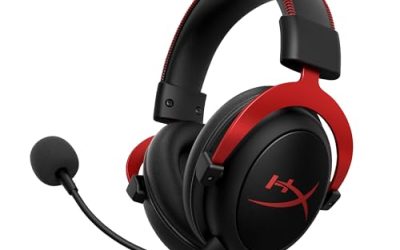
HyperX Cloud II Gaming Headset
The Cloud II has stayed relevant for years because it does the fundamentals well, and footsteps are a fundamentals problem. Its 53mm drivers deliver a clear, forward midrange that keeps soft steps audible under gunfire, while the included USB sound card adds virtual 7.1 surround for players who want a wider field. The wired connection means no charging and no wireless delay, and the aluminium frame with memory foam pads holds a steady seal through long matches. A detachable microphone with noise cancelling keeps squad chat clean, and the headset works across PC and consoles through USB or a 3.5mm jack.
Specs
- 7.1 Surround Sound
- 53mm drivers
- Memory foam ear pads
- Durable aluminum frame
- Detachable noise cancelling microphone
- USB sound card audio control box
- Multi platform headset, works with PC, PS4, PS4 PRO, Xbox One, Xbox One S
- Frequency response 15-25kHz
- Over-ear fit
Best for: PC players who want a simple wired headset that keeps footsteps clear without extra software.
Watch out for: It is an older model, and the Amazon listing itself points buyers toward a newer HyperX headset.
Razer BlackShark V2 Pro (2023) Wireless Gaming Headset
Razer built this headset around competitive FPS play, and the feature list reads like a checklist for hearing footsteps first. Pro-tuned FPS profiles shape the sound toward positional cues, THX spatial sound widens the field so front and rear steps separate cleanly, and the 50mm TriForce titanium drivers keep the midrange detailed rather than boomy. The detachable HyperClear super wideband microphone captures callouts clearly, and noise-isolating earcups with ultra-soft memory foam block room noise that would otherwise mask a quiet approach. With a 70-hour battery and a 2.4GHz wireless link plus Bluetooth, it covers long ranked sessions and casual listening alike.
Specs
- Pro-tuned FPS profiles
- THX spatial sound
- 50mm TriForce titanium drivers
- Detachable HyperClear super wideband microphone
- Noise-isolating earcups with ultra-soft memory foam
- 70-hour battery life
- 2.4GHz wireless and Bluetooth 5.2
- For PC, PS5, Switch 2
- Black
Best for: Ranked FPS players who want wireless freedom with audio profiles tuned for footsteps.
Watch out for: The listing shares its page with the 2020 model and the wired BlackShark V2, so confirm the 2023 edition before buying.
SteelSeries Arctis Nova 7 Wireless Multi-Platform Gaming Headset
The Nova 7 suits players who move between PC, console, and mobile and want footstep detail on every platform. Its Nova Acoustic System with neodymium magnetic drivers produces a wide, precise image, and 360-degree spatial audio helps you judge whether a step is above, below, or around a corner. Simultaneous 2.4GHz and Bluetooth means game audio and a phone call can run at once without swapping connections. The ClearCast Gen 2 AI microphone keeps voice chat clear, the 38-hour USB-C battery covers a full week of evenings, and the Sonar software includes equaliser presets shaped for hearing footsteps. The lightweight frame and adjustable headband keep the seal steady during long sessions.
Specs
- Neodymium magnetic drivers
- 360-degree spatial audio
- Simultaneous 2.4GHz and Bluetooth wireless
- 38-hour USB-C battery
- ClearCast Gen 2 AI microphone
- Sonar software with equaliser presets
- For PC, PS5, Switch, VR, Mobile
- Over-ear fit
Best for: Multi-platform players who want wireless footstep audio on PC, console, and mobile from one headset.
Watch out for: The Amazon listing notes a newer Gen 2 model, so check which generation the listing you buy belongs to.
Which One Fits Your Situation
You play ranked FPS most nights
Pick the Razer BlackShark V2 Pro (2023). Its FPS profiles and spatial processing are aimed squarely at competitive cues, and the wireless link frees you from cable drag during flick shots. The long battery means you will rarely think about charging mid-week, and the isolating earcups keep household noise from covering a quiet step. Set one spatial mode, learn it over a few sessions, and let the profiles do the heavy lifting.
You switch between PC and console
Pick the SteelSeries Arctis Nova 7. It moves between PC, PlayStation, Switch, and mobile without a tangle of adapters, and the simultaneous Bluetooth connection lets you take a call without dropping game audio. The spatial audio and Sonar presets travel with you across platforms, so the footstep cues you learn on PC still apply on console. It is the most flexible of the three when your gaming time is split.
You want a simple wired setup
Pick the HyperX Cloud II. Plug it in, pick the USB sound card or the direct jack, and play. There is no battery to manage, no dongle to lose, and no software to configure before your first match. The wired link keeps latency out of the conversation entirely, and the price of entry is lower than either wireless pick. It is the least fussy way to hear footsteps clearly.
You play long sessions and talk constantly
Pick the SteelSeries Arctis Nova 7 for its light frame and long battery, or the Razer BlackShark V2 Pro (2023) for its isolating earcups and wideband microphone. Both keep voice chat intelligible while footsteps stay audible, and both run for days between charges. The deciding factor is platform: Nova 7 if you roam across devices, BlackShark if your play is mostly competitive PC matches.
Common Mistakes
- Buying for deep bass instead of clear imaging, which buries quiet footsteps under explosions and reloads.
- Running headset surround sound and in-game spatial audio at the same time, doubling the processing and blurring direction cues.
- Ignoring the earcup seal, since gaps from glasses or a loose fit leak sound and shift the stereo image.
- Choosing a headset for one game only, when a balanced FPS tuning transfers across shooters.
- Skipping the platform check, since some wireless editions differ by console and a wrong edition can lose features.
Frequently Asked Questions
Do I need surround sound to hear footsteps?
No, but it can help. Good stereo imaging places footsteps left, right, near, and far, and many competitive players prefer stereo with a tuned equaliser. Virtual surround widens that field and adds a sense of front versus back, which some players find easier to read. Try stereo first, then enable one spatial mode and compare. Whichever gives you faster, more confident reads is the right choice for you.
Are wireless headsets fast enough for competitive play?
Yes, when they use a dedicated 2.4GHz dongle rather than Bluetooth alone. A 2.4GHz link keeps delay low enough that footsteps and gunfire stay in sync with the action on screen. Bluetooth-only connections can lag noticeably in fast matches, so reserve Bluetooth for music, calls, and casual play. Check the battery rating too, since a headset that dies mid-match is a bigger problem than any small latency difference.
Why do footsteps sound louder on some headsets?
Footsteps sit in the mid and upper frequencies, so a headset with a clear, forward midrange makes them stand out. Bass-heavy tuning pushes those frequencies down under explosions, while a balanced profile lets them cut through. Equaliser presets shaped for FPS play usually lift the footstep range and tame the low end. Fit matters too: a good seal keeps quiet sounds audible, while a loose fit lets them escape.
Can one headset work for FPS games and everyday listening?
Yes, all three picks handle music, films, and calls alongside competitive play. The Nova 7 is the most versatile, with simultaneous Bluetooth for phone audio and presets for different content. The BlackShark V2 Pro (2023) doubles as a comfortable wireless headset for media between matches. The Cloud II works well for music through its USB sound card, though its tuning leans toward gaming clarity over a warm musical sound.
Related guides
More from Amazon
Programs that pair well with the guide above. Offers and eligibility are set by Amazon and may change.
A free business account with business pricing and bulk-buying tools for work, shop or home office.
Create a business accountFree shipping on eligible items, Prime Video and more. Eligible new members can start with a free trial.
Start a Prime free trialAudiobooks and podcasts to listen to on the go. Eligible new members can start with a free trial.
Try Audible freeAd-free music streaming. Eligible new subscribers can start with a free trial.
Try Music Unlimited freeAs an Amazon Associate we earn from qualifying purchases.