Our Short List of 3

- Best for: Full-size players who want SOCD cleaning and a numpad on the same board.
- Layout: Full-size
- Switches: CORSAIR MLX Red linear mechanical, pre-lubed
- SOCD: Listed in the product title
- Keycaps: ABS double-shot

- Best for: Competitive players who travel to LANs or want a proven tournament tenkeyless layout.
- Layout: Tenkeyless
- Switches: GX Blue Clicky mechanical
- Cable: Detachable Micro USB
- Backlight: LIGHTSYNC RGB, per key

- Best for: Players who want tactile feedback, a numpad and a board that looks at home on a work desk.
- Layout: Full-size
- Switches: Tactile mechanical
- Keycaps: PBT
- Top case: Black aluminum
All 3 Picks at a Glance
| Product | Specs | Action |
|---|---|---|
| Corsair K70 CORE |
| Check price on Amazon |
| Logitech G PRO |
| Check price on Amazon |
| Logitech G413 SE |
| Check price on Amazon |
Counter-Strike 2 movement is built on counter-strafing, and the keyboard is the half of that equation players replace most often for the wrong reasons. Choosing a wired board is not really about the cable, since every pick here removes batteries and pairing from the equation. The real decision is how the switches behave under rapid A and D taps, whether the board offers SOCD input cleaning, and how much desk width it leaves for low-sensitivity mouse sweeps.
This roundup covers the main wired buying profiles for CS2: a full-size board with SOCD, a tournament tenkeyless built for travel, a plain tactile full-size board for mixed gaming and typing, a budget tenkeyless with deep key remapping, and a hot-swappable 96 percent board for players who still want a numpad. Every pick comes from the product names and specifications published on its Amazon page, so switch types, layouts and polling figures are compared as listed rather than as rumored.
Top 3 picks at a glance
Quick Picks
As an Amazon Associate we earn from qualifying purchases.
| Product | Best for | Key spec from title |
|---|---|---|
| Corsair K70 CORE | Full-size players who want SOCD counter-strafe cleaning | Pre-lubed MLX Red linear switches with SOCD |
| Logitech G PRO | Tournament-style tenkeyless players who like clicky feedback | Detachable Micro USB cable with LIGHTSYNC RGB |
| Logitech G413 SE | Tactile full-size buyers who want a simple, sturdy board | Tactile mechanical switches in a black aluminum case |
| Keychron C3 Pro | Budget tenkeyless players who remap every key | QMK/VIA programmable with 1000 Hz polling |
| Glorious GMMK 2 96 percent | Hot-swap tinkerers who refuse to drop the numpad | Hot-swap linear switches in a 96 percent layout |
How to Choose
Switch behavior and SOCD input cleaning
CS2 rewards clean stops, so what happens when A and D overlap matters more than raw switch speed. One board here, the Corsair K70 CORE, lists SOCD handling, which resolves simultaneous opposite directions instead of letting them cancel or stack unpredictably. The other four use conventional switches, where your own release timing does that work. Switch feel matters too: linear switches such as the MLX Red, Keychron Red and Glorious Fox suit fast repeated taps, tactile switches give a bump you can feel during jiggle peeks, and the G PRO’s clicky GX Blue switches add audible confirmation at the cost of noise.
Layout and mouse room
Layout decides how far your mouse hand can travel before it hits the keyboard, which is a genuine aim factor for low-sensitivity CS2 players. Tenkeyless boards such as the G PRO and C3 Pro free the whole numpad zone for wide swipes and let you angle the board without pushing your mouse pad off the desk. Full-size boards keep the numpad for buy binds and everyday number entry but demand a wider desk. The GMMK 2 splits the difference with a 96 percent layout that squeezes the numpad into a near-tenkeyless footprint, though its compressed navigation cluster takes adjustment.
Polling rate and the wired connection
A wired connection removes battery anxiety and wireless interference from ranked sessions, but polling rate still varies by model and is not always printed on the listing. The Keychron C3 Pro states 1000 Hz polling and full NKRO on its page. The other listings here do not state a polling figure in their product information, so the honest entry in their spec lists is not stated rather than an assumed number. Cable design matters for travel: the G PRO uses a detachable Micro USB cable that packs flat, while fixed cables suit boards that never leave one desk.
Keycaps, build and remapping software
Keycap material decides how the board feels after a year of ranked nights. PBT caps, like those on the G413 SE, resist the shine that ABS caps develop, while the double-shot ABS sets on the K70 CORE and C3 Pro keep legends from wearing off even as the surface smooths. Software depth splits the lineup as well: the C3 Pro’s QMK and VIA support remaps every key at firmware level, the K70 CORE stores up to five onboard profiles through iCUE, and the G PRO and G413 SE keep customization inside Logitech’s ecosystem and onboard controls respectively.
The 5 Best Options
Corsair K70 CORE
- Best for: Full-size players who want SOCD cleaning and a numpad on the same board.
- Layout: Full-size
- Switches: CORSAIR MLX Red linear mechanical, pre-lubed
- SOCD: Listed in the product title
- Keycaps: ABS double-shot
Full-size players who want SOCD cleaning and a numpad on the same board.
The keycaps are ABS rather than PBT, so expect surface shine to develop over time, and confirm the current listing if polling rate matters to you, since the page does not state it.
The K70 CORE is the pick for CS2 players who want a full-size board that still takes movement seriously. Its listing leads with SOCD handling alongside pre-lubed MLX Red linear switches, which is the combination counter-strafers actually shop for: smooth, fast key travel plus firmware-level resolution when both strafe keys are down. Two layers of sound dampening keep the board quiet under rapid taps, the multi-function rotary dial handles volume between rounds, and the included palm rest suits long sessions. It stores settings on up to five onboard profiles through iCUE, so a tuned CS2 profile travels with the board.
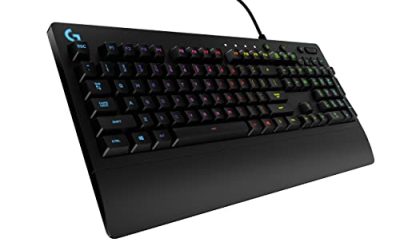
Logitech G PRO
- Best for: Competitive players who travel to LANs or want a proven tournament tenkeyless layout.
- Layout: Tenkeyless
- Switches: GX Blue Clicky mechanical
- Cable: Detachable Micro USB
- Backlight: LIGHTSYNC RGB, per key
Competitive players who travel to LANs or want a proven tournament tenkeyless layout.
Clicky switches are loud in shared rooms, and the detachable connector is Micro USB rather than the newer USB-C.
The G PRO is the classic tournament tenkeyless formula: a compact steel-reinforced deck, GX Blue Clicky switches with a definite tactile snap and audible click, and a detachable cable so the board drops into a backpack without a cable bent against its connector. That portability is why this design keeps showing up at LAN setups, and the tenkeyless footprint leaves maximum room for the wide mouse arcs CS2 riflers use on bombsites. LIGHTSYNC RGB runs per key, and the listed product information confirms this is the GX Blue Clicky variant, model 920-009388, so check the switch option carefully if you order, because the same board sells in other switch types.
Logitech G413 SE
- Best for: Players who want tactile feedback, a numpad and a board that looks at home on a work desk.
- Layout: Full-size
- Switches: Tactile mechanical
- Keycaps: PBT
- Top case: Black aluminum
Players who want tactile feedback, a numpad and a board that looks at home on a work desk.
Backlighting is white only with no per-key RGB, and the dimension field on the page reads like package measurements, so confirm the board footprint before ordering.
The G413 SE is the straightforward full-size option: tactile mechanical switches, PBT keycaps, a black brushed aluminum top case and white LED backlighting instead of an RGB light show. For CS2, the tactile bump gives a clear physical signal on each strafe tap, which some players prefer over the guesswork of a smooth linear press, and the full layout keeps the numpad for buy binds and desktop work. The listing title highlights anti-ghosting, and the aluminum deck keeps the board planted during frantic rounds. It is the least decorative board here, which is exactly its appeal for a desk that also does office duty.
Keychron C3 Pro
The C3 Pro is the budget tenkeyless with an enthusiast streak. Its page confirms QMK and VIA support, so every key can be remapped at firmware level, including a dedicated utility layer for CS2 buys and push-to-talk, without depending on a background app. The gasket mount design with sound-absorbing foam softens the board’s sound profile, Keychron Red linear switches suit rapid repeated taps, and the listing states a 1000 Hz polling rate with NKRO. Shine-through double-shot ABS keycaps and more than fourteen red backlight effects cover the lighting basics. One caution: the page lists two different weights in different sections, so treat the scale figures as unsettled.
Specs
- Layout: Tenkeyless, 87 keys
- Switches: Keychron Red mechanical, linear
- Firmware: QMK and VIA support
- Mount: Gasket mount with sound-absorbing foam
- Polling rate: 1000 Hz
- N-key rollover: Yes, as listed
- Keycaps: Shine-through double-shot ABS
- Backlight: Red LED, more than 14 effects
- Dimensions: 14.35 x 5.43 x 1.25 inches
- Weight: not stated (the page lists conflicting figures)
Best for: Budget buyers who want firmware-level remapping and a stated 1000 Hz polling rate.
Watch out for: The backlight is red only, and the product page gives inconsistent weight figures, so do not plan a travel setup around either number.
ASIN: B0CBWH8VPN
Glorious GMMK 2 96 percent
The GMMK 2 96 percent is for players who like to tune hardware. Its hot-swappable sockets accept MX-style switches, so you can run fast linears on the movement cluster and something heavier elsewhere, and the board ships with Glorious Fox linear switches and double-shot keycaps installed. The 96 percent layout keeps a numpad and arrow keys inside a footprint close to tenkeyless width, which protects mouse room better than a conventional full-size deck. Per-key RGB lighting is on board, and the aluminum-accented frame gives it the solid feel its 2.76 pound listed weight suggests. It is the most modifiable wired option in this roundup.
Specs
- Layout: 96 percent, full-size prebuilt ANSI
- Switches: Glorious Fox linear, hot-swappable, MX style
- Keycaps: Double-shot
- Backlight: RGB
- Polling rate: not stated
- Model number: GLO-GMMK2-96-FOX-B
- Weight: 2.76 pounds
- Dimensions: 14.8 x 4.9 x 1.5 inches
Best for: Tinkerers who want hot-swap switches and a numpad without a full-size footprint.
Watch out for: The compressed 96 percent navigation cluster crowds the arrow and delete keys, so check the layout image carefully if you rely on those keys by touch.
ASIN: B09YZ3BNYP
Which One Fits Your Situation
You play ranked daily and travel to LANs
Take the Logitech G PRO. The tenkeyless deck leaves the widest mouse area of any board here, the detachable Micro USB cable survives being packed and unpacked, and the clicky GX Blue switches give unmistakable confirmation on every counter-strafe. It is the only pick designed from the start as a carry-to-events board.
You split one desk between CS2 and office work
The Logitech G413 SE fits best. Tactile switches and PBT keycaps feel right for typing, the white backlight stays professional, and the full-size layout keeps the numpad your spreadsheets want. The Keychron C3 Pro is the alternative if your work machine runs macOS or Linux, since its page lists both alongside Windows.
You refuse to give up the numpad
Choose between the Corsair K70 CORE and the GMMK 2. The K70 CORE is the pick when SOCD handling and a media dial matter most, while the GMMK 2 squeezes its numpad into a narrower frame and adds hot-swap sockets. Both keep number entry for buy binds, though the GMMK 2 leaves noticeably more mouse room.
You plan to keep tuning the board for years
The GMMK 2 and the Keychron C3 Pro are the long-term projects. The GMMK 2 lets you change switches without soldering, and the C3 Pro’s QMK and VIA firmware lets you rebuild the keymap itself, including layers for other games. Either board grows with your preferences instead of being replaced by them.
Common Mistakes
- Buying clicky switches for a shared room, then playing worse because you are trying to stay quiet.
- Assuming SOCD or rapid-trigger style features are active out of the box, when some boards need the feature enabled in software first.
- Choosing a full-size board for a small desk and losing the mouse sweep space that low-sensitivity aim depends on.
- Treating an unstated polling rate as a confirmed figure instead of checking the listing before ordering.
- Paying for hot-swap sockets and premium keycaps when a fixed, simple board like the G413 SE already matches how you play.
Frequently Asked Questions
Is a wired keyboard still worth choosing for CS2?
Yes, for most players. A wired board removes battery management and wireless pairing from the setup, keeps behavior identical every session, and avoids any question about a receiver’s placement. Modern wireless boards are close in practice, but wired remains the simplest reliable option for a fixed gaming desk, which is why every pick in this roundup uses a cable.
What does SOCD do, and does it help in CS2?
SOCD, or simultaneous opposing cardinal directions, decides what happens when you hold A and D at the same time. Instead of the inputs cancelling or stacking oddly, SOCD cleaning resolves them by a set rule, which makes counter-strafing more consistent. Among these picks only the Corsair K70 CORE lists SOCD, so check whether that consistency matters to your movement style.
Which layout suits low-sensitivity aim?
Tenkeyless is the safest answer, because removing the numpad frees the space your mouse hand needs for wide turns and recentering swipes. The G PRO and C3 Pro both do this. A 96 percent board like the GMMK 2 is the compromise if you also need number keys, and a full-size board only makes sense on a genuinely wide desk.
Linear, tactile or clicky switches for CS2?
Linear switches are the common competitive choice because repeated strafe taps feel smooth and predictable, which is why three of these five boards ship linear. Tactile switches add a felt bump that some players use as confirmation of each press. Clicky switches add sound as well, which is satisfying solo but hard on teammates and roommates, so choose based on your room as much as your fingers.
Related guides
More from Amazon
Programs that pair well with the guide above. Offers and eligibility are set by Amazon and may change.
A free business account with business pricing and bulk-buying tools for work, shop or home office.
Create a business accountFree shipping on eligible items, Prime Video and more. Eligible new members can start with a free trial.
Start a Prime free trialAudiobooks and podcasts to listen to on the go. Eligible new members can start with a free trial.
Try Audible freeAd-free music streaming. Eligible new subscribers can start with a free trial.
Try Music Unlimited freeAs an Amazon Associate we earn from qualifying purchases.