Our Short List of 3
All 3 Picks at a Glance
| Product | Specs | Action |
|---|---|---|
 2. Logitech G213 Prodigy Gaming Keyboard | Check price on Amazon | |
 3. SteelSeries Apex 3 RGB Gaming Keyboard | Check price on Amazon | |
 4. Corsair K55 RGB PRO Gaming Keyboard | Check price on Amazon |
Yes, game streaming on a budget keyboard works well, and you do not need an expensive board to get a clean stream. The key is choosing a keyboard with quiet switches, dedicated media controls and a few programmable keys, because those three things keep keyboard noise out of your microphone and let you control your stream without leaving the game. The four boards below all fit that brief, and each one covers a different kind of streaming setup.
A streaming keyboard has a different job from a normal gaming keyboard. It is not only about fast inputs in the game. It also has to stay quiet while your microphone is live, give you quick access to mute, volume and scene changes, and survive long sessions without wearing out. Budget boards can do all of that, but only if you pick the right features and skip the ones that do not matter for a stream.
Top 3 picks at a glance
How to Choose a Budget Keyboard for Game Streaming
Quiet switches matter more than fast switches
Your microphone hears your keyboard. Loud clicky switches bleed into voice chat and stream audio, and no amount of noise suppression fully removes the clatter of a full game session. Linear switches and quiet membrane keys are the safest choices for streaming, because they bottom out with a soft thud instead of a sharp click. If a board lets you swap switches later, that is a bonus, since you can move to quieter switches without buying a whole new keyboard.
Dedicated media controls save your stream
While you are live, you need to adjust volume, mute your microphone or skip a track without tabbing out of the game. Dedicated media keys or a volume roller do that in one press. A keyboard that forces you to use function-key combinations for volume is slower and more error-prone mid-stream, especially when you are also trying to play. Look for a volume roller, a mute key and a play and pause key at minimum.
Macro keys run your stream
Streaming software lets you assign hotkeys to scene changes, turning the recording on and off, muting sources and triggering overlays. A keyboard with dedicated macro keys, or software that lets you remap any key, turns those hotkeys into one-press actions. Six macro keys are enough for most streamers: scene one, scene two, mute microphone, mute desktop audio, record on and off, and one spare for a sound effect or overlay toggle.
Layout and desk space
A full-size keyboard gives you a number pad and room for macro keys, but it takes up desk space that a microphone arm, a capture card or a second monitor might need. A tenkeyless layout drops the number pad and frees up room for your mouse, which helps if you play fast-paced games. Either layout works for streaming, so choose based on your desk. If your desk is tight, go compact. If you run a lot of stream controls, the extra keys of a full-size board earn their space.
Wired beats wireless for streaming
A wired connection removes battery anxiety and input delay from the equation. Your keyboard is one less thing that can drop out in the middle of a broadcast. Wireless boards have improved a lot, but for a stream setup where reliability matters more than a clean desk, a wired board is the practical choice, and wired boards also cost less at the same feature level.
Build quality and spill resistance
Drinks live near streaming desks, and a long broadcast means long hours of typing. A metal top plate, a spill-resistant design and keycaps that do not wear smooth in a few months all matter more than flashy lighting. Backlighting still helps: it lets you find keys in a dark room, and a simple single-color or zone-based glow is enough. Per-key lighting is nice for a light show, but it does not make your stream better.
What to skip
You do not need analog switches, adjustable actuation or a screen built into the keyboard to stream well. Those features belong on premium boards and add cost without improving audio quality or stream control. Spend your budget on quiet switches, media keys and macro support instead, and put the money you save toward a better microphone or a second monitor.
The Picks
1. Redragon K552 Mechanical Gaming Keyboard
Redragon K552 Mechanical Gaming Keyboard
The Redragon K552 is a compact tenkeyless mechanical keyboard with linear red switches, a metal top plate and rainbow LED backlighting, and it is the simplest way to get a mechanical feel on a streaming budget. The linear red switches are smooth and quiet for a mechanical board, with no click on actuation, so they stay out of your microphone far better than clicky blue switches. The 87-key layout drops the number pad, which frees up desk space for a microphone arm or a stream deck, and the metal frame keeps the board from flexing during long sessions.
Anti-ghosting and N-key rollover mean every keypress registers, even when you are holding movement keys and hitting ability keys at the same time. The K552 also supports macro programming through Redragon software, so you can map scene switches and mute toggles to keys you can reach without looking. The wired USB connection keeps input consistent, and the spill-resistant design adds some insurance against a knocked-over drink.
Who it is for: streamers who want a mechanical keyboard on a tight budget and have a small desk, or anyone building a first streaming setup who wants the tenkeyless layout for extra mouse room.
Limitations: the switches are soldered in on the classic version, so you cannot swap them later without soldering work. There are no dedicated media keys, so volume and mute controls rely on function-key combinations. The rainbow backlighting is zone-based rather than per-key, and the board has no wrist rest included.
2. Logitech G213 Prodigy Gaming Keyboard
Logitech G213 Prodigy Gaming Keyboard
The Logitech G213 Prodigy is a full-size membrane keyboard built around quiet Mech-Dome keys, and it is the pick for streamers who want dedicated media controls and a comfortable palm rest without paying for mechanical switches. The Mech-Dome keys are tuned for a tactile feel with a quiet sound profile, which is exactly what a live microphone needs: you can hear your own keypresses, but the microphone picks up far less of them than it would from a clicky board.
Dedicated media keys sit above the number pad, including a mute key, volume controls and playback keys, so you can adjust audio mid-stream without touching your mouse or leaving the game. The full-size layout also leaves room for a number pad, which some streamers use for hotkeys. Logitech G HUB software handles lighting, macro programming and key remapping, and the five-zone LIGHTSYNC RGB lighting lets you set a simple glow that matches your stream scene. A spill-resistant design and an integrated palm rest round out a board made for long sessions.
Who it is for: streamers who talk a lot on mic and want the quietest possible keypresses, plus anyone who wants dedicated media keys and a palm rest in one package.
Limitations: the membrane keys feel softer and less crisp than mechanical switches, and they cannot be swapped. The board is full-size, so it needs more desk space than a compact board. The lighting is zone-based rather than per-key, and the keycaps are not the easiest to replace if they wear.
3. SteelSeries Apex 3 RGB Gaming Keyboard
SteelSeries Apex 3 RGB Gaming Keyboard
The SteelSeries Apex 3 is a full-size keyboard with whisper-quiet gaming switches, 10-zone RGB illumination and IP32 water resistance, and it is the pick for streamers who want the quietest board in this group with a premium wrist rest. The whisper-quiet switches are designed for near-silent operation, which is the single most useful trait a streaming keyboard can have: your viewers hear your voice, not your keys.
The Apex 3 includes a magnetic wrist rest that snaps on and off, which helps during long broadcasts, and the IP32 water resistance protects against drips and small splashes. The 10-zone RGB lighting gives you a clean glow for a dark room, and SteelSeries Engine software handles lighting and macro programming. Gaming-grade anti-ghosting keeps inputs reliable when several keys are pressed at once, and the full-size layout gives you a number pad for extra hotkeys.
Who it is for: streamers who broadcast for hours at a time and want maximum comfort and minimum key noise, or anyone whose desk is in a shared room where keyboard noise bothers other people.
Limitations: the switches are membrane-style rather than mechanical, so the feel is softer and less tactile than a mechanical board. There is no dedicated volume roller, so volume changes go through function keys or software. The full-size footprint needs a wide desk, and the wrist rest adds to the depth of the board.
4. Corsair K55 RGB PRO Gaming Keyboard
Corsair K55 RGB PRO Gaming Keyboard
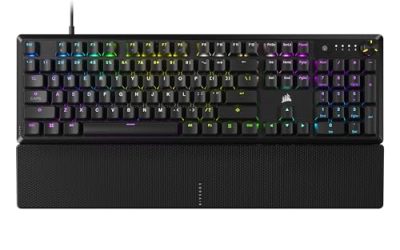
The Corsair K55 RGB PRO is a full-size membrane keyboard with six dedicated macro keys, Elgato Stream Deck software integration and IP42 dust and spill resistance, and it is the pick for streamers who want the most stream control built into the keyboard itself. The six macro keys sit on the left edge where your thumb can reach them, and they work with Corsair iCUE software or directly with Elgato Stream Deck software, so you can trigger scene changes, mute toggles and recording controls with one press.
Dedicated media keys and a volume control sit above the number pad, and the five-zone dynamic RGB backlighting can be set to a simple scheme that matches your stream. The detachable palm rest helps during long sessions, and the IP42 dust and spill resistance guards against accidents. The membrane keys are quiet, which keeps them out of your microphone, and the wired USB connection keeps input steady for the whole broadcast.
Who it is for: streamers who run a multi-scene setup and want dedicated macro keys with Stream Deck integration, or anyone who wants the most stream-focused feature set at a budget tier.
Limitations: the membrane keys feel softer than mechanical switches and cannot be swapped. The board is large, with macro keys and a palm rest adding width and depth, so it needs a wide desk. Full macro programming needs Corsair iCUE software, and the lighting is zone-based rather than per-key.
Comparison Table
| Keyboard | Switch type | Layout | Media controls | Macro keys | Spill resistance | Best for |
|---|---|---|---|---|---|---|
| Redragon K552 | Mechanical linear red | Tenkeyless, 87 keys | Function-key combinations | Software macros | Spill-resistant design | Compact mechanical feel on a small desk |
| Logitech G213 Prodigy | Mech-Dome membrane | Full-size | Dedicated media keys | G HUB remapping | Spill-resistant design | Quiet keys with a palm rest |
| SteelSeries Apex 3 | Whisper-quiet membrane | Full-size | Function-key combinations | SteelSeries Engine macros | IP32 water resistance | Quietest keys and long-session comfort |
| Corsair K55 RGB PRO | Membrane | Full-size | Dedicated media and volume keys | 6 dedicated macro keys, Stream Deck integration | IP42 dust and spill resistance | Most stream control built in |
FAQ
Do you need a mechanical keyboard to stream games?
No. A mechanical keyboard feels great, but a quiet membrane keyboard often works better for streaming because it makes less noise on a live microphone. What matters is quiet switches, media controls and macro support, and both mechanical and membrane boards can provide those. Choose based on noise level and feel, not on switch technology alone.
Are quiet switches really that important for streaming?
Yes, because your microphone sits close to your keyboard and picks up every keypress. Clicky switches create a sharp sound that noise suppression struggles to remove cleanly, and viewers notice it during quiet moments in a game. Linear switches and quiet membrane keys keep that noise low, which makes your voice audio cleaner without extra processing.
Can a budget keyboard handle streaming macros and scene switching?
Yes, as long as it supports macro programming or key remapping through software. Even a single row of macro keys covers the essentials: switching scenes, muting the microphone, muting desktop audio and turning a recording on or off. Streaming software also lets you assign those actions to any key, so a board with remappable keys works even without dedicated macro keys.
Is a full-size keyboard or a compact layout better for a streaming desk?
It depends on your desk. A full-size board gives you a number pad and room for dedicated macro and media keys, which helps if you run a lot of stream controls. A tenkeyless board frees up space for your mouse and microphone arm, which helps if your desk is tight or you play fast-paced games. If you use a separate stream controller for scene switching, a compact board is usually the better fit.
Should a streaming keyboard be wired or wireless?
Wired is the safer choice for streaming. A wired board never runs out of battery mid-broadcast and never drops its connection at the wrong moment. Wireless boards are convenient and keep the desk tidy, but for a live stream, the reliability of a wired connection is worth more than the cleaner look.
Conclusion
Game streaming on a budget keyboard comes down to three things: quiet switches that stay out of your microphone, media controls you can reach without leaving the game, and macro support for scene changes and mute toggles. The Redragon K552 is the best compact mechanical option, the Logitech G213 Prodigy is the quietest full-size pick with a palm rest, the SteelSeries Apex 3 is the quietest board overall for long sessions, and the Corsair K55 RGB PRO packs the most stream control into one board with its macro keys and Stream Deck integration. Pick the one that matches your desk size and how you run your stream, and check the listing directly before buying to confirm it is still in stock.
Disclosure: As an Amazon Associate, we may earn from qualifying purchases.
Related guides
More from Amazon
Programs that pair well with the guide above. Offers and eligibility are set by Amazon and may change.
A free business account with business pricing and bulk-buying tools for work, shop or home office.
Create a business accountFree shipping on eligible items, Prime Video and more. Eligible new members can start with a free trial.
Start a Prime free trialAudiobooks and podcasts to listen to on the go. Eligible new members can start with a free trial.
Try Audible freeAd-free music streaming. Eligible new subscribers can start with a free trial.
Try Music Unlimited freeAs an Amazon Associate we earn from qualifying purchases.