The best portable hard drives for photographers carry a whole photo library in a camera bag, survive the journey, and hand the files back quickly when it is time to edit. A wedding photographer coming home with hundreds of gigabytes of RAW files, a travel photographer backing up cards in a hotel room, and a portrait photographer keeping a client archive all need the same things: enough capacity, toughness for travel, a connection that fits whatever laptop is at hand, and reliability the files can depend on.


A spinning hard drive holds far more capacity for the money, which is why a 5TB portable hard drive is a normal purchase while a 5TB portable SSD is a luxury. The trade-off is speed: a portable hard drive moves large files well below SSD speed, so it is best for storage, backup, and archiving rather than editing directly from the drive. RAW files and finished exports live on the portable drive, while active editing happens from the laptop or a faster drive. The five drives below are all portable hard drives in the 4TB to 5TB range, chosen for capacity, toughness, and photographer-friendly features.
One habit matters more than any single drive choice: never keep the only copy of a shoot on one portable drive. Copy memory cards to the portable drive, then copy the portable drive to a second location, whether a desktop drive at home or a cloud service, before formatting the cards. A portable drive is small enough to lose, and it is still a single mechanical device, so it can fail. With that habit in place, these drives will serve a photographer well for years.
Our Top Picks
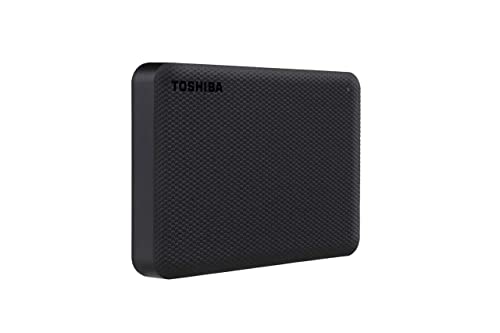 Toshiba Canvio Advance 4TB Portable External Hard Drive4TB4.3 x 3.1 x 0.77 inches0.48 poundsCheck on Amazon
Top 3 picks at a glance

How to Choose
1. Capacity for a growing library
Capacity is the first decision, and photographers should think in shoots rather than gigabytes. A single wedding can produce hundreds of gigabytes of RAW files, and a year of regular work can add several terabytes. A 4TB drive holds a large library, but a 5TB drive holds a quarter more for a small step up in size and weight, which is why four of the five picks here are 5TB models. If you shoot video alongside stills, lean toward the largest capacity you can carry. Check how much your current library occupies, then double it to allow for growth.
2. Ruggedness for travel and field work
A drive that lives in a camera bag needs to survive drops, knocks, dust, and rain. Rugged drives such as the LaCie Rugged USB-C use an aluminium core with a rubber sleeve that absorbs shocks, and they carry formal ratings for drop, shock, dust, and rain resistance. Ordinary portable drives are built for desks and bags rather than rough handling, so they need a padded case if they travel often. A drive that never leaves the studio does not need ruggedness, but a drive that goes on location does.
3. Connection and transfer speed
Every drive in this guide connects over USB, and the details matter. USB-C is now the standard connector on modern laptops, including MacBooks, while older machines use USB-A. Some drives include only a USB-C cable and some include both. Transfer speed is limited by the spinning disk inside rather than the USB connection, so expect speeds around 120 to 140 MB/s for large files. That is fast enough to copy a full memory card in minutes and browse a photo library, but slow enough that editing large files directly from the drive can feel sluggish. If you need to edit from the drive, a portable SSD is the better tool.
4. Backup software and encryption
The software bundled with a drive decides whether backups actually happen. WD includes backup software with the My Passport range, along with password protection and 256-bit AES hardware encryption on the Ultra model. Seagate includes its Toolkit software with the One Touch range, plus a Rescue Data Recovery Services plan. LaCie includes its Toolkit software and a Rescue plan with the Rugged range. Set up scheduled backups when you first connect the drive, and turn on password protection if it will carry client work, because a lost drive can contain unreleased client images.
5. Size and weight in the bag
A portable hard drive should disappear into a camera bag, and the drives here mostly do. The WD My Passport and Seagate One Touch are slim, pocket-sized units that weigh well under half a kilogram. The LaCie Rugged is thicker and heavier because of its protective sleeve, but it is still small enough for a bag pocket. The Toshiba Canvio Advance is one of the slimmest drives here, which suits photographers who already carry a heavy kit.
6. Compatibility with Mac, Windows, and cameras
Most portable hard drives work with Windows and Mac, but the factory format differs. Some ship formatted for Windows and need reformatting for Mac, while others work with both out of the box or ship in exFAT, which both systems read and write. If you move between a Windows desktop and a Mac laptop, exFAT is the simplest choice. Also check whether the drive works with the devices you use on location: some photographers back up from a camera or tablet, and USB-C support makes that far easier than USB-A.
7. Data recovery service and warranty
A recovery service is worth more to a photographer than to almost any other buyer, because the files on the drive may be irreplaceable client work. Seagate and LaCie include Rescue Data Recovery Services with the drives in this guide. WD covers the My Passport range with a three-year limited warranty. Read the terms for the exact model and register the drive after purchase. A drive with a recovery plan is a calmer thing to carry into the field.
Top Picks
1. WD My Passport 5TB
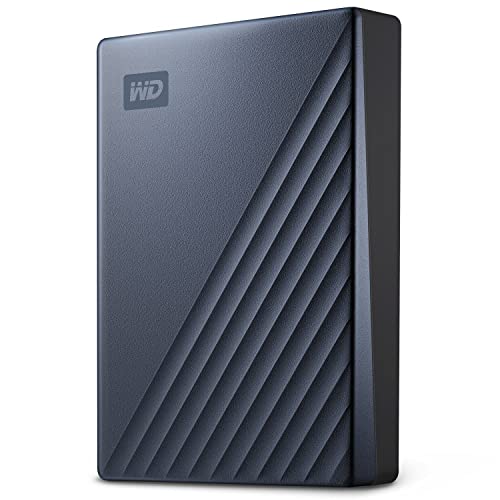
The WD My Passport 5TB is the default portable hard drive for photographers, and it holds that position because it gets the basics right. It packs 5TB into a slim, pocket-sized enclosure, connects over USB 3.1 with a USB-A cable, and includes backup software with password protection and defence against ransomware. The drive is bus powered, so there is no power brick to carry, and it works with Windows and Mac. At 5TB it holds a very large photo library in a single unit that fits in a jacket pocket.
What photographers will appreciate most is how little fuss it makes: plug it in, set up a backup schedule, and it quietly does its job. The 5TB capacity means you are unlikely to need a second drive for a long time. Its main limitation is toughness: this is a desk-and-bag drive rather than a field-hardened one, so it belongs in a padded pocket or case when it travels. Large imports take longer than on an SSD, though for backup and archiving that rarely matters.
Who it is for: photographers who want the largest capacity in the smallest, lightest package for everyday backup and archiving, at home or in a padded camera bag.
Caveats: it is not a rugged drive, so handle it gently on location, and check which cable is in the box if your laptop only has USB-C ports, as an adapter may be needed. Confirm the listing shows the exact model WDBPKJ0050BBK before ordering.
2. LaCie Rugged USB-C 5TB
The LaCie Rugged USB-C 5TB is the drive photographers reach for when the shoot leaves the studio. Its bright orange rubber sleeve is instantly recognisable, and it is there for a reason: the sleeve, the aluminium core, and the internal shock mounting give the drive resistance to drops, shocks, dust, and rain. It connects over USB-C, works with Mac, Windows, and iPad, and transfers files at up to 130 MB/s. The drive includes LaCie Toolkit backup software and a three-year Rescue Data Recovery Services plan.
On location, the Rugged earns its keep: it sits securely on uneven surfaces, survives being knocked off a table, and keeps working in dust and light rain that would worry an ordinary drive. The 5TB capacity matches the WD My Passport, so there is no capacity penalty for the toughness, though the Rugged is thicker and heavier than a slim drive. For travel, wedding, and documentary photographers, it is the most reassuring drive in this guide.
Who it is for: travel, wedding, documentary, and outdoor photographers who need a portable drive that can survive field conditions and rough handling.
Caveats: it is bulkier and heavier than the slim drives here, and the orange sleeve, while practical, is conspicuous. Confirm the listing shows the exact model STFR5000800 before ordering.
3. Seagate One Touch with Password 5TB
The Seagate One Touch with Password 5TB pairs a slim aluminium enclosure with hardware encryption that photographers carrying client work will value. Unlocking the drive requires a password, so the files stay protected if the drive is lost or taken, and the encryption is handled in hardware rather than by software on the computer. The drive connects over USB 3.0, works with Windows and Mac, and includes Seagate Toolkit backup software, a Rescue Data Recovery Services plan, and bundled software offers that include photo-related tools. At 5TB it holds a full working library with room to spare.
The One Touch stands out for its balance of security and portability. It is slimmer than the LaCie Rugged and lighter in the bag, yet it offers stronger out-of-the-box protection than the standard WD My Passport, thanks to password-activated encryption. The textured aluminium finish resists fingerprints and small scratches. Its transfer speed is in line with other portable hard drives, so large imports take a little patience, but for backup and archiving it is more than adequate.
Who it is for: photographers who carry client work and want password protection built into a slim, light 5TB drive without giving up capacity.
Caveats: the password must be remembered, because there is no way to recover the data without it, so store it somewhere safe and separate from the drive. Confirm the listing shows the exact model STKZ5000400 before ordering.
4. Toshiba Canvio Advance 4TB
The Toshiba Canvio Advance 4TB is the slimmest drive in this guide, and it suits photographers who already carry a heavy camera kit and want the lightest possible storage. It measures under 20 mm thick at 4TB, has a textured finish that resists fingerprints, and connects over USB 3.0 with a USB-A cable. It includes Toshiba Storage Backup Software and password protection, works with Windows and Mac, and comes in a choice of colours, including black, white, red, and green, which makes it easy to tell drives apart when you own more than one.
The Canvio Advance is a straightforward drive that does its job without extra features to learn. Its 4TB capacity is a step below the 5TB picks here, which matters if your library is already large, but it is still enough for a substantial collection of RAW files and exports. The slim profile is genuinely useful in a crowded bag, and the colour options help photographers who run separate drives for different clients or years. It is not a rugged drive, so it belongs in a padded pocket on location.
Who it is for: photographers who want the slimmest, lightest portable drive in this guide and are happy with 4TB, or who run several colour-coded drives for different clients or years.
Caveats: 4TB fills faster than 5TB, so check your current library size before choosing it over a 5TB pick, and it is not built for rough field handling. Confirm the listing shows the exact black model HDTCA40XK3CA before ordering.
5. WD My Passport Ultra 5TB
The WD My Passport Ultra 5TB is the premium version of the My Passport, and it earns its place with a metal enclosure and USB-C connectivity. The metal design feels more solid in the hand than the standard plastic My Passport, and the USB-C port connects directly to modern laptops without an adapter, which is a real convenience on location. It includes backup software with password protection, 256-bit AES hardware encryption, and defence against ransomware, and it works with Windows and Mac. At 5TB it matches the largest capacity in this guide.
For photographers, the Ultra is the My Passport for those who want a tougher-feeling drive and a modern connector. The metal enclosure resists scuffs better than plastic, and USB-C means one less adapter in the bag. It is slightly heavier than the standard My Passport, but the difference is small and the drive remains pocket-sized. If your laptop has only USB-C ports, the Ultra removes a daily annoyance, and if you carry client work, the hardware encryption adds protection worth having.
Who it is for: photographers with modern USB-C laptops who want a metal-bodied 5TB drive with hardware encryption and a premium feel.
Caveats: it costs more than the standard My Passport for the same capacity, so the extra money buys build quality and USB-C rather than storage. Confirm the listing shows the exact model WDBFTM0050BBL before ordering.
Comparison Table
| Drive | Capacity | Connection | Top transfer speed | Ruggedness | Encryption | Recovery service |
|---|---|---|---|---|---|---|
| WD My Passport 5TB | 5TB | USB 3.1, USB-A | Up to 130 MB/s class | Standard | Password protection | 3-year limited warranty |
| LaCie Rugged USB-C 5TB | 5TB | USB-C | Up to 130 MB/s | Drop, shock, dust, rain resistant | Password protection | 3-year Rescue Data Recovery Services |
| Seagate One Touch with Password 5TB | 5TB | USB 3.0 | Up to 130 MB/s class | Standard | Password-activated hardware encryption | Rescue Data Recovery Services |
| Toshiba Canvio Advance 4TB | 4TB | USB 3.0, USB-A | Up to 130 MB/s class | Standard | Password protection | Backup software included |
| WD My Passport Ultra 5TB | 5TB | USB-C, USB 3.1 | Up to 130 MB/s class | Metal enclosure | 256-bit AES hardware encryption | 3-year limited warranty |
Which One Is Right for You?
Start with where the drive will live. If it travels on location, in all weather, and in shared kit bags, the LaCie Rugged USB-C 5TB is the clear choice: its protection and recovery plan are built for exactly that life. If it mostly stays at home or in a padded camera bag, the WD My Passport 5TB gives you the same capacity in a slimmer, lighter package, and the WD My Passport Ultra 5TB adds a metal body and USB-C for modern laptops.
If you carry client work and want the strongest protection on a slim drive, the Seagate One Touch with Password 5TB is the pick, because its hardware encryption locks the files without extra software. If you run several drives and want the lightest option, or you like colour-coding drives by client or year, the Toshiba Canvio Advance 4TB is the one, though its 4TB capacity means checking your library size first.
Whichever drive you choose, copy memory cards to the drive, then copy the drive to a second location before formatting the cards. A portable drive is a convenient home for a photo library, but it should never be the only home.
Frequently Asked Questions
Should photographers buy a portable hard drive or a portable SSD?
A portable hard drive is the right choice for storage, backup, and archiving, because it holds far more capacity for the money. A portable SSD is the right choice for editing directly from the drive, because it transfers files much faster. Many photographers own both: a hard drive for the library and a smaller SSD for active editing.
How much capacity does a photographer need?
A photographer working in RAW can fill several hundred gigabytes on a busy shoot, and a year of regular work can add several terabytes. A 5TB drive holds a large library with room to grow, while a 4TB drive suits a smaller library or a drive dedicated to a single year or client. Check how much your current library occupies, then choose a drive with at least twice that capacity.
Can I back up memory cards directly to a portable hard drive in the field?
Most portable hard drives need a laptop or tablet in between, because they cannot read a memory card on their own. Some photographers use a laptop, a tablet with USB-C, or a dedicated backup device to copy cards to the drive on location. Whichever method you use, verify the copy before formatting the card.
What should I do if my portable hard drive gets wet or dropped?
Stop using it immediately and do not plug it in repeatedly. If the drive contains irreplaceable work, contact the manufacturer about its data recovery service before attempting anything yourself, as further use can make recovery harder. This is also why a second copy of every shoot matters: a rugged drive survives most accidents, but no drive is indestructible.
Disclosure: As an Amazon Associate, we may earn from qualifying purchases.
Related guides
More from Amazon
Programs that pair well with the guide above. Offers and eligibility are set by Amazon and may change.
A free business account with business pricing and bulk-buying tools for work, shop or home office.
Create a business accountFree shipping on eligible items, Prime Video and more. Eligible new members can start with a free trial.
Start a Prime free trialAudiobooks and podcasts to listen to on the go. Eligible new members can start with a free trial.
Try Audible freeAd-free music streaming. Eligible new subscribers can start with a free trial.
Try Music Unlimited freeAs an Amazon Associate we earn from qualifying purchases.