The best looking white pc cases turn a gaming build into a centrepiece. A white case brightens the interior, shows off components and lighting, and suits a desk setup far better than a plain dark box. White also photographs well, pairs with white fans, cables, and coolers, and keeps a build looking fresh for years. The challenge is choosing a case that looks good and still cools well, fits the chosen parts, and stays easy to build in.


A good-looking white case needs more than a white shell. The finish should stay clean and resist marks, the glass panel should be clear and free of distortion, and the interior should hide cables so the eye falls on the components rather than the wiring. Airflow matters just as much as appearance, because a beautiful case that runs hot will throttle parts and spin fans loudly. The five cases in this guide balance looks with airflow, space, and build quality, from a clean mid-tower to a panoramic showcase and a warm wood-accented design.
Before buying, measure the desk space and check the parts list. Confirm the motherboard size, the graphics card length, the CPU cooler height, and the radiator support. White cases show dust more readily than dark cases, so a case with dust filters and easy panel removal will stay looking good with less effort. Think about lighting too: a white interior reflects light well, so a few well-placed fans or strips go further than a full set of bright components.
Top 3 picks at a glance

How to Choose
Finish and Colour Consistency
Not all white cases look the same. Some use a bright pure white, others use a softer chalk white, and some mix white panels with a black interior. Check whether the interior, the fan blades, the cables, and the front panel match, because a case that is white outside and dark inside can look unfinished through a glass panel. A consistent finish across panels, screws, and trims gives a cleaner result. Matte finishes hide fingerprints better than gloss, while a smooth powder-coated surface resists marks and stays easy to wipe clean.
Glass Panels and Visibility
Tempered glass side panels are the main way a white case shows off a build. A single side panel suits a traditional layout, while a dual-panel panoramic design removes the front corner pillar for an uninterrupted view. Check the glass tint, because a dark tint can mute white components and lighting, while clear glass keeps colours true. Tool-free panels and hinged doors make cleaning and component swaps easier, and a well-seated panel should sit flush without rattling or bowing.
Airflow and Cooling Support
Looks mean little if the case cannot cool the parts inside. Mesh front panels, bottom fan mounts, and top radiator support all help move air through the case. Check how many fans are included, where they mount, and whether the front panel is solid glass, solid metal, or mesh. A mesh front usually cools better, while a glass front looks cleaner but needs side or bottom intakes to compensate. Confirm radiator support for the planned liquid cooler, including the maximum size at the front, top, and side.
Size and Component Clearance
Measure twice and order once. Confirm the maximum graphics card length, CPU cooler height, power supply length, and motherboard size the case supports. A long graphics card needs room at the front, a tall air cooler needs headroom at the top, and a thick radiator needs clearance from memory and motherboard heatsinks. A dual-chamber case places the power supply and drives behind the motherboard tray, which frees space in the main chamber but makes the case wider. A traditional mid-tower is narrower but needs careful cable routing.
Cable Management
A white build lives or dies on cable management. Look for a cable routing channel, tie points, Velcro straps, and enough space behind the motherboard tray for thick cables. A PSU shroud hides the power supply and drive cables, while grommets keep cables tidy where they pass through the tray. Cases with a clean rear chamber make it easier to route cables out of sight, so the front of the build stays uncluttered. White cable extensions and white fans complete the look once the main cables are hidden.
Lighting and Interior Brightness
A white interior reflects light, so lighting choices matter. Addressable RGB fans and strips add colour without overwhelming the build, while a single-colour white glow suits a minimal setup. Check whether the case includes fans, a lighting controller, or a hub, and whether the lighting works with the motherboard software. A case with a bright interior needs fewer lights to look good, while a dark interior needs more. Keep the lighting balanced so the components, not the lights, remain the focus.
Build Quality and Ease of Use
A good case feels solid when panels are removed and refitted. Check the thickness of the steel, the quality of the glass, and the fit of the panels. Tool-free drive mounts, removable dust filters, and a clear manual make the build faster and less frustrating. Front input and output should include USB Type-C and USB Type-A ports within easy reach, plus a headphone and microphone jack. A case that is easy to open, clean, and upgrade will look good for longer than one that fights the builder at every step.
Top Picks
NZXT H7 Flow 2024 White
The NZXT H7 Flow 2024 in white is the cleanest all-rounder in this guide. Its perforated front panel brings in cool air, its white interior and tempered glass side panel show off components, and its layout keeps cables tidy behind the motherboard tray. Three 120 mm fans come pre-installed at the front, with room for bottom fans that blow directly onto the graphics card. Front radiator support reaches 420 mm, so a large liquid cooler fits without compromise. Cable management is a strength, with wide channels, straps, and a clean PSU shroud that hides the power supply and drives.
The look is restrained and modern: a white shell, a clear glass panel, and a mesh front that stays subtle on a desk. The case suits a builder who wants a bright, tidy build without a panoramic layout or heavy lighting. It fits ATX motherboards, long graphics cards, and tall air coolers, and the top panel supports a radiator as well. Front input and output include USB Type-C, which keeps modern accessories within reach.
Caveats: the H7 Flow 2024 does not include RGB fans in this version, so builders who want colour will need to add their own fans or strips. The case is a full mid-tower, so measure desk depth before ordering, and note that the white finish will show dust sooner than a dark case.
Lian Li O11 Dynamic EVO White
The Lian Li O11 Dynamic EVO in white is the showcase pick for builders who want a panoramic view of their components. Its dual tempered glass panels meet at the front corner with no pillar in between, so the interior is visible from the front and the side at once. The dual-chamber layout places the power supply and cables behind the motherboard tray, leaving the main chamber open for the motherboard, graphics card, and cooling. An aluminium front strip with addressable lighting adds a subtle accent without dominating the build.
Flexibility is the strength here. The case supports E-ATX motherboards, upright and standard graphics card mounting, and multiple radiator positions, so a builder can shape the layout around the parts rather than the other way around. The white finish is consistent across panels, and the glass is clear enough to show white fans, cables, and coolers to full effect. This is the pick for a builder who plans a showpiece system with custom cooling, white components, and careful cable work.
Caveats: the O11 Dynamic EVO is wide, so check desk space and clearance beside the monitor. It does not include fans in every configuration, so factor in fans and a lighting controller when planning the build. The panoramic glass needs regular cleaning to stay clear, and fingerprints show readily on the panels.
Fractal Design North Chalk White Tempered Glass
Fractal Design North Chalk White Tempered Glass
The Fractal Design North in Chalk White with tempered glass is the most distinctive case in this guide. A genuine oak wood front with vertical slats gives the case a warm, furniture-like character that suits a living room or a calm office as well as a gaming desk. The chalk white chassis keeps the look bright, while brass-coloured details add a refined touch. Two 140 mm Aspect PWM fans come included, and the mesh side and front options keep air moving through the case.
Inside, the North is a practical ATX mid-tower with room for a long graphics card, a tall air cooler, and radiators at the front and top. The interior is clean and uncluttered, with cable routing that keeps the focus on the components. USB Type-C sits on the front panel for modern accessories. This is the pick for a builder who wants a white case that looks like a piece of furniture rather than a gaming tower, and who values a calm, warm design over heavy lighting.
Caveats: a front radiator reduces the maximum graphics card length, so check the clearance for the planned combination. The wood front needs gentle cleaning, and the case suits a restrained build more than a build covered in bright lighting. White components and a tidy cable layout will show best through the clear glass panel.
HYTE Y60 White
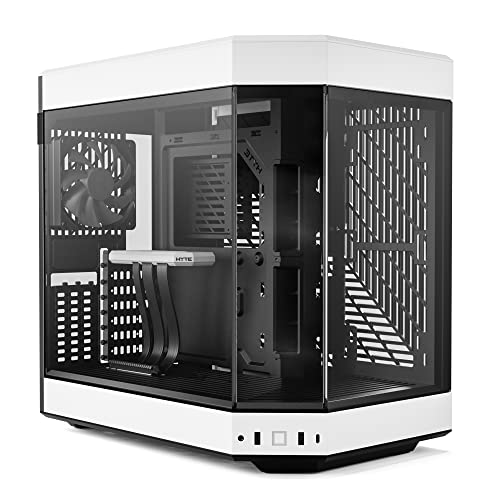
The HYTE Y60 in white is a panoramic dual-chamber case built for display. Its three-piece panoramic tempered glass design gives an uninterrupted view of the motherboard and graphics card, while the vertical graphics card mount places the card front and centre. A PCIe 4.0 riser cable is included, so the vertical mount works without a separate purchase. The dual-chamber layout hides the power supply and cables behind the tray, which keeps the main chamber clean and bright.
The Y60 supports ITX, micro-ATX, ATX, and E-ATX motherboards, with room for large graphics cards and radiators. Its white and black finish suits a build with white fans and a white cooler, and the glass panels make lighting and component choices visible from several angles. This is the pick for a builder who wants the graphics card on display, a clean dual-chamber layout, and a case that looks striking on a desk even when the system is idle.
Caveats: the white version of the Y60 pairs a white exterior with a black interior in some configurations, so check the exact colour layout before ordering to confirm it matches the planned build. The case is wide and heavy, so measure desk space, and the vertical graphics card mount needs care during installation to keep the card seated and the riser cable routed cleanly.
Montech AIR 903 Max White

The Montech AIR 903 Max in white is the value pick for a bright build with strong airflow. Its mesh front panel pulls in cool air, and four 140 mm fans come pre-installed, with three addressable RGB fans at the front and one plain fan at the rear. The tempered glass side panel shows off the interior, while the white chassis and white fan frames keep the look consistent. E-ATX motherboard support, room for long graphics cards, and support for large radiators make the case flexible for a gaming build.
Cable management is straightforward, with a PSU shroud and routing space behind the tray, and front input and output include USB Type-C. The mesh front and included fans mean the case cools well straight out of the box, without extra fan purchases. This is the pick for a builder who wants a white case that looks good, cools well, and arrives ready to build with fans already fitted.
Caveats: the mesh front prioritises airflow over a solid glass look, so builders who want a fully glass front should look at the panoramic picks. The included fans use addressable lighting, so check motherboard support for lighting control, and keep the mesh front clean so dust does not dull the white finish.
Comparison Table
| Product | Form Factor | Panels | Included Fans | Radiator Support | Standout Look |
|---|---|---|---|---|---|
| NZXT H7 Flow 2024 White | ATX mid-tower | Tempered glass side, mesh front | 3 x 120 mm front | Up to 420 mm front | Clean white, tidy interior |
| Lian Li O11 Dynamic EVO White | E-ATX mid-tower, dual chamber | Dual tempered glass, panoramic | Fans not included in all configurations | Multiple positions, front/top/side | Pillar-free glass corner |
| Fractal Design North Chalk White | ATX mid-tower | Tempered glass side, oak wood front | 2 x 140 mm Aspect PWM | Front and top | Warm oak wood front |
| HYTE Y60 White | ATX mid-tower, dual chamber | Three-piece panoramic glass | Fans not included in all configurations | Front, top, side | Vertical graphics card display |
| Montech AIR 903 Max White | E-ATX mid-tower | Tempered glass side, mesh front | 4 x 140 mm, 3 addressable RGB | Front and top | Bright mesh front, white fans |
Which One Is Right for You?
Choose the NZXT H7 Flow 2024 White if the goal is a clean, bright, and practical white build. It cools well, builds easily, and looks tidy without extra lighting or a panoramic layout. Choose the Lian Li O11 Dynamic EVO White if the build is a showpiece with custom cooling, white components, and a panoramic view. Its dual-chamber layout and flexible mounting suit a builder who enjoys shaping the layout.
Choose the Fractal Design North Chalk White if the case should look at home in a living room or a calm office. Its oak wood front and chalk white chassis give a warm, furniture-like character that no other case here matches. Choose the HYTE Y60 White if the graphics card should sit front and centre behind panoramic glass. Its vertical mount and included riser cable make the card the focus of the build.
Choose the Montech AIR 903 Max White if airflow and included fans matter most. It arrives with four large fans, a mesh front, and a bright white finish, so a gaming build stays cool and looks good without extra fan purchases. Whichever case is chosen, confirm motherboard size, graphics card length, cooler height, and radiator support before ordering, and plan the cable routing so the white interior stays clean.
Frequently Asked Questions
Do white PC cases show dust and marks more than black cases?
Yes, white cases show dust, fingerprints, and marks more readily than dark cases. The trade-off is a brighter interior that shows components and lighting better. Cases with dust filters, tool-free panels, and a smooth finish stay looking good with regular wiping and a quick clean of the filters.
Is a glass front panel worse for airflow than a mesh front panel?
A solid glass front usually restricts intake more than a mesh front, because air must enter from the sides or the bottom. A mesh front brings in more air directly. Panoramic glass cases compensate with side and bottom intakes, while mesh cases like the NZXT H7 Flow and Montech AIR 903 Max use the front panel itself for intake. Check the fan positions for the chosen case.
What size motherboard fits in these white cases?
All five cases in this guide support ATX motherboards. The Lian Li O11 Dynamic EVO and Montech AIR 903 Max also support E-ATX boards, while the HYTE Y60 supports ITX, micro-ATX, ATX, and E-ATX boards. Always confirm the exact motherboard size, graphics card length, and cooler height against the case specifications before ordering.
Should I choose white fans and cables for a white case?
White fans, cables, and coolers complete the look and keep the interior consistent through a glass panel. A white case with dark fans and dark cables can still look good, but the contrast draws the eye to the cables rather than the components. White cable extensions are a simple way to tidy the visible runs without replacing the power supply.
Disclosure: As an Amazon Associate, we may earn from qualifying purchases.
Related guides
More from Amazon
Programs that pair well with the guide above. Offers and eligibility are set by Amazon and may change.
A free business account with business pricing and bulk-buying tools for work, shop or home office.
Create a business accountFree shipping on eligible items, Prime Video and more. Eligible new members can start with a free trial.
Start a Prime free trialAudiobooks and podcasts to listen to on the go. Eligible new members can start with a free trial.
Try Audible freeAd-free music streaming. Eligible new subscribers can start with a free trial.
Try Music Unlimited freeAs an Amazon Associate we earn from qualifying purchases.