The best SSD for Fortnite in 2026 is a 1 TB PCIe 4.0 NVMe drive with a DRAM cache or a good controller design, such as the WD_BLACK SN850X, Samsung 990 EVO Plus or Crucial P310. Fortnite is limited more by capacity and loading behavior than by raw sequential speed, so a fast Gen4 drive is already at the point of diminishing returns. A SATA SSD like the Crucial MX500 is a fine upgrade over a hard drive, but pass on a PCIe 5.0 drive for this game alone.
Note on the search: “hero for SSDs” appears to be a garbled form of “best SSD for Fortnite”, so this guide answers that question.
As an Amazon Associate we earn from qualifying purchases at no extra cost to you.


Our Top Picks
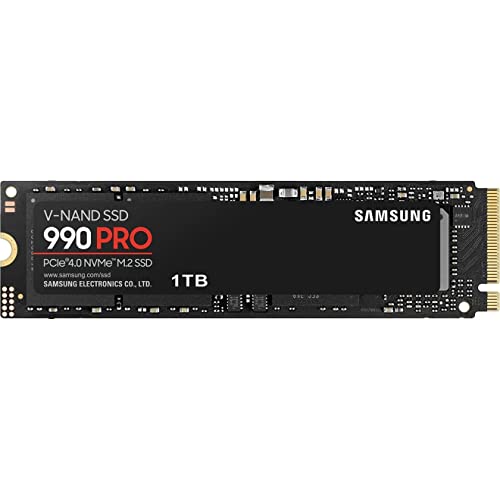


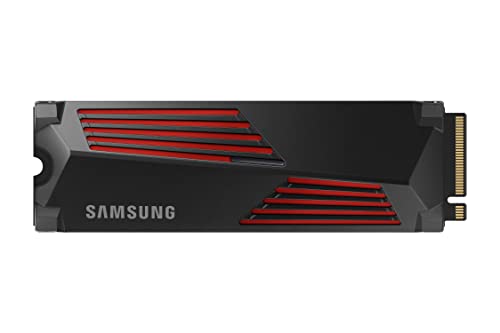
Top 3 picks at a glance
Quick comparison of the best SSDs for Fortnite
| Pick | Best for | Key specs (manufacturer-rated, up to) | Price tier |
|---|---|---|---|
| WD_BLACK SN850X (1–2 TB) | Best overall, PC and PS5 | PCIe 4.0 x4, ~7,300 MB/s read, ~6,600 MB/s write (1–2 TB), optional heatsink | Mid-range to premium |
| Samsung 990 EVO Plus (1–2 TB) | Best all-rounder with low heat | PCIe 4.0 x4 / 5.0 x2 interface, ~7,250 MB/s read, ~6,300 MB/s write | Mid-range |
| Crucial P310 (1–2 TB) | Best value NVMe | PCIe 4.0 x4, ~7,100 MB/s read, ~6,000 MB/s write, DRAM-less | Budget to mid-range |
| Samsung 990 Pro (1–2 TB) | Best premium / heavy multitasking | PCIe 4.0 x4, ~7,450 MB/s read, ~6,900 MB/s write, DRAM cache | Premium |
| Crucial MX500 (500 GB–2 TB) | Best SATA upgrade for older PCs | SATA III, ~560 MB/s read, ~510 MB/s write, 2.5-inch | Budget |
Speeds above come from the manufacturers’ spec sheets and vary by capacity. Real game loading will not scale with these headline numbers, as explained below.
What Fortnite actually needs from an SSD
Fortnite streams a large number of small and medium assets (textures, meshes, audio) while you drop in and move across the map. That workload depends on random read latency and queue handling more than on peak sequential throughput. Epic’s published system requirements list an SSD (NVMe for the recommended tier), and it is the shift from a hard drive to any SSD that makes the largest difference, mainly in lobby-to-match load times and in reducing pop-in and hitching from slow asset streaming.
The step from SATA to NVMe is much smaller in practice. Published load-time comparisons across games typically show NVMe saving a few seconds over SATA, and the gap shrinks further between a Gen4 and a Gen5 drive. Frame rates are driven by your GPU and CPU, not the drive, though a hard drive can cause stutter when assets arrive late.
Best overall: WD_BLACK SN850X
The SN850X is a long-running Gen4 benchmark with a strong controller, consistently high random performance and sustained write behavior that holds up during big game updates. It suits anyone building or upgrading a gaming PC who wants one drive to last through several hardware generations. It is also a common choice for PS5 storage expansion when you buy the heatsink version. The trade-off is price: it usually costs more than value Gen4 drives that feel the same in Fortnite.
Best all-rounder: Samsung 990 EVO Plus
This drive pairs Gen4 speeds with comparatively modest heat, which suits compact cases and laptops with a single M.2 slot. It is a sensible default for a 1 TB or 2 TB Fortnite machine. The trade-off is that it sits below the 990 Pro in sustained heavy-write and mixed workloads, which rarely matter for gaming alone.
Best value: Crucial P310
The P310 delivers Gen4 read speeds at a budget-to-mid price. It uses a DRAM-less design relying on host memory buffer, which is fine for loading games. The trade-off is weaker sustained writes once its cache fills, so it can slow down when you copy a large library or install several big updates at once. For a Fortnite-first PC with a few other games, this is hard to beat on cost per terabyte.
Best premium: Samsung 990 Pro
Choose the 990 Pro if the same drive also handles video editing, game capture or a large Steam and Epic library. Its DRAM cache and strong sustained performance justify the price for mixed use. For Fortnite alone, you are paying for headroom you will rarely use.
Best budget SATA: Crucial MX500
If your motherboard has no free M.2 slot, or you are upgrading an older desktop from a hard drive, a 2.5-inch SATA SSD removes most of the HDD-related loading pain. A 1 TB MX500 is dependable and widely compatible. The trade-off is that SATA caps at around 550 MB/s and you give up the NVMe upgrade path, so it is only the right pick when the platform leaves you no alternative.
Worked example: how much capacity do you need?
Capacity is the criterion people most often get wrong. Fortnite’s install size depends on which modes and optional content you select in the Epic Games Launcher and grows with patches, so check the figure in the launcher before buying. Here is a realistic budget using a round 110 GB for Fortnite:
| Item | 500 GB drive | 1 TB drive | 2 TB drive |
|---|---|---|---|
| Usable space (decimal TB to Windows GiB, approx.) | ~465 GB | ~931 GB | ~1,862 GB |
| Keep 20% free for performance and wear | ~372 GB | ~745 GB | ~1,490 GB |
| Windows, drivers and apps (~120 GB) | ~252 GB left | ~625 GB left | ~1,370 GB left |
| Fortnite (~110 GB) plus patch scratch (~25 GB) | ~117 GB left | ~490 GB left | ~1,235 GB left |
| Other 80–150 GB titles that fit | About 1 | About 4 | About 10 |
A 500 GB drive technically holds Fortnite but leaves little for anything else, and large updates can briefly need extra space. For this reason, 1 TB is the sensible minimum for most players, and 2 TB makes sense if you keep several modern AAA games installed.
Decision matrix: match your setup to a drive
| Your situation | Choose | Why |
|---|---|---|
| Modern desktop, Fortnite plus a few games | 1 TB Gen4 NVMe (P310 or 990 EVO Plus) | Fast enough, cheap per GB, low heat |
| Large library, capture or editing | 2 TB SN850X or 990 Pro | Sustained writes and capacity |
| Older PC, no M.2 slot | 1 TB SATA SSD (MX500) | Plugs into SATA, big gain over an HDD |
| PS5 storage expansion | Gen4 NVMe with heatsink, 5,500 MB/s or faster read per Sony’s requirements | Meets console spec; check slot clearance |
| Laptop with one M.2 2280 slot | 990 EVO Plus or similar low-heat Gen4 | Limits thermal throttling in tight chassis |
| Xbox Series X|S | Official Seagate/WD expansion card, or external USB SSD for storage only | Optimized titles need the proprietary card for internal-speed play |
How to choose: the criteria that matter
- Capacity first: Buy 1 TB minimum. Free space below roughly 10–20% can reduce sustained write speed on many drives.
- Interface: PCIe 4.0 x4 is the sweet spot. PCIe 5.0 drives cost more, run hotter and show little gain in Fortnite load times.
- Flash type: TLC is preferred. Avoid QLC drives for your main game drive unless the price gap is large, because they slow badly once the cache is exhausted.
- DRAM cache: Helpful but not essential for a games-only drive; matters more if the same drive is your OS and work disk.
- Endurance and warranty: Look for a 5-year warranty and a stated TBW. Gaming writes are light, so a 1 TB drive rated for several hundred TBW will outlast the rest of the system.
- Thermals: Use the motherboard’s M.2 heatsink. Throttling usually begins around 80 °C and sustained game installs can push bare drives close to it.
Setup tips to get the most from the drive
- Install Fortnite on the NVMe drive itself, not on a secondary HDD, and keep the drive on the CPU-connected M.2 slot where possible.
- Update your motherboard chipset drivers and SSD firmware so the drive negotiates the correct link speed.
- Allow the shader precompile step to finish after updates; it reduces in-match hitching more than the drive does.
- Leave at least 20% of the drive free so updates and shader caches do not run into space limits.
Frequently Asked Questions
Is an SSD necessary for Fortnite?
Epic’s system requirements recommend an SSD, and the experience is noticeably better than on a hard drive, with faster loading and less asset pop-in. The game can technically run from an HDD, but long load times and streaming stutter are common. Any SSD is a bigger upgrade than the choice between SSD models.
Does an NVMe SSD give more FPS in Fortnite than a SATA SSD?
No, not in any meaningful way. Frame rate is determined by your GPU, CPU and settings. NVMe may shave a few seconds off loading compared with SATA, and the difference shows up only in load times and occasional streaming hitches.
How big an SSD do I need for Fortnite?
1 TB is the practical minimum for most players. After Windows, a Fortnite install of roughly 100 GB or more and update headroom, a 500 GB drive fills up quickly. Choose 2 TB if you install other large games.
Is a PCIe 5.0 SSD worth it for Fortnite?
Not for this game. Gen5 drives post much higher sequential numbers, but Fortnite loads depend on latency and CPU decompression, so the gains are tiny. The extra cost and heat are better spent on a larger Gen4 drive or a better GPU.
Can I use an external SSD for Fortnite?
On PC, a fast USB 3.2 Gen 2 external SSD works and is much better than an HDD, though it will usually load slower than an internal NVMe. On consoles, external drives generally store games but may not run optimized titles, so check the platform rules first.
Will a DRAM-less SSD like the Crucial P310 hurt Fortnite performance?
Not noticeably. Games read data far more than they write it, and modern DRAM-less drives use host memory buffer to keep random reads fast. The weakness shows up in long, heavy write sessions, which are rare for gaming.
Related guides
More from Amazon
Programs that pair well with the guide above. Offers and eligibility are set by Amazon and may change.
A free business account with business pricing and bulk-buying tools for work, shop or home office.
Create a business accountFree shipping on eligible items, Prime Video and more. Eligible new members can start with a free trial.
Start a Prime free trialAudiobooks and podcasts to listen to on the go. Eligible new members can start with a free trial.
Try Audible freeAd-free music streaming. Eligible new subscribers can start with a free trial.
Try Music Unlimited freeAs an Amazon Associate we earn from qualifying purchases.


