For most gaming PCs in 2026, the best choice is a 2TB PCIe 4.0 NVMe SSD such as the Samsung 990 Pro or WD_BLACK SN850X as the main drive, plus a 4TB+ mechanical hard drive only if you need cheap bulk storage for old games and media. A hard drive is no longer a sensible place to install a game you are actively playing. This guide shows which drive type fits your situation, how much capacity you need, and which specific models are worth shortlisting.
As an Amazon Associate we earn from qualifying purchases at no extra cost to you.



Our Top Picks



Top 3 picks at a glance
Quick comparison of the best picks
| Pick | Best for | Key specs (manufacturer-rated, up to) | Price range |
|---|---|---|---|
| Samsung 990 Pro | Best overall NVMe SSD | PCIe 4.0 x4, about 7,450 MB/s read, 6,900 MB/s write, 1-4TB | Mid-range to premium |
| WD_BLACK SN850X | Best for gaming performance per cost | PCIe 4.0 x4, about 7,300 MB/s read, 6,600 MB/s write, 1-8TB, optional heatsink | Mid-range |
| Crucial P310 | Best budget NVMe | PCIe 4.0 x4, about 7,100 MB/s read (2TB), 500GB-4TB | Budget to mid-range |
| Samsung 990 EVO Plus | Best low-heat all-rounder | PCIe 4.0 x4 / 5.0 x2, about 7,250 MB/s read, 1-4TB | Budget to mid-range |
| Crucial T705 | Best PCIe 5.0 for enthusiasts | PCIe 5.0 x4, about 14,500 MB/s read, needs a heatsink | Premium |
| Crucial MX500 | Best SATA SSD (old PCs, laptops) | 2.5-inch SATA III, about 560 MB/s read, 510 MB/s write | Budget to mid-range |
| Seagate BarraCuda (3.5-inch) | Best bulk hard drive | 7,200 RPM class, SATA III, roughly 180-250 MB/s sustained | Budget per terabyte |
First, decide: SSD, hard drive, or both?
“Hard drives” and “SSDs” are different tools, and the search for the best of both usually comes down to one question: what will live on the drive? Use this matrix to map your situation to a choice.
| Your situation | Boot / games drive | Secondary drive |
|---|---|---|
| Modern desktop with a free M.2 slot | 1-2TB PCIe 4.0 NVMe | Optional SATA SSD or HDD |
| Library over 2TB, tight budget | 1TB NVMe for current games | 4TB+ 3.5-inch HDD for backups and older titles |
| Older PC with only SATA ports | SATA SSD (MX500 class) | HDD if needed |
| Gaming laptop with one M.2 slot | 2TB NVMe (check the single-sided or heatsink fit) | External SSD |
| Video editing plus gaming | 2TB PCIe 4.0 NVMe | Second 2-4TB NVMe for projects |
| PS5 storage expansion | PCIe 4.0 NVMe rated at 5,500 MB/s or faster, with heatsink | Not applicable |
Best overall: Samsung 990 Pro
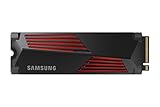
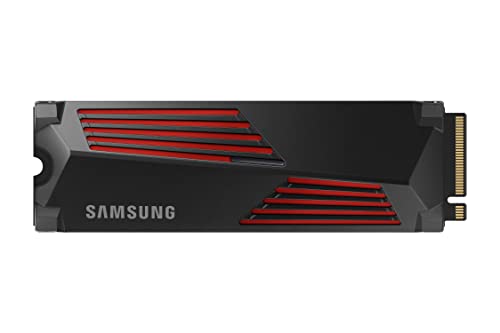
The Samsung 990 Pro is the safe pick for a main gaming drive. It is rated at up to 7,450 MB/s sequential reads on PCIe 4.0, has strong sustained write behaviour and efficient power use, and is sold in capacities up to 4TB. Samsung also sells a heatsink version for desktop and PS5 use.
Trade-off: It costs more than budget PCIe 4.0 drives that feel nearly identical in games. If you only load games and browse, you are paying for headroom you rarely use.
Best for performance per cost: WD_BLACK SN850X
The SN850X is a long-running gaming favourite, rated by Western Digital at up to roughly 7,300 MB/s reads, and it comes in 1TB, 2TB, 4TB and 8TB versions. It suits builders who want top PCIe 4.0 speed and are happy to pick up a heatsink version for a PS5 or a cramped board.
Trade-off: It can run warmer under long writes than the 990 EVO Plus, so make sure your motherboard heatsink makes contact with the drive.
Best budget: Crucial P310
The Crucial P310 is a DRAM-less PCIe 4.0 drive that still reaches around 7,100 MB/s on the larger models, per Crucial’s spec sheet. For game loading, where reads are small and random rather than long sequential bursts, it feels close to the premium drives.
Trade-off: Without DRAM and with a smaller write cache, sustained writes drop sharply once the cache fills. That matters if you copy hundreds of gigabytes at a time or edit video from it.
Best low-heat all-rounder: Samsung 990 EVO Plus
This drive is rated at up to about 7,250 MB/s reads and is efficient, which helps in compact PCs and laptops that throttle early. It is a strong choice if you want one drive for Windows, games and everyday work without fuss.
Trade-off: It does not match the 990 Pro on sustained heavy workloads, and it is also DRAM-less, so heavy video work belongs on a faster drive.
Best PCIe 5.0 option: Crucial T705
The Crucial T705 reaches up to about 14,500 MB/s reads on a PCIe 5.0 x4 slot. It is for people with a compatible CPU-attached M.2 slot, large video or data projects, or who simply want the fastest drive available.
Trade-off: It runs hot and needs real cooling, and for games the practical gain over a good PCIe 4.0 drive is small. DirectStorage titles are still few, and most games are limited by the CPU and decompression, not raw drive speed.
Best SATA SSD: Crucial MX500
If your PC lacks an M.2 slot, the MX500 turns a slow, hard-drive-based system into a responsive one. At about 560 MB/s it is capped by the SATA III interface, yet it is many times snappier than a hard drive for random access, and that is what you feel in Windows and game launchers.
Trade-off: Do not buy it for a new build with M.2 slots, because NVMe drives often cost about the same.
Best bulk hard drive: Seagate BarraCuda
For storing a large library of games you rarely play, plus screen recordings, backups and media, a 3.5-inch 7,200 RPM hard drive such as the Seagate BarraCuda gives the most terabytes per unit of budget. Choose a size of 4TB or more to make the mechanical drive worthwhile.
Trade-off: Sustained speeds of roughly 180-250 MB/s and slow random access mean long installs and stutter in open-world games. Avoid SMR (shingled) models for heavy write use if the spec sheet lists the recording type.
How to choose: the numbers that matter
1. Capacity: do the maths
A drive’s labelled capacity is in decimal units, so a “1TB” drive shows about 931 GiB in Windows. Subtract Windows plus apps (about 100-150 GB), and keep 10-20% free so the SSD can maintain write speed.
- 1TB drive: 931 GiB minus 150 GB for system and apps leaves about 780 GB. Keep 15% free (about 140 GB) and you have around 640 GB for games.
- With large modern titles at 80-150 GB each, that is roughly 5-8 games installed at once.
- A 2TB drive leaves about 1.5 TB for games, which is roughly 12-18 large games, so it is the practical minimum for most players.
2. Install and copy time
Moving a 150 GB game between drives shows why the type matters. The time is size divided by sustained speed:
- Hard drive at 200 MB/s: 150,000 MB / 200 = 750 seconds, about 12.5 minutes.
- SATA SSD at 500 MB/s: 300 seconds, about 5 minutes.
- NVMe SSD sustaining 2,000 MB/s after its cache fills: 75 seconds.
The point: the headline 7,000 MB/s figure rarely applies to long copies, so a drive’s sustained write speed and DRAM matter more than the label if you move big files.
3. Interface and slot compatibility
- Check your motherboard manual: an M.2 slot can be PCIe or SATA-only, and some slots share bandwidth with SATA ports.
- PCIe 4.0 drives work in PCIe 3.0 slots but are limited to around 3,500 MB/s, which is still plenty for games.
- Laptops often need a single-sided 2280 drive. Check the clearance before buying a heatsink model.
4. Cooling and endurance
Use the motherboard’s M.2 heatsink on PCIe 4.0 drives, and always cool PCIe 5.0. Compare the rated endurance (TBW) on the spec sheet: for gaming, even a 600 TBW 1TB drive would take decades to wear out at a typical 20-50 GB written per day.
Common buying mistakes
- Paying for PCIe 5.0 speeds for a games-only PC when a PCIe 4.0 drive performs almost the same in real titles.
- Choosing a 500GB drive, which fills after a handful of games.
- Installing your actively played games on a hard drive to save money, then blaming the GPU for stutter.
- Ignoring the drive type on unnamed budget SSDs. Stick to makers that publish full specs and a clear warranty.
Frequently Asked Questions
Is an SSD better than a hard drive for gaming?
Yes. An SSD loads games, levels and Windows far faster, and it avoids the texture pop-in and hitching that a hard drive can cause in open-world titles. A hard drive is only a good fit for storing games you are not currently playing.
Do I need an NVMe SSD, or is a SATA SSD enough?
A SATA SSD is enough for a smooth gaming experience if your PC lacks an M.2 slot. NVMe is faster on paper and usually costs about the same, so choose it for any new build. In most games the real-world loading difference between SATA and NVMe is small.
How much SSD storage do I need for gaming in 2026?
Aim for 2TB if you can. Modern AAA games often take 80-150 GB each, and a 1TB drive leaves room for only five to eight of them after Windows and free space. If budget is tight, buy a 1TB NVMe and add a hard drive for archives.
Is PCIe 5.0 worth it for gaming?
Usually not. PCIe 5.0 drives like the Crucial T705 are very fast in file transfers, but games are limited by CPU, decompression and the engine, so the gain over a good PCIe 4.0 drive is small. They also run hot and cost more.
Can I use a hard drive and an SSD together?
Yes, and it is a popular setup. Put Windows and your current games on the SSD, and use the hard drive for media, backups and older games. Windows treats them as separate drives, so you simply choose the install location in your game launcher.
Will an SSD last long enough?
For gaming, almost certainly. Manufacturers rate consumer SSDs at several hundred terabytes written for 1TB models, which is far above what a typical gamer writes in many years. Keep some free space and a backup of important files, as with any drive.
Related guides
More from Amazon
Programs that pair well with the guide above. Offers and eligibility are set by Amazon and may change.
A free business account with business pricing and bulk-buying tools for work, shop or home office.
Create a business accountFree shipping on eligible items, Prime Video and more. Eligible new members can start with a free trial.
Start a Prime free trialAudiobooks and podcasts to listen to on the go. Eligible new members can start with a free trial.
Try Audible freeAd-free music streaming. Eligible new subscribers can start with a free trial.
Try Music Unlimited freeAs an Amazon Associate we earn from qualifying purchases.


