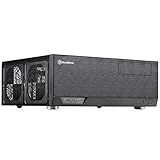
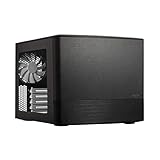
The best horizontal PC case for most people is the SilverStone Grandia GD09, a full-size desktop-style ATX case that fits an AV rack or desk. If you need a small box for a shelf or TV stand, the Fractal Design Node 202 is the usual pick, and the Lian Li DK-04 suits a showpiece desk build. The right choice depends on three limits: motherboard size, how much GPU you need to fit, and how much clearance the cabinet gives you.
As an Amazon Associate we earn from qualifying purchases at no extra cost to you.

Top 3 picks at a glance
Quick comparison of horizontal case picks
| Pick | Best for | Key specs (check the maker’s spec sheet) | Price range |
|---|---|---|---|
| SilverStone Grandia GD09 | Best overall: ATX HTPC or AV-rack build | Desktop/HTPC layout, ATX support, full-height expansion slots, front 5.25-inch bays | Mid-range |
| Fractal Design Node 202 | Best compact: shelf or TV stand | About 10 liters, mini-ITX, SFX-class PSU, 2-slot GPU, low-profile cooler space | Mid-range |
| SilverStone Grandia GD11 | Best for storage: media server or NAS-style build | HTPC-style ATX case with a large hot-swap-style drive bay array | Mid-range to premium |
| Lian Li DK-04 | Best for a desk-integrated showpiece | Desk-style chassis, large board support, built-in lift mechanism | Premium |
| Streacom DB4 | Best for a minimalist flat design | Low horizontal profile, ITX-class, aluminium and glass construction | Premium |
| Generic 4U rackmount (spec class) | Best cheap option for a rack | ATX support, 4U height (about 177 mm), room for tower-style coolers up to roughly 150 mm | Budget to mid-range |
Models and revisions change, so confirm the current version’s GPU length, cooler height and PSU type against the manufacturer’s spec sheet before buying.
Best overall: SilverStone Grandia GD09
The Grandia line is the long-standing answer for a horizontal ATX build. It has the flat, AV-component look, takes a standard ATX board and standard ATX power supply, and leaves enough height for a real graphics card. It suits someone who wants a gaming PC under a TV or in a media cabinet without moving to a tiny form factor.
Trade-off: it is large and deep, and airflow depends on the fans you add and how much space the cabinet leaves. A horizontal case also gives a tall tower cooler less vertical room than a mid-tower, so check cooler height before you buy.
Best compact: Fractal Design Node 202
The Node 202 is the standard small horizontal case. It is built for mini-ITX, an SFX-class PSU and a two-slot graphics card, and it fits in a shelf slot or under a monitor. Choose it if floor or shelf space is the main limit and you are willing to plan the part list around the case.
Trade-off: compatibility is tight. You are limited to a thin low-profile CPU cooler, a short two-slot GPU and an SFX power supply. High-wattage GPUs can get loud in such a small volume.
Best for storage: SilverStone Grandia GD11
The GD11 keeps the desktop-style layout but puts more weight on drive capacity. It is the pick if the PC also acts as a media server, game library host or backup box. A large array of drive bays means you can add bulk storage without an external enclosure.
Trade-off: drive bays take up internal room, so cable routing and airflow need more planning than in a case built mainly for a GPU.
Best for a desk showpiece: Lian Li DK-04
The DK-04 is a desk-style case, the kind you build into a work surface and show through glass. It is for people who want the build visible and are willing to treat the case as furniture.
Trade-off: it costs more than any conventional horizontal case and uses more desk space and planning. It is not meant for a cabinet or shelf.
Best for a minimalist flat look: Streacom DB4
The DB4 is a low, flat, design-led case aimed at a clean desk or lounge setup. It suits an ITX-based build where appearance matters as much as performance.
Trade-off: it is niche and priced as a premium piece. Check GPU and cooler limits carefully, because flat designs restrict hardware. Streacom also makes fanless horizontal cases, but those need compatible low-power parts.
Budget route: a 4U rackmount case
A generic 4U rackmount case is the cheapest way to get a horizontal ATX layout. A 4U chassis is about 177 mm tall, enough for a full-height GPU and many mid-size tower coolers. It suits a rack, a workshop shelf or a server-style game host.
Trade-off: most rack cases are built for server fans, which are loud. Plan on replacing them with quieter fans, and check GPU length and front-to-back depth.
How to choose: a decision matrix
| Your situation | Choose | Why |
|---|---|---|
| Full-size GPU, ATX board, AV rack or desk | Grandia GD09 | Standard parts, room for a tall card |
| Shelf or TV stand, mini-ITX | Node 202 | Smallest practical footprint, with part limits |
| Media server with many drives | Grandia GD11 | Storage-focused layout |
| Visible build built into a desk | Lian Li DK-04 | Desk-style design |
| Rack or workshop, tight budget | 4U rackmount | Lowest cost for ATX horizontal |
| Silent, low-power HTPC | Fanless Streacom-style case | Passive cooling, but only with low-TDP parts |
Check the height budget first
Horizontal cases limit CPU cooler height far more than tower cases do. Compare the cooler’s listed height with the case’s CPU cooler clearance, and leave a few millimeters of margin for the lid and any cables. Case-and-cooler pairs that look fine on paper can fail by a few millimeters, so use the manufacturer’s stated clearance, not an estimate.
Worked example: cabinet airflow budget
A common mistake is putting a gaming PC in a closed media cabinet. A PC drawing 350 W under gaming load puts out about 350 W of heat (roughly 1,190 BTU per hour). A standard airflow rule of thumb is CFM = 3.16 × watts ÷ temperature rise in °F. The airflow you need to keep the cabinet air from rising too far above room temperature looks like this:
| System heat load | Allowed air rise | Airflow needed |
|---|---|---|
| 350 W | 10 °C (18 °F) | about 61 CFM |
| 350 W | 5 °C (9 °F) | about 123 CFM |
| 150 W (light-load HTPC) | 10 °C (18 °F) | about 26 CFM |
| 500 W (high-end gaming) | 10 °C (18 °F) | about 88 CFM |
The result: a gaming-class PC in a cabinet needs open venting and good air exchange, not just case fans. If the cabinet cannot move that air, choose a low-power build, such as an efficient GPU, or leave the door open or vented.
Plan the airflow direction
- Flat board, GPU facing up or down: in most horizontal cases the GPU fans face the lid or the floor of the case, so ventilation above and below the card matters. Leave a gap between the card and any lid.
- Intake at the front, exhaust at the back: this works best in a cabinet or rack, because the front face is usually the one with open air.
- Hot air rises: do not stack other equipment directly on the case’s vents. Most horizontal cases vent through the top.
Other checks before buying
- PSU type: ATX, SFX or SFX-L. Small cases accept only one or two of these.
- GPU length and thickness: measure the limit in millimeters and slots. A 3-slot card will not fit a 2-slot-only case.
- Storage: count the 3.5-inch and 2.5-inch bays you need, and M.2 slots on the board.
- Noise: small cases force high fan speeds. Pick cooling hardware rated for the case, not the biggest GPU you can afford.
- Remote or IR support: HTPC cases sometimes include front displays or IR receivers. They matter only if you use a remote.
Frequently Asked Questions
Are horizontal PC cases worse for cooling than towers?
They can be, mainly because there is less vertical space and fewer fan mounts. A well-designed horizontal case with good intake and exhaust can run as cool as a compact tower. The problem usually comes from low-profile coolers or a closed cabinet.
Can I lay a regular tower case on its side?
Some cases work on their side, but many are not designed for it. Feet, ventilation and drive trays may not suit a flat position, and the side panel may end up on the bottom. A case made for horizontal use handles airflow and support properly.
Can a horizontal case fit a high-end graphics card?
Yes, in larger ATX desktop cases and 4U rackmount cases that have full-height slots. In compact cases like the Node 202, you are limited to a short, two-slot card. Always compare the card’s length and thickness with the case’s listed limits.
Is a horizontal case good for a living room gaming PC?
Yes, if the cabinet allows airflow. The flat shape matches AV equipment and fits a TV stand. For a gaming-class system, keep the cabinet vented and watch temperatures, as the airflow table above shows.
Which is better for a quiet build: horizontal or vertical?
Neither format is automatically quieter. Noise depends on fan size, heat load and case design. Larger horizontal cases with 120 mm fans and efficient parts can be quiet, while compact cases usually need faster fans.
Do horizontal cases cost more?
Specialty horizontal cases are usually priced mid-range to premium because they are made in smaller volumes. A rackmount case is the cheapest way in. Design-led models such as the Lian Li DK-04 and Streacom DB4 sit at the premium end.
Related guides
More from Amazon
Programs that pair well with the guide above. Offers and eligibility are set by Amazon and may change.
A free business account with business pricing and bulk-buying tools for work, shop or home office.
Create a business accountFree shipping on eligible items, Prime Video and more. Eligible new members can start with a free trial.
Start a Prime free trialAudiobooks and podcasts to listen to on the go. Eligible new members can start with a free trial.
Try Audible freeAd-free music streaming. Eligible new subscribers can start with a free trial.
Try Music Unlimited freeAs an Amazon Associate we earn from qualifying purchases.


