A first gaming monitor should be a 24-inch 1080p IPS screen with a refresh rate of 144Hz or higher, because that combination stays sharp at a normal desk distance, keeps colors consistent from any angle, and runs well on an entry-level graphics card. A 165Hz or 180Hz panel is the sweet spot for beginners: motion looks far smoother than a 60Hz office screen, and you do not need a high-end GPU to reach those frame rates at 1080p. Start with this spec sheet, and spend the rest of your budget on the graphics card.
This roundup is aimed at first-time PC builders, players moving from console to desktop, and anyone replacing a tired office display. Every pick below is a monitor sold on Amazon with a real model number and a listing you can check, and each one is a flat 1080p screen between 24 and 27 inches, so nothing here asks you to learn curved panels or ultrawide layouts on day one.
Top 3 picks at a glance

Quick Picks
As an Amazon Associate we earn from qualifying purchases
| Product | Best for | Key spec from title |
|---|---|---|
| ASUS TUF Gaming VG249Q1A | First-time builders who want one safe choice | 23.8-inch Full HD IPS, 165Hz |
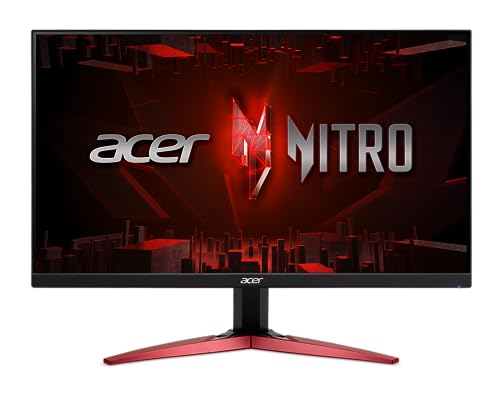
| Acer Nitro KG241Y M3biip | Competitive beginners who want the fastest refresh | 23.8-inch Full HD IPS, 180Hz |
| KOORUI 24E3 | Small desks and mixed gaming-plus-study setups | 24-inch Fast IPS, 165Hz |
| ASUS TUF Gaming VG279Q1A | Players who want the biggest screen here | 27-inch Full HD IPS, 165Hz |
| Acer Nitro KG241Y Sbiip | Dark-room gaming with deeper blacks | 23.8-inch Full HD VA, 165Hz |
How to Choose
Start with 1080p at 24 inches
Resolution decides how hard your graphics card works, and 1080p is the kindest starting point. A 24-inch screen at 1920 x 1080 keeps text crisp at arm’s length, and an entry-level card can push high frame rates without turning settings down. Jumping to 1440p sounds tempting, but it asks for a much stronger GPU to hold the same smoothness, and a first build rarely has that headroom. A 27-inch 1080p screen is the largest size that still looks sharp at this resolution; beyond that, individual pixels start to show. Match the monitor to the card you own today, not the one you hope to buy later.
Pick an IPS panel first, VA second
Panel type shapes color and viewing angles more than any other spec on the box. IPS panels hold their colors when you lean back, shift in your chair, or watch a video with a friend sitting beside you, which is why four of the five monitors below use IPS. VA panels trade some of that angle stability for deeper blacks, so dark game scenes look richer, though colors can shift at the edges when viewed off-center. TN panels sit at the cheapest end of the market, but their washed-out colors make them a poor start for PC gaming. For a first screen, IPS is the safe default, and VA is the pick if you mostly play in a dark room.
Treat 144Hz as the floor, not the ceiling
Refresh rate is the number of frames your screen can show each second, and the jump from 60Hz to 144Hz is the single biggest upgrade a beginner will notice. Mouse movement feels direct, scrolling turns smooth, and fast games stop smearing. The monitors below run from 144Hz to 180Hz, and anything in that band is plenty for a first setup; chasing 240Hz or higher only pays off with a strong GPU and competitive shooters. Just as important is adaptive sync, listed as FreeSync Premium or Adaptive Sync on these models, which matches the screen to the card’s output and stops tearing. Check that your graphics card supports the sync standard on the listing before you buy.
Check the ports and the stand before checkout
A monitor is only as good as its connection to your PC. DisplayPort is the port that unlocks the full refresh rate on most of these models, while HDMI can cap some panels below their headline speed, so confirm which cable is in the box and which port your graphics card has free. Two HDMI ports are handy if a console shares the desk. The stand matters more than beginners expect: every monitor below tilts, but only some swivel or adjust in height, and a fixed low stand can leave you stacking books under the screen. A VESA mount pattern lets you swap in an arm later, so treat it as cheap insurance for your desk setup.
The 5 Best Options
ASUS TUF Gaming VG249Q1A

The VG249Q1A is the most complete starter monitor in this roundup, and the one to buy if you want a single safe choice. Its 23.8-inch IPS panel runs at 165Hz in overclocked mode, with FreeSync Premium keeping frames tear-free on both AMD and NVIDIA cards, and the built-in speaker covers casual videos and voice chat without extra desk clutter. Extreme Low Motion Blur sharpens fast movement, and the Shadow Boost setting lifts detail out of dark corners in shooters. The stand tilts only, so plan on a monitor arm if you need height adjustment.
Specs
- 23.8-inch Full HD (1920 x 1080) IPS panel
- 165Hz refresh rate (overclocked; supports 144Hz)
- 1ms response time with Extreme Low Motion Blur
- AMD FreeSync Premium and Shadow Boost
- Built-in speaker
- DisplayPort and HDMI inputs, VESA mountable
Best for: First-time builders who want one dependable 24-inch screen for gaming and everyday use.
Watch out for: The 165Hz mode is an overclock above the standard 144Hz range, so confirm your graphics card and cable support it.
Acer Nitro KG241Y M3biip
The M3biip is the fastest screen in this group, and the pick for beginners who play competitive shooters. Its 180Hz refresh rate and 0.5ms response mode give fast games a noticeably sharper feel than the 144Hz panels nearby, while the IPS panel keeps colors accurate across wide viewing angles. HDR10 support adds a little extra range to bright scenes, and the two HDMI ports plus DisplayPort leave room for a console beside the PC. The tilt-only stand is the main compromise, and the model name is easy to confuse with the VA version of the same monitor, so check the M3biip suffix on the listing.
Specs
- 23.8-inch Full HD (1920 x 1080) IPS panel
- 180Hz refresh rate
- Up to 0.5ms response time
- AMD FreeSync Premium and HDR10 support
- Wide sRGB color coverage
- 1 x DisplayPort 1.2 and 2 x HDMI 2.0
Best for: Competitive beginners who want the highest refresh rate in this roundup.
Watch out for: Acer sells several KG241Y variants with different panels; confirm the listing says M3biip and IPS before buying.
KOORUI 24E3
The 24E3 is the pick for a small desk or a first setup that also handles schoolwork and streaming. Its slim frame and narrow bezels keep a 24-inch screen from dominating a compact workspace, and the five-way joystick on the back makes the on-screen menu far easier to use than the button rows on many budget monitors. The Fast IPS panel runs at 165Hz with Adaptive Sync, and a built-in crosshair and timer help in shooters without extra software. The stand tilts only, and the brand is newer than ASUS or Acer, so check the warranty terms on the listing.
Specs
- 24-inch Full HD (1920 x 1080) Fast IPS panel
- 165Hz refresh rate and 1ms response time
- Adaptive Sync
- Wide sRGB color gamut
- Ultra-slim frame, VESA mountable
- HDMI and DisplayPort inputs
Best for: Small desks and mixed gaming-plus-study setups.
Watch out for: The VESA mount pattern differs from the common 100 x 100 size, so check arm compatibility before buying a mount.
ASUS TUF Gaming VG279Q1A

The VG279Q1A is the same formula as its 24-inch sibling, stretched to 27 inches for players who want a bigger picture. The extra screen size suits story-driven games, racing titles, and split-screen multitasking, and the IPS panel holds its colors at the wider angles a big screen invites. It runs at 165Hz over DisplayPort with FreeSync Premium and Extreme Low Motion Blur, and the stand adds swivel to the usual tilt, which is rare at this size. At 1080p the pixels are larger than on a 24-inch screen, so sit a little further back to keep text looking sharp.
Specs
- 27-inch Full HD (1920 x 1080) IPS panel
- 165Hz refresh rate (supports 144Hz)
- 1ms (MPRT) response time with Extreme Low Motion Blur
- Adaptive-sync and FreeSync Premium
- DisplayPort 1.2 and 2 x HDMI 1.4
- Eye Care technology
Best for: Players who want the biggest screen in this roundup for story games and media.
Watch out for: HDMI tops out at 144Hz on this model, so use DisplayPort for the full 165Hz.
Acer Nitro KG241Y Sbiip
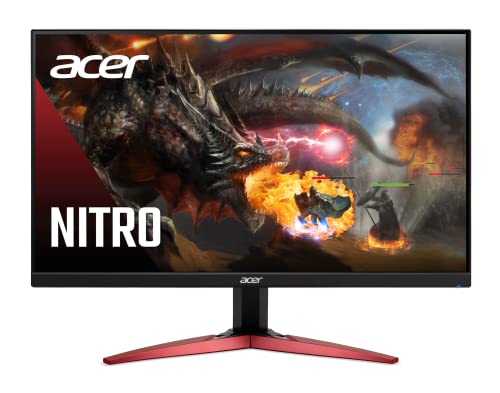
The Sbiip is the VA alternative in this roundup, and the pick for night-time players. Its VA panel delivers deeper blacks than any IPS screen here, so horror games and dark movie scenes gain real depth, and the 165Hz refresh rate with FreeSync Premium keeps motion just as smooth. The ZeroFrame design keeps bezels thin for a clean look, and the port layout matches its IPS sibling with DisplayPort and two HDMI inputs. Colors shift a little at wide angles, so this is a screen for one person sitting straight in front of it, not for sharing a couch.
Specs
- 23.8-inch Full HD (1920 x 1080) VA panel
- 165Hz refresh rate
- 1ms (VRB) response time
- AMD FreeSync Premium technology
- ZeroFrame design
- 1 x DisplayPort 1.2 and 2 x HDMI 2.0
Best for: Dark-room gaming where deep blacks matter more than wide viewing angles.
Watch out for: Acer sells IPS and VA versions under the KG241Y name; confirm the listing says Sbiip and VA before buying.
Which One Fits Your Situation
Your graphics card is entry-level
Stick with a 24-inch 1080p screen, because it asks the least of your GPU. The Acer Nitro KG241Y M3biip is the best fit here: its 180Hz panel makes the most of every frame an entry card can produce, and 1080p keeps frame rates high enough to use it. The ASUS VG249Q1A is the fallback if you would rather have a built-in speaker and a more established brand.
Your desk is small or shared
A compact screen with a slim frame matters more than raw size when space is tight. The KOORUI 24E3 fits a narrow desk without crowding your keyboard, and its joystick menu is easy to reach in a cramped corner. The ASUS VG249Q1A is the alternative if you want a tilt stand with a smaller footprint and a speaker built in.
You want one big screen for games and movies
Go straight to the 27-inch ASUS VG279Q1A. The larger panel makes story games and films feel more cinematic, and the IPS colors hold up when you lean back in your chair. Sit a little further from the desk than you would with a 24-inch screen, and use DisplayPort so you get the full 165Hz refresh rate.
You play mostly at night
Dark rooms reward contrast, which makes the Acer Nitro KG241Y Sbiip the right call. Its VA panel shows deeper blacks than the IPS screens in this roundup, so night scenes in horror and stealth games look the way they were meant to. Just sit directly in front of the screen, since VA colors shift when viewed from a sharp angle.
Common Mistakes
- Buying a 1440p or 4K monitor for an entry-level graphics card, then dropping settings to keep games smooth.
- Connecting over HDMI and wondering why the monitor will not reach its headline refresh rate, when DisplayPort is the port that unlocks it.
- Ignoring the stand: a tilt-only stand at a fixed height can leave the screen sitting too low for comfortable viewing.
- Choosing a TV instead of a monitor, and ending up with slower response times and no DisplayPort input.
- Picking a monitor by the highest refresh number alone, while ignoring panel type, ports, and viewing angles.
Frequently Asked Questions
Is 1080p enough for a beginner gaming monitor?
Yes. At 24 inches, 1080p looks sharp from a normal desk distance, and it lets an entry-level graphics card reach high frame rates without lowering settings. Move to 1440p only when your graphics card can hold high frame rates at that resolution, which usually means a mid-range card or better.
What refresh rate should a beginner aim for?
Aim for 144Hz as a minimum, since the jump from 60Hz is the most noticeable upgrade a new player will feel. The monitors in this roundup run from 144Hz to 180Hz, and any of them is plenty for a first setup. Higher refresh rates only pay off with competitive shooters and a graphics card strong enough to feed them.
Should a first monitor be IPS or VA?
IPS is the safer first choice, because its colors stay accurate when you shift position or share the screen with someone beside you. VA is worth it if you play mostly in a dark room and want deeper blacks in night scenes. Avoid TN panels for a first monitor: their colors wash out quickly off-center.
Do I need to buy a DisplayPort cable separately?
Check the listing before you order, because the cable in the box varies by model. DisplayPort is the connection that unlocks the full refresh rate on most of these monitors, and HDMI can cap some panels at 144Hz. If no DisplayPort cable is included and your graphics card has the port free, add one to your order.
Related guides
More from Amazon
Programs that pair well with the guide above. Offers and eligibility are set by Amazon and may change.
A free business account with business pricing and bulk-buying tools for work, shop or home office.
Create a business accountFree shipping on eligible items, Prime Video and more. Eligible new members can start with a free trial.
Start a Prime free trialAudiobooks and podcasts to listen to on the go. Eligible new members can start with a free trial.
Try Audible freeAd-free music streaming. Eligible new subscribers can start with a free trial.
Try Music Unlimited freeAs an Amazon Associate we earn from qualifying purchases.