The best 250GB SSD for most people is the Samsung 870 EVO 250GB if your PC uses a SATA port, and the WD Black SN770 250GB if you have an M.2 NVMe slot. A 250GB drive works well as a Windows boot drive or a refresh for an old laptop, but it holds only one to three modern games. Pick by interface and slot first, then by endurance and cache behavior, because at this capacity the speed differences matter less than the ones between SATA and NVMe.
As an Amazon Associate we earn from qualifying purchases at no extra cost to you.


Our Top Picks

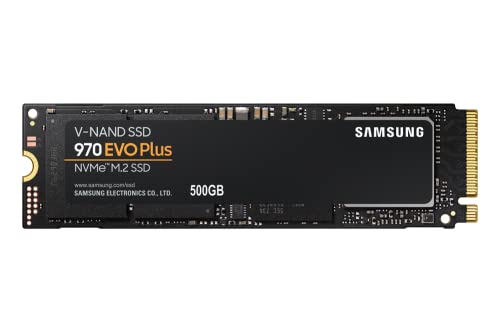
Top 3 picks at a glance
Quick comparison of 250GB SSD picks
Figures below are the manufacturers’ rated “up to” numbers from their spec sheets. Real-world speeds depend on your platform, drive temperature and how full the drive is. Prices are not listed because 250GB models are being phased out in some regions and street pricing swings widely. Treat them as budget-class parts, but check whether a 500GB version costs only slightly more.
| Pick | Best for | Interface | Rated sequential read / write | Rated endurance | Price class |
|---|---|---|---|---|---|
| Samsung 870 EVO 250GB | Best overall SATA | SATA III 2.5-inch | About 560 / 530 MB/s | 150 TBW | Budget to mid-range |
| Crucial MX500 250GB | Reliable SATA alternative | SATA III 2.5-inch | About 560 / 510 MB/s | 100 TBW | Budget |
| WD Black SN770 250GB | Best NVMe for speed | PCIe 4.0 x4, M.2 2280 | Up to about 4,000 / 2,000 MB/s | 200 TBW | Budget to mid-range |
| Samsung 980 250GB | NVMe with strong brand support | PCIe 3.0 x4, M.2 2280 | Up to about 2,900 / 1,300 MB/s | 150 TBW | Budget to mid-range |
| Kingston NV2 250GB | Cheapest NVMe boot drive | PCIe 4.0 x4, M.2 2280 | Up to about 3,000 / 1,300 MB/s | 80 TBW | Budget |
Best overall: Samsung 870 EVO 250GB
The 870 EVO is the safe SATA choice. It saturates the SATA III interface (the roughly 550 MB/s ceiling), uses a DRAM cache, and carries a 150 TBW endurance rating and a multi-year warranty per Samsung’s spec sheet. It suits older desktops, laptops with a 2.5-inch bay and anyone replacing a hard drive in a family PC.
Trade-off: SATA caps you at about 560 MB/s, so large game loads and file copies are slower than on NVMe. In everyday Windows use, though, the gap is much smaller than the spec sheets suggest.
Best NVMe: WD Black SN770 250GB
The SN770 is a DRAM-less PCIe 4.0 drive that uses the host memory buffer, and it is among the faster small NVMe options. It suits a modern motherboard with a free M.2 slot, a handheld-style build, or a boot drive paired with a larger secondary drive. Its endurance rating is also the highest of this group.
Trade-off: 250GB models of any drive are often slower on writes than larger siblings because there are fewer NAND chips working in parallel. A PCIe 4.0 drive in a PCIe 3.0 slot also tops out around 3,500 MB/s.
Best budget SATA: Crucial MX500 250GB
The MX500 has a long track record, a DRAM cache and power-loss protection features described in Crucial’s documentation. It is a good pick if the 870 EVO is out of stock or priced higher. Its 100 TBW rating is lower, which matters only for heavy-write users.
Trade-off: It is slower on sustained writes once the pseudo-SLC cache fills, a common trait of drives this small.
Best for older NVMe-capable systems: Samsung 980 250GB
The 980 is a PCIe 3.0 NVMe drive. It suits older Intel and AMD boards with Gen 3 M.2 slots, where PCIe 4.0 speed would go unused anyway. It also handles sustained temperatures reasonably well in cramped laptop bays.
Trade-off: It is DRAM-less and slower than the SN770 on a modern platform, so it only makes sense if the price is right.
Cheapest NVMe: Kingston NV2 250GB
The NV2 is the entry-level NVMe pick for a basic office PC or a spare machine. It outpaces any SATA drive in sequential reads and fits any M.2 2280 slot.
Trade-off: Its 80 TBW rating is the lowest here. Kingston has also revised NAND on NV-series drives over time, so performance can differ between production batches. Do not use it as a heavy scratch disk.
How much can a 250GB SSD actually hold?
This is the number most spec sheets skip. A drive sold as 250GB uses decimal gigabytes, while Windows reports binary units:
- 250,000,000,000 bytes ÷ 1,073,741,824 = about 232.8 GiB, shown in Windows as roughly 232 GB.
- Windows 11 with updates, drivers and a few apps typically occupies about 35–50 GB, including the pagefile and temporary files.
- That leaves about 180–195 GB. Keep 10–20% free so the SSD keeps its write cache and garbage-collection headroom, which is about 25–35 GB.
- Realistic space for games and files: roughly 150–165 GB.
Many current AAA games install at roughly 50–150 GB each, with wide variation by title and patch. So you can fit one large game plus a few smaller ones. If you play many big titles, a 250GB drive should be your boot drive only.
Endurance worked out in daily writes
TBW sounds abstract, so convert it. Over a 5-year warranty:
- 150 TBW = 150,000 GB ÷ 1,825 days = about 82 GB written per day.
- 100 TBW = about 55 GB per day.
- 80 TBW = about 44 GB per day.
- 200 TBW = about 110 GB per day.
A typical home or gaming PC writes perhaps 10–30 GB per day, so all of these drives have large margins. The low-TBW models only become a concern for video editing scratch disks, constant downloads, or a drive that is nearly full and rewriting the same blocks.
Which 250GB SSD fits your situation?
| Your situation | Choose | Reason |
|---|---|---|
| Old desktop or laptop with a SATA bay and no M.2 slot | Samsung 870 EVO or Crucial MX500 | SATA is the only interface that fits; either saturates it |
| Modern board with a PCIe 4.0 M.2 slot | WD Black SN770 | Fast, high endurance rating, no benefit from SATA |
| Older board with a PCIe 3.0 M.2 slot | Samsung 980 | Matches the slot speed without paying for unused bandwidth |
| Minimum-cost office or secondary PC | Kingston NV2 | Cheapest route to NVMe performance for light use |
| Laptop M.2 slot that is SATA-only (some older models) | M.2 SATA drive, not NVMe | An NVMe drive will not be detected; check the manual first |
| PS4 or PS5 storage expansion | Not recommended | Capacity too small; PS5 slots also have heatsink and size requirements |
How to choose: the checks that matter
- Confirm the slot type. M.2 slots come as SATA-only, NVMe-only or both. Check your motherboard or laptop manual. The slot’s key notch and length (2280 is 80 mm) must also match.
- Prefer a DRAM cache if you will keep the drive full. DRAM-less drives work fine for boot use, but performance falls more when they are nearly full or under heavy mixed loads.
- Compare 250GB against 500GB. If the larger version costs only a small step up, the extra space usually gives more benefit than any speed difference between these models.
- Look at the warranty. Five years is common for the SATA picks; check the specific listing, because terms vary by region.
- Plan for heat. Fast NVMe drives can throttle without airflow. Use the motherboard heatsink if one is supplied; in laptops, check clearance.
Cloning and setup tips for a 250GB boot drive
- If cloning from a larger drive, first check that the used space is under about 200 GB. Cloning tools cannot shrink data that does not fit.
- Move the Downloads, Documents and video folders to a second drive in Windows storage settings to keep the boot drive from filling.
- Run Windows disk cleanup after major updates, since old update files can take several gigabytes.
- Install your most-played game on the SSD and keep the rest on a secondary drive.
Frequently Asked Questions
Is 250GB enough for Windows 11 and a few games?
It is enough for Windows 11, your core apps and one or two modern games. After the operating system and a sensible free-space buffer, you have about 150–165 GB for everything else. If you install several large titles, expect to run out quickly.
Is a 250GB NVMe SSD noticeably faster than a SATA SSD?
In benchmarks, yes, with sequential reads several times higher. In everyday boot times and app launches the difference is small, and many users will not notice it. Large file transfers and some game load times show the clearest gains.
Do 250GB SSDs have lower write speeds than larger models?
Often, yes, particularly on NVMe drives. Smaller capacities use fewer NAND chips, which limits parallelism and can reduce sustained write performance. Read speeds are usually closer to larger versions, and the manufacturer’s spec sheet lists the exact figures per capacity.
Is a 240GB SSD the same as a 250GB SSD?
Almost. A 240GB drive is a slightly different capacity class, often with more over-provisioning, while 250GB drives use a different layout. For practical use, the difference of about 10 GB is minor, so compare models on interface, cache and endurance instead.
How long will a 250GB SSD last?
For normal use, many years. The endurance ratings above equate to roughly 44–110 GB of writes per day over five years, far more than most home PCs write. Keeping some free space and avoiding constant heavy write workloads will help the drive last.
Should I buy a 250GB SSD in 2026 or go larger?
Go larger if the price gap is small, since 500GB and 1TB drives are common and give much more room. Buy 250GB only for a dedicated boot drive, an older system, or a tight budget. It also makes sense as a cheap secondary drive for a specific job.
Related guides
More from Amazon
Programs that pair well with the guide above. Offers and eligibility are set by Amazon and may change.
A free business account with business pricing and bulk-buying tools for work, shop or home office.
Create a business accountFree shipping on eligible items, Prime Video and more. Eligible new members can start with a free trial.
Start a Prime free trialAudiobooks and podcasts to listen to on the go. Eligible new members can start with a free trial.
Try Audible freeAd-free music streaming. Eligible new subscribers can start with a free trial.
Try Music Unlimited freeAs an Amazon Associate we earn from qualifying purchases.


