For most field work, the best choice is a rugged portable SSD such as the Samsung T7 Shield or SanDisk Extreme Portable SSD, because it has no moving parts and offloads cards several times faster than any hard drive. If you need cheap bulk capacity for a backup copy, a shock-rated 2.5-inch HDD such as the SanDisk Professional G-DRIVE ArmorATD or LaCie Rugged is the better value per terabyte. This guide assumes “field” means photography, video, surveying, research, or travel away from a desk, and it focuses on what actually matters out there: shock, water, speed, and bus power.
As an Amazon Associate we earn from qualifying purchases at no extra cost to you.


Our Top Picks

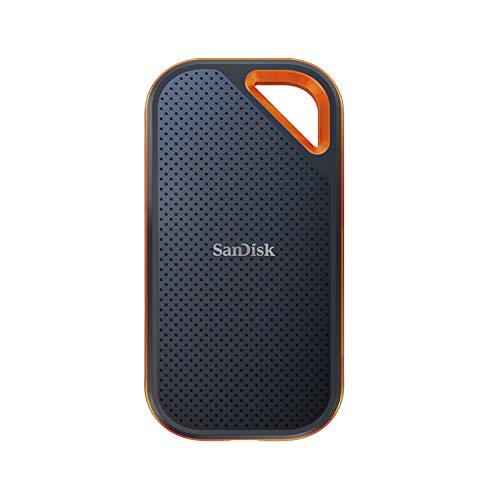
Top 3 picks at a glance
Quick comparison of the picks
| Pick | Best for | Key specs (per manufacturer spec sheets) | Price range |
|---|---|---|---|
| Samsung T7 Shield (SSD) | Best overall | USB 3.2 Gen 2, up to about 1,050 MB/s, IP65, rated for drops up to 3 m, 1 TB to 4 TB | Mid-range to premium |
| SanDisk Extreme Portable SSD | Best for hiking and travel | USB-C, up to about 1,050 MB/s on common versions, IP55 or higher depending on generation, 500 GB to 4 TB | Mid-range |
| SanDisk Professional G-DRIVE ArmorATD (HDD) | Best rugged HDD | 2.5-inch 5400 rpm HDD, USB 3.2 Gen 1, shock-resistant shell, dust and water resistance, 1 TB to 5 TB | Budget to mid-range |
| LaCie Rugged (HDD) | Best for drop and crush abuse | 2.5-inch HDD, USB-C, orange rubber bumper, drop, crush and rain resistance, up to 5 TB class | Mid-range |
| ADATA HD710 Pro (HDD) | Best budget waterproof HDD | IP68 water and dust rating, military-grade shock rating, USB 3.2 Gen 1, 1 TB to 5 TB | Budget |
| SanDisk Professional PRO-G40 (SSD) | Best for 4K/6K video offload | Thunderbolt 3 / USB 3.2 Gen 2×2 class, IP68 and crush-resistant design, multi-GB/s class speeds | Premium |
Specs vary by capacity and hardware revision, so check the exact model number on the box before buying.
Best overall: Samsung T7 Shield
The T7 Shield pairs a rubberized shell with an IP65 dust and splash rating and a manufacturer drop rating of 3 m. It runs at around 1,050 MB/s on a USB 3.2 Gen 2 port, which is enough to saturate most camera card readers. It suits photographers, drone pilots, and anyone who backs up cards in a tent, truck, or hotel room. The trade-off is price per terabyte: you pay a clear premium over a rugged HDD, and IP65 means splash-proof, not submersible.
Best for hiking and travel: SanDisk Extreme Portable SSD
This is a pocketable drive with a carabiner loop and similar speeds. Newer generations carry IP65-class ratings, while older versions carry IP55, so verify which one you are buying. It suits ultralight travelers who want a single SSD that doubles as a working drive for a laptop. The trade-off is a slightly less armored shell than the Shield or a LaCie, so a padded pouch is still a good idea.
Best rugged HDD: SanDisk Professional G-DRIVE ArmorATD
The ArmorATD is an aluminum-and-rubber 2.5-inch HDD built for shock and weather. Real-world speeds are typically in the 100–130 MB/s range, per typical published reviews, which is fine for a nightly backup but slow for working directly from video files. It suits people who need several terabytes of second-copy storage on a modest budget. The trade-off is that a spinning disk is still a spinning disk: it is more vulnerable to impacts while powered on than any SSD.
Best for drop and crush abuse: LaCie Rugged
LaCie’s orange-bumper line has been a field staple for years. The manufacturer rates the drives for drops, crushing weight, and rain, and USB-C models connect easily to modern laptops and phones. It suits video crews and location shoots where drives get thrown into gear cases. The trade-off is bulk: the bumper makes it thicker than bare-shell drives, and the speed is HDD-class.
Best budget waterproof HDD: ADATA HD710 Pro
The HD710 Pro is one of the few budget drives with a full IP68 rating, meaning it is rated for dust-tight use and continuous immersion under the manufacturer’s stated conditions. It suits kayakers, boat users, and field researchers in wet environments. The trade-off is that the rubber flap over the port must be sealed correctly to hold the rating, and it uses a slower USB 3.2 Gen 1 interface.
Best for 4K/6K video offload: SanDisk Professional PRO-G40
If you shoot high-bitrate video on a laptop with Thunderbolt or fast USB, this class of drive offloads far faster than a 1,050 MB/s SSD. It suits DITs and documentary crews. The trade-off is the premium cost and the need for a compatible port and cable; on a plain USB 5 Gbps port you pay for speed you cannot use.
How to choose: the numbers that matter
1. Calculate capacity with a backup multiplier
Field data should exist in at least two places before you leave a location. A worked example: a 45-megapixel camera produces RAW files of roughly 50 MB. At 1,500 frames per day that is 75 GB per day, so a 10-day trip is 750 GB. Two copies means 1.5 TB. Add 20 percent headroom and you want about 2 TB total, either as two 1 TB drives or one 2 TB drive plus cloud or a second device. For video, 4K 10-bit at around 600 Mbps is about 75 MB/s, or roughly 270 GB per hour, so one hour a day for a week is nearly 1.9 TB before backups.
2. Calculate offload time
Offload time is size divided by sustained speed, and sustained speed is usually below the headline number.
| Data to copy | Rugged HDD (about 110 MB/s) | SATA-class or USB 10 Gbps SSD (about 800 MB/s sustained) |
|---|---|---|
| 128 GB card | about 19 minutes | about 2.7 minutes |
| 512 GB | about 78 minutes | about 11 minutes |
| 1 TB | about 2.5 hours | about 21 minutes |
These are arithmetic estimates assuming the card reader and source are not the bottleneck. If a card reader tops out at 300 MB/s, the SSD’s advantage shrinks accordingly. On a battery-limited trip, shorter offloads also mean less laptop runtime used.
3. Check bus power and cables
A USB-A port is nominally 5 V at 900 mA, or 4.5 W. A 2.5-inch HDD typically draws about 1.5–2.5 W while running and spikes higher at spin-up, so it is fine on laptops but can fail to spin up on a phone or tablet with weak output. SSDs draw less in idle and may draw more in sustained writes. If a drive disconnects randomly, try the shorter cable that came with it before blaming the drive.
4. Read the ratings correctly
An IP rating has two digits: the first covers dust (6 is dust-tight), the second covers water (5 is jets, 7 is temporary immersion, 8 is continuous immersion under stated conditions). Drop ratings are lab results onto specific surfaces, and crush ratings apply to the shell, not to the internals when the drive is running. Treat them as margin, not permission.
5. Decision matrix by situation
| Your situation | Choose | Reason |
|---|---|---|
| Hiking or backpacking, one drive | SanDisk Extreme Portable SSD | Light, fast, no moving parts |
| Vehicle-based shoots, rough handling | Samsung T7 Shield or LaCie Rugged | Thicker shell and higher drop and crush ratings |
| Wet environments (boats, rain forests) | ADATA HD710 Pro (HDD) or an IP68 SSD | IP68 handles immersion |
| Large second-copy archive | Rugged HDD at 4–5 TB | Lowest cost per terabyte |
| 4K/6K video on a Thunderbolt laptop | SanDisk Professional PRO-G40 class | Speed matches the port |
| Offloading to a phone or tablet | Rugged SSD with USB-C | Lower power draw and faster transfers |
6. Field habits that protect data
- Use the 3-2-1 idea in simplified form: two drives plus the original card until you are home.
- Do not move an HDD while it is writing; eject first and wait for the light to stop.
- Keep drives out of direct sun in vehicles, since many consumer drives are specified for roughly 0–45 °C operation. Check the sheet for your model.
- Format as exFAT for cross-platform use, but note exFAT has no journaling, so always eject cleanly.
Frequently Asked Questions
Is a rugged SSD or a rugged HDD better for field use?
A rugged SSD is better for most field users because it has no moving parts, is faster, and uses less power. A rugged HDD makes sense when you need many terabytes cheaply for a second copy. Many professionals carry one of each.
How much capacity do I need for a week in the field?
Multiply daily data by days, then by two for a backup copy, and add about 20 percent. For 75 GB per day over seven days that is roughly 1.3 TB, so a 2 TB drive is a safe choice.
Does IP68 mean I can use the drive underwater?
No. IP68 means the enclosure is rated to resist immersion under conditions the manufacturer specifies, usually with the port cover sealed. The drive is not meant to be connected and used while submerged, and the rating does not cover saltwater unless stated.
Can I plug a rugged drive into my phone?
Often yes, if the drive uses USB-C and the phone supports external storage. SSDs generally work more reliably than HDDs, which can need more power than a phone supplies. Use the cable supplied with the drive and test it before your trip.
Are rugged drives safe to leave in a hot car?
Not really. Interior car temperatures can exceed the operating and storage ranges in many spec sheets, and heat shortens electronics lifespan. Keep the drive with you or in a shaded, insulated bag.
Do I still need a backup if I buy a rugged drive?
Yes. Rugged shells reduce physical damage but do not stop loss, theft, or electronic failure. Keep your camera cards untouched until the data exists on two separate devices.
Related guides
More from Amazon
Programs that pair well with the guide above. Offers and eligibility are set by Amazon and may change.
A free business account with business pricing and bulk-buying tools for work, shop or home office.
Create a business accountFree shipping on eligible items, Prime Video and more. Eligible new members can start with a free trial.
Start a Prime free trialAudiobooks and podcasts to listen to on the go. Eligible new members can start with a free trial.
Try Audible freeAd-free music streaming. Eligible new subscribers can start with a free trial.
Try Music Unlimited freeAs an Amazon Associate we earn from qualifying purchases.


