For most gaming PCs in 2026, the best SSD is a 2TB PCIe 4.0 NVMe drive such as the Samsung 990 Pro or WD_BLACK SN850X. Value buyers should look at the Samsung 990 EVO Plus or Crucial P310, and PCIe 5.0 drives like the Crucial T705 only make sense for heavy file work. This guide is independent and not affiliated with Consumer Reports. It covers the criteria that separate good drives from merely fast-looking ones, because rankings alone don’t tell you which drive fits your PC.
As an Amazon Associate we earn from qualifying purchases at no extra cost to you.

Our Top Picks

Top 3 picks at a glance
Quick comparison of the best SSDs
| Pick | Best for | Key specs (manufacturer’s rated) | Price tier |
|---|---|---|---|
| Samsung 990 Pro | Best overall, gaming and PS5 | PCIe 4.0 x4, up to 7,450 MB/s read / 6,900 MB/s write, 1–4TB | Upper mid-range |
| WD_BLACK SN850X | Best for capacity options | PCIe 4.0 x4, up to 7,300 MB/s read / 6,600 MB/s write, 1–8TB | Upper mid-range |
| Samsung 990 EVO Plus | Best value all-rounder | PCIe 4.0 x4 (also PCIe 5.0 x2), up to 7,250 MB/s read / 6,300 MB/s write, 1–4TB | Mid-range |
| Crucial P310 | Best budget NVMe | PCIe 4.0 x4, around 7,100 MB/s read, 500GB–2TB | Budget |
| Crucial T705 | Best PCIe 5.0 for creators | PCIe 5.0 x4, up to 14,500 MB/s read / 12,700 MB/s write | Premium |
| Crucial MX500 / Samsung 870 EVO | Best SATA upgrade for old PCs | SATA 6Gb/s, about 560 MB/s read / 510–530 MB/s write, 2.5-inch | Budget to mid-range |
| Samsung T7 Shield | Best portable SSD | USB 3.2 Gen 2, up to about 1,050 MB/s, rugged casing | Mid-range |
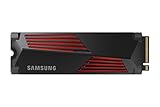
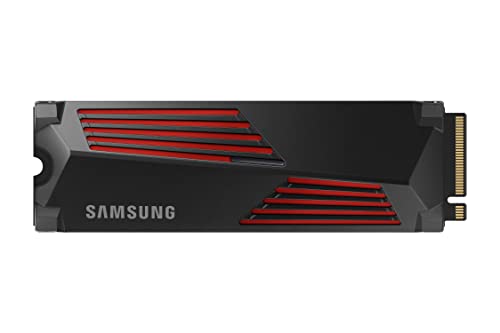
Best overall: Samsung 990 Pro
The 990 Pro pairs a high-end controller with DRAM cache and consistently posts strong results in published reviews. It suits a main gaming drive, a PS5 expansion slot (with a heatsink version or a compatible heatsink) or a video-editing scratch disk. The trade-off is price: you pay a premium for headroom that games rarely use, since load times on a good Gen4 drive are within a few seconds of the cheaper options.
Best for capacity: WD_BLACK SN850X
The SN850X matches the 990 Pro closely in real-world gaming and is sold from 1TB up to 8TB, which matters if you keep a large library installed. Heatsink and PS5-oriented variants exist. The trade-off is that it runs warm under sustained writes, so a motherboard heatsink is a good idea in a compact case.
Best value: Samsung 990 EVO Plus
The 990 EVO Plus is the pick when you want name-brand reliability and a 5-year warranty without paying flagship money. It is a mid-range drive that reads at around 7,000 MB/s in the rated specs. Its main compromise is that it doesn’t use dedicated DRAM like the 990 Pro, so heavy sustained workloads, such as copying several hundred gigabytes at once, can slow it more than a top-tier drive. For gaming and general use, that rarely shows.
Best budget: Crucial P310
The P310 offers Gen4-class read speeds at a budget tier, with 1TB and 2TB the sensible sizes. It’s a DRAM-less design, so expect lower sustained write speed once its fast cache fills. It is a good fit for a game library drive where you write a game once and read it many times. Similar value options include the WD_BLACK SN7100 and Lexar NM790, which are worth comparing when prices move.
Best for creators: Crucial T705 (PCIe 5.0)
The T705 is among the fastest consumer drives, rated up to 14,500 MB/s reads. It makes sense for large 8K video projects, big datasets, or moving huge files between fast drives. Trade-offs are heat (a heatsink is essentially mandatory), price, and a PCIe 5.0 M.2 slot requirement to reach those speeds. For games, the real-world benefit over Gen4 is small.
Best SATA upgrade: Crucial MX500 or Samsung 870 EVO
If you are replacing a hard drive in an older desktop or laptop with no M.2 slot, a 2.5-inch SATA SSD is still a big jump. Both are proven drives with DRAM cache and good endurance. They top out around 560 MB/s because the SATA interface is the limit, so don’t choose SATA if you have a free NVMe slot at a similar price.
Best portable: Samsung T7 Shield
For game libraries on a handheld or console, or for carrying project files, the T7 Shield offers a rugged shell and about 1,000 MB/s speeds. Check that your port supports USB 3.2 Gen 2 or better; a plain USB 3.0 port will cut speed to roughly half. Note that external drives can’t play PS5 games, only store them.
How to choose: the criteria that actually matter
1. Interface and slot compatibility
Check your motherboard or laptop manual before buying. Theoretical x4 bandwidth is roughly 3.9 GB/s for PCIe 3.0, 7.9 GB/s for PCIe 4.0 and 15.8 GB/s for PCIe 5.0, while SATA is about 0.6 GB/s. A Gen4 drive in a Gen3 slot works but is capped near 3,500 MB/s. A PCIe 5.0 drive in a Gen4 slot gets limited to about 7,000 MB/s, so it becomes a very expensive Gen4 drive.
2. DRAM cache vs DRAM-less
DRAM-less drives (some use host memory buffer) cost less and are fine for gaming. Drives with DRAM keep mapping tables on board, which helps consistency in mixed workloads like editing and big installs. If you do mainly gaming and browsing, DRAM-less is a smart saving.
3. Capacity: buy more than you think
Modern AAA games routinely take 100GB or more. A worked example: a 1TB drive shows about 931GB usable. Windows and apps take around 120GB, leaving about 810GB. Keep 15 to 20 percent free for performance (about 150GB), leaving roughly 660GB for games. At an average of 90GB each, that is seven games. A 2TB drive (about 1,863GB usable) leaves nearly 1,500GB, or around 16 games. For most gamers, 2TB is the practical sweet spot.
4. Endurance (TBW) and warranty
Typical 1TB consumer drives carry TBW ratings from roughly 300 to 600TB. Worked example: at 600TBW and 50GB written per day (a heavy day by gaming standards), 600,000GB ÷ 50GB = 12,000 days, or about 33 years. Even at 200GB per day, it is around 8 years. Endurance almost never decides a gaming purchase; the 5-year warranty length and the manufacturer’s support do matter more.
5. Sustained write speed and thermals
Headline speeds come from short bursts into a fast cache. Once the cache fills, cheaper drives can fall to well under 1,500 MB/s, which matters when you copy 200GB of footage but not when you install a game over a typical internet connection. Heat can also trigger throttling, so use a motherboard heatsink for Gen4 and a proper one for Gen5.
Decision matrix: match your situation to a drive
| Your situation | Choose | Capacity | Why |
|---|---|---|---|
| Gaming PC with free Gen4 M.2 slot | 990 Pro or SN850X | 2TB | Top Gen4 performance, strong consistency |
| Tight budget, game library drive | Crucial P310 | 1–2TB | Gen4 reads at low cost; writes happen rarely |
| Balanced value and warranty | 990 EVO Plus | 2TB | Reliable brand, mid-range cost |
| PS5 internal expansion | 990 Pro or SN850X with heatsink | 1–2TB | Needs Gen4 M.2 with cooling, per Sony’s requirements |
| Old PC or laptop, no M.2 slot | MX500 or 870 EVO | 1–2TB | SATA is the maximum the port supports |
| 4K/8K editing, large transfers | Crucial T705 | 2TB | Fast sustained work on a Gen5 slot |
| Handheld, console or travel | T7 Shield | 1–2TB | Rugged, USB 3.2 Gen 2 |
Does a faster SSD improve gaming?
Barely. A SATA SSD to a Gen4 NVMe typically cuts game load times by only a few seconds in published comparisons, and frame rates stay the same. The big leap is from a hard drive to any SSD. DirectStorage titles can benefit more from NVMe, but the gap between Gen4 and Gen5 is minor. Spend extra on capacity before speed.
Frequently Asked Questions
Are Consumer Reports SSD ratings the best way to choose a drive?
Not on their own. A single overall rating can’t tell you whether a drive fits your slot, workload or capacity needs. Combine a trusted brand’s warranty and support with the criteria above: interface, cache type, sustained writes, thermals and capacity. Independent tech reviews that publish sustained-write tests are especially useful.
Is 1TB enough for a gaming PC in 2026?
It works if you keep only a few games installed at once, but it fills quickly. After Windows and free-space headroom, you may have room for about seven large titles. A 2TB drive is the safer choice, and it often costs less per gigabyte.
Do I need a PCIe 5.0 SSD?
Most people don’t. Gen5 drives cost more and run hotter, and games load only marginally faster than on Gen4. They are worthwhile mainly for professionals moving very large files who also have a Gen5 slot.
Is a DRAM-less SSD bad?
No. Modern DRAM-less NVMe drives such as the Crucial P310 perform very well for gaming and everyday use. They can slow down more during long, heavy writes, so creators who regularly copy hundreds of gigabytes should favor drives with DRAM.
Can I use an NVMe SSD in an older PC?
Only if the motherboard has an M.2 slot that supports NVMe (many boards from around 2015 onward do, but not all). Some older boards can’t boot from NVMe without a BIOS update. If there is no suitable slot, a SATA SSD is the right upgrade, or you can add a PCIe adapter card for storage.
Do SSDs need a heatsink?
Gen4 drives generally benefit from one, especially in cases with weak airflow, and many motherboards include M.2 heatsinks. Gen5 drives need serious cooling to avoid throttling. SATA drives do not need a heatsink.
Related guides
More from Amazon
Programs that pair well with the guide above. Offers and eligibility are set by Amazon and may change.
A free business account with business pricing and bulk-buying tools for work, shop or home office.
Create a business accountFree shipping on eligible items, Prime Video and more. Eligible new members can start with a free trial.
Start a Prime free trialAudiobooks and podcasts to listen to on the go. Eligible new members can start with a free trial.
Try Audible freeAd-free music streaming. Eligible new subscribers can start with a free trial.
Try Music Unlimited freeAs an Amazon Associate we earn from qualifying purchases.


