The best 11-inch portable laptop for most people in 2026 is an 11.6-inch Chromebook 2-in-1 such as the Lenovo 300e Yoga Chromebook Gen 4. It combines a roughly 1.2–1.4 kg body, 8+ hours of battery and a price that usually sits between $250 and $450. If you need Windows apps, choose an Intel N-series mini laptop with 8–16 GB of RAM. If budget is no object, an 11-inch iPad Pro with a keyboard folio is the most powerful option at this size.
True 11-inch laptops are now a niche. Most makers moved to 13-inch and 14-inch designs, so the options are mainly education-oriented 11.6-inch machines, tiny Windows mini laptops and 11-inch tablets with keyboards. Below is how each class compares, who it suits, and the numbers to check before you buy.
As an Amazon Associate we earn from qualifying purchases at no extra cost to you.


Our Top Picks
Top 3 picks at a glance
Quick comparison of 11-inch picks
| Pick | Best for | Key specs (typical) | Price range |
|---|---|---|---|
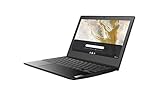
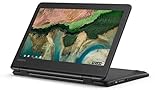
| Lenovo 300e Yoga Chromebook Gen 4 (11.6-inch class) | Best overall | 11.6-inch touchscreen, 360° hinge, ChromeOS, stylus support, 4–8 GB RAM | Usually $250–$450 |
| Acer Chromebook Spin 311 (11.6-inch class) | Best budget | 11.6-inch convertible, ChromeOS, 4 GB RAM, 32–64 GB eMMC | Usually $180–$330 |
| Intel N100/N150 mini laptop, about 10.5–11.6 inches | Best for Windows apps | 4 cores, 8–16 GB RAM, 256–512 GB SSD, 6–15 W sustained | Usually $300–$500 |
| iPad Pro 11-inch with Magic Keyboard | Best premium / fastest | 11-inch OLED, Apple M-series, around 1 kg combined | Usually $1,300–$2,000 with keyboard |
Specs and prices vary by configuration and region. Confirm RAM, storage type and panel details on the manufacturer’s spec sheet before purchasing, because many 11-inch models ship in several tiers under the same name.
Best overall: 11.6-inch Chromebook 2-in-1 (Lenovo 300e Yoga Chromebook Gen 4)
A convertible Chromebook gives you the best balance of weight, battery life and price at 11 inches. ChromeOS is light enough that a low-power chip and 4–8 GB of RAM feel smooth for browsing, documents, video calls and streaming. The 360° hinge and touchscreen also make it usable as a tablet for reading or note-taking.
Trade-off: these models are built for classrooms, so the screens are usually 1366×768 or 1920×1200 IPS panels at modest brightness, and the cases are plastic. Local PC gaming is limited to Android apps, Linux apps on supported models, and cloud gaming.
Best budget: Acer Chromebook Spin 311 class
If you want a secondary machine for travel, a kid’s first laptop or a couch browser, an entry convertible in the $180–$330 range does the job. Prioritize 4 GB of RAM as a minimum and be wary of 32 GB eMMC storage, which fills quickly once you add Android apps and offline files.
Trade-off: expect a dim, low-resolution display and slower multitasking with many tabs open. Check the model’s Auto Update Expiration date on Google’s published list, since a cheap Chromebook with only a few years of updates left is a poor value.
Best for Windows apps: Intel N-series mini laptop
If you need desktop software, a full browser with extensions, emulators for older consoles or SSH tools, an Intel N100 or N150 mini laptop is the practical 11-inch choice. Look for 16 GB of RAM if you can. Integrated graphics share system memory, so an 8 GB model leaves little headroom once Windows and a browser load.
Good fits for this class include 2D indie games, retro emulation up to about the 16-bit and early 3D era, and cloud gaming. Modern 3D titles are generally limited to low settings at 720p, with frame rates that vary heavily by game, driver and power mode.
Trade-off: small chassis often mean fans that are either absent or loud, and sustained performance drops as heat builds. Several models in this size use 10.5-inch screens, so check the exact diagonal if 11 inches is a hard requirement.
Best premium: iPad Pro 11-inch with Magic Keyboard
An 11-inch iPad Pro is the fastest option in this size class by a large margin. Apple’s M-series chips, an OLED panel and a combined weight of roughly 1 kg (tablet plus keyboard, per Apple’s spec sheets) make it a strong travel machine for video editing, drawing and cloud gaming. It is not a laptop in the traditional sense, so there is no desktop file system behavior or Windows software.
Trade-off: the total cost can match a mainstream 14-inch laptop, and iPadOS still limits multi-window workflows and external-GPU style expansion.
Decision matrix: match your situation to a pick
| Your situation | Choose | Why |
|---|---|---|
| Browsing, docs, streaming, under $300 | Budget Chromebook convertible | Lowest cost, 8+ hours of battery |
| Student, note-taking with stylus | 11.6-inch Chromebook 2-in-1 | Touch, stylus, tablet mode |
| Need Windows-only software or emulators | N100/N150, 16 GB RAM, SSD | Runs x86 apps natively |
| Cloud gaming on the go | Chromebook or iPad Pro with Wi-Fi 6 or newer | Network speed matters more than the chip |
| Creative work and the best screen | iPad Pro 11-inch plus keyboard | OLED display and the fastest chip |
| Local 3D gaming is the priority | Step up to a 13–14-inch ultraportable | 11-inch cooling limits sustained power |
How to choose: the numbers that matter
Battery runtime: a worked example
Runtime is roughly battery capacity in watt-hours divided by average system draw in watts. Manufacturer battery claims use light loads, so estimate with your actual use. A typical 11-inch laptop has a 40–50 Wh battery. Using a 45 Wh pack as an example:
| Workload | Average draw | Estimated runtime on 45 Wh |
|---|---|---|
| ChromeOS web browsing and docs | 5–6 W | 7.5–9 hours |
| Windows N-series, browsing and video | 8–10 W | 4.5–5.5 hours |
| Cloud gaming over Wi-Fi (screen at high brightness) | 9–12 W | 3.75–5 hours |
| Local emulation or light 3D games | 15–20 W | 2.25–3 hours |
Example: 45 Wh ÷ 10 W = 4.5 hours. Real results shift with brightness, Wi-Fi quality and battery age, so treat these as planning figures rather than measured results.
Cloud gaming bandwidth
Because local graphics are weak at this size, cloud gaming is the most realistic way to play recent games. Nvidia’s published guidance for GeForce Now suggests roughly 25 Mbps for 1080p at 60 fps. Keep that in mind when you shop, because a laptop with a Wi-Fi 5 radio on a congested 2.4 GHz network can cause more stutter than the CPU ever will. Look for Wi-Fi 6 or newer and use the 5 GHz band, ideally within one room of the router. Playing on a hotspot also drains battery faster, since the radio works harder.
RAM, storage and display
- RAM: 4 GB is the floor for ChromeOS, and 8 GB is better. For Windows, 8 GB is the floor and 16 GB is the safer choice.
- Storage: eMMC is slow and non-upgradeable. An NVMe or SATA SSD makes app launches and updates noticeably quicker.
- Display: 1920×1200 at 11.6 inches gives about 195 pixels per inch, versus about 135 for 1366×768, which looks visibly softer. Aim for at least 300 nits if you will use it near windows.
- Keyboard: small keyboards vary a lot in key travel and layout. Prefer a full-size Enter and shift key and a well-sized trackpad.
- Weight and charging: aim for under 1.4 kg and USB-C charging so you can share a charger with your phone.
Frequently Asked Questions
Are 11-inch laptops still worth buying in 2026?
Yes, if portability and battery life matter more than screen space or gaming power. They fit on airplane tray tables, in small bags and in cramped commutes. If you spend hours on spreadsheets or multi-window work, a 13-inch model is easier on the eyes.
Can an 11-inch laptop play PC games?
It can run older and lightweight games, and Windows models with Intel N-series chips handle 2D and retro titles. Recent 3D games usually need low settings at 720p, with frame rates that vary widely by title and driver. Cloud gaming over a stable 5 GHz Wi-Fi connection is the better route for modern releases.
Is a Chromebook or a Windows mini laptop better at 11 inches?
A Chromebook is usually cheaper, lasts longer on battery and needs less maintenance. A Windows mini laptop is better if you need desktop apps, emulators or specific peripherals. Choose by software requirements first, since that decides what works.
How much RAM do I need on an 11-inch laptop?
For ChromeOS, 4 GB works for light use and 8 GB gives more room for many tabs and Android apps. For Windows, 16 GB is a sensible target because integrated graphics borrow from system memory. Check whether the RAM is soldered, as most models at this size do not allow upgrades.
Is an iPad Pro 11-inch a good laptop replacement?
It can be, for people whose work happens in browsers, creative apps and cloud tools. It is much faster than any 11.6-inch Chromebook, but it does not run Windows or macOS software. Price the tablet and keyboard together before comparing it with a laptop.
What is the difference between 11-inch and 11.6-inch screens?
Most “11-inch” laptops are 11.6 inches diagonal, a size that dates back to netbooks. Tablets with 11-inch panels are slightly smaller and often use taller aspect ratios. Check the exact diagonal and aspect ratio in the spec sheet if you plan to buy a specific sleeve or case.
Related guides
More from Amazon
Programs that pair well with the guide above. Offers and eligibility are set by Amazon and may change.
A free business account with business pricing and bulk-buying tools for work, shop or home office.
Create a business accountFree shipping on eligible items, Prime Video and more. Eligible new members can start with a free trial.
Start a Prime free trialAudiobooks and podcasts to listen to on the go. Eligible new members can start with a free trial.
Try Audible freeAd-free music streaming. Eligible new subscribers can start with a free trial.
Try Music Unlimited freeAs an Amazon Associate we earn from qualifying purchases.


