For most buyers, the best 11-inch 2-in-1 is a ruggedized 11.6-inch convertible Chromebook such as the Lenovo 300e Yoga Chromebook Gen 4, because it is cheap, light and lasts a full school or travel day. If you need real Windows apps, pick an 11.6-inch Intel N-series convertible with at least 8GB RAM and 128GB storage. If you want the most gaming power in an 11-inch body, an iPad Air 11-inch with a keyboard case beats any budget 2-in-1, though it is a tablet and not a laptop.
True 11-inch 2-in-1s are a shrinking category. Most “11-inch” models are 10.95 to 11.6 inches, and most are low-power machines built for browsing, notes and streaming. That shapes the whole buying decision, so this guide focuses on what these machines can and cannot do, including light gaming through cloud services and Android or ChromeOS titles.
As an Amazon Associate we earn from qualifying purchases at no extra cost to you.



Top 3 picks at a glance
Quick comparison of the picks
| Pick | Best for | Key specs (typical, check the listing) | Price range |
|---|---|---|---|
| Lenovo 300e Yoga Chromebook Gen 4 | Best overall, durability | 11.6-inch touch convertible, stylus support, ChromeOS, rugged education build | Usually $250–$450 |
| Acer Chromebook Spin 311 | Best budget | 11.6-inch touch convertible, MediaTek-class chip, 4GB RAM and 32–64GB eMMC common | Usually $200–$350 |
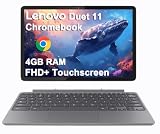
| Lenovo Chromebook Duet 11 | Best detachable | About 11-inch tablet with keyboard cover, MediaTek chip, ChromeOS | Usually $250–$400 |
| 11.6-inch Intel N100/N150 Windows convertible (spec class) | Best for Windows apps | Quad-core Intel N-series, 8GB RAM, 128GB+ storage, Windows 11 | Usually $350–$550 |
| iPad Air 11-inch with keyboard case | Best for performance and games | 11-inch tablet, Apple M-series chip, iPadOS, keyboard sold separately | Usually $850–$1,100 with keyboard |
Best overall: Lenovo 300e Yoga Chromebook Gen 4
This is the default recommendation because the 360-degree hinge, touchscreen and stylus support all come in a body designed for classroom abuse. Per Lenovo’s positioning, it targets education, so expect reinforced corners and a spill-resistant keyboard rather than a premium look. ChromeOS also keeps the system responsive on modest hardware.
Trade-off: the display is typically 1366×768, and the performance is fine for web, video and Android apps, but not for heavy multitasking. Treat it as a durable secondary device, not a main PC.
Best budget: Acer Chromebook Spin 311
The Spin 311 is the entry-level convertible to look for when the goal is the lowest price that still folds into tablet mode. It covers email, documents, streaming and Android apps.
Trade-off: base configurations often pair 4GB of RAM with 32GB of eMMC. That gets tight with many tabs open and a few Android games installed. If the price gap is small, step up to 8GB RAM or 64GB storage where offered.
Best detachable: Lenovo Chromebook Duet 11
A detachable works better as a tablet. It is lighter in the hand for reading, video and touch games, and the keyboard cover turns it into a mini laptop when needed. It suits couch use and travel.
Trade-off: with a kickstand and cover, lap typing is less stable than on a hinged convertible. The keyboard is also cramped for long typing sessions.
Best for Windows apps: an 11.6-inch Intel N-series convertible
Because model availability changes often, shop this one by spec class. Look for an Intel N100 or N150 chip, 8GB RAM, a 128GB or larger SSD or UFS drive, and Windows 11. This is the class to choose if you need desktop software, Steam’s lighter library, retro emulators or a full browser with extensions.
Trade-off: these chips use integrated graphics, so modern 3D games are limited to older or 2D titles at low settings. Do not buy 64GB Windows models, as explained in the storage math below.
Best for gaming power: iPad Air 11-inch with a keyboard case
This is not a laptop, but it is the strongest 11-inch option if games matter. Apple’s M-series chips handle demanding mobile titles and the App Store library far better than the budget chips above.
Trade-off: the total cost is two to four times a Chromebook once you add a keyboard case, and iPadOS cannot run desktop PC games. If you need Windows software, the 12-inch Surface Pro is the nearest Windows alternative, but it costs more and sits just above the 11-inch class.
How to choose: decision matrix
| Your situation | Choose | Minimum spec |
|---|---|---|
| Kid or student, rough handling | Rugged convertible Chromebook | 4GB RAM, 32GB storage |
| Cheapest touch laptop for web and video | Budget Chromebook convertible | 4GB RAM, 64GB if possible |
| Mostly reading, video, touch games | Detachable Chromebook or iPad | 4GB RAM (Chromebook) |
| Need Windows desktop apps | Intel N-series convertible | 8GB RAM, 128GB storage |
| Cloud gaming (GeForce Now, Xbox Cloud Gaming) | Any of the above with Wi-Fi 5 or newer | Stable 5GHz Wi-Fi or Ethernet adapter |
| Native mobile games at high settings | iPad Air 11-inch | Current M-series chip |
Three calculations that matter more than the spec sheet
1. Screen sharpness
Pixel density is the diagonal resolution divided by the diagonal size. A 1366×768 panel at 11.6 inches works out to about 135 ppi (1,567 diagonal pixels ÷ 11.6). A 1920×1200 panel at 11 inches is about 206 ppi (2,264 ÷ 11). The first looks soft for text, the second looks crisp. If you read or write a lot, the higher-resolution panel is worth paying for.
2. Battery runtime
Runtime is battery capacity in watt-hours divided by average power draw. Take a typical 42Wh battery as an example. Light use such as web and documents draws about 6W, giving roughly 7 hours. Video at higher brightness or a casual game draws about 10–12W, giving roughly 3.5–4 hours. Manufacturer battery claims usually reflect the light case, so plan around the lower number if you game.
3. Cloud gaming data use
NVIDIA recommends roughly 25 Mbps for 1080p at 60 fps and about 15 Mbps for 720p60 on GeForce Now. On a 11.6-inch screen the visual difference is small, but the data cost is not. At 25 Mbps, one hour uses 25 × 3,600 ÷ 8 = 11,250 MB, or about 11.3GB. At 15 Mbps, it is 6,750 MB, or about 6.8GB. If you are on a capped connection or tethering, setting the stream to 720p saves around 40% of data per hour.
Storage math: why 64GB Windows models are a poor deal
Windows 11 and its updates commonly consume 30–40GB of a 64GB drive, leaving little room for apps or games. ChromeOS uses far less, so a 64GB Chromebook typically leaves around 40GB or more usable, though this varies by model. For Windows, buy 128GB. For Chromebooks, 64GB is a comfortable target if you install Android games.
What to check before buying
- Keyboard and trackpad size: an 11-inch deck is small. If you type a lot, check that the layout has no cramped arrow or punctuation keys.
- Wi-Fi standard: Wi-Fi 5 or Wi-Fi 6 helps for cloud gaming. Older Wi-Fi 4 adapters cause latency spikes.
- Auto Update Expiration (Chromebooks): Google lists a support end date per model. Choose one with several years left.
- Charging: USB-C charging lets you share a power bank or phone charger.
- Storage type: eMMC is slower than SSD or UFS, and you will notice it when installing apps and updates.
- Stylus support: not all convertibles include or support a pen, so verify before buying if you take notes.
Frequently Asked Questions
Can an 11-inch 2-in-1 laptop run PC games?
Only light ones. Intel N-series Windows models can run older, 2D and indie titles at low settings, with frame rates that vary widely by game and patch. For modern AAA games, use a cloud service such as GeForce Now or Xbox Cloud Gaming, which only needs a good connection.
Is a Chromebook or Windows 2-in-1 better at 11 inches?
A Chromebook is better if your work happens in a browser and you want low cost and long battery life. Windows is better if you need desktop software, emulators or specific launchers. At this screen size, Chromebooks generally feel smoother because ChromeOS needs fewer resources.
How much RAM do I need?
Get 4GB as an absolute minimum on a Chromebook and 8GB on Windows. With 4GB, many open tabs plus Android apps can cause slowdowns. If a model offers 8GB for a small premium, it is usually worth it.
Are there powerful 11-inch 2-in-1 laptops with dedicated graphics?
Not in any meaningful numbers. Cooling and battery limits keep dedicated GPUs out of this size class. For stronger graphics, move up to 13- to 14-inch 2-in-1s, or choose an iPad Air if you only need mobile gaming performance.
Is a detachable or a convertible better?
Choose a convertible if you type often and use it on your lap. Choose a detachable if you mostly use it as a tablet and want less weight. Detachables are lighter in tablet mode but tend to be less stable and comfortable for typing.
How long will an 11-inch 2-in-1 last?
Chromebooks last as long as their update window, which Google lists per model and is typically several years from release. Windows models last as long as their performance remains acceptable. Buying more RAM and storage up front is the cheapest way to extend usable life.
Related guides
More from Amazon
Programs that pair well with the guide above. Offers and eligibility are set by Amazon and may change.
A free business account with business pricing and bulk-buying tools for work, shop or home office.
Create a business accountFree shipping on eligible items, Prime Video and more. Eligible new members can start with a free trial.
Start a Prime free trialAudiobooks and podcasts to listen to on the go. Eligible new members can start with a free trial.
Try Audible freeAd-free music streaming. Eligible new subscribers can start with a free trial.
Try Music Unlimited freeAs an Amazon Associate we earn from qualifying purchases.


