The best air conditioner thermostat depends on the AC you own. For central AC with a standard 24V thermostat wire, the ecobee Smart Thermostat Premium is the strongest all-round pick because its remote sensors fix the hot-gaming-room problem. For window units, portable units and mini-splits, an infrared smart controller such as the Sensibo Air or Cielo Breez Plus is the right product, because wall thermostats can’t control those units at all.
This guide is written for people who cool a room with a gaming PC in it. A tower with a high-end GPU puts out as much heat as a small space heater, and that skews ordinary thermostat behavior. The advice below covers which type fits your AC, how to size the load, and which settings to change.
As an Amazon Associate we earn from qualifying purchases at no extra cost to you.

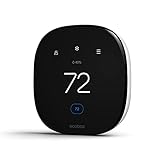


Top 3 picks at a glance
Quick comparison of the best AC thermostats
| Pick | Best for | Key specs | Typical price |
|---|---|---|---|
| ecobee Smart Thermostat Premium | Central AC / heat pump, best overall | 24V, remote SmartSensor support, Wi-Fi, Apple Home, Alexa and Google Home support | $200–$250 |
| Google Nest Learning Thermostat (4th gen) | Hands-off scheduling in central systems | 24V, learning schedule, optional Nest Temperature Sensors, Matter-era smart home support | $250–$280 |
| Google Nest Thermostat | Budget central AC | 24V, Wi-Fi, simple schedule, no learning dial | $100–$130 |
| Sensibo Air (or Air Pro) | Mini-splits and window ACs with IR remotes | IR blaster, temperature and humidity sensing, app and voice control | $90–$150 |
| Cielo Breez Plus | Budget IR control for window and portable units | IR blaster, built-in temperature and humidity sensor, app scheduling | $60–$100 |
| Honeywell Home T9 | Central AC with multiple rooms | 24V, wireless room sensors, smart response scheduling | $150–$200 |
Step one: match the thermostat to your AC type
Most buying mistakes come from skipping this check. A smart thermostat is only useful if it speaks the same “language” as your cooling hardware.
| Your cooling setup | What controls it | Choose | Watch out for |
|---|---|---|---|
| Central AC, 24V low-voltage wiring | Wall thermostat | ecobee Premium, Nest Learning, Honeywell T9 | May need a C-wire or power adapter kit |
| Ductless mini-split with IR remote | Handheld remote | Sensibo Air, Cielo Breez Plus | Needs line of sight to the indoor unit |
| Window AC with IR remote | Handheld remote | Cielo Breez Plus, Sensibo Air | Unit must support the remote’s commands |
| Window or portable AC with only knobs | Physical dial | A smart plug may work only if the unit restarts on power-up; otherwise no smart control | Many units come back in standby after power loss |
| Baseboard heat or line-voltage (120/240V) | Line-voltage thermostat | Not the 24V models above | Wrong thermostat can damage equipment |
A quick check for central systems: turn off the HVAC breaker, pull the old thermostat off the wall, and look for terminals labeled R, Y, G and C. R and Y mean cooling is 24V and controllable. A missing C wire is common, and ecobee ships with a power extender kit for exactly that case, per the manufacturer’s documentation.
Best overall: ecobee Smart Thermostat Premium
The ecobee Premium suits a gaming room because it supports remote SmartSensors. Instead of reading the temperature at the hallway wall, you can have it average or prioritize the sensor on your desk or shelf. It also supports the major smart home platforms and has an occupancy-based mode that adjusts when rooms are in use.
Trade-off: it costs about twice as much as a basic smart thermostat, and each extra sensor adds to the price. If you only have one room with a heat problem, one sensor is usually enough.
Best for hands-off schedules: Google Nest Learning Thermostat (4th gen)
The Nest Learning Thermostat builds a schedule from your manual changes and has a polished interface. The 4th generation supports separate Nest Temperature Sensors, which helps with room-specific readings. It’s a good fit if your gaming sessions are irregular and you’d rather not program anything.
Trade-off: the learning algorithm can be slow to match an irregular schedule, and it is the most expensive option here. Learned schedules can also make wrong guesses after a week of unusual hours, such as a weekend LAN marathon.
Best budget central AC: Google Nest Thermostat
The basic Nest Thermostat covers scheduling, remote app control and energy reports at a modest price. For a single-zone home where the thermostat sits in a reasonable spot, that is enough.
Trade-off: remote room sensors are not its strength, so if your gaming room is the problem room, the ecobee or Honeywell T9 solves more of it.
Best for mini-splits and window units: Sensibo Air
The Sensibo Air sits near the indoor unit, learns the remote’s IR codes, and acts as the smart brain. Its built-in temperature and humidity sensing lets it run its own thermostat logic, and its “Climate React” feature can trigger changes at temperature or humidity thresholds. That is useful if your PC heats the room quickly under load.
Trade-off: the sensor sits on or beside the AC, which can read cooler than your desk. Position it away from direct airflow, or the control loop will be misled.
Best budget IR controller: Cielo Breez Plus
The Cielo Breez Plus does the same basic job for less: IR control, temperature and humidity sensing, schedules and app control. It’s a sensible choice for a single window unit in a bedroom setup.
Trade-off: fewer ecosystem features and less polished automation than Sensibo. Confirm that your exact AC brand is supported before buying.
Best for multi-room central systems: Honeywell Home T9
The T9 supports wireless room sensors and can prioritize the rooms in use. It’s a good alternative to the ecobee if you prefer Honeywell’s interface.
Trade-off: sensors are an add-on, and the app experience varies by region and firmware. It’s a strong pick when your priority is balancing rooms rather than deep automation.
Worked example: how much cooling does your PC add?
Almost every watt a PC draws turns into heat in the room. The conversion is 1 watt = 3.412 BTU/hr.
- Gaming PC under load: about 450 W (mid-to-high-end GPU plus CPU)
- Monitor(s): about 60 W
- Speakers, router, lights and a person: about 100 W for equipment, plus roughly 350 BTU/hr for one seated adult, a commonly cited figure
Equipment: 450 + 60 + 100 = 610 W × 3.412 ≈ 2,080 BTU/hr. Add about 350 BTU/hr for the person and the total is roughly 2,430 BTU/hr during a session.
A window AC rated at 8,000 BTU/hr therefore spends about 30% of its capacity just on the gaming setup, before sun, walls and the door are counted. That’s why a gaming room needs more headroom than a standard “square feet” chart suggests.
Running cost: if the AC has an EER of 10 (BTU/hr per watt), removing 2,430 BTU/hr takes about 243 W of electricity. Four hours a day at $0.15/kWh is 0.243 × 4 × 0.15 ≈ $0.15 per day, or around $4.40 per month. The real gain from a better thermostat comes from not cooling the room when no one is in it, not from the gaming load itself.
Settings that matter for a gaming room
- Setpoint: 72–75°F (22–24°C) while gaming. Components don’t need cold air; a case at 25°C ambient is well within normal operating range. Lower setpoints mostly cost money.
- Setback: raise by 4–6°F when away. The US Department of Energy has long suggested that setting back several degrees for around eight hours saves roughly 1% per degree. The gain is modest but free.
- Differential (swing): 1–2°F. A tighter swing than 1°F makes the compressor cycle more often. The point is to avoid short-cycling, which wears compressors.
- Minimum off time: at least 5 minutes. Most thermostats have a built-in compressor protection delay; don’t disable it.
- Sensor placement: mount sensors at chest height, 1–2 m from the PC’s exhaust, out of direct sunlight and away from the AC outlet. A sensor behind the tower reads several degrees high and will overcool the whole house.
- Fan: Auto. “On” runs the blower continuously and can re-evaporate moisture from the coil back into the room.
- Humidity target: 40–55%. Where the controller reports humidity, keep it in that range. Very dry air raises static risk; very humid air is uncomfortable.
How to choose: decision criteria with numbers
- Wiring first: 24V central system means ecobee, Nest or Honeywell. IR remote unit means Sensibo or Cielo. If you can’t tell, check the model number on your AC against the controller’s supported list.
- Sensor need: if the gaming room is more than about 3°F hotter than the thermostat room under load, buy remote-sensor support.
- Budget: $60–$130 gets you capable control; above $200 you are paying for sensors, polish and ecosystem breadth.
- Smart home platform: check Apple Home, Google Home or Alexa support if you want voice control or routines tied to your gaming setup lights.
- Utility rebates: many US utilities offer rebates on smart thermostats, so check before you buy.
Frequently Asked Questions
Can a smart thermostat control a window air conditioner?
Not a wall-mounted one. Window units don’t use 24V thermostat wiring. You need an IR smart controller like the Sensibo Air or Cielo Breez Plus, and your AC must have an infrared remote for it to copy.
Do I need a C-wire for a smart thermostat?
Most smart thermostats need continuous 24V power. Many include a power extender or adapter kit for homes without a C-wire. Check the manufacturer’s wiring guide and your existing terminals before buying.
Will my gaming PC confuse the thermostat?
It can if the thermostat or sensor sits in the same room, near the exhaust. A PC that adds 400–600 W of heat will warm the sensor and make the system overcool. Place sensors away from the exhaust or use a remote sensor in a better location.
What temperature should I set for gaming?
Between 72°F and 75°F (22–24°C) is comfortable for most people and fine for PC hardware. Setting it lower mainly increases electricity use. If your GPU runs hot, improve case airflow rather than dropping the room temperature.
Is a smart thermostat worth it for a single room?
For a window or mini-split unit, a $60–$130 IR controller is worth it if you forget to turn the unit off or want to pre-cool the room before a session. Savings come from not running the AC in an empty room. If you already use a timer and remember to use it, the benefit is smaller.
Do smart thermostats work with heat pumps?
Most 24V models support heat pumps, including reversing valve settings, but you must configure the system type correctly during setup. Wiring and options vary by system, so check compatibility with the manufacturer’s tool before buying.
Related guides
More from Amazon
Programs that pair well with the guide above. Offers and eligibility are set by Amazon and may change.
A free business account with business pricing and bulk-buying tools for work, shop or home office.
Create a business accountFree shipping on eligible items, Prime Video and more. Eligible new members can start with a free trial.
Start a Prime free trialAudiobooks and podcasts to listen to on the go. Eligible new members can start with a free trial.
Try Audible freeAd-free music streaming. Eligible new subscribers can start with a free trial.
Try Music Unlimited freeAs an Amazon Associate we earn from qualifying purchases.

