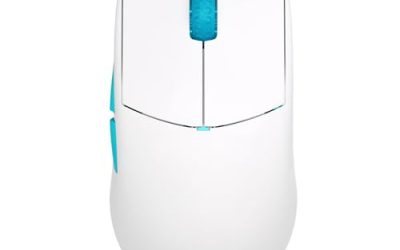
Valorant rounds turn on first-shot accuracy. Your crosshair has to stop exactly where your eyes land, hold that spot through a counter-strafe, and do it again in the next duel thirty seconds later. Wireless used to mean accepting a slower link for that freedom, but current 2.4 GHz flagship connections report as quickly as cables, so the real decision is no longer wired versus wireless. It is weight, shape, and how steadily the link holds its polling rate under pressure.
This roundup is for ranked grinders chasing consistency, fingertip and claw aimers who live on micro-corrections, and casual players who still hate losing pistol rounds to a shaky mouse. Each pick below was chosen from its Amazon product page by name and listed specification: three ultralight shells built for precise aim, one ergonomic alternative for palm-leaning players, and one battery-sipping budget option that still carries a flawless sensor.
Our Top Picks
 Logitech G Pro X Superlight 2 Lightspeed WirelessClassic1.57 x 2.5 x 4.92 inches0.1 poundsCheck on Amazon
 Razer DeathAdder V3 Pro Wireless Gaming Mouse1000 Hz5.01 x 2.65 x 1.69 inches0.1 poundsCheck on Amazon

Top 3 picks at a glance
Quick Picks
As an Amazon Associate we earn from qualifying purchases
| Product | Best for | Key spec from title |
|---|---|---|
| Razer Viper V3 Pro | Fingertip aim and 8K polling | 55 g lightweight |
| Logitech G PRO X SUPERLIGHT 2 | Claw grip consistency | 60 g pro-grade |
| Razer DeathAdder V3 Pro | Palm-leaning ergonomic aim | 63 g lightweight |
| Logitech G305 LIGHTSPEED | Budget ranked play | 250h battery life |
How to Choose
Weight decides how cleanly you stop
Valorant aim is mostly small corrections and hard stops, not huge swipes. A lighter shell starts moving with less force and, more importantly, stops with less overshoot, so your flick lands on the head instead of sliding past it. That is why every flagship pick here sits between 55 and 63 grams. There is a floor, though: players who aim with a very low sensitivity and a relaxed wrist sometimes find an ultralight mouse twitchy on angle holds. Match the weight to how you actually move, and pair a light mouse with a pad that gives you enough friction to brake.
Polling rate and link stability
A standard 1000 Hz link reports your position every millisecond, which already feels instant in a tactical shooter. The 8000 Hz modes on the flagship picks cut that interval further, smoothing the cursor path during fast corrections. The gains are subtle, and they only show up if the connection stays clean: keep the receiver close to your pad with the included extension, away from routers and crowded USB hubs. High polling also drains batteries far faster, so treat 8000 Hz as a match setting rather than a permanent one, and drop back for everyday play.
Shape for fingertip and claw grips
Most Valorant players aim with fingertip or claw grips because both leave the fingers free to pull the mouse down for recoil control and make tiny vertical adjustments. Those grips want a symmetrical shell with a low, centred hump that does not force the palm into the mouse. Fingertip players usually prefer the smaller end of the range, while claw players benefit from a little extra rear length to brace against. If your palm rests fully on the shell, an ergonomic right-handed shape supports the hand better and stops your wrist doing all the work.
A sensor and switches that stay honest
Raw DPI numbers are marketing; what matters is that the sensor tracks without smoothing, acceleration, or spin-outs when you snap to an angle. Every sensor listed here is rated flawless by its maker and tracks far beyond the speeds a human arm can produce. You will play somewhere between 400 and 1600 DPI regardless. Optical switches are the other quiet win: they fire with light instead of a metal contact, which resists the double-click faults that ruin pistol rounds on ageing mechanical switches, and they keep click latency consistently low.
The 4 Best Options
Razer Viper V3 Pro

The Razer Viper V3 Pro is the symmetrical shell most aim-obsessed Valorant players end up circling. At 55 grams in white it disappears under a fingertip grip, and the safe, low-profile shape lets your fingers drive micro-corrections without the shell pushing back. Its headline trick is true wireless polling up to 8000 Hz through the included HyperPolling dongle, which keeps fast corrections feeling connected even mid-flick. The Focus Pro 35K sensor tracks on a wide range of surfaces, and the optical switches keep clicks crisp through long ranked sessions without a hint of mushiness developing over time.
Specs
- Weight: 55 g (white)
- Sensor: Razer Focus Pro 35K Optical Sensor Gen-2
- Max sensitivity: 35,000 DPI
- Max speed: 750 IPS; max acceleration: 70 G
- Connectivity: Razer HyperSpeed Wireless and wired
- Polling: up to 8000 Hz with the included HyperPolling Wireless Dongle
- Switches: Razer Optical Mouse Switches Gen-3
- Battery life: up to 95 hours at 1000 Hz polling
- Buttons: 8 programmable buttons
Best for: fingertip and claw players who want the lightest, fastest flagship for precise aim.
Watch out for: battery life falls sharply at 8000 Hz polling, so ranked-only use of that mode makes sense.
ASIN: B0CW25XR5S
Logitech G PRO X SUPERLIGHT 2
The Logitech G PRO X SUPERLIGHT 2 is the default recommendation when someone asks for one mouse that simply never misbehaves. Its 60-gram symmetrical shell is the shape a generation of tactical FPS players learned on, with a gently rounded rear that suits a relaxed claw grip through best-of-three ranked nights. LIGHTSPEED wireless supports report rates up to 8 kHz, and the HERO 2 sensor underneath is rated for sub-micron tracking accuracy, so slow angle holds stay exactly as still as your hand does. LIGHTFORCE hybrid switches add a crisp, mechanical-feeling click with optical actuation speed.
Specs
- Weight: 60 g
- Sensor: HERO 2, up to 44,000 DPI
- Report rate: up to 8 kHz
- Connectivity: LIGHTSPEED wireless via USB receiver
- Switches: LIGHTFORCE hybrid optical-mechanical switches
- Battery life: up to 95 hours
- Charging: USB-C
- Buttons: 5 programmable buttons
Best for: claw-grip players who want proven, drama-free consistency across long sessions.
Watch out for: the shape is right-handed only in feel despite the symmetrical shell, and there are no extra buttons for utility binds.
ASIN: B09NBWL8J5
Razer DeathAdder V3 Pro
The Razer DeathAdder V3 Pro covers the players the symmetrical mice leave behind: palm and palm-claw hybrids whose hand wants a sculpted right-handed shell to rest on. At 63 grams it stays firmly in ultralight territory, so the ergonomic support never turns into the sluggish feeling older ergo mice were known for. The Focus Pro 30K sensor and HyperSpeed wireless link deliver the same class of tracking and response as the Viper above, while the contoured right side keeps your ring and pinky fingers from dragging on the pad during wide swings onto a site.
Specs
- Weight: 63 g
- Sensor: Razer Focus Pro 30K optical sensor
- Switches: Razer Optical Switches Gen-3
- Connectivity: Razer HyperSpeed Wireless
- Polling: 1000 Hz, higher with a separate HyperPolling dongle
- Battery life: up to 90 hours
- Buttons: 5 programmable buttons
- Shape: ergonomic right-handed
Best for: palm-leaning aimers with medium-to-large hands who still want flagship speed.
Watch out for: the ergonomic shell does not suit fingertip grips or left-handed players at all.
ASIN: B0B6XZLNHQ
Logitech G305 LIGHTSPEED
The Logitech G305 LIGHTSPEED is the pick for players who want real competitive wireless without flagship money or charging cables. Its HERO sensor is an older design that still tracks flawlessly at the speeds Valorant demands, and the 1 ms LIGHTSPEED link feels indistinguishable from wired in actual duels. At 99 grams it is heavier than everything else here, which some low-sensitivity arm aimers honestly prefer for stable angle holds. The party trick is endurance: a single AA battery runs for up to 250 hours, and the receiver stores inside the shell when you travel.
Specs
- Weight: 99 g
- Sensor: HERO 12K, 200 to 12,000 DPI
- Max speed: over 400 IPS
- Connectivity: LIGHTSPEED wireless, 1 ms report rate
- Battery life: up to 250 hours on a single AA battery (included)
- Buttons: 6 programmable buttons
- Extras: on-board memory and built-in USB receiver storage
Best for: budget-conscious players and laptop setups that need dependable wireless aim.
Watch out for: polling is fixed at 1000 Hz and the extra weight shows during fast fingertip corrections.
ASIN: B07CMS5Q6P
Which One Fits Your Situation
You aim with your fingertips on a large cloth pad
Pick the Viper V3 Pro. Its 55-gram shell and low symmetrical hump leave your fingers in charge of every stop and correction, and the 8000 Hz wireless mode keeps fast snaps feeling direct. Cloth pads add the braking friction an ultralight mouse needs, so the pairing suits players who hold tight angles and clear corners with short, sharp movements.
You claw-grip through long ranked sessions
Pick the SUPERLIGHT 2. The rounded rear fills a relaxed claw without forcing your fingers into a cramped arch, and the 95-hour battery means charging rarely interrupts a session streak. Its tracking stays composed during the slow, tense angle holds that decide late rounds, which is exactly where a consistent mouse earns its place on your desk.
Your palm does the steering
Pick the DeathAdder V3 Pro. The sculpted right-handed shell supports your whole hand, so your shoulder and forearm guide the big movements while your fingers rest instead of gripping. You give up nothing in sensor quality or wireless speed, and the 63-gram weight keeps wide site-entry swings from feeling like arm day at the gym.
You are buying your first serious mouse
Pick the G305 LIGHTSPEED. It delivers the two things that actually matter while you learn Valorant aim: a flawless sensor and a lag-free wireless link. The AA battery removes charging from your routine entirely, and the money saved goes further spent on a good pad. Upgrade later only if the weight starts limiting your grip style.
Common Mistakes
- Copying a professional player’s DPI and sensitivity exactly, instead of finding the range where your own arm and grip stay accurate.
- Leaving the wireless receiver plugged into the back of the PC, far from the pad, where desks and metal cases weaken the link.
- Running 8000 Hz polling permanently, then wondering why the battery drains in days and the mouse dies before an evening session.
- Choosing a button-heavy MMO mouse for Valorant, where two side buttons cover every bind the game realistically needs.
- Judging a new shape in the first hour, before your grip has had a few matches to settle into it.
Frequently Asked Questions
Is wireless reliable enough for Valorant ranked play?
Yes, at this level it genuinely is. LIGHTSPEED and HyperSpeed links report in about a millisecond at 1000 Hz, the same as a wired connection, and both are used throughout professional tactical FPS play. Keep the receiver close to your pad on the included extension and the connection stays stable through entire matches.
Does 8000 Hz polling actually improve aim?
It smooths the reported cursor path during fast movements, which some players feel as slightly cleaner micro-corrections on high-refresh monitors. The difference is refinement, not transformation: your settings, practice, and shape fit matter far more. Treat it as a bonus for match play, and remember it costs significant battery life on every mouse here.
What DPI should I use for Valorant?
Most competitive players land between 400 and 1600 DPI, paired with an in-game sensitivity that gives an effective DPI in the low hundreds. Lower settings favour the small, controlled corrections Valorant rewards. Pick a value, keep it fixed for several weeks, and let muscle memory form instead of adjusting after every bad match.
How often will I need to charge these mice?
The three rechargeable flagships run roughly 90 to 95 hours per charge at 1000 Hz, which covers weeks of evening play, though 8000 Hz modes shorten that considerably. The G305 skips charging entirely: one AA battery lasts up to 250 hours of continuous play, and swapping it takes seconds when it finally runs down.
Related guides
More from Amazon
Programs that pair well with the guide above. Offers and eligibility are set by Amazon and may change.
A free business account with business pricing and bulk-buying tools for work, shop or home office.
Create a business accountFree shipping on eligible items, Prime Video and more. Eligible new members can start with a free trial.
Start a Prime free trialAudiobooks and podcasts to listen to on the go. Eligible new members can start with a free trial.
Try Audible freeAd-free music streaming. Eligible new subscribers can start with a free trial.
Try Music Unlimited freeAs an Amazon Associate we earn from qualifying purchases.