Our Top Picks

Top 3 picks at a glance

Table of Contents
- Quick Answer
- What a 32-Inch Monitor Must Do for the Xbox Series X
- Samsung Odyssey OLED G8 (G80SD): Best Overall
- ASUS ROG Swift OLED PG32UCDM: Best Premium Pick
- MSI MPG 321URX QD-OLED: Best Flagship Value
- LG UltraGear 32GS95UE-B: Best for Console and PC
- Gigabyte M32U: Best Mid-Range Non-OLED Pick
- How to Choose
- Who Should Skip
- FAQ
- Conclusion
- Product and ASIN Reference
A 32-inch screen is the largest size that still works at a desk, and it is where the Xbox Series X looks its best: the console’s native 4K output maps one-to-one onto a 32-inch 4K panel, so games stay sharp at a normal seating distance. The catch is that the Series X only unlocks 4K at 120Hz over HDMI 2.1, and not every 32-inch monitor wires its HDMI ports for full bandwidth.
This roundup narrows the field to five 32-inch monitors that clear the console’s real requirements: a 4K panel, at least one full-bandwidth HDMI 2.1 port, variable refresh rate over HDMI, and HDR handling that does the hardware justice. Four picks use OLED panels for perfect blacks and near-instant response, and one IPS model covers players who want the size without the OLED tier or its burn-in trade-offs.
As an Amazon Associate, we earn from qualifying purchases.
Quick Answer
For most Xbox Series X players, the Samsung Odyssey OLED G8 (G80SD) is the best 32-inch pick: a flat 4K QD-OLED panel with 240Hz, two HDMI 2.1 ports and a glare-free finish. The Gigabyte M32U is the mid-range alternative, trading OLED contrast for a 4K 144Hz IPS panel, a KVM switch and no burn-in risk.
What a 32-Inch Monitor Must Do for the Xbox Series X
Three checks decide whether a 32-inch monitor suits the Series X. First, bandwidth: 4K at 120Hz with HDR needs HDMI 2.1, so the monitor must accept the console’s full signal over HDMI rather than reserving high refresh rates for DisplayPort. Every pick here runs at least 120Hz over HDMI 2.1. Second, variable refresh rate: the Xbox uses VRR to smooth frame drops, and all five monitors support FreeSync over HDMI, the sync standard the console works with. Third, HDR handling: the Series X outputs HDR10, and a panel with real local light control holds shadow detail that a plain edge-lit screen washes out.
Size matters too. At 32 inches, 4K resolution stays crisp roughly an arm’s length away, which is why this class suits desks better than a living-room TV.
Samsung Odyssey OLED G8 (G80SD): Best Overall

The Odyssey OLED G8 is the most complete console package in this group. Its flat 32-inch QD-OLED panel runs at 4K and 240Hz, so the Series X gets its full 120Hz over HDMI 2.1 with headroom to spare, and FreeSync Premium Pro keeps VRR smooth. A 0.03ms response time keeps fast camera pans clean, and per-pixel light control delivers the deep blacks that make HDR scenes hold together.
Samsung’s glare-free coating cuts reflections better than the glossy finishes on rival QD-OLED panels, which helps in bright rooms. The built-in smart platform and speakers also make it the easiest pick here to use without a headset. The trade-offs are a stand with a wide footprint and smart-TV menus that add a layer between you and the input you want.
Specs
- Panel: 32-inch QD-OLED, flat
- Resolution: 3840 x 2160 (4K UHD)
- Refresh rate: 240Hz
- Response time: 0.03ms (GtG)
- Adaptive sync: FreeSync Premium Pro
- Ports: 2x HDMI 2.1, 1x DisplayPort 1.4, USB hub
- HDR: VESA DisplayHDR True Black 400
ASUS ROG Swift OLED PG32UCDM: Best Premium Pick
The PG32UCDM is the enthusiast version of the same 32-inch 4K QD-OLED formula. It matches the Samsung on resolution, 240Hz refresh and 0.03ms response, then adds a custom heatsink that lets the panel sustain brightness with less aggressive dimming, plus Dolby Vision support alongside HDR10. FreeSync Premium Pro and G-Sync compatibility cover both the Xbox and a gaming PC.
Connectivity is the strongest in this group: two HDMI 2.1 ports for consoles, DisplayPort 1.4 for a PC, and USB-C with 90W power delivery and a KVM switch for a laptop. It sits firmly in the premium tier, and it has no built-in speakers, so budget for a headset or desktop audio.
Specs
- Panel: 32-inch QD-OLED, flat
- Resolution: 3840 x 2160 (4K UHD)
- Refresh rate: 240Hz
- Response time: 0.03ms (GtG)
- Adaptive sync: FreeSync Premium Pro, G-Sync compatible
- Ports: 2x HDMI 2.1, 1x DisplayPort 1.4, USB-C (90W PD), KVM
- HDR: HDR10, Dolby Vision
MSI MPG 321URX QD-OLED: Best Flagship Value
The MPG 321URX uses the same generation of 32-inch 4K QD-OLED panel as the ASUS and Samsung, with the same 240Hz refresh and 0.03ms response, but usually lands in a lower tier than the ROG model. For the Series X it covers every requirement: two HDMI 2.1 ports accept 4K at 120Hz, and FreeSync Premium Pro keeps VRR engaged over HDMI.
MSI layers on its OLED Care 2.0 features, including pixel refresh and panel protection routines that reduce burn-in risk from static game HUDs. USB-C carries 98W power delivery, and the KVM switch makes it a practical shared screen for a work laptop. The stand is sturdy but plain, and like the ASUS it skips built-in speakers.
Specs
- Panel: 32-inch QD-OLED, flat
- Resolution: 3840 x 2160 (4K UHD)
- Refresh rate: 240Hz
- Response time: 0.03ms (GtG)
- Adaptive sync: FreeSync Premium Pro
- Ports: 2x HDMI 2.1, 1x DisplayPort 1.4, USB-C (98W PD), KVM
- HDR: VESA DisplayHDR True Black 400
LG UltraGear 32GS95UE-B: Best for Console and PC
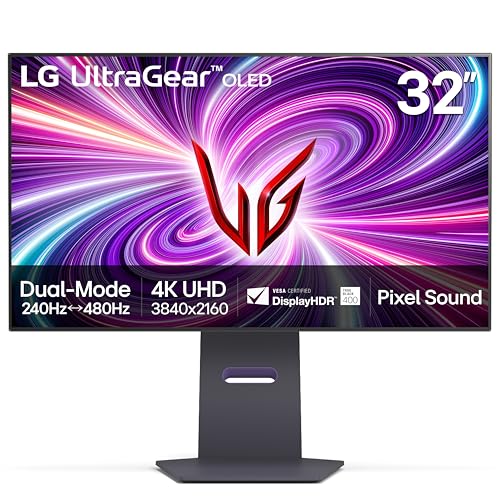
The 32GS95UE-B is the one pick here built on a WOLED panel instead of QD-OLED, and its party trick is Dual Mode: it runs 4K at 240Hz for the Xbox Series X, then switches to 1080p at 480Hz for competitive PC play. Over HDMI 2.1 the console gets its full 4K 120Hz signal with VRR through FreeSync Premium Pro, and G-Sync compatibility covers the PC side.
LG’s Pixel Sound speakers fire audio through the panel area, which sounds clearer than the small down-firing speakers most monitors include, so casual play without a headset works better here than on the ASUS or MSI. Its HDR highlights are a step behind the QD-OLED picks, but for a shared desk where the Series X sits next to a gaming PC, this is the most flexible screen of the five.
Specs
- Panel: 32-inch WOLED, flat
- Resolution: 3840 x 2160 (4K UHD), Dual Mode 1080p
- Refresh rate: 240Hz at 4K, 480Hz at 1080p
- Response time: 0.03ms (GtG)
- Adaptive sync: FreeSync Premium Pro, G-Sync compatible
- Ports: 2x HDMI 2.1, 1x DisplayPort 1.4, USB hub
- HDR: VESA DisplayHDR True Black 400
Gigabyte M32U: Best Mid-Range Non-OLED Pick

The M32U is the sensible mid-range option and the only LCD in this group. Its 32-inch IPS panel runs 4K at 144Hz, which still clears the Series X ceiling of 120Hz over its HDMI 2.1 ports, and FreeSync Premium Pro keeps VRR working over HDMI. Colors are wide and accurate for an IPS screen, and there is no burn-in risk, which suits players who leave the dashboard on screen for hours.
The trade-offs are the familiar IPS ones: black levels are a dark gray rather than true black, and the HDR400 rating adds little because there is no local dimming. In return you get a KVM switch, USB-C for a laptop, built-in speakers and full height adjustment, all in a lower tier than any OLED here. If the console shares the desk with work, the M32U is the easiest pick to live with every day.
Specs
- Panel: 32-inch IPS, flat
- Resolution: 3840 x 2160 (4K UHD)
- Refresh rate: 144Hz
- Response time: 1ms (MPRT)
- Adaptive sync: FreeSync Premium Pro
- Ports: 2x HDMI 2.1, 1x DisplayPort 1.4, USB-C, KVM
- HDR: VESA DisplayHDR 400
How to Choose
Start with the port check, because it is the one that locks features out. The Series X needs HDMI 2.1 for 4K at 120Hz; a monitor that only reaches high refresh rates over DisplayPort will cap the console at 4K 60Hz. All five picks here have full-bandwidth HDMI 2.1, but confirm it on the console after setup: the Xbox video modes screen should show ticks for 4K, 120Hz and VRR at the same time.
Next, pick a panel type. OLED delivers the contrast and response the console’s HDR modes deserve, and current QD-OLED and WOLED panels include protection routines that make burn-in a manageable risk for varied gaming. IPS, represented here by the M32U, gives up deep blacks but removes the burn-in question entirely. Then weigh the extras that match your desk: a KVM switch and USB-C if a laptop shares the screen, real speakers if you play without a headset, and a stand that fits your space.
Finally, set the console up to match the screen: enable 120Hz and VRR in the Xbox settings, and run the HDR game calibration app so HDR games tone-map correctly.
Who Should Skip
Skip this entire size class if you sit more than about six feet from the screen: at couch distance a 32-inch monitor gives up the immersion a TV provides, and the Series X is equally at home on a large HDMI 2.1 television. Competitive players may also prefer a smaller 27-inch 1440p screen, where the console’s performance modes render natively.
Skip the OLED picks if your usage is mostly static content, such as leaving the dashboard or a spreadsheet up all day; the M32U covers that pattern without panel-care routines. And skip the premium flagships if your library is mainly 60Hz games: the extra refresh headroom only pays off in titles with a 120Hz performance mode.
FAQ
Does the Xbox Series X need HDMI 2.1 for 120Hz?
Yes, at 4K it does. The console can send 120Hz at 1440p over HDMI 2.0, but 4K at 120Hz with HDR requires HDMI 2.1 bandwidth. Every monitor here has HDMI 2.1 ports, so each accepts the console’s full 4K 120Hz signal.
Is a 32-inch monitor too big for a desk?
For most desks it is the practical maximum. A 32-inch 4K screen stays sharp at a viewing distance of roughly two to three feet, which matches a standard desk. Shallower desks can feel crowded with the wider flagship stands, so check stand depth before buying.
Do these monitors support VRR and ALLM on Xbox?
All five support variable refresh rate over HDMI through FreeSync, which is the form of VRR the Xbox uses, so frame drops in 120Hz modes stay smooth. Auto low latency mode support varies by model; the console still switches to each monitor’s game picture mode in normal use, so check the product page if ALLM is a deciding factor.
Will an OLED monitor get burn-in from Xbox games?
The risk is low with varied gaming, because game scenes change constantly. Static elements such as a dashboard left on screen for hours every day are the real concern. The OLED picks here include pixel refresh and panel protection features, and the console’s screen dimming setting reduces the risk further.
Conclusion
A 32-inch 4K monitor with HDMI 2.1 is the sharpest way to run an Xbox Series X at a desk, and the current OLED generation makes the choice mostly about extras. The Samsung Odyssey OLED G8 (G80SD) is the best all-round pick, the ASUS PG32UCDM and MSI MPG 321URX cover the flagship tier, the LG 32GS95UE-B adds a dual-mode panel for PC play, and the Gigabyte M32U keeps the size and the 120Hz support in the mid-range. Confirm 4K, 120Hz and VRR are all ticked in the console’s video settings, and the Series X will show everything it can do.
Product and ASIN Reference
| Product | ASIN |
|---|---|
| Samsung Odyssey OLED G8 (G80SD) | B0DHJ8B7TP |
| ASUS ROG Swift OLED PG32UCDM | B0CV26XVMD |
| MSI MPG 321URX QD-OLED | B0CTSC3VS4 |
| LG UltraGear 32GS95UE-B | B0CV1Y7NLT |
| Gigabyte M32U | B083GRVFXN |
Related guides
More from Amazon
Programs that pair well with the guide above. Offers and eligibility are set by Amazon and may change.
A free business account with business pricing and bulk-buying tools for work, shop or home office.
Create a business accountFree shipping on eligible items, Prime Video and more. Eligible new members can start with a free trial.
Start a Prime free trialAudiobooks and podcasts to listen to on the go. Eligible new members can start with a free trial.
Try Audible freeAd-free music streaming. Eligible new subscribers can start with a free trial.
Try Music Unlimited freeAs an Amazon Associate we earn from qualifying purchases.