A 27 inch 4K gaming monitor is the sharpest size you can buy. Packing 3840 x 2160 into a 27 inch panel gives you roughly 163 pixels per inch, so game worlds look crisp, text stays clean for work, and you do not need the desk depth a 32 inch screen demands.
The five picks below all run at 144Hz or faster, all carry HDMI 2.1 for 4K 120Hz console play, and all support variable refresh rate. They split by panel technology: one QD-OLED flagship at 240Hz, and four IPS models that trade true blacks for higher brightness, zero burn-in risk, and friendlier pricing tiers.
As an Amazon Associate, we earn from qualifying purchases.
Top 3 picks at a glance


Quick Answer
For most players, the LG UltraGear 27GP950-B is the best 27 inch 4K gaming monitor, pairing a 144Hz Nano IPS panel with HDMI 2.1 for PC and console play. The Alienware AW2725Q is the premium step up with a 240Hz QD-OLED panel, while the MSI MAG 274UPF covers the same 4K 144Hz basics on a tighter budget.
Table of Contents
- Dell Alienware AW2725Q
- LG UltraGear 27GP950-B
- Sony INZONE M9
- BenQ MOBIUZ EX2710U
- MSI MAG 274UPF
- How to Choose
- Who Should Skip
- FAQ
- Conclusion
Dell Alienware AW2725Q

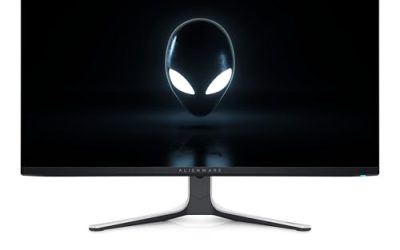
The Alienware AW2725Q is the premium pick and the image-quality leader here. Its 26.7 inch QD-OLED panel pairs 4K resolution with a 240Hz refresh rate and a 0.03ms GtG response time, motion clarity no LCD can match. Per-pixel lighting delivers true blacks and a 1,500,000:1 contrast ratio, and the HDR stack includes Dolby Vision alongside VESA DisplayHDR True Black 400.
At about 166 pixels per inch, the highest density Alienware has shipped, fine detail in strategy games and racing cockpits stays razor sharp at a normal viewing distance. FreeSync Premium Pro, G-Sync Compatible, and VESA AdaptiveSync cover every sync standard in use, and two HDMI 2.1 ports feed consoles at 4K 120Hz while DisplayPort 1.4 handles the PC.
The ownership notes are standard OLED ones. USB-C provides up to 15W of power delivery, enough for accessories rather than laptop charging, and Dell includes a three-year warranty with burn-in coverage plus panel-care features such as pixel refresh.
Specs
- Screen size: 26.7 inches
- Panel type: QD-OLED
- Resolution: 3840 x 2160 (4K UHD), about 166 ppi
- Refresh rate: 240Hz
- Response time: 0.03ms GtG
- Variable refresh: AMD FreeSync Premium Pro, NVIDIA G-Sync Compatible, VESA AdaptiveSync
- HDR: VESA DisplayHDR True Black 400, Dolby Vision
- Color gamut: 99 percent DCI-P3
- Inputs: 2 x HDMI 2.1, 1 x DisplayPort 1.4, USB hub, USB-C with 15W power delivery
- Extras: Height, tilt, swivel and pivot stand, three-year warranty with burn-in coverage
LG UltraGear 27GP950-B
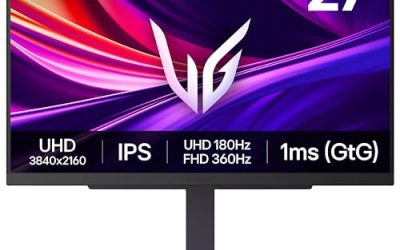
The LG UltraGear 27GP950-B is the most complete IPS option for players who split time between a fast PC and a console. Its 27 inch Nano IPS panel runs at 144Hz natively and overclocks to 160Hz over DisplayPort, while HDMI 2.1 accepts a console’s 4K 120Hz signal with variable refresh. A 1ms GtG response time and both G-Sync Compatible and FreeSync Premium Pro support keep motion clean on either platform.
Color is a strength here, with 98 percent DCI-P3 coverage and a DisplayHDR 600 certification that gives HDR games more highlight punch than entry-level 4K panels manage. The stand adjusts for height, tilt, and pivot, and the near-borderless design suits multi-monitor desks.
The trade-offs are the usual IPS ones: black levels are good rather than OLED-deep, and there are no built-in speakers, so a headset or external audio is part of the package. For mixed PC and console desks that also handle work, it remains the balanced default in this size class.
Specs
- Screen size: 27 inches
- Panel type: Nano IPS
- Resolution: 3840 x 2160 (4K UHD)
- Refresh rate: 144Hz, 160Hz overclock over DisplayPort (120Hz over HDMI 2.1)
- Response time: 1ms GtG
- Variable refresh: NVIDIA G-SYNC Compatible, AMD FreeSync Premium Pro
- HDR: VESA DisplayHDR 600
- Color gamut: 98 percent DCI-P3
- Inputs: 2 x HDMI 2.1, 1 x DisplayPort 1.4 with DSC, USB hub
- Extras: Height, tilt and pivot stand, no built-in speakers
Sony INZONE M9
The Sony INZONE M9 is the monitor designed around the PS5 itself. Connected to the console, its Auto HDR Tone Mapping applies HDR settings automatically, and Auto Genre Picture Mode switches between low-latency and picture-focused profiles for games and video apps. The styling matches the console, which matters in a tidy setup.
Picture quality is the other headline. The 27 inch IPS panel uses full-array local dimming with 96 zones, a feature rarely found at this size, and carries a DisplayHDR 600 certification with a 600-nit peak brightness. Contrast runs deeper than edge-lit rivals manage, while the 144Hz panel, HDMI 2.1 VRR, and G-Sync Compatible support keep motion smooth on console and PC alike.
A USB-C input and a pair of 2W speakers round out a monitor that doubles as a small-room entertainment hub. PC players get the same panel benefits, though the console picture modes are the real reason to pick it over the LG.
Specs
- Screen size: 27 inches
- Panel type: IPS with full-array local dimming (96 zones)
- Resolution: 3840 x 2160 (4K UHD)
- Refresh rate: 144Hz (120Hz over HDMI 2.1)
- Response time: 1ms GtG
- Variable refresh: HDMI 2.1 VRR, NVIDIA G-SYNC Compatible
- HDR: VESA DisplayHDR 600
- Color gamut: 95 percent DCI-P3
- Inputs: 2 x HDMI 2.1, 1 x DisplayPort 1.4, USB-C
- Extras: Auto HDR Tone Mapping, Auto Genre Picture Mode, 2 x 2W speakers
BenQ MOBIUZ EX2710U

The BenQ MOBIUZ EX2710U is the mid-range pick for players who do not want separate speakers on the desk. Its built-in 2.1-channel audio pairs two 2W speakers with a 5W woofer, and the included remote adjusts volume and picture settings from the couch. The 27 inch IPS panel runs at 4K 144Hz, accepts 120Hz from consoles over HDMI 2.1, and supports FreeSync Premium Pro.
BenQ’s HDRi processing and DisplayHDR 600 certification give it a stronger HDR presentation than entry-level 4K models, and local dimming helps dark scenes hold detail. Color coverage matches the LG at 98 percent DCI-P3, so it doubles well as a media screen.
A noise-cancelling microphone is built in for party chat over USB-C. If sound from the monitor itself matters to your setup, nothing else here is close.
Specs
- Screen size: 27 inches
- Panel type: IPS
- Resolution: 3840 x 2160 (4K UHD)
- Refresh rate: 144Hz (120Hz over HDMI 2.1)
- Response time: 1ms GtG
- Variable refresh: AMD FreeSync Premium Pro
- HDR: VESA DisplayHDR 600 with HDRi
- Color gamut: 98 percent DCI-P3
- Inputs: 2 x HDMI 2.1, 1 x DisplayPort 1.4, USB-C
- Extras: 2.1-channel speakers with 5W woofer, noise-cancelling microphone, remote control
MSI MAG 274UPF

The MSI MAG 274UPF is the budget-tier way into 4K 144Hz gaming. Its Rapid IPS panel delivers the same headline numbers as the pricier IPS picks: 3840 x 2160, a 144Hz refresh rate, and a 1ms GtG response time. Both HDMI 2.1 ports are console-ready, and FreeSync Premium plus G-Sync Compatible covers both graphics card camps.
A USB-C input with DisplayPort Alt Mode and power delivery makes it easy to dock a laptop on the same screen for work use too. The fully adjustable stand tilts, swivels, pivots, and raises, ergonomics cheaper 4K monitors often skip.
Where the savings show is HDR: the DisplayHDR 400 certification is a checkbox tier, and there is no local dimming. Treat it as an excellent SDR gaming monitor with clean motion and sharp text, and it makes a strong case as the value pick.
Specs
- Screen size: 27 inches
- Panel type: Rapid IPS
- Resolution: 3840 x 2160 (4K UHD)
- Refresh rate: 144Hz
- Response time: 1ms GtG
- Variable refresh: AMD FreeSync Premium, NVIDIA G-Sync Compatible
- HDR: VESA DisplayHDR 400
- Inputs: 2 x HDMI 2.1, 1 x DisplayPort 1.4, 1 x USB-C with DisplayPort Alt Mode and power delivery
- Extras: Tilt, swivel, pivot, and height adjustment stand
How to Choose
Start with your graphics card. Driving 4K at 144Hz or beyond takes a high-end GPU in modern titles, and upscaling does much of the heavy lifting. A mid-range card still works with every monitor here, but you will lean on variable refresh and upscaling far more than a 1440p buyer would.
Next, pick the panel for your room and habits. QD-OLED gives true blacks, the fastest response, and the best HDR contrast, but asks for panel-care habits to avoid burn-in and suits dimmer rooms. IPS models are brighter and care-free with static desktop elements.
Check the HDR tier honestly. DisplayHDR True Black 400 on an OLED and DisplayHDR 600 with local dimming on the Sony and BenQ are meaningful steps; the MSI’s DisplayHDR 400 without local dimming is not a real HDR upgrade.
Finally, match the ports to your desk. Console players need HDMI 2.1 for 4K 120Hz with VRR, and all five picks have two of those ports. Laptop users should look for USB-C with DisplayPort Alt Mode and power delivery, offered by the MSI, Sony, and BenQ; the Alienware’s USB-C is accessory-grade at 15W.
Who Should Skip
Competitive esports players should skip this whole category. A 24 or 27 inch 1440p monitor at 240Hz or higher is cheaper and far easier to drive at pro-level frame rates, and the extra 4K sharpness does nothing for target acquisition in fast shooters.
Players with mid-range graphics cards should also think twice. If your GPU cannot hold high frame rates at 4K even with upscaling, a 1440p high-refresh monitor will feel smoother every day. And if you mostly watch films from the couch, a 32 inch screen fills your view better.
FAQ
Is 27 inches big enough for 4K gaming?
Yes, at a typical desk distance it is the sweet spot for 4K. At roughly 163 pixels per inch, individual pixels are effectively invisible, so games look sharp and text stays crisp for work. Players who sit farther back, or want a more cinematic field of view, should step up to 32 inches.
Can the PS5 and Xbox Series X run these monitors at 120Hz?
Yes. All five monitors have HDMI 2.1 ports that accept a 4K 120Hz signal with variable refresh from both consoles. The Sony INZONE M9 goes further with PS5-specific features such as Auto HDR Tone Mapping, but every pick here unlocks the consoles’ 120Hz performance modes where games support them.
Is an OLED monitor worth it over IPS at 27 inches?
For picture quality, yes: the Alienware’s QD-OLED panel delivers true blacks, near-instant response, and HDR contrast IPS cannot match. IPS counters with higher brightness, no burn-in risk from static elements, and lower pricing tiers. Mixed work-and-play desks usually suit IPS; dedicated gaming setups in controlled lighting get the most from OLED.
What graphics card do you need for 4K 144Hz gaming?
Plan on a high-end card for native 4K at high refresh in demanding games, and expect to use DLSS or FSR upscaling to hold frame rates above 100 in the heaviest titles. Esports and older games are far less demanding. If your current card targets 1440p, these monitors still work, but a 1440p panel is the more balanced pairing.
Conclusion
The 27 inch 4K class is where sharpness, speed, and desk-friendly size meet. The LG UltraGear 27GP950-B is the balanced default, the Alienware AW2725Q the premium OLED step up, and the Sony INZONE M9 and BenQ MOBIUZ EX2710U serve console-first and audio-first setups. The MSI MAG 274UPF is the value route to 4K 144Hz. Match the panel to your room and graphics card, and any of the five will anchor a setup for years.
Product and ASIN Reference
| Product | ASIN |
|---|---|
| Dell Alienware AW2725Q | B0F148HG5M |
| LG UltraGear 27GP950-B | B094RWMN8K |
| Sony INZONE M9 | B0B3SHR8TF |
| BenQ MOBIUZ EX2710U | B09X9KWXVS |
| MSI MAG 274UPF | B0CJKPM3PB |
Related guides
More from Amazon
Programs that pair well with the guide above. Offers and eligibility are set by Amazon and may change.
A free business account with business pricing and bulk-buying tools for work, shop or home office.
Create a business accountFree shipping on eligible items, Prime Video and more. Eligible new members can start with a free trial.
Start a Prime free trialAudiobooks and podcasts to listen to on the go. Eligible new members can start with a free trial.
Try Audible freeAd-free music streaming. Eligible new subscribers can start with a free trial.
Try Music Unlimited freeAs an Amazon Associate we earn from qualifying purchases.