The PS5 Pro pushes its best picture through PS5 Pro Enhanced games at 4K with PSSR upscaling, and an OLED panel is the display type that shows that output at its best: per-pixel dimming holds true blacks next to bright highlights, and near-instant response keeps 120Hz performance modes clean. Every monitor in this roundup carries full-bandwidth HDMI 2.1 ports, so the console’s 4K 120Hz signal with VRR passes through without compromise.
The lineup below is built entirely from OLED panels: four 32-inch 4K flagships from Alienware, Samsung, MSI and ASUS, plus one 27-inch 1440p LG for smaller desks. All five double as high-refresh PC monitors, so a shared setup gets full value from the panel on both inputs.
As an Amazon Associate, we earn from qualifying purchases.
Top 3 picks at a glance


Table of Contents
- Quick Answer
- Alienware AW3225QF
- Samsung Odyssey OLED G8 (G80SD)
- MSI MPG 321URX QD-OLED
- ASUS ROG Swift OLED PG32UCDP
- LG UltraGear 27GS95QE-B
- How to Choose
- Who Should Skip
- FAQ
- Final Verdict
- Product and ASIN Reference
Quick Answer
The Alienware AW3225QF is the most complete OLED match for a PS5 Pro: a 32-inch curved 4K QD-OLED panel with HDMI 2.1, 120Hz console support, VRR and Dolby Vision. The Samsung Odyssey OLED G8 runs it close with a flat panel and smart TV features, while the LG UltraGear 27GS95QE-B covers smaller desks at 1440p.
Alienware AW3225QF
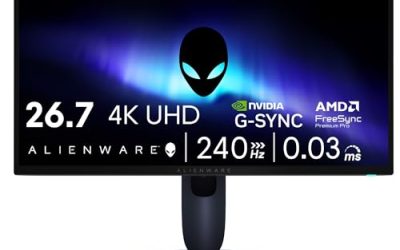
Dell’s flagship pairs a 31.6-inch QD-OLED panel with a gentle 1700R curve that wraps the 4K image slightly toward the player, which suits a single-player console desk. The panel runs 3840 x 2160 at up to 240Hz with a 0.03ms gray-to-gray response time, and its two HDMI 2.1 ports accept the PS5 Pro’s 4K 120Hz output with VRR and auto low latency mode. A dedicated console mode maps the console’s color output correctly, a detail many PC-first monitors skip.
HDR is a strength: the AW3225QF carries VESA DisplayHDR True Black 400 certification, supports Dolby Vision HDR, and covers 99 percent of the DCI-P3 color space, so HDR-graded titles show deep shadow detail and bright highlights together. A DisplayPort 1.4 input and USB hub round out the connections, and Dell backs the panel with a three-year warranty that includes burn-in coverage.
Specs
- Screen size: 31.6 inches, curved 1700R
- Panel type: QD-OLED
- Resolution: 3840 x 2160 (4K UHD)
- Refresh rate: 240Hz
- Response time: 0.03ms (GtG)
- HDR: VESA DisplayHDR True Black 400, Dolby Vision
- Color gamut: DCI-P3 99 percent
- Adaptive sync: HDMI VRR, AMD FreeSync Premium Pro, NVIDIA G-Sync Compatible
- Ports: 2 x HDMI 2.1, DisplayPort 1.4, USB hub
- Extras: Console mode, three-year warranty with burn-in coverage
- Tier: Premium
Samsung Odyssey OLED G8 (G80SD)
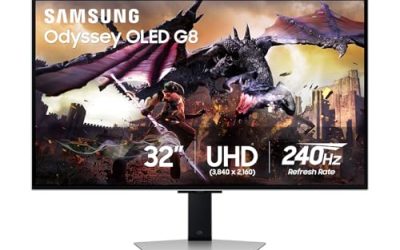
Samsung’s G80SD takes the same 32-inch 4K QD-OLED formula and keeps the panel flat, which many players prefer for a monitor that also handles everyday PC work. It runs at 240Hz with a 0.03ms response time, and its HDMI 2.1 ports carry the PS5 Pro at 4K and 120Hz with VRR. Samsung rates typical brightness at 250 nits, and the panel is certified to VESA DisplayHDR True Black 400.
Two features separate it from the Alienware. A matte anti-glare coating cuts reflections in brighter rooms where glossy OLED panels mirror windows and lamps, and Samsung’s OLED Safeguard+ uses a dynamic cooling system to manage panel heat. The monitor also runs Samsung’s smart platform, so streaming apps and the Gaming Hub work without the console or a PC switched on.
Specs
- Screen size: 32 inches, flat
- Panel type: QD-OLED
- Resolution: 3840 x 2160 (4K UHD)
- Refresh rate: 240Hz
- Response time: 0.03ms (GtG)
- HDR: VESA DisplayHDR True Black 400, typical brightness 250 nits
- Adaptive sync: HDMI VRR, AMD FreeSync Premium Pro
- Ports: 2 x HDMI 2.1, DisplayPort 1.4, USB hub
- Extras: Anti-glare coating, OLED Safeguard+, smart TV apps and Gaming Hub
- Model: LS32DG802SNXZA
- Tier: Premium
MSI MPG 321URX QD-OLED
The MPG 321URX matches the Samsung and Alienware on the core numbers: a 31.5-inch QD-OLED panel at 4K and 240Hz, a 0.03ms response time, DisplayHDR True Black 400 certification and 99 percent DCI-P3 coverage. Two HDMI 2.1 ports take the PS5 Pro’s full 4K 120Hz VRR signal, so console performance is identical in practice to the other 32-inch picks here.
Where the MSI pulls ahead is desk integration. A USB-C input with DisplayPort alt mode and 90W power delivery drives a laptop over one cable, and a built-in KVM switch shares peripherals across machines. MSI’s OLED Care 2.0 suite runs pixel-refresh routines, a graphene film and custom heatsink manage heat without a fan, and the three-year warranty includes burn-in coverage. For a mixed console, PC and laptop desk, this is the most convenient 32-inch model here.
Specs
- Screen size: 31.5 inches, flat
- Panel type: QD-OLED
- Resolution: 3840 x 2160 (4K UHD)
- Refresh rate: 240Hz
- Response time: 0.03ms (GtG)
- HDR: VESA DisplayHDR True Black 400
- Color gamut: DCI-P3 99 percent
- Adaptive sync: HDMI VRR, Adaptive-Sync
- Ports: 2 x HDMI 2.1, DisplayPort 1.4, USB-C (DP alt mode, 90W PD), USB hub
- Extras: KVM switch, OLED Care 2.0, three-year warranty with burn-in coverage
- Tier: Premium
ASUS ROG Swift OLED PG32UCDP

The PG32UCDP is the esports-leaning flagship of the group. Its 32-inch WOLED panel runs 4K at 240Hz and adds a dual-mode option that switches to 1920 x 1080 at 480Hz for competitive PC play, a trick none of the QD-OLED picks here match. Response time is 0.03ms, and the panel carries DisplayHDR True Black 400 certification with 99 percent DCI-P3 coverage and a peak brightness rated at 1,300 nits in a small HDR window.
For the PS5 Pro, the two HDMI 2.1 ports deliver 4K at 120Hz with VRR, as on the other flagships; the console uses a fraction of the panel’s speed. The extra hardware aims at the PC side: a custom heatsink, OLED Anti-Flicker technology and USB-C with 90W power delivery. Buy it if a serious gaming PC shares the desk; console-only players pay for speed they cannot use.
Specs
- Screen size: 32 inches, flat
- Panel type: WOLED
- Resolution: 3840 x 2160 (4K UHD), dual mode 1920 x 1080
- Refresh rate: 240Hz at 4K, 480Hz at 1080p
- Response time: 0.03ms (GtG)
- HDR: VESA DisplayHDR True Black 400, peak brightness 1,300 nits (small window)
- Color gamut: DCI-P3 99 percent
- Adaptive sync: HDMI VRR, NVIDIA G-Sync Compatible, AMD FreeSync Premium Pro
- Ports: 2 x HDMI 2.1, DisplayPort 1.4, USB-C (90W PD), USB hub
- Extras: Dual-mode refresh, OLED Anti-Flicker, custom heatsink
- Tier: Premium
LG UltraGear 27GS95QE-B

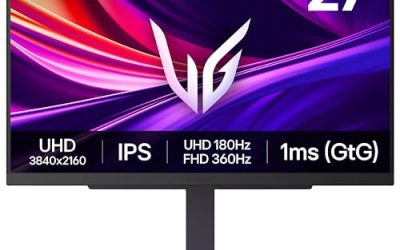
The 27GS95QE-B is the smaller, sharper-value route into OLED for a PS5 Pro. Its 26.5-inch WOLED panel runs at 2560 x 1440 rather than 4K, and the console’s native 1440p output mode feeds it directly at up to 120Hz with VRR over HDMI 2.1. Refresh rate is 240Hz with a 0.03ms response time, so performance modes look as fluid as on the bigger panels; only pixel density drops.
HDR performance stays in flagship territory: DisplayHDR True Black 400 certification, 98.5 percent DCI-P3 coverage and per-pixel blacks identical in character to the 32-inch models. An anti-glare coating helps in lit rooms, and a four-pole headphone output with DTS Headphone:X covers chat and game audio from one jack. On a compact desk, or as a dedicated console station where 4K is wasted at viewing distance, this is the sensible OLED size.
Specs
- Screen size: 26.5 inches, flat
- Panel type: WOLED
- Resolution: 2560 x 1440 (QHD)
- Refresh rate: 240Hz
- Response time: 0.03ms (GtG)
- HDR: VESA DisplayHDR True Black 400, HDR10
- Color gamut: DCI-P3 98.5 percent
- Adaptive sync: HDMI VRR, NVIDIA G-Sync Compatible, AMD FreeSync Premium
- Ports: 2 x HDMI 2.1, DisplayPort 1.4, USB hub, 4-pole headphone out
- Tier: Mid-range
How to Choose
Start with the connection, because it decides whether the console’s best modes work at all. The PS5 Pro needs a full-bandwidth HDMI 2.1 port for 4K at 120Hz with VRR; every pick here qualifies, including the 1440p LG, which uses the console’s native 1440p 120Hz mode instead. An HDMI 2.0 OLED from an older product line can force the console down to 60Hz, so confirm the port generation before anything else.
Next, choose size and resolution by desk and viewing distance. The four 32-inch 4K models show PSSR-upscaled output at full detail, while the 27-inch 1440p LG keeps the same contrast, response time and 120Hz console support in a smaller footprint. Panel flavor is the last call: QD-OLED models (Alienware, Samsung, MSI) offer wide color volume and strong HDR highlights, while the WOLED picks (ASUS, LG) add features like dual-mode refresh and anti-flicker. All five need the usual OLED care habits, and the three-year burn-in warranties on the Alienware and MSI are worth weighting if the monitor will show static HUDs daily.
Who Should Skip
Skip this category if the PS5 Pro already plays on a good 4K OLED TV, where screen size beats desk ergonomics for most living-room play. Skip it if your games are mostly bright, slow-paced titles and a quality IPS monitor already covers them; OLED’s advantage shows in dark scenes and fast motion, not everywhere. Competitive PC players who want 1440p at 360Hz or higher should compare dedicated esports roundups instead, and buyers who leave static desktop screens up all day may prefer an LCD panel that asks for no burn-in care.
FAQ
Does the PS5 Pro need an OLED monitor to look its best?
No, but OLED flatters what the console does well. PS5 Pro Enhanced games lean on PSSR upscaling and HDR grading, and an OLED panel’s per-pixel dimming renders that HDR with true blacks and no backlight blooming. A good IPS or VA monitor still shows the higher frame rates and resolution modes; it simply cannot match OLED contrast in dark scenes.
Will these monitors run the PS5 Pro at 4K and 120Hz?
Yes. Every 32-inch pick here accepts the console’s 4K 120Hz signal with VRR over HDMI 2.1, and the 27-inch LG accepts the console’s native 1440p output at up to 120Hz with VRR on the same connection. The panels’ higher native refresh rates, 240Hz and above, are headroom that only a connected gaming PC can use.
Is burn-in a real concern for console gaming?
It is a manageable one. Game HUDs are static elements, so all five makers build in pixel-refresh and panel-protection routines, and the Alienware and MSI add three-year warranties that explicitly cover burn-in. Running the maintenance cycles, using the console’s screen dimmer and varying content keeps the risk low for typical mixed play.
Is a 1440p OLED enough for the PS5 Pro, or is 4K worth it?
Both are legitimate. The PS5 Pro outputs a native 1440p signal, so the LG in this roundup shows a sharp image with full 120Hz and VRR support at a lower tier. The 4K models add fine detail in PSSR-upscaled titles and double better as PC monitors. Choose by desk size and whether a PC shares the screen, not by the console alone.
Final Verdict
For most PS5 Pro desks, the Alienware AW3225QF is the complete package: 4K QD-OLED contrast, a curve that suits solo play, console mode and a burn-in warranty. The Samsung Odyssey OLED G8 is the flat-panel alternative with smart features for a dual-purpose screen, and the MSI MPG 321URX is the pick when USB-C and KVM simplify a crowded desk. The ASUS PG32UCDP serves esports-leaning PC players first, and the LG 27GS95QE-B brings the same OLED character to smaller desks at 1440p.
Product and ASIN Reference
| Product | ASIN |
|---|---|
| Alienware AW3225QF 32-inch 4K QD-OLED Gaming Monitor | B0CVQGSRZ9 |
| Samsung Odyssey OLED G8 (G80SD) 32-Inch Gaming Monitor | B0DHJ8B7TP |
| MSI MPG 321URX QD-OLED | B0CTSC3VS4 |
| ASUS ROG Swift OLED PG32UCDP | B0D7NNK43H |
| LG UltraGear 27GS95QE-B 27-Inch OLED Monitor | B0CSGWXVBN |
Related guides
More from Amazon
Programs that pair well with the guide above. Offers and eligibility are set by Amazon and may change.
A free business account with business pricing and bulk-buying tools for work, shop or home office.
Create a business accountFree shipping on eligible items, Prime Video and more. Eligible new members can start with a free trial.
Start a Prime free trialAudiobooks and podcasts to listen to on the go. Eligible new members can start with a free trial.
Try Audible freeAd-free music streaming. Eligible new subscribers can start with a free trial.
Try Music Unlimited freeAs an Amazon Associate we earn from qualifying purchases.