
When choosing between TLC and QLC NAND flash SSDs, the real decision is not simply speed versus capacity. For a home user, it is about how much data the drive will write, how long the drive should remain useful, and whether saving money today could mean replacing it sooner.
TLC stores three bits per NAND cell, while QLC stores four. QLC packs more data into the same physical space, which helps reduce the price per terabyte. TLC generally tolerates more write activity and offers a wider performance cushion when the drive is nearly full or handling sustained transfers.
As an Amazon Associate we earn from qualifying purchases at no extra cost to you.


For occasional browsing, office work, streaming, photo storage, and game libraries, either type can be a sensible choice. For video editing, frequent backups, a home server, or a PC that receives large daily writes, TLC is usually the safer long-term option. The best choice in 2026 depends less on headline speed and more on workload, capacity, warranty, and the manufacturer’s TBW rating.
Our Top Picks



Top 3 picks at a glance
Quick Verdict
Choose a TLC SSD if endurance, consistent performance, and long-term reliability matter more than the lowest purchase price. TLC is the better all-around choice for a primary desktop drive, a family computer, a work-from-home system, or a small NAS that sees regular updates.
Choose a QLC SSD if you want inexpensive capacity for a lightly used laptop, a game library, a media collection, or secondary storage. QLC is not automatically unreliable, but its lower write endurance makes it less attractive for workloads that constantly rewrite large files.
A practical rule is simple: buy TLC for the operating-system drive when the price difference is modest, and consider QLC when you need more capacity than your budget would allow with TLC.
Side by Side
| Factor | TLC NAND SSD | QLC NAND SSD |
|---|---|---|
| Ownership comfort | More forgiving during large, frequent writes | Comfortable for light everyday use; needs more workload awareness |
| Durability | Usually higher write endurance and stronger sustained performance | Usually lower write endurance, especially when nearly full |
| Price range | About $70–$130 for 1TB SATA or entry NVMe models; $120–$230 for 2TB | About $55–$100 for 1TB SATA or entry NVMe models; $90–$180 for 2TB |
| Maintenance | Keep roughly 10–20% free for best performance | Keeping 15–20% free is especially helpful for write-heavy use |
| Space needed | Common 2.5-inch models measure about 100 × 69.85 × 7 mm | Available in the same 2.5-inch size, or compact M.2 formats such as 22 × 80 mm |
| Look | Usually indistinguishable from QLC in a laptop or desktop | Same understated 2.5-inch or M.2 appearance |
| Resale | Often easier to sell later when health and TBW ratings are strong | Lower capacity pricing can reduce used-market value |
| Best for | Primary drives, creative work, backups, gaming plus frequent updates | Media libraries, game storage, light laptops, and budget upgrades |
| Typical power draw | Often roughly 2–5 watts in active consumer use, depending on interface and model | Often in a similar general range, but check the individual specification |
Where TLC Wins
TLC’s main advantage is write endurance. Because each cell stores three bits instead of four, the controller has more voltage margin when writing and reading data. NAND cells wear as they are programmed and erased, so TLC generally provides more usable write cycles than QLC.
Manufacturers express endurance as TBW, or terabytes written. A 600TBW rating, for example, means the manufacturer has rated the drive for 600 terabytes of writes under its stated warranty conditions. It does not promise that the SSD will fail immediately after 600TB, nor does it guarantee a particular lifespan. The rating is a comparison tool, not a countdown clock.
TLC also tends to hold up better during sustained transfers. Consumer SSDs commonly use an SLC cache, which temporarily treats part of the NAND as if it stored one bit per cell. That cache can make both TLC and QLC drives look fast during short transfers. Once the cache is exhausted, native write performance can fall. TLC commonly suffers a smaller drop or recovers more quickly.
That distinction matters when importing a large photo archive, creating a backup, editing 4K video, or moving several hundred gigabytes between drives. The Gigastone 512GB High Endurance SSD is a useful example of how a product may emphasize TLC flash, SLC caching, 24/7 reliability, and a five-year warranty. Its listed price is around $99, but buyers should still check its actual TBW figure before comparing it with a different TLC model.
TLC is also preferable when the drive will stay fairly full. All SSDs need spare space for garbage collection and wear leveling, but QLC drives can be more sensitive to reduced free capacity. A 1TB drive with 150GB available is generally more comfortable to manage than a 1TB drive with only 20GB free.
Where QLC Nand Flash Ssd Endurance Wins
QLC does not win on raw endurance. It wins on capacity value, which can be more important in a home where the alternative is buying a smaller drive or continuing to use a mechanical hard disk.
A QLC SSD is well suited to data that is written once and read many times. Examples include a Steam or console game library, downloaded movies, music, scanned documents, and a photo archive that is occasionally expanded. Game loading and everyday application launches can feel much faster than with a hard drive, even when the QLC drive is not designed for heavy sustained writes.
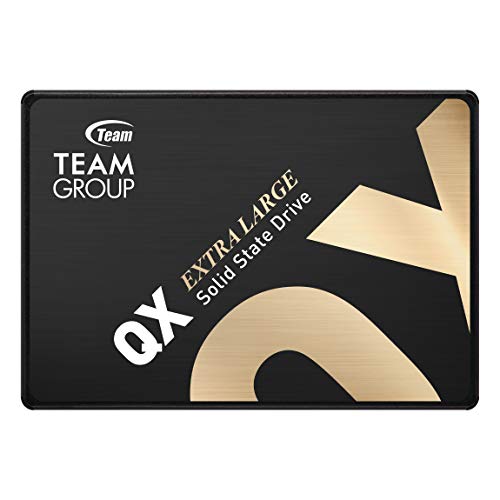
The TEAMGROUP QX 1TB is an example of a budget QLC SATA drive. It is listed at around $130 and carries a 200TBW rating, with advertised sequential speeds of up to 560MB/s read and 500MB/s write. Those figures are useful for comparison, but sequential speed does not tell the whole endurance story. A drive can reach its advertised burst speed while still being a poor fit for constant rewriting.
QLC is also sensible for a secondary desktop drive or an older laptop with a 2.5-inch SATA bay. A typical 2.5-inch SSD weighs roughly 40–70 grams and uses very little power compared with a spinning hard drive. Before buying, confirm whether the computer accepts 2.5-inch SATA, M.2 SATA, or M.2 NVMe; these formats are not interchangeable simply because they look similar.
Cost Over 5 Years
Purchase price is only part of the five-year cost. Suppose a 1TB QLC drive costs $65 and a comparable 1TB TLC drive costs $90. The upfront difference is $25, or $5 per year over five years. That is a small premium if TLC avoids a replacement or provides enough confidence to use the drive for backups and active projects.
On the other hand, a QLC drive can be the economical choice when its workload is light. If it stores games and media, receives only occasional updates, and remains below about 80–85% capacity, its lower TBW rating may never become a practical limitation. Spending $25 more on TLC would not necessarily produce a noticeable improvement in that scenario.
Include the cost of backup storage. Neither TLC nor QLC should be the only copy of irreplaceable photos or records. A 2TB external hard drive may cost roughly $60–$100, while a 2TB external SSD may cost about $100–$180. A reliable backup often matters more than moving from one consumer NAND type to another.
Which One for Your Home
Small apartment
Choose based on the computer’s role. For a compact laptop used for browsing, documents, and streaming, a QLC SSD can deliver a quiet, responsive upgrade at a lower price. For a small desktop used for work, photo management, or frequent downloads, TLC is worth the modest premium. A 1TB drive is usually enough for everyday software, while 2TB makes sense if the computer also stores games and media.
Family with kids and pets
TLC is the safer primary-drive choice because family computers often accumulate photos, school projects, games, updates, and device backups without a carefully managed schedule. Look for at least a five-year warranty and a clearly stated TBW rating. Keep 10–20% of the capacity free, and maintain a separate backup for photos and important documents.
Rental
For a rental property’s smart-home hub, spare laptop, or inexpensive streaming computer, QLC is often adequate. It keeps the upgrade cost down and uses little power. If the device runs surveillance recording, a local file server, or continuous downloads, step up to TLC or a drive specifically designed for high-endurance recording. Check operating temperatures and ventilation rather than hiding the drive in a tightly enclosed cabinet.
Long-term home
Choose TLC for a computer or home server you expect to keep for many years. The extra endurance gives more flexibility if your habits change from light office work to photo editing, gaming, or home backups. A 2TB TLC SSD priced around $120–$230 can be a better long-term purchase than replacing a cheaper 1TB QLC drive after your storage needs grow.
FAQ
Is TLC always more reliable than QLC?
No. Reliability depends on the NAND, controller, firmware, cooling, warranty, and manufacturing quality as well as the cell type. TLC generally offers more write endurance, but a well-made QLC drive can serve reliably for years under a light workload.
Is QLC bad for gaming?
No. QLC is usually fine for storing and playing games. Game installation, patching, and updates create writes, so leave free space and avoid using a low-end QLC drive as a constant recording or editing workspace.
How much SSD endurance does a home user need?
Many home users write far less data than they expect. A TBW rating of 200TB represents about 110GB of writes every day for five years, while 600TB represents roughly 329GB per day over the same period. Actual needs vary, but these examples show why a rated 200TBW QLC drive can be adequate for ordinary use.
Should I buy a larger QLC drive or a smaller TLC drive?
Buy the larger QLC drive when capacity is the priority and the data is mostly read. Buy TLC when the drive will hold the operating system, active projects, frequent backups, or constantly changing files. In either case, compare TBW, warranty length, interface compatibility, and total price rather than relying on NAND type alone.









