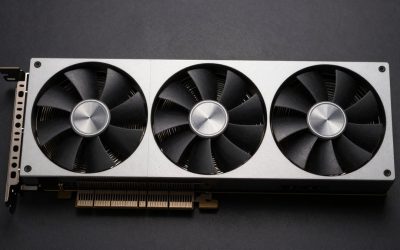
Yes, upgrading from an RTX 2070 to an RTX 5060 Ti 16GB is worth it for 1440p and modern AAA games: published data puts the newer card roughly 40-80% faster depending on source and resolution, it doubles VRAM from 8 GB to 16 GB, and it adds DLSS frame generation including Multi Frame Generation, all at nearly the same power draw; the main reasons to wait are a CPU that is already the bottleneck or a play list made of light esports titles.
The RTX 2070 launched in October 2018 at $499 and introduced many PC gamers to ray tracing and DLSS. Seven years later it still runs a lot of games, but 8 GB of VRAM and Turing-era performance increasingly force compromises. The RTX 5060 Ti 16GB, released in April 2025 at $429, sits in the middle of NVIDIA’s current RTX 50 lineup and is the natural drop-in successor for an RTX 2070 owner who does not want to change power supply or case.
As an Amazon Associate we earn from qualifying purchases at no extra cost to you.


Our Top Picks
 MSI GAMING GeForce RTX 2070 8GB GDRR6 256-bitBoost Clock: 1620 MHz8.9 x 5.04 x 1.6 inches1.7 poundsCheck on Amazon
 ASUS Dual GeForce RTX 5060 Ti 16GB GDDR7RTX5060Ti|OC|16GB9 x 4.7 x 2 inches1.4 poundsCheck on Amazon
Top 3 picks at a glance
RTX 2070 vs RTX 5060 Ti 16GB at a Glance
| Spec | RTX 2070 | RTX 5060 Ti 16GB |
|---|---|---|
| Architecture | Turing | Blackwell 2.0 |
| Release date | 17 October 2018 | 16 April 2025 |
| Launch MSRP | $499 | $429 |
| CUDA cores | 2304 | 4608 |
| Boost clock | 1620 MHz | 2572 MHz |
| Process | 12 nm | 5 nm |
| TDP | 175 W | 180 W |
| Memory | 8 GB GDDR6 | 16 GB GDDR7 |
| Memory bus | 256-bit | 128-bit |
| Bandwidth | 448.0 GB/s | 448.0 GB/s |
| L2 cache | 4 MB | 32 MB |
| Interface | PCIe 3.0 x16 | PCIe 5.0 x8 |
| Power connectors | 1x 8-pin | 1x 8-pin |
| Length / width | 229 mm, 2-slot | 241 mm, 2-slot |
| Display outputs | 1x DVI, 1x HDMI 2.0, 2x DP 1.4a, 1x USB-C | 1x HDMI 2.1b, 3x DP 2.1b |
Memory bandwidth is identical at 448 GB/s; the 5060 Ti gets there with fast GDDR7 on a 128-bit bus instead of GDDR6 on 256-bit, and it adds an eight-times-larger L2 cache. The real jumps are core count, clock speed, VRAM capacity and architecture.
What the Performance Jump Looks Like
Sources disagree on the exact size of the gap, which is common for cards several generations apart. Benchmark aggregators range from about 40% to around 79% in favor of the RTX 5060 Ti 16GB across large game samples, with 3DMark showing a gap near 75%. Review data from Gamers Nexus showed the 5060 Ti 16-39% ahead of the RTX 3060 Ti at 1440p, and the RTX 3060 Ti itself is clearly faster than an RTX 2070, which supports a total uplift toward the upper half of that range in modern games.
- 1080p: a large gain in demanding titles, smaller in esports games where the CPU sets the limit.
- 1440p: the sweet spot for this upgrade. A modern AAA game that averages roughly 40-50 FPS on an RTX 2070 at High settings commonly moves into the 70-85 FPS band on the 5060 Ti 16GB, before upscaling. Exact numbers vary with settings, CPU and patch.
- Ray tracing: the gain is usually larger than in raster, since Blackwell’s RT cores are three generations newer than Turing’s.
DLSS 4 and Frame Generation: The Feature Gap
The RTX 2070 still benefits from NVIDIA’s software. It supports DLSS super resolution, and NVIDIA’s DLSS 4 transformer model for super resolution and ray reconstruction runs on all RTX cards back to the 20 series. What the RTX 2070 cannot use is frame generation of any kind from NVIDIA.
- DLSS Frame Generation (2x) requires RTX 40 or newer.
- DLSS Multi Frame Generation, which generates up to three extra frames per rendered frame, is exclusive to RTX 50 cards like the 5060 Ti.
- NVIDIA Reflex works on both and is important when frame generation is enabled to keep input latency in check.
Frame generation works best when the base frame rate is already reasonable, around 50-60 FPS or more. The 5060 Ti’s higher native performance is what makes its frame generation useful rather than laggy.
VRAM: The Quiet Reason to Upgrade
The 8 GB RTX 2070 is increasingly squeezed. Several recent releases exceed 8 GB at 1440p High textures, and settings such as ray tracing and frame generation add memory pressure on top. Going to 16 GB removes this limit for the foreseeable future at 1440p and gives breathing room for texture packs and mods. The 8 GB version of the RTX 5060 Ti exists too, but for an upgrade meant to last several years, the 16 GB model is the safer pick.
Platform Check: PCIe 3.0, PSU and Case
Many RTX 2070 systems use PCIe 3.0 motherboards. The RTX 5060 Ti runs on eight lanes, so on a PCIe 3.0 board it operates at 3.0 x8. With 16 GB of VRAM, games rarely overflow memory, so the measured loss is usually small; it is the 8 GB 5060 Ti that suffers more in that situation.
Power barely changes. Sizing as GPU TDP plus CPU plus about 150 W headroom with a 105 W CPU:
- RTX 2070: 175 + 105 + 150 = 430 W.
- RTX 5060 Ti 16GB: 180 + 105 + 150 = 435 W, so the same quality 550 W PSU that ran the 2070 is typically fine.
Both reference specs use a single 8-pin connector and a 2-slot cooler, and the 5060 Ti is 241 mm against 229 mm, so most cases that fit an RTX 2070 will fit a dual-fan 5060 Ti. Triple-fan partner models can be longer. Note that the 5060 Ti has no DVI output; older monitors using DVI need an adapter.
Is the CPU Ready for the New Card?
An RTX 2070 was often paired with processors such as a Ryzen 5 2600/3600 or an Intel Core i5-8400 to i7-9700K. Those chips still game well, but the RTX 5060 Ti 16GB can outrun some of them at 1080p, particularly in CPU-heavy open-world games, simulators and esports titles running at very high frame rates. A simple check: run a demanding game on the RTX 2070 at the current resolution and watch GPU utilization. If it already sits well below 95% during gameplay, the CPU is limiting performance, and a faster GPU will deliver less than the benchmark gap suggests. At 1440p the GPU carries more of the load, so most 6-core CPUs from 2019 onward let the 5060 Ti show most of its advantage. Frame generation also helps in CPU-bound scenes, since generated frames do not require additional CPU work, though the base frame rate should stay reasonable for responsive input.
Upgrade Math
The RTX 2070 now usually sells for about $130-$180 used. If an RTX 5060 Ti 16GB is bought near its $429 MSRP and the old card is sold, the net cost is roughly $250-$300. Taking the RTX 2070 as 100 and the 5060 Ti 16GB at about 165, that is roughly $4 per percentage point of extra performance, plus double the VRAM and frame generation. At original launch prices the comparison is even more lopsided: $499 bought 100 points of performance in 2018, while $429 buys around 165 today.
Is Your Setup a Good Fit?
| Setup | Recommendation |
|---|---|
| 1440p monitor, AAA games, CPU from 2020 or newer | Upgrade; this is the ideal case |
| 1080p, competitive shooters on an older quad-core | Upgrade the CPU or platform first |
| Games running out of 8 GB VRAM | Upgrade to the 16 GB model, not the 8 GB |
| Budget closer to $550-$600 | Consider an RTX 5070 for a larger jump |
| Happy with current 1080p Medium performance | The RTX 2070 still has life; waiting is reasonable |
Frequently Asked Questions
How much faster is the RTX 5060 Ti 16GB than the RTX 2070?
Published comparisons range from about 40% to roughly 80%, depending on the game list, resolution and settings. The gain tends to be larger at 1440p, with ray tracing enabled, and in games that need more than 8 GB of VRAM.
Can the RTX 2070 use DLSS 4?
Partly. The RTX 2070 supports the DLSS 4 transformer model for super resolution and ray reconstruction. It does not support DLSS Frame Generation or Multi Frame Generation, which need RTX 40 and RTX 50 cards respectively.
Do I need a new PSU to upgrade from an RTX 2070?
Usually not. The RTX 5060 Ti 16GB has a 180 W TDP versus 175 W for the RTX 2070, and both reference specs use a single 8-pin connector. A quality 550 W unit is typically sufficient.
Will the RTX 5060 Ti lose performance on a PCIe 3.0 motherboard?
Only a little in most games. It runs at PCIe 3.0 x8 on those boards, but with 16 GB of VRAM it rarely needs heavy bus traffic. The 8 GB model is more sensitive to this.
Is the 8 GB RTX 5060 Ti a good alternative upgrade?
It is cheaper but carries the same 8 GB VRAM limit that is already holding back the RTX 2070. For a multi-year upgrade, the 16 GB model is the safer choice.
Related guides
More from Amazon
Programs that pair well with the guide above. Offers and eligibility are set by Amazon and may change.
A free business account with business pricing and bulk-buying tools for work, shop or home office.
Create a business accountFree shipping on eligible items, Prime Video and more. Eligible new members can start with a free trial.
Start a Prime free trialAudiobooks and podcasts to listen to on the go. Eligible new members can start with a free trial.
Try Audible freeAd-free music streaming. Eligible new subscribers can start with a free trial.
Try Music Unlimited freeAs an Amazon Associate we earn from qualifying purchases.