
An M.2 2230 SSD is a 22 mm-wide, 30 mm-long NVMe drive — roughly the size of a postage stamp — and in 1TB capacity it’s the standard storage upgrade for the Steam Deck, the original ASUS ROG Ally, and Microsoft’s removable-SSD Surface lineup. Everything below covers what the form factor actually limits, which devices take it (and which popular ones don’t), and what speeds you should realistically expect before you spend $70–$120.
As an Amazon Associate we earn from qualifying purchases at no extra cost to you.
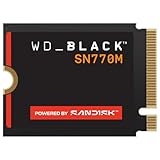
What “2230” Actually Means
M.2 sizing is literal: 2230 means 22 mm wide and 30 mm long. For context, the standard desktop drive is 2280 (80 mm long), and 2242 sits between them. That 30 mm length only leaves room for one NAND package plus the controller, which forces three design compromises you won’t see on a spec sheet:
- No DRAM cache. Every retail 2230 drive is DRAM-less and uses HMB (Host Memory Buffer), borrowing ~64 MB of system RAM instead. Fine for gaming and OS use; it only shows up as slower sustained writes during very large file transfers.
- One NAND package. Sequential write speed is limited by how many dies can be written in parallel inside that single package — this is why even “Gen4” 2230 drives top out around 5,000–7,000 MB/s read but often write slower than their 2280 siblings.
- Single-sided only. Devices like the Steam Deck have almost zero z-height clearance. Nearly all retail 2230 drives are single-sided, but if you’re buying an OEM pull or a bare PCB, verify there’s nothing on the back of the board.
Which Devices Actually Take a 1TB M.2 2230
This is where buyers get burned, because several popular handhelds look identical to their predecessors but moved to the longer 2280 slot. Here’s the map:
| Device | SSD slot | Interface | 1TB 2230 fits? |
|---|---|---|---|
| Steam Deck LCD (64/256/512) | M.2 2230, single-sided | PCIe 3.0 x4 | Yes — 64GB model ships with the slot empty (eMMC onboard) |
| Steam Deck OLED | M.2 2230, single-sided | PCIe 3.0 x4 | Yes |
| ASUS ROG Ally (2023) | M.2 2230, single-sided | PCIe 4.0 x4 | Yes |
| ASUS ROG Ally X (2024) | M.2 2280 | PCIe 4.0 x4 | No — buy a 2280 drive instead |
| Lenovo Legion Go / Legion Go S | M.2 2280 | PCIe 4.0 x4 | No |
| Surface Pro 8, 9, 10, 11 / Pro X | M.2 2230 (behind kickstand door) | PCIe 3.0/4.0 x4 | Yes |
| Surface Laptop 3 / 4 / 5 | M.2 2230 (under rubber feet) | PCIe 3.0 x4 | Yes |
| Some thin laptops (Dell, ASUS, Lenovo models) | M.2 2230 or dual-position standoff | Varies | Check service manual — many 2230 mounts also accept 2242/2280 |
The two traps worth repeating: the ROG Ally X dropped 2230 entirely when ASUS enlarged the chassis for its bigger battery, and the Legion Go was 2280 from day one. If you own either, this entire product category is irrelevant to you.
Realistic 1TB Performance — And the Steam Deck Math
Spec-sheet numbers on 2230 drives are measured on Gen4 desktops. Two things change in real devices:
Interface ceiling. The Steam Deck’s slot is PCIe 3.0 x4. One Gen3 lane carries roughly 985 MB/s after encoding overhead, so four lanes cap at ~3.94 GB/s — call it ~3.5 GB/s in practice. That means a 1TB drive rated at 7,100 MB/s delivers less than half its rated read speed in a Deck. A cheaper 4,800 MB/s drive loses almost nothing. In the ROG Ally and Gen4 Surfaces, you get the full rating.
Load times are CPU-bound anyway. Game loading on the Deck is dominated by decompression and shader compilation, not raw reads. Moving from a stock drive to the fastest 2230 on the market typically shaves a second or two at most per load screen — you’re buying capacity and reliability, not speed.
Battery impact is small but real. Modern 2230 drives pull roughly 4–6 W during heavy writes and near 1 W in typical gameplay streaming. Worked example on a Steam Deck OLED (50 Wh battery): if your game session draws 20 W total, you get 50 Wh ÷ 20 W = 2.5 hours. A drive averaging 1 W more than a low-power OEM unit drops that to 50 Wh ÷ 21 W ≈ 2.38 hours — about 7 minutes. Noticeable, not decisive.
Sustained writes. DRAM-less drives with TLC NAND hold roughly 300–700 MB/s once the SLC cache fills; QLC-based 2230 models can fall to ~80–150 MB/s. Copying a 150 GB game takes around 4–8 minutes on TLC versus potentially 20+ on exhausted QLC. Do the big installs once, and it stops mattering.
Is 512GB Enough? The 2230 512GB vs 1TB Decision
An M.2 2230 SSD in 512GB exists and makes sense in exactly two cases: you’re upgrading a 64GB or 256GB Steam Deck on a tight budget, or you’re refreshing a Surface that’s mostly used for documents and browsing. Options include the WD Black SN770M 500GB, the Sabrent Rocket 2230 512GB, and OEM pulls like the Kioxia BG5/BG6 512GB that ship inside Decks and Surfaces from the factory.
The math usually favors 1TB. Typical pricing: 512GB runs ~$45–$65 (about $0–around $0 per GB), while 1TB runs ~$70–$110 (about $0–around $0 per GB). You pay roughly 40–50% more money for 100% more capacity. Also note that 512GB variants often carry write-speed ratings 10–20% below their 1TB siblings, since fewer NAND dies are active in the package.
One scenario where 512GB is pointless: upgrading a 512GB Steam Deck or Surface to another 512GB drive. Same capacity, half a day of reinstalling — skip it.
Top 1TB M.2 2230 Picks for 2026
| Model | Rated read/write | NAND | Best for | Typical price |
|---|---|---|---|---|
| WD Black SN770M 1TB | 5,150 / 4,900 MB/s | TLC | The default Deck/Ally pick — purpose-built for 2230, 5-year warranty | $80–$110 |
| Crucial P310 1TB | 7,100 / 6,000 MB/s | QLC | Highest peak spec; best in Gen4 devices like the ROG Ally where the speed is reachable | $70–$95 |
| Corsair MP600 Mini 1TB | 4,800 / 4,800 MB/s | TLC | Balanced alternative; well-matched to the Steam Deck’s Gen3 ceiling | $75–$105 |
| Sabrent Rocket 2230 1TB | ~4,750 / 4,300 MB/s | TLC | Frequently the cheapest retail TLC option; also sold in 512GB | $65–$95 |
| OEM pulls (Kioxia BG6, Samsung PM9B1, Micron 2400) | 4,500–6,000 MB/s class | TLC or QLC, varies | Budget buys — often $40–$60, but usually no retail warranty | $40–$65 |
For a Steam Deck specifically, the honest ranking is whichever TLC drive is cheapest — the Gen3 cap erases the speed differences. For an Ally or Gen4 Surface, the P310 or SN770M justify their premium.
Install Notes Per Device
- Steam Deck: Power down fully, remove the 8 Phillips screws, unplug the battery ribbon before touching the SSD. After the swap, boot with a SteamOS recovery USB and reimage (or clone beforehand). Either way, plan on re-downloading games unless you cloned.
- ROG Ally: Back cover off, battery disconnected, single screw on the drive. ASUS includes Cloud Recovery in the BIOS, which rebuilds Windows over Wi-Fi — it works, but cloning to the new drive first is faster.
- Surface: The easiest swap of the three — the rSSD door pops with a SIM tool, no chassis disassembly. Have a Surface recovery USB ready before you start, because the new drive ships blank.
On all three: check the drive is single-sided, don’t overtighten the retention screw (the PCB is thin and flexes), and update the device BIOS before assuming a detection problem is a dead drive.
FAQ
Will a Gen4 2230 drive work in a Gen3 device like the Steam Deck?
Yes — NVMe is fully backward compatible. It just runs at Gen3 speeds (~3.5 GB/s ceiling), so don’t pay extra for a 7,000 MB/s rating you can’t use.
Is 1TB enough for a Steam Deck in 2026?
For most libraries, yes. At an average installed size of 30–60 GB for AAA titles, 1TB holds roughly 15–25 large games plus indies and the OS. If you keep multiple 100GB+ live-service games installed permanently, consider that 2TB 2230 models now exist — usually $140–$200.
Do I need a heatsink?
No. None of these devices have room for one, and 2230 drives are designed to throttle safely in enclosed handhelds. Heavy sustained writes will warm them up, but game streaming loads rarely trigger throttling.








