CFexpress replaced the aging CompactFlash and XQD formats for high-end cameras and capture workflows, but it ships in two physically incompatible shapes: Type A and Type B. Buying the wrong one is an expensive mistake, because the slot in your camera or reader only accepts one. Here is how the two differ and which storage pipeline each one feeds.
As an Amazon Associate we earn from qualifying purchases at no extra cost to you.


Our Top Picks
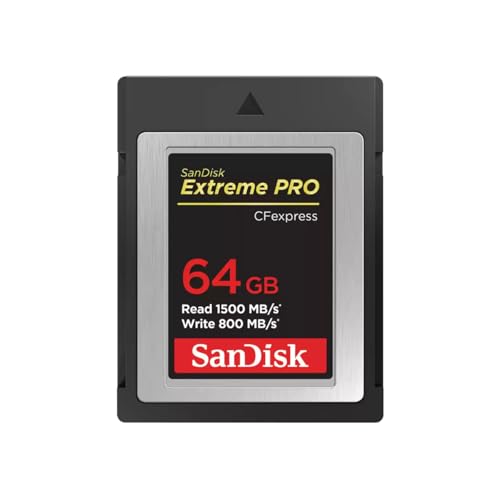
 SANDISK 128GB Extreme PRO CFexpress 4.0 Type B128GB0.09 x 1.43 x 0.1 inches0.02 poundsCheck on Amazon


Top 3 picks at a glance
Same protocol, different bodies
Both types are built on NVMe and PCIe, the same technology inside your M.2 SSD, which is why CFexpress cards are so much faster than SD. The difference is lane count and card size. Type A uses a single PCIe lane in a compact body, while Type B uses two lanes in a larger shell that is dimensionally identical to old XQD cards.
Speed classes at a glance
| Spec | Type A | Type B |
|---|---|---|
| PCIe lanes | 1 | 2 |
| Theoretical max | ~1000 MB/s | ~2000 MB/s |
| Typical real read | 700-900 MB/s | 1400-1700 MB/s |
| Physical size | Smaller than SD | XQD-sized |
| Common use | Select mirrorless bodies | Cinema, high-res bursts |
Which one do you need?
You do not choose the card; your device chooses for you. A camera with a Type A slot cannot take a Type B card and vice versa. Type A is rarer and tends to cost more per gigabyte because the manufacturing is trickier, while Type B dominates high-bitrate video and rapid-fire stills. Always confirm the exact type your body accepts before buying.
Sustained versus burst speed
Marketing numbers quote peak reads. What matters for 8K video or long RAW bursts is sustained write speed, which can be half the headline figure once the card’s internal cache fills. Look for a minimum sustained write rating, expressed as VPG (Video Performance Guarantee) 200 or 400, meaning 200 or 400 MB/s guaranteed.
Readers and offloading
To pull footage onto a PC quickly you want a reader that matches the card and connects over USB 3.2 Gen 2 (10 Gbps) or better. A Type B card in a 10 Gbps reader can offload a full 256 GB in a few minutes, versus half an hour for the same data over an old UHS-I SD reader. If your PC has USB4 or Thunderbolt, even the fastest Type B card will not bottleneck.
Longevity and heat
Because CFexpress cards run NVMe controllers, they generate heat during sustained high-bitrate recording, and thermal throttling can drop write speed mid-clip. Type B’s larger body dissipates heat better than the compact Type A, which is one reason cinema cameras favor it. If you shoot long takes, prefer a card with a generous sustained write rating and give it a moment to cool between marathon sessions.
Formatting and care
Always format cards in the camera that will use them, not in a computer, so the file system matches the device’s expectations. Reformat rather than deleting clips to keep the card’s internal housekeeping clean, and replace any card that starts throwing write errors, since a failing card in the field can cost you an entire shoot. Treat CFexpress like the small SSD it is, not like a disposable memory card.
Quick reference
Before buying a CFexpress card, run through this short checklist:
- Confirm the exact type your device accepts; Type A and Type B slots are not interchangeable.
- Type A caps near 1000 MB/s on one PCIe lane; Type B roughly doubles that on two lanes.
- Prioritize sustained write and VPG 200/400 ratings over headline peak read speeds.
- Type B dissipates heat better for long high-bitrate takes; give any card time to cool.
- Pair the card with a 10 Gbps-or-faster reader so offloading does not bottleneck.
FAQ
Can I use a CFexpress Type B card in place of an XQD card?
Often yes, after a firmware update from the camera maker, because the two share the same physical shell. Always check the manufacturer’s compatibility note first, since not every XQD device gained CFexpress support.
Is CFexpress faster than a good UHS-II SD card?
Dramatically. UHS-II tops out around 300 MB/s, while even Type A roughly triples that and Type B can be five times faster, which is why high-bitrate video modes require CFexpress.
Bottom line
Type A is small, single-lane, and caps near 1000 MB/s; Type B is XQD-sized, dual-lane, and reaches roughly 2000 MB/s. They are not interchangeable, so match the card to your device’s slot, prioritize sustained write and VPG ratings over peak numbers, and pair it with a fast reader to keep your storage pipeline moving.
Related guides
More from Amazon
Programs that pair well with the guide above. Offers and eligibility are set by Amazon and may change.
A free business account with business pricing and bulk-buying tools for work, shop or home office.
Create a business accountFree shipping on eligible items, Prime Video and more. Eligible new members can start with a free trial.
Start a Prime free trialAudiobooks and podcasts to listen to on the go. Eligible new members can start with a free trial.
Try Audible freeAd-free music streaming. Eligible new subscribers can start with a free trial.
Try Music Unlimited freeAs an Amazon Associate we earn from qualifying purchases.