The best PC cleaning and maintenance tools are a rechargeable electric air duster for the case, a gel or brush for the keyboard, and a low-torque screwdriver for opening the panels; this guide compares eleven listings across those three jobs. Nine of them are cordless or corded electric blowers, which replace canned air. The rest cover keys and screws. Claims such as RPM figures come from sellers and are not comparable across brands, so read them as marketing ranges.
Our Top Picks
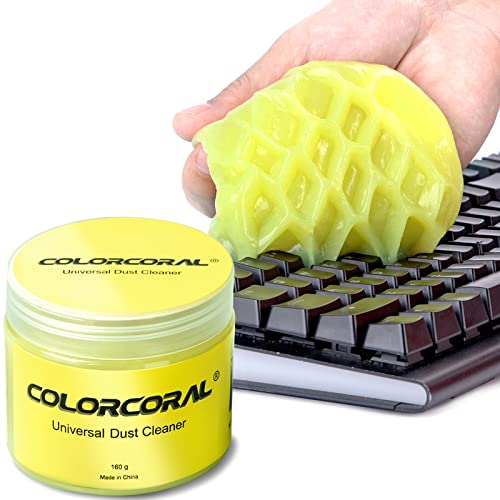 ColorCoral Cleaning Gel Universal Dust Cleaner for PC5.6 Ounce (Pack of 1)2.69 x 2.69 x 2.35 inches0.35 PoundsCheck on Amazon

Top 3 picks at a glance
Quick comparison by job
As an Amazon Associate we earn from qualifying purchases at no extra cost to you.




| Model | Key point from title | Price tier | Best for |
|---|---|---|---|
| FAOGO 170,000 RPM | Brushless, 4-speed, cordless duster | Check listing | Highest speed claim |
| ColorCoral Cleaning Gel | 160g gel for keyboards and car interiors | Check listing | Keys and vents |
| Fanttik S1 Pro | 16 bits, 3 torque settings, 2000mAh | Check listing | Opening panels |
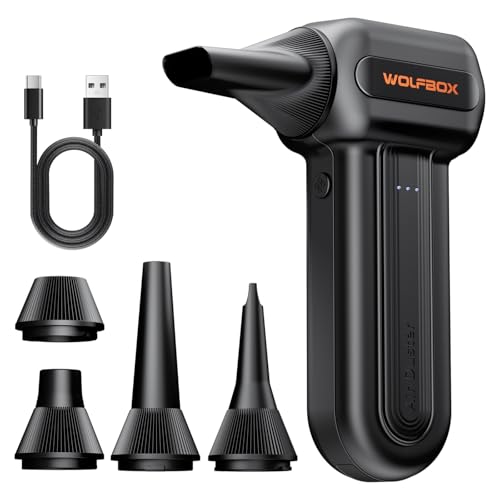
| WOLFBOX MF60 | 3-speed, 110,000 RPM, 0.5 lb | Mid-range | Light handheld use |
| CAGIWIRU 130000RPM | 3 gears, LED light, rechargeable | Budget | Cheapest blower |
| WOLFBOX MegaFlow 50 | 110,000 RPM, 4 nozzles, 0.45 lb | Mid-range | Lightest, most nozzles |
| FRESMOL 100000RPM | Smart LED display, LED light | Budget | Display readout |
| WOLFBOX MF100 | 150000RPM, 45 m/s, Type-C, 5 nozzles + 2 brushes | Premium | Full accessory kit |
| ZOAIVR 130,000RPM | 8000mAh battery, 4 gears | Mid-range | Longer battery claim |
| VELLROX 110000RPM | 8000mAh, LED display and light | Budget | Battery at a low tier |
| METROVAC DataVac ED500 | Corded electric, made in USA | Premium | Repeat heavy use |
Each tool in turn
FAOGO Compressed Air Duster, 170,000 RPM
A handheld electric duster with a brushless motor and four speed settings, sold as a canned air alternative for keyboards, PCs and cars. The 170,000 RPM figure is the highest in this set but is a seller claim, and fan speed alone does not tell you airflow. Check the listing for nozzles and run time. Read the listing for nozzle types before relying on that speed claim, because a wide nozzle cuts the effective force at the dust.
Pros
- Four speeds for delicate and heavy jobs
- Brushless motor listed
Cons
- No weight or battery size in the title
- RPM is not a direct airflow measure
Who it’s for: Buyers who want the most speed steps.
ColorCoral Cleaning Gel, 160g
A sticky gel for lifting dust from keyboards, vents and car trim. It is a different class from the air dusters, which is useful: gel picks up what a blower pushes around. Press it gently between keys; leaving it on a surface for long may leave residue, so follow the pack. Treat it as a partner to a blower rather than a replacement, since each handles a different kind of mess.
Pros
- No battery or charging
- Reaches between keycaps
Cons
- Cannot clear a heatsink or fan
- Check the listing for residue guidance
Who it’s for: Keyboard owners who want a dust-free desk.
Fanttik S1 Pro Electric Screwdriver
The only tool here for opening the case. The title lists 16 S2 steel bits, three torque settings up to 6 N.m, a 2000mAh battery, an LED light and a 1/4″ hex. PC screws are small, so keep to the lowest setting and finish by hand. The LED light helps inside a case, but check bit sizes against your case, drive and M.2 screws before buying.
Pros
- Covers many bit types
- LED light helps inside a dark case
Cons
- 6 N.m maximum is far above what small PC screws need
- Check bit sizes for M.2 and drive screws
Who it’s for: Builders who open cases often.
WOLFBOX MF60 Compressed Air Duster
A 110,000 RPM electric blower with three speeds, fast charging and a 0.5 lb weight, named for keyboard cleaning. At mid-range money it sits between budget units and the MF100. The title omits airflow, so read buyer comments on strength. It suits a single bench session, and the weight is easy on the wrist; hold the nozzle a few inches off the board.
Pros
- Light enough for one-hand use
- Fast charging listed
Cons
- Lower RPM claim than several rivals
- No nozzle count in the title
Who it’s for: Occasional cleaners who want a light tool.
CAGIWIRU 130000RPM Cordless Air Duster
Rechargeable and brushless per the title, with three gears and an LED light, for computers, houses and cars. It carries the lowest price tier among the blowers, so it is the low-risk first purchase. Battery capacity is not named, so check the listing. Read recent buyer comments on durability, as lesser-known brands vary, and plan to charge it fully before a big clean.
Pros
- Lowest price tier among blowers
- LED light for dark corners
Cons
- Battery size not listed
- Brand is lesser known; read recent comments
Who it’s for: First-time buyers swapping out canned air.
WOLFBOX MegaFlow 50 Air Duster
A 110,000 RPM mini blower at 0.45 lb with three gears and four nozzles. It is the lightest in the set, a plus when you hold it over a motherboard for ten minutes. Same RPM as the MF60, so extra nozzles are the main difference. Short bursts keep the motor cool, and the spare nozzles help reach the gap between a graphics card and a case wall.
Pros
- Lightest listed at 0.45 lb
- Four nozzles for tight gaps
Cons
- Same speed claim as the MF60
- Mid-range price for a mini unit
Who it’s for: Laptop and small-form-factor owners.
FRESMOL 100000RPM Cordless Air Duster
Three gears, an LED light and a smart LED display, at the lowest RPM claim in the set. The display is the unusual part; it should show the speed or battery state, though the title does not say which. Rechargeable and cordless. Wipe the screen-side dust off first, then blow in short bursts, so the readout is easy to see and the battery lasts.
Pros
- Display adds feedback
- Budget price tier
Cons
- Lowest RPM claim here
- Display function is not specified
Who it’s for: Budget buyers who like a readout.
WOLFBOX MF100 Compressed Air Duster
The strongest claims in the set: 150000RPM, 45 m/s airflow, Type-C fast charging, five nozzles and two brushes, at 0.66 lb. The brushes let it double as a keyboard cleaner. It costs more, so it earns its place only if you clean monthly. The included brushes also loosen caked dust on heatsink fins, which air alone can leave behind in humid rooms.
Pros
- Airflow figure and brushes named
- Type-C charging
Cons
- Heaviest cordless unit here
- Premium price tier
Who it’s for: Heavy cleaners and shared-desk households.
ZOAIVR 130,000RPM Electric Air Duster
Four gears and an 8000mAh battery for keyboard, computer, car and home use. The big battery figure suggests longer sessions than 2000mAh tools, but real run time is unstated. Mid-range price, same tier as the MF60. Charge fully before a big clean, and work in short bursts so the motor does not overheat during a multi-PC session.
Pros
- 8000mAh battery named
- Four speed steps
Cons
- Run time not given
- Little else in the title to separate it
Who it’s for: People cleaning several machines in one sitting.
VELLROX Rechargeable Air Duster, 110000RPM
Electric duster with an LED display and light, three gears and an 8000mAh battery, aimed at computers, outdoors and cars. It pairs a large battery with a low price tier, which is the best value read on paper. Verify charging time in the listing. Check how long a full charge takes in the listing, since a large battery can mean a long wait before the next job.
Pros
- 8000mAh at a budget tier
- Display and light included
Cons
- Less established brand
- Charging time not in the title
Who it’s for: Value hunters who want battery headroom.
METROVAC DataVac ED500 Electric Duster
A corded electric blower made in the USA, aimed at PCs and office equipment. There is no battery to degrade, so it suits repeated heavy use. The price tier is the highest here and the cord limits reach. Check the listing for noise and nozzles. Plan a power point near the bench, and tidy the cord so it cannot snag a cable or pull a part off the desk.
Pros
- Corded, so power is constant
- Long-use tool for offices
Cons
- Highest price tier
- Cord tethers you to an outlet
Who it’s for: Shops and offices that clean many machines.
How we picked these
The shortlist comes from published specifications, manufacturer documentation and buyer reviews, grouped by job: airflow, keyboard, fasteners. We kept near-duplicates, such as three WOLFBOX units, so you can see what changes. Spec numbers are seller claims. Nobody on the team used or measured these units. Price tiers are relative within the set.
What matters when choosing cleaning gear
Power source and airflow
Cordless blowers trade run time for freedom; a corded unit like the METROVAC avoids battery wear. RPM figures from 100000 to 170,000 are seller claims; airflow and nozzle design matter more, and only the MF100 lists an airflow figure (45 m/s). Weight matters too: the titles quote 0.45 lb for the MegaFlow 50, 0.5 lb for the MF60 and 0.66 lb for the MF100, a spread that you will feel after ten minutes at arm’s length over a motherboard.
Keyboard and fan options
A gel lifts what sits between keys, while a brush loosens caked dust on fins. Blow first, then wipe. Never let a case fan spin up from airflow; hold the blade still, since a freewheeling fan can build up speed and may damage the bearing. If you run fans through a controller, see our guide to PC fan controllers for steady low settings.
Screwdriver coverage and torque
Small PC screws need light torque. The Fanttik lists three torque settings up to 6 N.m; use the lowest and finish by hand. Look for bits that match case, drive and M.2 screws.
Safety
Power down and unplug the PC, touch bare case metal to discharge static, wear eye protection, and work in a ventilated spot. Do not use a household vacuum inside; it can build static.
A 20-minute dust-out routine
Our estimate, assuming one mid-tower: five minutes to power off and open panels, ten to blow filters, fans and heatsinks in short bursts, five to wipe and close. Doing it four times a year adds up to about 80 minutes. If dust returns fast, a case with better filters, such as those in our airflow case guide, reduces the work.
Storage
Check for a case or pouch; none is named in the titles here, so budget a small box for nozzles and bits. Loose bits and small nozzles vanish easily, and a labelled tin or zip pouch keeps the toolkit ready for the next quarterly clean.
Mistakes buyers make
The usual error is chasing the biggest RPM number; nozzle shape and battery matter just as much. Others hold the blower too close to a motherboard, spin fans unchecked, or clean with the PC plugged in. Some buy a screwdriver and crank it to maximum, which can strip small screws; start low and finish by hand. Many skip the gel and only blow dust around the desk. Last, buyers skim past the charging type: Type-C charging is easier to replace than a proprietary lead, and only the WOLFBOX units name fast charging or Type-C in their titles. Also remember that gel and brushes are cheap, so do not spend premium money on a blower if you only dust a keyboard twice a year.
Verdict
For most buyers the VELLROX or CAGIWIRU covers the blower job at a low price tier, the WOLFBOX MF100 suits heavy use, and the METROVAC suits offices. Add the ColorCoral gel for keys and the Fanttik if you open cases often. Keep torque low and power off. If you only want one purchase today, a mid-range blower plus the gel covers nearly every routine job, and the screwdriver can wait until a build or upgrade needs it.
Related guides
- Nvidia Control Panel Best Settings For Gaming
- How To Test Gpu Stability After Overclocking
- Cpu Cores And Threads For Gaming Explained
Frequently asked questions
Is an electric air duster better than canned air?
An electric blower removes the recurring can cost and the cold, sometimes liquid spray. The trade-off is battery wear and noise, and the airflow depends on the nozzle. Check each listing for run time and charging. For regular dust-outs, electric units here such as the WOLFBOX MF100 or VELLROX are designed to replace cans. Buyers who clean once a month usually see the saving in about a year, though that is an estimate that depends on can prices where you live.
Can I use a cleaning gel inside the PC case?
Gel is meant for keyboards, vents and car trim, not for circuit boards or heatsink fins. Press lightly and lift away, and avoid leaving it on surfaces. For fans and heatsinks, use gentle air and a soft brush. Follow the pack instructions from ColorCoral. For fans, filters and heatsinks, a blower and soft brush are the safer pair.
How much torque do PC screws need?
Small case and drive screws need only light tightening, far below the Fanttik’s 6 N.m maximum. Use the lowest of its three settings, then finish by hand. Overtightening can strip heads or crack boards, so stop when the screw is snug. If a screw feels tight, stop and check the thread rather than adding force.
How often should I clean my PC?
A common guide is every three months in a dusty home, less often in a clean room, so treat that as an estimate. Check your filters and fans visually. If dust bunnies are visible or temperatures climb, schedule a clean sooner. Pets, carpets, smoking and open windows all shorten the interval, so check filters first.
Is it safe to blow compressed air on spinning fans?
Hold the fan blade still with a cotton bud or finger. Air can spin it far faster than normal and may damage the bearing. Power the PC off first and unplug it. Work in short bursts, and keep the nozzle a few inches away from components. If you cannot hold the blade still, leave that fan alone and clean the fins and frame around it.