- Top Pick: NETGEAR Nighthawk RAX70
- Runner-up: Linksys Hydra Pro 6E
- Also consider: ASUS ROG Rapture GT-AX11000
A tri-band gaming router solves the most common cause of in-game lag at home: your PC or console sharing one 5 GHz band with every phone, TV and stream in the house. The third radio gives gaming traffic its own lane, so a 4K stream in the next room no longer competes with your match. The short answer is that the ASUS ROG Rapture GT-AX11000 is the best all-round pick, the NETGEAR Nighthawk RAX70 is the budget choice, and the Wi-Fi 6E models from ASUS and NETGEAR are the premium step up.
The five routers below split into two Wi-Fi 6 designs with a second 5 GHz band and three Wi-Fi 6E designs that swap that second 5 GHz radio for a cleaner 6 GHz band. Each entry lists the published band speeds, ports and coverage figures, so you can match the hardware to your internet plan, your home size and the devices you actually own before spending anything.
As an Amazon Associate, we earn from qualifying purchases.
Top 3 picks at a glance
Quick Answer
The best tri-band gaming router for most players is the ASUS ROG Rapture GT-AX11000, which pairs a dedicated 5 GHz gaming band with a 2.5G port and triple-level game acceleration. NETGEAR’s Nighthawk RAX70 covers smaller homes for less, while the GT-AXE11000 and Nighthawk RAXE500 add a 6 GHz band for Wi-Fi 6E devices.
Table of Contents
- Quick Answer
- NETGEAR Nighthawk RAX70
- Linksys Hydra Pro 6E
- ASUS ROG Rapture GT-AX11000
- NETGEAR Nighthawk RAXE500
- ASUS ROG Rapture GT-AXE11000
- How to Choose
- Who Should Skip
- FAQ
- Final Verdict
NETGEAR Nighthawk RAX70
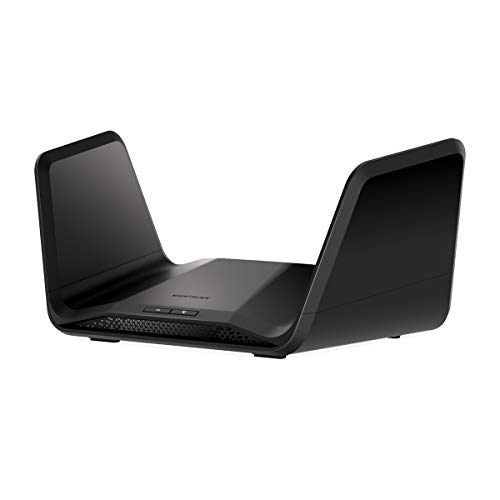
The RAX70 is the budget entry point into tri-band gaming. Its AX6600 radio set splits traffic across a 2.4 GHz band and two 5 GHz bands, with the faster 5 GHz radio reaching 4,800 Mbps on 160 MHz channels. That gives a household one band for gaming, one for streaming devices and one for everything else, without paying for 6 GHz hardware that older devices cannot use anyway. NETGEAR rates it for homes up to 2,500 square feet and up to 40 connected devices, which fits most apartments and smaller houses.
Specs:
- Wi-Fi standard: Wi-Fi 6 (802.11ax), tri-band AX6600
- Band speeds: 600 Mbps (2.4 GHz), 1,200 Mbps (5 GHz), 4,800 Mbps (5 GHz)
- Streams: 8
- Processor: 1.5 GHz quad-core
- Coverage: up to 2,500 sq. ft., up to 40 devices
- Ports: 4 x Gigabit LAN, 1 x Gigabit WAN, 1 x USB 3.0
- Wired features: port aggregation for internet plans up to 2 Gbps
- Technologies: OFDMA, MU-MIMO, 1024-QAM, Beamforming+, Smart Connect
- Security: NETGEAR Armor, NETGEAR Smart Parental Controls, WPA3
- Model: RAX70-100NAS
Linksys Hydra Pro 6E

The Hydra Pro 6E is the mid-range Wi-Fi 6E option and the natural upgrade if your phone, laptop or VR headset already supports the 6 GHz band. It is an AXE6600 design, so the third band is a wide, lightly used 6 GHz radio rated at 4,800 Mbps instead of a second 5 GHz band. Linksys rates coverage at 2,700 square feet and more than 55 devices, and its Intelligent Mesh technology lets it join a Linksys Velop mesh system later if a single router stops covering the house.
Specs:
- Wi-Fi standard: Wi-Fi 6E (802.11ax), tri-band AXE6600
- Band speeds: 600 Mbps (2.4 GHz), 1,200 Mbps (5 GHz), 4,800 Mbps (6 GHz)
- Coverage: up to 2,700 sq. ft., 55+ devices
- Mesh: Linksys Intelligent Mesh, works with Velop mesh systems
- Ports: 1 x Gigabit WAN, 4 x Gigabit LAN, 1 x USB 3.0
- Technologies: MU-MIMO, OFDMA, beamforming
- Model: MR7500
ASUS ROG Rapture GT-AX11000

The GT-AX11000 is the mid-range pick built specifically for gaming. It is an AX11000 Wi-Fi 6 router, so both 5 GHz bands run at a full 4,804 Mbps and one of them can be reserved as a dedicated gaming band. ASUS layers triple-level game acceleration on top, prioritizing traffic from the device to the game server, and the 2.5G port gives a wired PC or console a faster-than-gigabit path. AiMesh support means it can also anchor or join an ASUS mesh network, and AiProtection Pro security is included without a subscription.
Specs:
- Wi-Fi standard: Wi-Fi 6 (802.11ax), tri-band AX11000
- Band speeds: 1,148 Mbps (2.4 GHz), 4,804 Mbps (5 GHz), 4,804 Mbps (5 GHz)
- Processor: 1.8 GHz quad-core
- Ports: 1 x 2.5G gaming port, 4 x Gigabit LAN, 1 x Gigabit WAN, 2 x USB 3.0
- Coverage: very large homes (manufacturer rating)
- Gaming features: triple-level game acceleration, dedicated gaming band, Game Boost QoS, WTFast support, Open NAT port forwarding
- Mesh and security: AiMesh compatible, AiProtection Pro with lifetime internet security, Aura RGB lighting
- Model: GT-AX11000
NETGEAR Nighthawk RAXE500

The RAXE500 is NETGEAR’s premium Wi-Fi 6E flagship. It keeps 12 streams and spreads them across 2.4 GHz, 5 GHz and the 6 GHz band for an AXE11000 rating, and NETGEAR quotes the widest single-router coverage in this roundup at 3,500 square feet with support for up to 60 devices. Eight internal antennas keep the design free of external stalks, and the multi-gig port can serve as either a fast internet uplink or a 2.5G wired connection for a gaming PC or NAS.
Specs:
- Wi-Fi standard: Wi-Fi 6E (802.11ax), tri-band AXE11000
- Band speeds: 1.2 Gbps (2.4 GHz), 4.8 Gbps (5 GHz), 4.8 Gbps (6 GHz)
- Streams: 12
- Processor: 1.8 GHz quad-core
- Coverage: up to 3,500 sq. ft., up to 60 devices
- Ports: 4 x Gigabit LAN, 1 x 2.5G multi-gig port, 2 x USB 3.0
- Antennas: 8 internal
- Technologies: OFDMA, MU-MIMO, 1024-QAM, Beamforming+, Smart Connect
- Security: NETGEAR Armor, WPA3
- Model: RAXE500-100NAS
ASUS ROG Rapture GT-AXE11000
The GT-AXE11000 takes the GT-AX11000 formula and moves the top band to 6 GHz. The result is the same AXE11000 total, but the fastest band sits in spectrum that only Wi-Fi 6E and newer devices can see, which keeps it clear of neighborhood congestion. It keeps the gaming toolkit of its sibling, including triple-level game acceleration, a prioritized 2.5G port and VPN Fusion, which lets the router run a VPN and a normal connection at the same time so only chosen devices go through the tunnel.
Specs:
- Wi-Fi standard: Wi-Fi 6E (802.11ax), tri-band AXE11000
- Band speeds: 1,148 Mbps (2.4 GHz), 4,804 Mbps (5 GHz), 4,804 Mbps (6 GHz)
- Processor: 1.8 GHz quad-core with cooling system
- Ports: 1 x 2.5G LAN/WAN gaming port, 4 x Gigabit LAN, 1 x Gigabit WAN, 2 x USB 3.2 Gen 1
- Antennas: 8 external
- Gaming features: triple-level game acceleration, VPN Fusion, Game Boost QoS
- Mesh and security: AiMesh compatible, AiProtection Pro
- Dimensions: 12.91 x 12.91 x 7.05 in
- Model: GT-AXE11000
How to Choose
Start with the third band. A Wi-Fi 6 tri-band router adds a second 5 GHz radio, which every modern device can use, while a Wi-Fi 6E model swaps it for a 6 GHz radio that only Wi-Fi 6E and Wi-Fi 7 devices can see. If your gaming laptop, phone and headset are 6E-capable, the 6 GHz band is the cleaner lane. If they are not, a Wi-Fi 6 model puts the extra capacity where your hardware can actually reach it.
Next, match the ports to your internet plan and your desk. A 2.5G port matters if your plan is faster than gigabit or if you want a multi-gig wired link to a PC or NAS; on a sub-gigabit plan it changes nothing today. Count the LAN ports you need for consoles, PCs and streaming boxes, since wired connections still beat any radio for latency. Finally, check the coverage rating against your home size, and decide whether mesh expandability, such as AiMesh or Linksys Intelligent Mesh, is worth having in reserve.
Who Should Skip
Skip tri-band entirely if you live alone with a handful of devices: a good dual-band router will not be congested, and the third radio will sit idle. Skip the Wi-Fi 6E models if none of your devices support 6 GHz, because you would be paying a premium tier price for a band nothing can join. Skip a single powerful router of any kind if your home is large or has thick walls; dead zones are a placement problem, and a mesh system will fix them better than one flagship box. Competitive players on a wired Ethernet connection already get most of the latency benefit, so for them a router upgrade is about household congestion, not raw ping.
FAQ
Is a tri-band router better for gaming than a dual-band router?
It is better when the network is busy. The third band gives gaming traffic a radio that streaming TVs, phones and downloads are not sharing, which cuts the queueing delays that show up as ping spikes. On a quiet network with few devices, a dual-band router performs about the same.
Do I need Wi-Fi 6E devices to use the 6 GHz band?
Yes. Only devices with Wi-Fi 6E or Wi-Fi 7 radios can see and join the 6 GHz band. Older Wi-Fi 6 and Wi-Fi 5 devices still connect to the 2.4 GHz and 5 GHz bands on the same router, so nothing is left offline, but they do not benefit from the emptier spectrum.
Can I dedicate one band to gaming only?
On the ASUS ROG models, yes: one 5 GHz or the 6 GHz band can be reserved for gaming devices, and the game acceleration features prioritize that traffic end to end. On the NETGEAR and Linksys models, Smart Connect usually merges the bands, but you can separate the SSIDs manually and put only your gaming devices on the fastest band.
Will a tri-band router lower my ping?
It lowers the part of your ping caused by your own network. If your latency comes from a busy household sharing one band, separating gaming traffic helps noticeably. If your latency comes from the distance to the game server or from your internet provider, no router can fix that, and a wired connection plus the right server region matters more.
Final Verdict
For most gaming households, the ASUS ROG Rapture GT-AX11000 is the right buy: a dedicated gaming band, a 2.5G port and full game acceleration at a mid-range tier. The NETGEAR Nighthawk RAX70 delivers the same tri-band idea for smaller homes at a budget tier, and the Linksys Hydra Pro 6E is the sensible mid-range step into 6 GHz. At the premium end, the GT-AXE11000 suits ASUS fans who want gaming tools plus Wi-Fi 6E, while the RAXE500 offers the widest coverage and the cleanest design.
Related guides
More from Amazon
Programs that pair well with the guide above. Offers and eligibility are set by Amazon and may change.
A free business account with business pricing and bulk-buying tools for work, shop or home office.
Create a business accountFree shipping on eligible items, Prime Video and more. Eligible new members can start with a free trial.
Start a Prime free trialAudiobooks and podcasts to listen to on the go. Eligible new members can start with a free trial.
Try Audible freeAd-free music streaming. Eligible new subscribers can start with a free trial.
Try Music Unlimited freeAs an Amazon Associate we earn from qualifying purchases.


