- Top Pick: Samsung T9 Portable SSD
- Runner-up: WD_BLACK P40 Game Drive SSD
- Also consider: Crucial X10 Pro
Gaming laptops rarely ship with enough storage for a modern game library, and opening one up to add a second internal drive is not always an option. A USB-C external SSD solves the problem without tools: plug it in, point your game launcher at the new drive, and your library travels with the laptop. The catch is that portable SSDs come in two speed classes, and picking the wrong one leaves performance on the table.
This roundup compares five USB-C portable SSDs that suit gaming laptops, from premium 20Gbps models rated near 2,000 MB/s to a budget 10Gbps drive that weighs less than a set of earbuds. Every pick below uses published manufacturer specifications, and each one is matched to the kind of laptop port it actually needs to reach its rated speed.
As an Amazon Associate, we earn from qualifying purchases.
Our Top Picks
Top 3 picks at a glance
Table of Contents
- Quick Answer
- Samsung T9 Portable SSD
- WD_BLACK P40 Game Drive SSD
- Crucial X10 Pro
- Samsung T7 Shield
- Kingston XS1000
- How to Choose
- Who Should Skip
- FAQ
- Final Verdict
Quick Answer
The Samsung T9 Portable SSD is the best USB-C external SSD for most gaming laptops, pairing a USB 3.2 Gen 2×2 interface with sequential speeds up to 2,000 MB/s, capacities up to 4TB, and a drop-resistant shell. The WD_BLACK P40 is the gaming-styled alternative, while the Kingston XS1000 covers the budget tier.
Samsung T9 Portable SSD

The T9 is Samsung’s flagship portable SSD and the natural top pick for a gaming laptop with a fast USB-C port. Its USB 3.2 Gen 2×2 interface doubles the bandwidth of standard 10Gbps drives, and Samsung rates sequential read and write speeds at up to 2,000 MB/s, which keeps large game installs and library transfers short. A Dynamic Thermal Guard monitors temperature to limit throttling during long transfers, and the rubberized shell is rated for drops up to 3 meters. Samsung Magician software handles firmware updates and drive health checks, and AES 256-bit hardware encryption with password protection is built in. This is the premium tier pick, best suited to laptops that actually carry a 20Gbps USB-C port.
Specs:
- Interface: USB 3.2 Gen 2×2 (20Gbps), USB-C
- Sequential speeds: up to 2,000 MB/s read and write
- Capacities: 1TB, 2TB, 4TB
- Drop resistance: up to 3 m (9.8 ft)
- Weight: 122 g (4.3 oz)
- Security: AES 256-bit hardware encryption
- In the box: USB-C to C and USB-C to A cables
- Warranty: 5-year limited
WD_BLACK P40 Game Drive SSD

The P40 is the only drive in this roundup designed specifically for gamers. It matches the T9 on interface and headline speed, with reads up to 2,000 MB/s and writes up to 1,950 MB/s over USB 3.2 Gen 2×2, and adds customizable RGB lighting controlled through the WD_BLACK Dashboard software on Windows. That lighting makes it a natural fit for a gaming laptop setup where the drive sits visibly on the desk. The metal top cover and drop resistance up to 2 meters suit a drive that gets unplugged and carried between rooms or LAN events. Western Digital lists compatibility with PC, Mac, PlayStation, and Xbox, so the same drive can double as console overflow storage for backward-compatible titles. It sits in the premium tier.
Specs:
- Interface: USB 3.2 Gen 2×2 (20Gbps), USB-C
- Sequential speeds: up to 2,000 MB/s read, 1,950 MB/s write
- Capacities: 500GB, 1TB, 2TB
- Lighting: customizable RGB via WD_BLACK Dashboard (Windows)
- Drop resistance: up to 2 m
- Dimensions: 4.21 x 2.0 x 0.51 in
- Compatibility: PC, Mac, PlayStation, Xbox
- Warranty: 5-year limited
Crucial X10 Pro
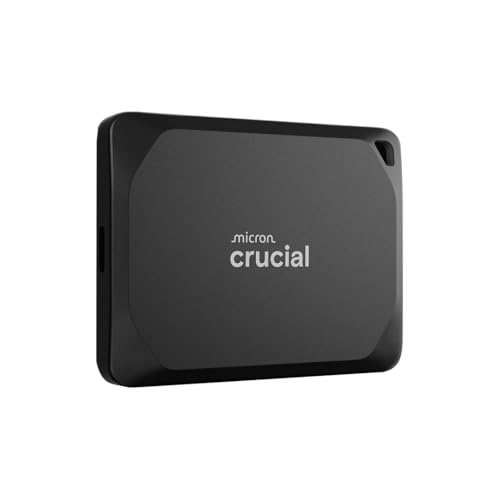
The X10 Pro posts the highest rated read speed in this group at up to 2,100 MB/s, with writes up to 2,000 MB/s over the same USB 3.2 Gen 2×2 connection as the two drives above. Crucial packages that speed in an anodized aluminum enclosure that weighs just 42 g, carries an IP65 rating against dust and water, and is drop proof up to 2 meters. A lanyard loop is built into the corner, which suits laptop bags and travel. Password protection is available for keeping a carried game library private. For a gaming laptop owner who wants the fastest rated transfers in the smallest shell, the X10 Pro is the premium tier alternative to the T9, and the 4TB capacity option matches the largest libraries.
Specs:
- Interface: USB 3.2 Gen 2×2 (20Gbps), USB-C
- Sequential speeds: up to 2,100 MB/s read, 2,000 MB/s write
- Capacities: 1TB, 2TB, 4TB
- Rating: IP65 dust and water resistant
- Drop proof: up to 2 m (6.5 ft)
- Weight: 42 g
- Security: password protection
- Warranty: 5-year limited
Samsung T7 Shield
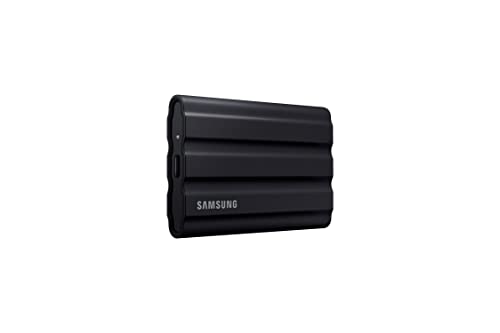
The T7 Shield gives up the 20Gbps interface and focuses on surviving life in a laptop bag. Its USB 3.2 Gen 2 connection still delivers sequential reads up to 1,050 MB/s and writes up to 1,000 MB/s, which is the full speed most gaming laptop USB-C ports support anyway. The elastomer shell carries an IP65 rating and drop resistance up to 3 meters, the strongest durability figures in this roundup. Samsung rates the drive for use with PCs, Macs, Android devices, and gaming consoles, and AES 256-bit hardware encryption is included. For players who carry their laptop and drive daily and value toughness over peak transfer speed, this is the mid-range pick to beat.
Specs:
- Interface: USB 3.2 Gen 2 (10Gbps), USB-C
- Sequential speeds: up to 1,050 MB/s read, 1,000 MB/s write
- Capacities: 1TB, 2TB, 4TB
- Rating: IP65 dust and water resistant
- Drop resistance: up to 3 m (9.8 ft)
- Weight: 98.5 g (3.47 oz)
- Security: AES 256-bit hardware encryption
- Warranty: 3-year limited
Kingston XS1000

The XS1000 is the budget tier pick and the smallest drive here, at 69.54 mm long and 28.7 g. It uses a USB 3.2 Gen 2 interface rated up to 1,050 MB/s read and 1,000 MB/s write, the same speed class as the T7 Shield, in a pocket-sized metal and plastic casing. Kingston includes a USB-C to USB-A cable and a rubber sleeve in the box, so it connects to older laptops with only Type-A ports and shrugs off bag wear. There is no water resistance rating and no hardware encryption, which is where the savings show. As overflow storage for a gaming laptop library that mostly lives at home, it covers the essentials at the lowest tier.
Specs:
- Interface: USB 3.2 Gen 2 (10Gbps), USB-C
- Sequential speeds: up to 1,050 MB/s read, 1,000 MB/s write
- Capacities: 1TB, 2TB
- Weight: 28.7 g
- Dimensions: 69.54 x 32.58 x 13.5 mm
- In the box: USB-C to USB-A cable, rubber sleeve
- Warranty: 5-year limited
How to Choose
Start with your laptop’s ports, because the port sets the ceiling. A 20Gbps drive such as the T9, P40, or X10 Pro only reaches its rated speed on a USB 3.2 Gen 2×2 port. Many gaming laptops ship with 10Gbps USB-C ports or Thunderbolt ports instead, and Thunderbolt connections fall back to 10Gbps with these drives. On a 10Gbps port, every drive in this roundup performs at the same class of speed, so a mid-range or budget 10Gbps model is the smarter match.
Next, size the capacity to your library. A single modern game can take 50 GB to 150 GB, so a 1TB drive fills quickly; 2TB is the practical sweet spot for a carried library, and 4TB suits players who archive several large titles. Then weigh durability. An IP65 rating and a stated drop height matter if the drive rides in a laptop bag daily, while a desk-bound drive can trade toughness for speed. Finally, check the included cables: a bundled USB-C to A cable keeps a drive usable on older laptops and docks.
Who Should Skip
Skip an external SSD entirely if your gaming laptop has a free internal M.2 slot. An internal NVMe drive is faster than any USB connection, stays out of the way, and avoids cable and port limits. Also skip the premium 20Gbps tier if your laptop has no Gen 2×2 port, since the extra speed cannot be used and a 10Gbps drive delivers the same real transfers for less. Players who only need cold storage for games they rarely launch can skip SSDs altogether and use a portable hard drive, accepting slower installs and load times in exchange for more capacity at the budget tier.
FAQ
Can I play games directly from a USB-C external SSD?
Yes. Steam, Epic, GOG, and Battle.net all let you set an external drive as an install location and play from it. Load times on a 10Gbps or 20Gbps SSD are close to internal SATA SSD performance, though the very fastest internal NVMe drives still load quicker.
Why does a 20Gbps SSD run at half speed on my gaming laptop?
The drive needs a USB 3.2 Gen 2×2 port to reach 20Gbps. Most gaming laptops offer 10Gbps USB-C or Thunderbolt ports, and both limit a Gen 2×2 drive to 10Gbps operation. The drive is working correctly; the port is the bottleneck.
Does USB-C guarantee fast transfers?
No. USB-C is only the connector shape. Speed depends on the USB version behind the port and the drive: 5Gbps, 10Gbps, and 20Gbps devices all share the same plug. Check the rated interface on both the laptop port and the drive before buying.
How much space do I need for a portable game library?
Plan around your largest titles. Many current releases occupy 50 GB to 150 GB each, so a 2TB drive typically holds a dozen or more large games with room for updates. Players rotating a few titles at a time can manage with 1TB.
Final Verdict
For gaming laptops with a 20Gbps USB-C port, the Samsung T9 is the strongest all-round choice, with the WD_BLACK P40 adding gaming styling and the Crucial X10 Pro offering the highest rated read speed in the smallest shell. On the far more common 10Gbps ports, the rugged Samsung T7 Shield and the budget Kingston XS1000 deliver the same practical transfer speeds for less. Match the drive to your port first, and every pick here will serve a growing game library well.
Related guides
More from Amazon
Programs that pair well with the guide above. Offers and eligibility are set by Amazon and may change.
A free business account with business pricing and bulk-buying tools for work, shop or home office.
Create a business accountFree shipping on eligible items, Prime Video and more. Eligible new members can start with a free trial.
Start a Prime free trialAudiobooks and podcasts to listen to on the go. Eligible new members can start with a free trial.
Try Audible freeAd-free music streaming. Eligible new subscribers can start with a free trial.
Try Music Unlimited freeAs an Amazon Associate we earn from qualifying purchases.