Our Top Picks
 SAMSUNG 870 EVO SATA SSD 500GB 2.5” Internal0.5 TB3.94 x 2.76 x 0.27 inches0.13 poundsCheck on Amazon


Top 3 picks at a glance
Introduction
Capacity is the first decision to make when shopping for a solid state drive, and it shapes everything that follows. A drive that is too small fills up fast and forces constant juggling of games and files, while a drive that is far larger than you need ties up money that could have gone toward a faster graphics card or more memory. The right size depends on how you use your PC, how many games you keep installed at once, and whether the drive will hold only an operating system or an entire library.
This guide groups the best SSDs by size, with one clear pick for each of the four capacities that matter most to PC builders in 2026: 500GB, 1TB, 2TB, and 4TB. Each size serves a different role. A 500GB drive works well as a boot drive or a companion to a larger hard drive in a budget build. A 1TB drive is the sweet spot for most gaming PCs, holding the operating system, a handful of large games, and everyday applications without constant space management. A 2TB drive suits players with large libraries who dislike uninstalling games to make room for the next one. A 4TB drive is the choice for creators and collectors who keep huge libraries, raw footage, and project files on fast storage.
Every drive below is a real product sold on Amazon US, and each one was chosen for its place in its size class rather than for raw speed alone. Endurance, warranty length, and interface type all factor into the picks.
At a Glance
| Size | Pick | Interface | Listed Sequential Read | Best For |
|---|---|---|---|---|
| 500GB | Samsung 870 EVO 500GB | SATA III, 2.5-inch | Up to 560 MB/s | Boot drive and older PCs |
| 1TB | Samsung 990 PRO 1TB | PCIe 4.0 NVMe, M.2 2280 | Up to 7,450 MB/s | Main drive for most gaming PCs |
| 2TB | WD_BLACK SN850X 2TB | PCIe 4.0 NVMe, M.2 2280 | Up to 7,300 MB/s | Large game libraries |
| 4TB | Crucial T705 4TB | PCIe 5.0 NVMe, M.2 2280 | Up to 14,100 MB/s | Huge libraries and heavy workloads |
500GB Pick: Samsung 870 EVO 500GB
Samsung 870 EVO 500GB SATA SSD
A 500GB drive is the smallest capacity that still makes sense as a primary drive in 2026, and the Samsung 870 EVO is the most dependable way to fill that slot. It is a 2.5-inch SATA drive, which means it fits any desktop or laptop with a standard SATA bay and cable, including older machines that have no M.2 slot at all. For a builder reviving an aging PC, or for a second machine that only needs an operating system and a few applications, this is the straightforward choice.
The listing features tell the story of a drive built to squeeze the most out of the SATA interface. Sequential reads reach up to 560 MB/s and sequential writes up to 530 MB/s, which is essentially the ceiling of SATA III, so nothing is left on the table. The drive uses Samsung V-NAND flash with a 512MB cache, and it carries a 300 TBW endurance figure with a five-year limited warranty. Samsung Magician software is included for firmware updates, health monitoring, and drive management, and the 2.5-inch 7mm form factor fits slim laptops as well as desktops.
In everyday use, a 500GB 870 EVO holds an operating system, core applications, and a small rotation of games with room to spare, provided large media libraries live elsewhere. Boot times and application launches feel immediate compared with a spinning hard drive, and the drive runs cool and silent with no moving parts.
Considerations
SATA speed is the hard limit here, so a 500GB 870 EVO will never match an NVMe drive for large file transfers or game loading. The 500GB capacity also fills up faster than many buyers expect once modern games, which can each take up a large slice of the drive, start piling up. Check that your case has a free 2.5-inch bay and that your power supply has a spare SATA power connector before ordering, and plan your storage layout so the SSD holds the operating system and the programs you open daily.
1TB Pick: Samsung 990 PRO 1TB
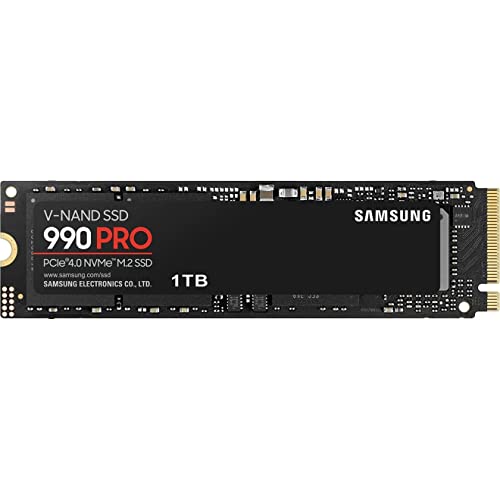
Samsung 990 PRO 1TB PCIe 4.0 NVMe SSD
One terabyte is the capacity most PC builders should aim for, and the Samsung 990 PRO 1TB is the drive to put in that slot. It is a PCIe 4.0 NVMe M.2 2280 drive with an in-house controller, and it delivers the kind of speed that makes a whole system feel responsive: fast boots, near-instant application launches, and game levels that load before you have time to read the tips on the loading screen.
The listing features back up that role. Sequential reads reach up to 7,450 MB/s and sequential writes up to 6,900 MB/s, with random read performance listed up to 1,550K IOPS. The drive uses Samsung V-NAND TLC flash, carries a 600 TBW endurance figure, and includes a five-year limited warranty. Power efficiency is a stated strength of the design, with the controller managing heat so the drive holds its speed under sustained load. The drive is also listed as compatible with PlayStation 5 consoles, which makes it a flexible pick if you later move it to a console or a second machine.
For a typical gaming PC, 1TB is enough for the operating system, a suite of applications, and a rotating set of several large games. It is the size where you stop thinking about storage most days, because there is usually room for the next install without deleting something first.
Considerations
A PCIe 4.0 M.2 slot is needed to reach the listed speeds; on a PCIe 3.0 slot the drive still works but runs at the lower interface ceiling. Make sure your motherboard has a free M.2 2280 slot and check whether the slot sits under a graphics card, since that affects airflow and cooling. If your library grows past a handful of large games, you may find yourself managing space sooner than expected, in which case the 2TB pick below is the better starting point.
2TB Pick: WD_BLACK SN850X 2TB
Two terabytes is the capacity for players who keep a large library installed and hate uninstalling games. The WD_BLACK SN850X 2TB is built for exactly that job, and it pairs high capacity with the speed to load big open-world games quickly. It is a PCIe 4.0 NVMe M.2 2280 drive, and the 2TB model is the point in the lineup where capacity and performance line up best for gaming.
The listing features show a drive tuned for gaming workloads. Sequential reads reach up to 7,300 MB/s and sequential writes up to 6,300 MB/s on the 2TB model. The drive uses TLC 3D NAND, supports Microsoft DirectStorage, and includes a downloadable SANDISK Dashboard for Windows that monitors drive health and enables Game Mode 2.0 features. A heatsink version is listed separately for consoles and builds that need extra cooling, while the bare version here fits under a motherboard heatsink or in a laptop. The SN850X line is listed in capacities up to 8TB, so the platform is proven across the range.
With 2TB on board, a gaming PC can hold the operating system, applications, and dozens of games at once, including the largest modern titles, without constant space management. Load times stay short, texture streaming stays smooth, and there is room for capture footage and mods alongside the games themselves.
Considerations
The SN850X is a performance drive, so it benefits from airflow over the M.2 slot, and sustained heavy writes will warm it up like any fast NVMe drive. Confirm that your motherboard has a free M.2 2280 slot and that the slot supports PCIe 4.0, and decide whether you want the bare drive or the heatsink version before ordering. If your board has a built-in M.2 heatsink, the bare version is usually the right call, since stacking two heatsinks can cause fitment trouble.
4TB Pick: Crucial T705 4TB
Crucial T705 4TB PCIe Gen5 NVMe SSD
Four terabytes is the capacity for builders who want everything on fast storage at once: a full game library, raw video, project files, and virtual machines, with no slow drive in the system at all. The Crucial T705 4TB is a PCIe 5.0 NVMe M.2 drive, and it is the fastest drive in this guide by a wide margin, which suits the heavy workloads that usually come with a drive this large.
The listing features place it at the top of the current consumer market. Sequential reads reach up to 14,100 MB/s and sequential writes up to 12,600 MB/s, roughly double the listed speed of the PCIe 4.0 drives above. The drive uses Micron 232-layer TLC NAND, supports Microsoft DirectStorage, and is listed as compatible with Intel 13th and 14th Gen systems and AMD Ryzen 7000 series systems. It is backward compatible with Gen3 and Gen4 slots, carries a five-year limited warranty, and includes a one-month Adobe Creative Cloud All-Apps subscription. The T705 line is listed in capacities from 1TB to 4TB, and this 4TB model is the largest of the range.
A 4TB Gen5 drive changes how you organize a PC. There is no need to split games and media across separate drives, no need to shuffle files to free space before a big install, and no slow tier to manage. Content creators can keep active projects, scratch files, and finished exports on the same fast volume.
Considerations
A PCIe 5.0 M.2 slot is required to reach the listed speeds, and many current motherboards have only one such slot, so check your board manual before ordering. Gen5 drives run hot under sustained load, so the T705 is designed to be installed with a motherboard heatsink or an aftermarket heatsink and good case airflow. The drive is also the largest investment in this guide, so it makes the most sense when you genuinely need 4TB of fast storage rather than as a first drive for a modest build.
How to Choose
Start with an honest count of what you store. Add up the size of your operating system, your applications, and the games you actually play, then add room for the next few installs. If the total lands near 400GB, a 500GB drive will feel tight within a year, and 1TB is the safer starting point. If you keep more than a dozen large games installed, or you work with video and large project files, 2TB is the practical minimum, and 4TB is worth considering if your library keeps growing.
Interface comes second. SATA drives like the 870 EVO fit any machine with a SATA port and are the only option for older systems without an M.2 slot. NVMe drives need an M.2 slot, and the generation of that slot decides the ceiling: a Gen5 drive in a Gen4 slot runs at Gen4 speeds, and a Gen4 drive in a Gen3 slot runs at Gen3 speeds. None of that makes a mismatched drive a bad buy, since NVMe drives are backward compatible, but it does mean you should match the drive to the slot you actually have.
Endurance and warranty deserve a look as well. The TBW figure on a listing tells you how much writing the manufacturer expects the drive to handle over its life, and a five-year warranty is the standard for the drives in this guide. Heavy writers, such as creators who export video daily, should weigh endurance more heavily than peak sequential speed, which matters most for large file transfers and less for ordinary gaming.
Finally, think about how many M.2 slots your board has. A board with two slots lets you start with a 1TB boot drive and add a second drive later, while a board with one slot argues for buying the capacity you will need for the life of the build up front. A single 2TB drive is often simpler than a 500GB boot drive plus a 1TB game drive, because there is only one volume to manage and no guessing about which drive a game should live on.
Fit and Installation
Installing an M.2 NVMe drive takes a few minutes and one small screw. Power down the PC, open the side panel, and find a free M.2 slot on the motherboard. Remove the mounting screw, slide the drive into the slot at a slight angle, press it flat, and secure it with the screw. If your motherboard has a built-in heatsink over the slot, remove it first, peel the protective film from its thermal pad, and refit it over the drive. Most boards include the mounting screw in the motherboard box, so check there before ordering a spare.
A 2.5-inch SATA drive installs differently. Mount the 870 EVO in a 2.5-inch bay or on a mounting bracket, connect a SATA data cable from the drive to a SATA port on the motherboard, and connect a SATA power cable from the power supply. The drive will appear in the system firmware, and Windows Disk Management will show it as uninitialized storage ready to be formatted.
After the hardware is in place, initialize and format the drive if it is a second drive, or install the operating system if it is a boot drive. Samsung Magician and the SANDISK Dashboard are useful for checking firmware and drive health after installation, and both are free downloads from the manufacturers. Keep the firmware current, leave some free space on the drive rather than filling it to the last gigabyte, and confirm in the system firmware that the M.2 slot is running at the expected PCIe generation.
Frequently Asked Questions
How much SSD storage do I need for gaming?
For most players, 1TB is the starting point and 2TB is the comfortable choice. A 1TB drive holds the operating system, applications, and a rotating set of several large games. A 2TB drive holds a much larger library without frequent uninstalls, and it is the size to pick if you play many large titles at once or dislike managing space. A 500GB drive works as a boot drive or for a small library, while 4TB suits players and creators who keep everything installed.
Is a 500GB SSD still enough in 2026?
A 500GB SSD is enough for a boot drive, an office PC, or a secondary machine with a small set of programs. It is tight as the only drive in a gaming PC, because modern games can each take up a large share of the capacity, and the operating system and applications take their own slice first. If the budget allows, stepping up to 1TB removes most of the space pressure and gives the drive room to breathe.
Should I choose a 4TB Gen4 SSD instead of a 2TB Gen5 SSD?
Choose the larger Gen4 drive if capacity matters more than peak speed, which is the case for most gaming libraries. A 4TB Gen4 drive holds twice as many games as a 2TB Gen5 drive, and the loading difference between Gen4 and Gen5 is small in most titles. Choose the Gen5 drive if you move very large files often, work with high-resolution video, or want the fastest interface available for a build that will last several years.
Can I mix SATA and NVMe SSDs in one PC?
Yes, and many builds do exactly that. A common layout is a fast NVMe drive for the operating system and games, with a SATA SSD or a hard drive holding media and files that do not need top speed. The drives appear as separate volumes, and you can install programs on either one. The only requirement is a free SATA port and power connector for the SATA drive, plus a free M.2 slot for the NVMe drive.
Conclusion
The best SSD size is the one that fits your library with room to grow, and the four picks in this guide cover the range that matters. A 500GB Samsung 870 EVO revives older machines and serves as a dependable boot drive. A 1TB Samsung 990 PRO is the right main drive for most gaming PCs. A 2TB WD_BLACK SN850X holds a large library without constant uninstalls. A 4TB Crucial T705 puts an entire collection on the fastest interface available. Pick the capacity that matches how you actually use your PC, check that your board has the right slot, and you will end up with storage that stays out of your way for years.
As an Amazon Associate, we earn from qualifying purchases.
Related guides
More from Amazon
Programs that pair well with the guide above. Offers and eligibility are set by Amazon and may change.
A free business account with business pricing and bulk-buying tools for work, shop or home office.
Create a business accountFree shipping on eligible items, Prime Video and more. Eligible new members can start with a free trial.
Start a Prime free trialAudiobooks and podcasts to listen to on the go. Eligible new members can start with a free trial.
Try Audible freeAd-free music streaming. Eligible new subscribers can start with a free trial.
Try Music Unlimited freeAs an Amazon Associate we earn from qualifying purchases.


