A PlayStation 5 fills up fast. A handful of large games can leave the console’s built-in storage nearly full, and deleting a game every time you want to install another one gets old quickly. Adding a compatible NVMe SSD to the PS5 expansion slot is the straightforward fix: it gives you room for more games without juggling downloads, and every drive in this guide states PS5 compatibility on its Amazon listing.
This guide is for PS5 owners who want more space and do not want to guess about compatibility. Every drive here is a 2TB Gen4 NVMe SSD in the M.2 2280 form factor, with read speeds above Sony’s 5,500 MB/s minimum for the expansion slot, and each pick was chosen from the product name and specifications shown on its Amazon page. Four of the five come with a heatsink already fitted; the fifth is a single-sided drive that the listing says fits the slot without modification.
Our Top Picks

Top 3 picks at a glance

Quick Picks
As an Amazon Associate we earn from qualifying purchases
| Product | Best for | Key spec from title |
|---|---|---|
| WD_BLACK SN850 for PS5 Consoles 2TB with Heatsink | Officially licensed PS5 storage | Up to 7,000 MB/s read |
| WD_BLACK SN850P NVMe 2TB for PS5 Consoles with Heatsink | Fastest officially licensed read speed | Up to 7,300 MB/s read |
| SAMSUNG 990 PRO with Heatsink SSD 2TB | Top sequential speeds with heatsink | Up to 7,450/6,900 MB/s |
| SABRENT Rocket 4 NVMe SSD 2TB | Single-sided fit without a heatsink | Up to 7,450 MB/s read |
| Addlink A93 2TB Storage Expansion for PS5 Console with Heatsink | High-speed expansion with tall heatsink | Up to 7,400/6,500 MB/s |
How to Choose
Check the PS5 Speed Requirement
Sony requires any drive for the PS5 M.2 expansion slot to read at 5,500 MB/s or faster, so speed is the first filter, not a nice extra. Every drive in this guide clears that bar with room to spare, but the lesson still matters when you shop beyond this list: a drive that reads at 4,800 MB/s may still carry PS5 wording in its title, yet it falls short of the requirement. Read the sequential read figure in the specifications before anything else, and treat a missing or vague speed figure as a reason to keep looking rather than a detail to overlook.
Heatsink: Built In or Bought Separately
The PS5 expansion slot needs a drive with effective cooling, which is why most PS5-ready drives ship with a heatsink already attached. Four of the five drives here arrive with one fitted, so there is nothing extra to buy or install. The Sabrent Rocket 4 is the exception: it ships without a heatsink, and its listing states that no bulky heatsink is required and that the drive fits the internal slot without modification. If you pick a bare drive from another brand, check the heatsink height the console allows and budget for one separately, because a drive that overheats under load will slow down when you need it most.
Pick the Right Capacity
All five drives here are 2TB, and that is a deliberate choice: it roughly triples the space of the console’s built-in storage and holds a large library without constant management. A 1TB drive costs less and suits someone who plays a few games at a time, while 4TB is for collectors who keep dozens of titles installed at once. Think about how many games you actually keep installed rather than how many you own, because a drive that is always nearly full leaves little room for updates and new installs. If you already own a large digital library, 2TB is the sensible middle ground.
Form Factor and Fit
Every PS5 expansion drive must be an M.2 2280 NVMe SSD, which is the size and connector the console’s slot accepts. All five drives in this guide meet that description, and the Sabrent Rocket 4 adds a single-sided design that the listing says fits the internal slot without modification. Pay attention to total height once a heatsink is fitted: the Addlink A93, for example, carries an 8.75mm heatsink, and the listing states full PS5 compatibility, but a drive from another brand with an oversized cooler may not close the slot cover. Confirm the form factor and the heatsink height on the listing before you buy, and keep the console’s slot cover screw safe during installation.
The 5 Best Options
WD_BLACK SN850 for PS5 Consoles 2TB with Heatsink
The SN850 built for PS5 is the safe, officially licensed choice. Its all-in-one heatsink is designed for the PS5 M.2 expansion slot, so installation is a straight swap with nothing extra to source. Read speeds reach up to 7,000 MB/s, with writes up to 5,300 MB/s, comfortably above the console’s minimum. It comes in 1TB and 2TB capacities, and this pick is the 2TB version, which suits a growing library of large games. The official PlayStation licensing is the main reason to choose it over a generic Gen4 drive.
Specs
- Officially licensed for PlayStation 5 consoles
- All-in-one heatsink designed for the PS5 M.2 expansion slot
- Gen4 PCIe, M.2 2280
- Up to 7,000 MB/s read, up to 5,300 MB/s write
- 1TB–2TB capacities; model WDBBKW0020BBK-WRSN
Best for: PS5 owners who want an officially licensed drive with a fitted heatsink.
Watch out for: Check the 2TB capacity on the listing before ordering, since the drive also comes in 1TB.
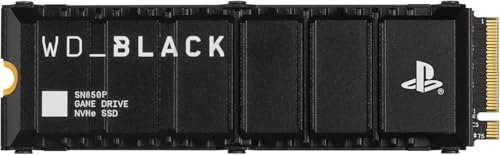
WD_BLACK SN850P NVMe 2TB for PS5 Consoles with Heatsink
The SN850P is the quicker of the two officially licensed WD_BLACK drives, with a headline read speed up to 7,300 MB/s. Its heatsink is built specifically for the PS5 M.2 slot, so it slots in without extra parts or guesswork about cooling. This is a 2TB drive, giving plenty of room for a large collection of PS5 titles alongside the console’s built-in storage. Choose it if you want the fastest officially licensed read speed in this guide and a heatsink made for the console rather than adapted to it.
Specs
- Officially licensed storage expansion for PS5 consoles
- Heatsink built specifically for the PS5 M.2 slot
- M.2 2280; up to 7,300 MB/s read
- 2TB capacity; model WDBBYV0020BNC-WRSN
Best for: Buyers who want the fastest officially licensed read speed with a PS5-specific heatsink.
Watch out for: The listing shows a conflicting media-speed figure in one section; rely on the 7,300 MB/s headline read speed only.
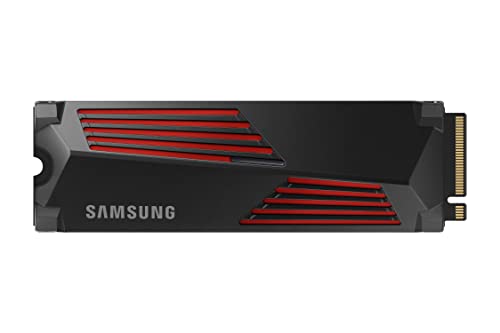
SAMSUNG 990 PRO with Heatsink SSD 2TB
The 990 PRO with heatsink pairs the highest sequential speeds in this guide with an integrated heatsink, reading up to 7,450 MB/s and writing up to 6,900 MB/s. Samsung lists it as compatible with PlayStation 5, and the PCIe Gen4 M.2 2280 design matches the console’s expansion slot. It is a strong fit for players who move large games on and off the drive often, since both directions of transfer are fast. The integrated heatsink means cooling is handled out of the box, with nothing extra to fit.
Specs
- Compatible with PlayStation 5
- Integrated heatsink
- PCIe Gen4 M.2 2280
- Sequential read/write speeds up to 7,450/6,900 MB/s
- Model MZ-V9P2T0CW
Best for: Players who want the highest sequential speeds in this guide with cooling included.
Watch out for: Confirm the heatsink version on the listing, since the 990 PRO also sells without one.
SABRENT Rocket 4 NVMe SSD 2TB

The Rocket 4 takes a different route: a single-sided drive with no heatsink, which the listing says fits the PS5 internal slot without modification and needs no bulky heatsink. It still reads up to 7,450 MB/s, matching the fastest drives here, with writes up to 6,400 MB/s for the 2TB model. The PCIe Gen4 x4, NVMe 1.4 design uses 3D TLC NAND, and the listing’s Q&A confirms all capacities meet PS5 requirements. It suits buyers who want a slim drive and are comfortable with the listing’s no-heatsink fit.
Specs
- Compatible with desktops, laptops, and PS5
- Single-sided M.2 2280 design
- PCIe Gen4 x4, NVMe 1.4; 3D TLC NAND
- Sequential read up to 7,450 MB/s, write up to 6,400 MB/s (2TB)
- No heatsink included; model SB-RKT4L-2TB
Best for: Buyers who want a slim single-sided drive that fits the slot without modification.
Watch out for: No heatsink is included, so read the listing’s fit statement carefully before ordering.
Addlink A93 2TB Storage Expansion for PS5 Console with Heatsink
The Addlink A93 is a purpose-built PS5 expansion drive with a premium aluminum heatsink standing 8.75mm tall. Its headline speeds reach up to 7,400 MB/s read and 6,500 MB/s write, putting it among the fastest drives in this guide. The Gen4 PCIe NVMe M.2 2280 design includes an SLC cache, and the drive comes in 1TB, 2TB and 4TB, with this pick being the 2TB model. It fits players who want a tall, purpose-made heatsink and near-top speeds without stepping up to a bigger capacity.
Specs
- Fully compatible with PS5
- Premium aluminum heatsink, 8.75mm height
- Gen4 PCIe NVMe M.2 2280; SLC cache
- Sequential read/write up to 7,400/6,500 MB/s
- Available in 1TB, 2TB and 4TB; model ad2TBA93M2P
Best for: Players who want a purpose-built PS5 drive with a tall aluminum heatsink and near-top speeds.
Watch out for: The listing shows a lower PS5 read figure in one specs field; rely on the 7,400 MB/s headline only.
Which One Fits Your Situation
You want the officially licensed option
If official PlayStation licensing matters most, pick the WD_BLACK SN850 for PS5 or the SN850P. Both carry the licensing on their listings and arrive with a heatsink made for the console’s slot. The SN850 reads up to 7,000 MB/s, while the SN850P reaches up to 7,300 MB/s, so choose the SN850P if the extra read speed appeals and the SN850 if the standard licensed drive covers your needs.
You want the fastest speeds
For the highest sequential speeds, the Samsung 990 PRO with heatsink and the Sabrent Rocket 4 both read up to 7,450 MB/s. The 990 PRO writes up to 6,900 MB/s and includes an integrated heatsink, while the Rocket 4 writes up to 6,400 MB/s and ships without one. The Addlink A93 sits just behind at up to 7,400 MB/s read. Pick the 990 PRO for the best combination of read and write speed with cooling included.
You want the simplest installation
If you want the easiest install, choose any of the four drives that arrive with a heatsink fitted: the SN850, SN850P, 990 PRO, or A93. There is nothing extra to buy, measure, or attach before the drive goes into the slot. The Rocket 4 is the only pick that ships bare, so it suits buyers who are comfortable with the listing’s statement that it fits without modification and needs no bulky heatsink.
You want a big library without managing space
Every pick here is 2TB, so any of them ends the cycle of deleting games to make room. The SN850P and A93 pair that capacity with officially licensed or purpose-built PS5 designs, while the 990 PRO adds the fastest write speed for moving games back and forth. If your library keeps growing, 2TB is the capacity that holds a large set of titles with room left for updates and new installs.
Common Mistakes
- Buying a drive that reads below 5,500 MB/s because the title mentions PS5 — always check the sequential read figure in the specifications.
- Choosing an external SSD or hard drive for the expansion slot, which only accepts an internal M.2 2280 NVMe SSD.
- Picking a bare drive without checking the heatsink situation, then discovering the cooler you planned to add does not fit under the slot cover.
- Ordering the wrong capacity or the non-heatsink version of a drive that sells in several variants, such as the 990 PRO.
- Assuming every listing’s speed fields agree — some listings show conflicting figures, so use the headline read and write speeds and check the listing before ordering.
Frequently Asked Questions
Do all PS5-compatible NVMe SSDs need a heatsink?
The PS5 expansion slot needs effective cooling, and most PS5-ready drives ship with a heatsink fitted. Four of the five drives in this guide include one. The Sabrent Rocket 4 is the exception: its listing states that no bulky heatsink is required and that the drive fits the internal slot without modification.
What read speed does a PS5 expansion SSD need?
Sony requires a minimum sequential read speed of 5,500 MB/s for the M.2 expansion slot. Every drive in this guide reads well above that figure, from 7,000 MB/s to 7,450 MB/s. A drive that reads below the minimum, even one with PS5 wording in its title, does not meet the requirement.
Is 2TB enough storage for a PS5?
For most players, 2TB roughly triples the console’s built-in storage and holds a large library without constant deleting. Players who keep only a few games installed at a time may manage with 1TB, while collectors who keep dozens of titles installed may want 4TB. Think about how many games you keep installed, not how many you own.
Can I use an external SSD instead of an internal NVMe drive?
An external SSD can store PS5 games, but PS5 titles cannot run directly from external storage — they must be moved back to the console or an internal expansion drive first. Only an internal M.2 2280 NVMe SSD in the expansion slot adds space that PS5 games can run from, which is why every drive in this guide is an internal NVMe SSD.
Related guides
More from Amazon
Programs that pair well with the guide above. Offers and eligibility are set by Amazon and may change.
A free business account with business pricing and bulk-buying tools for work, shop or home office.
Create a business accountFree shipping on eligible items, Prime Video and more. Eligible new members can start with a free trial.
Start a Prime free trialAudiobooks and podcasts to listen to on the go. Eligible new members can start with a free trial.
Try Audible freeAd-free music streaming. Eligible new subscribers can start with a free trial.
Try Music Unlimited freeAs an Amazon Associate we earn from qualifying purchases.


