
A passive-cooled graphics card has no fan on the card itself. It uses a large heatsink and your case fans to move heat away, eliminating GPU fan noise and one moving part that can eventually fail.
The trade-off is performance. Modern passive cards are generally entry-level models, while anything built for serious 1440p gaming or 4K usually needs active cooling. The best passive cooled GPU is therefore the one that matches your workload, case airflow, and tolerance for heat—not simply the card with the largest heatsink.
As an Amazon Associate we earn from qualifying purchases at no extra cost to you.


Our Top Picks
 GIGABYTE Radeon RX 9070 XT Gaming OC 16GRADEON9070XT11.34 x 5.2 x 2.2 Inches3.9 PoundsCheck on Amazon
 msi Gaming RTX 3050 LP 6G OC Graphics1.7" x 2.7" x 6.9"6.9 x 2.7 x 0.1 inches1.16 PoundsCheck on Amazon

Top 3 picks at a glance
Quick picks
- Best overall for a silent basic gaming PC: a fanless GeForce RTX 3050 6GB, where available.
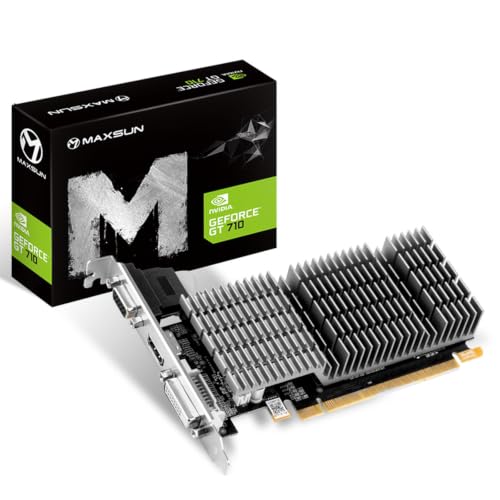
- Best for media playback and light games: a passive GeForce GT 1030.
- Best cheap upgrade for an office PC: a low-profile, passive GeForce GT 1030.
- Best alternative: integrated graphics, if you only need video output, streaming, and older or lightweight games.
Stock varies considerably, so it is sensible to check current fanless graphics cards before planning a build around one particular model. Look carefully at the listing: “quiet” and “zero RPM” do not mean the same thing as passive cooling. A zero-RPM card still has fans that start under load.
What should you buy?
| GPU type | Typical use | Main advantage | Main limitation |
|---|---|---|---|
| Fanless RTX 3050 6GB | 1080p gaming, esports, media PCs | Much faster than older entry-level cards; hardware ray tracing and modern video features | Limited availability and a large heatsink; still not a high-end gaming card |
| Fanless GT 1030 2GB | Desktop upgrade, video output, older games | Low power consumption and simple cooling requirements | Weak gaming performance and only 2GB of VRAM |
| Passive Radeon entry-level card | Basic gaming and multi-monitor use | Can be good value when discounted | Model availability and driver support vary by generation |
| Integrated graphics | Office work, streaming, casual games | No add-in card, no extra heat, and no purchase required | Usually weaker than even a modest discrete GPU |
Best passive performance: fanless RTX 3050 6GB
A passive GeForce RTX 3050 6GB is the most capable kind of fanless card worth considering for a current gaming PC. It is aimed at 1080p rather than demanding 1440p gaming, but it has a substantial advantage over older GT-series hardware: more graphics memory, newer media features, and support for modern upscaling and ray-tracing technologies.
It suits someone building a quiet small-form-factor or living-room PC who mainly plays esports games, older releases, indie titles, and newer games at reduced settings. Expect to adjust texture quality and use upscaling in demanding games. The passive heatsink can become very hot during long sessions, even when the card is operating within specification.
Check the physical dimensions before buying. A fanless card often uses a two-slot or larger heatsink, and its cooler may extend below the standard circuit board. It can block a neighboring expansion slot or interfere with a short case.
If you find one at a sensible price, this is the fanless RTX 3050 6GB category to target. Do not pay a large premium simply for the absence of a fan. A conventional low-noise card may deliver more performance for less money.
Best budget option: passive GT 1030
A passive GeForce GT 1030 remains useful when your needs are modest. It can add HDMI or DisplayPort output to an older desktop, drive multiple monitors depending on the exact model, and handle video playback without adding much power consumption. It is also adequate for older games and lightweight competitive titles at reduced settings.
It is not a good choice for current demanding games. The 2GB memory capacity is restrictive, and performance is far below modern gaming GPUs. Some GT 1030 listings also use slower DDR4 memory rather than GDDR5. That version can be dramatically slower, so check the memory type instead of buying solely on the model number.
For an office computer or home theater PC, a passive GT 1030 can be perfectly fine. It is especially sensible when the alternative is replacing an entire older system. It is poor value if you are assembling a new gaming PC and can afford a more capable card.
What about AMD and Intel?
AMD has offered passive versions of several low-power Radeon cards over the years, particularly in entry-level and small-form-factor ranges. These can be good purchases when priced below comparable NVIDIA cards, but confirm the exact GPU, memory type, outputs, and operating-system support. “Radeon” alone does not tell you enough about performance.
Intel Arc cards are generally active-cooled designs. They offer attractive performance in some price ranges, but they are not normally the answer for a fanless build. If absolute silence is the priority, look at NVIDIA or older Radeon passive models instead—or use a processor with integrated graphics.
Passive cooling still needs airflow
“Fanless” does not mean “works in a sealed case.” The card transfers heat into the surrounding air, and that air must leave the chassis. A case with at least one quiet intake fan and one exhaust fan is a safer choice than a completely stagnant enclosure.
Common failure modes include thermal throttling, reduced boost clocks, crashes during long gaming sessions, and heat soaking nearby components. Dust buildup makes the heatsink less effective. A passive card can also raise the temperature of the CPU, SSD, and power supply because its heat remains inside the case longer.
For the best result, use a ventilated case, keep cables away from the heatsink, and clean the fins periodically. Monitor GPU temperature during a long game rather than relying only on a short benchmark. If the system becomes unstable, the problem may be insufficient case airflow rather than a defective graphics card.
Buying advice
Start with the workload. For office work, streaming, and several monitors, integrated graphics may be the cheapest and quietest solution. For older games, a passive GT 1030 is enough. For current 1080p gaming, target a fanless RTX 3050 6GB only if its price and dimensions make sense.
Then check power and compatibility. Passive cards are usually low power, but your motherboard still needs the right slot, your case needs enough clearance, and the card must provide the video connectors you actually use. Low-profile systems require a matching low-profile bracket; a standard-height card will not fit simply because it is short.
Finally, compare a passive card with a normal card using a large heatsink and a quiet fan. Under light desktop use, both may be silent. Under gaming load, the active card may be cooler, faster, and cheaper. Choose passive cooling when silence, simplicity, or a fanless media PC matters more than maximum frame rate.
FAQ
Are passive graphics cards completely silent?
The graphics card itself makes no fan noise, but the computer may still have case, CPU, or power-supply fans. A well-ventilated system can be very quiet without being entirely silent.
Can a fanless GPU run modern games?
A fanless RTX 3050 6GB can handle many modern games at 1080p with sensible settings. Older passive cards such as the GT 1030 are better suited to older, lightweight, and esports games.
Do passive graphics cards overheat?
They can if the case has poor airflow, the heatsink is obstructed, or dust blocks the fins. Passive cooling depends on moving warm air out of the case, so ventilation is essential.
Is a passive GPU better than integrated graphics?
Usually, but not always. A discrete passive card can provide more gaming performance and additional display outputs, while integrated graphics are cheaper, simpler, and produce less heat inside the case.



