The best over-the-air TV antenna is the one matched to your distance from the broadcast towers, not the one with the biggest “mile range” on the box. Within about 25 miles of the towers, a flat indoor antenna such as the Mohu Leaf 50 or Winegard FlatWave Amped is enough. At 30 to 70 miles, an attic or rooftop Yagi-style antenna such as the Antennas Direct ClearStream 4V or a spec-class equivalent beats any indoor panel. Broadcast TV is free, uncompressed by streaming bitrates, and works with ATSC 1.0 and 3.0 tuners.
As an Amazon Associate we earn from qualifying purchases at no extra cost to you.
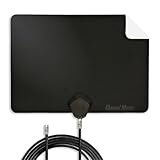


Top 3 picks at a glance
Quick comparison of the picks
| Pick | Best for | Key specs (manufacturer-rated) | Price range |
|---|---|---|---|
| Mohu Leaf 50 | Apartments, strong-signal cities | Flat indoor, amplified (USB powered), roughly 50-mile rating | Usually $30–$50 |
| Winegard FlatWave Amped | Window mounting, mixed signal | Flat indoor, amplified, VHF/UHF, roughly 40-mile rating | Usually $30–$50 |
| Antennas Direct ClearStream 4V | Best overall for suburbs | Indoor/outdoor, UHF-focused with VHF-high element, roughly 70-mile rating | Usually $80–$130 |
| High-gain rooftop or attic Yagi (spec class) | Rural, 50+ miles, weak signal | 10–14 dBi UHF gain, narrow beam, needs a mast | Usually $70–$200 |
| Compact outdoor/attic non-amplified antenna (spec class) | Strong signal, multiple TVs | No amplifier, so no overload; clean cable run | Usually $40–$90 |
Mile ratings come from the manufacturers and assume clear line of sight. Treat them as a ceiling, not a promise.
Best overall: Antennas Direct ClearStream 4V
This is the pick for most suburban homes 20 to 50 miles from the towers. It mounts in an attic, on a mast, or on an outdoor wall. It works best when the towers are in roughly the same direction, so the aim is simple. The trade-off is size and installation: you need cable runs, a mount, and ideally a ladder. If you can’t mount outdoors, a flat indoor panel is the better choice.
Best indoor for strong signals: Mohu Leaf 50
The Leaf 50 is a thin, paintable panel with a USB-powered amplifier. It suits apartments and condos within about 25 miles of the towers, particularly with a window facing them. The trade-off is that amplified indoor antennas can overload on nearby towers and struggle behind brick, stucco or Low-E glass. If you live within 10 miles, try the non-amplified mode or the unamplified spec class first.
Best for windows and VHF stations: Winegard FlatWave Amped
This flat amplified antenna is easy to place, and Winegard rates it for both VHF and UHF. That helps if a local network affiliate still broadcasts on VHF-high (channels 7–13). Flat panels are weak on VHF, so check your station list before you buy. Placement matters more than anything else: a window facing the towers can be the difference between 30 channels and 8.
Best for rural or weak signal: high-gain Yagi
Beyond 50 miles, or when hills block the path, you need gain and height. A UHF Yagi with 10–14 dBi of gain on a mast above the roofline concentrates reception into a narrow beam. The trade-off is directionality: if stations sit in different directions, you’ll need a rotator or a second antenna. Pairing it with a quality preamp (low noise figure, mounted at the antenna) is often better than a distribution amp indoors.
Best for strong signals with multiple TVs: non-amplified outdoor or attic
If towers are close, an unamplified antenna avoids overload and keeps the signal clean through a splitter. Choose this if you plan to feed 3 or more TVs and your signal is already strong.
How to choose: decision matrix
| Your situation | Distance to towers | Choose |
|---|---|---|
| Apartment, window faces towers | 0–25 miles | Flat indoor (amplified only if signal is weak) |
| Apartment, no clear window | Any | Balcony-mounted compact outdoor antenna, if allowed |
| House, towers one direction | 25–50 miles | Attic-mounted multi-element antenna |
| House, towers in several directions | 25–50 miles | Multidirectional antenna or rotator |
| Rural, hilly or wooded | 50–70+ miles | Rooftop Yagi plus low-noise preamp |
| 3+ TVs | Under 30 miles | Non-amplified antenna, short RG6 runs |
Step 1: Find your actual stations
Use the FCC’s DTV reception map or a similar tool from the antenna makers to list your stations, their distances, compass bearings and RF channel numbers. Check whether they are on VHF or UHF. Most stations broadcast on UHF now, but a few key affiliates remain on VHF-high.
Step 2: Estimate your line-of-sight limit
TV signals travel mostly in straight lines. A common rule of thumb for radio horizon distance in miles is roughly 1.23 × (√tower height in feet + √receiving antenna height in feet).
- Tower at 1,000 ft: √1000 ≈ 31.6.
- Antenna at 10 ft (indoor, ground floor): √10 ≈ 3.2, so about 1.23 × 34.8 ≈ 43 miles.
- Antenna at 30 ft (roof mast): √30 ≈ 5.5, so about 1.23 × 37.1 ≈ 46 miles.
Going from 10 ft to 30 ft adds only about 3 miles of theoretical horizon. Height therefore matters mainly for clearing nearby trees and buildings, not for stretching distance. If a hill sits between you and the tower, no indoor antenna’s “70-mile” rating will help.
Step 3: Do the cable and splitter math
Typical RG6 coax loses roughly 5–6 dB per 100 feet in the UHF band, and a 2-way splitter loses around 3.5 dB per output (a 4-way about 7 dB). Typical figures vary by product, so check the cable and splitter specs.
- Antenna to a TV via 75 ft of RG6: about 4 dB loss.
- Add a 4-way splitter feeding four TVs: about 7 dB more.
- Total: about 11 dB. A signal that was marginal at the antenna is now below the tuner’s threshold.
Each 3 dB lost halves the signal power. An 11 dB loss means the TV sees roughly 8% of the power the antenna delivered. The fix is a preamp placed at the antenna before the splitter, or shorter cable runs. On strong signals, skip the amplifier entirely.
Step 4: Decide on amplification
Use an amplifier only when you have long cable runs, several splitters, or a weak signal. Amplifying a strong signal causes overload, which shows up as pixelation on channels that were fine before. If you can scan more channels with the amp switched off, leave it off.
Step 5: Aim, scan and re-scan
Move the antenna a few inches at a time, then run a full channel scan and check signal quality (not just strength) in your TV’s tuner menu. Wait 20 to 30 seconds per move because the reading lags. Rescan after any change, and every few months as stations change channels.
ATSC 3.0 and gaming setups
ATSC 3.0 (NextGen TV) uses the same antennas as ATSC 1.0, so you do not need a new antenna for it. You need a TV or external tuner with an ATSC 3.0 receiver, and availability depends on your market. Some 3.0 signals are somewhat more fragile in weak conditions, so a cleaner, well-aimed antenna helps. For PC users, a USB ATSC tuner or a TV with a tuner can handle live broadcasts, but DRM on some 3.0 channels can limit recording. Check the tuner’s specs first.
Common mistakes to avoid
- Buying on mile range alone instead of checking your station bearings.
- Ignoring VHF stations when buying a UHF-only flat panel.
- Using a cheap splitter with 4 outputs when only 2 TVs are connected.
- Mounting low behind metal siding or Low-E windows.
- Judging by signal strength instead of quality or error rate.
Frequently Asked Questions
Are “HDTV” antennas different from regular antennas?
No. “HD,” “4K” and “digital” are marketing labels. An antenna receives radio frequencies, and any antenna covering the right VHF and UHF bands works for ATSC 1.0 and 3.0. What matters is gain, band coverage, placement and cable quality.
Is an amplified antenna always better?
No. An amplifier boosts weak signals and compensates for cable and splitter losses, but it also amplifies noise and can overload the tuner on strong local signals. Close to the towers, an unamplified antenna often works better.
Do I need an outdoor antenna?
Not necessarily. Indoor antennas work well within roughly 25 miles of the towers with a clear path. Beyond that, or behind hills and dense buildings, a high attic or rooftop antenna usually receives far more channels.
Why do I lose channels in bad weather?
Rain, wet foliage and atmospheric ducting can change signal levels, especially on marginal channels. If you have little signal margin, you will see dropouts. A better aim, more gain or a rooftop mount adds margin.
Can I split one antenna to several TVs?
Yes, but every split costs signal (about 3.5 dB for a 2-way). Use a low-loss splitter, keep cable runs short, and add a preamp at the antenna if the signal is weak. Strong signals often handle two or three TVs without any amplification.
Does an antenna work with ATSC 3.0 TVs?
Yes. The antenna is the same for both formats, and the TV’s built-in or external tuner decodes the signal. Rescan after your local stations switch to or add NextGen broadcasts.
Related guides
More from Amazon
Programs that pair well with the guide above. Offers and eligibility are set by Amazon and may change.
A free business account with business pricing and bulk-buying tools for work, shop or home office.
Create a business accountFree shipping on eligible items, Prime Video and more. Eligible new members can start with a free trial.
Start a Prime free trialAudiobooks and podcasts to listen to on the go. Eligible new members can start with a free trial.
Try Audible freeAd-free music streaming. Eligible new subscribers can start with a free trial.
Try Music Unlimited freeAs an Amazon Associate we earn from qualifying purchases.


