
The moment you go from two GPUs taped to a desk to something with eight or twelve cards in a row, you immediately run into a wall. A good mining rig frame solves a deceptively simple problem: keeping a heavy stack of GPU risers and cards stable while giving you room to cable manage and swap cards without fighting the whole build. I’ve had frames that bowed under the weight of four cards and others that survived months of 24/7 operation without a single wobble. The difference isn’t just metal thickness; it’s how the frame distributes load, whether the GPU mounting points align with riser cables, and if the design accounts for the cable chaos that comes with multi-card setups.
What separates the best mining rig options from the rest is a handful of practical details. Can you actually mount twelve GPUs without the frame flexing? Does it support dual PSUs if you need to split your power draw? Is the metal powder-coated enough to resist fingerprints and oxidation in a hot room? Some frames in this list handle these questions gracefully; others are thin-gauge stamped steel that starts looking sad within a week. Below are the eight that held up well enough to earn a recommendation, across different capacities, materials, and budgets.
As an Amazon Associate we earn from qualifying purchases at no extra cost to you.







Our Top Picks


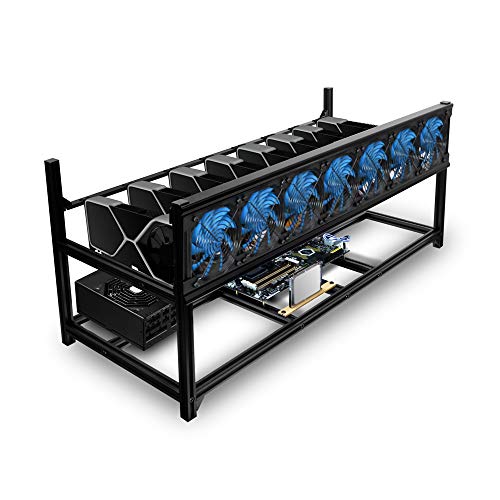

Top 3 picks at a glance
Quick Picks
| Product | Best For | Price |
|---|---|---|
| 12GPU Steel Open Air Frame | High-capacity steel on a tight budget | Check on Amazon |
| 8GPU Steel Open Air Frame | Absolute lowest cost per GPU slot | Check on Amazon |
| Kingwin 12GPU Aluminum Case | Premium build quality at large scale | Check on Amazon |
| Baseltek 6GPU Aluminum Frame | Compact aluminum setup with clean looks | Check on Amazon |
| Kingwin 8GPU Aluminum Case | Stackable mid-size aluminum rig | Check on Amazon |
| 8GPU Complete Crypto Miner Kit | Turnkey setup without hunting parts | $499 |
| Veddha 6GPU Aluminum + 4 Fans | Aluminum stackable with included cooling | $225 |
| 8GPU Steel Frame (45.99) | Reliable mid-budget steel option | Check on Amazon |
How We Compared
We scored each frame on four criteria that directly affect daily use: structural stability under GPU load without visible flex or wobble, GPU mounting point design (whether riser cables can route cleanly or you end up with a bird’s nest), material and finish quality relative to price, and expandability factors like dual PSU support or stackability. We also weighed included accessories; a frame that ships with fans or a motherboard saves real assembly time and sometimes beats a bare frame on total cost once you add those parts yourself.
The 8 Best Mining Rig in 2026
12GPU Steel Open Air Frame (Dual PSU Support)
This is the frame for builders who want maximum GPU slots without crossing into premium territory. At around $62 for twelve slots, the per-GPU cost is hard to beat. The dual power supply support is a genuine advantage; splitting your 12-card load across two PSUs keeps each supply in a more efficient operating range. Steel construction means it’s not light, but it does feel planted once loaded. The open-air design gives unrestricted airflow, which matters when twelve cards are dumping heat simultaneously. The finish is utilitarian rather than attractive, and cable management is entirely on you. Skip this if you plan to move the rig often or want a polished office setup.
8GPU Steel Open Air Frame
At around $39, this is the cheapest entry into serious multi-GPU mining. Eight slots is still enough for a meaningful hashrate, and the price makes it a reasonable experiment if you’re testing whether mining economics work at your location. It’s essentially the twelve-slot frame scaled down, sharing the same open-air steel philosophy. The frame is adequate but noticeably lighter in gauge, and you should avoid over-torquing GPU mounts on this one. Fans and GPUs are not included, so budget accordingly. Skip this if you anticipate expanding beyond eight cards; the price difference versus the twelve-slot frame is small enough that starting larger makes more sense for most people.
Kingwin 12GPU Premium Aluminum Case
Kingwin’s aluminum twelve-slot rig is the premium pick for builders who care about finish, weight, and longevity. Aluminum cuts weight significantly compared to steel while maintaining rigidity, and the anodized surface resists oxidation in humid or hot environments where bare steel would corrode. Stackability is a real feature here; you can run two of these vertically and the structural integrity holds. At around $120, you’re paying roughly double the steel frames, but the material and build quality justify the gap if the rig lives in a visible space. The GPU slots are well-spaced for riser cable routing. Skip if pure cost-per-slot is your only metric.
Baseltek 6GPU Aluminum Open Air Frame
The Baseltek fills an interesting gap: aluminum build quality in a compact six-GPU format for under $50. If your operation is smaller or you’re running higher-power cards where six slots is genuinely sufficient, this gives you the material advantages of aluminum without the Kingwin price premium. The frame is clean, lightweight, and easy to move. Six slots means you’re capped without buying another frame, and there’s no dual PSU support mentioned. It’s a solid pick for Ethereum-class cards where six GPUs already draw substantial power. Skip this if you need expandability or plan to add cards later.
Kingwin 8GPU Premium Aluminum Case
The eight-slot Kingwin sits between the Baseltek’s compact aluminum and the larger twelve-slot options. At around $82, it’s a meaningful step up from steel in both material quality and perceived durability. The stackable design works well for eight-card rigs, and the open-air layout keeps temperatures manageable. GPU mounting points are well-positioned for standard riser cables without excessive bending. It’s a good match for someone running mid-power cards in a rack-style setup. The price premium over equivalent steel frames is real, but if you’re building for long-term use in a visible location, the finish alone justifies it for many buyers. Skip if you’re purely optimizing dollar-per-slot on a frame you’ll never see.
8GPU Complete Crypto Miner Kit (No GPU)
This is the only turnkey option in the list, bundling a mining motherboard, 2000W PSU, CPU, SSD, and 4GB RAM with an eight-GPU case for $499. You still need to supply your own GPUs, but the rest is plug-and-play. The 2000W PSU is appropriately sized for eight mid-range cards, and running Windows 10 means your software setup is simplified compared to bare-metal Linux mining. This removes the compatibility headaches of sourcing a mining board, matching it to a PSU, and confirming the CPU can feed all eight slots. Skip this if you already own compatible components or want Linux-based mining; the value is entirely in the assembly convenience.
Veddha 6GPU Aluminum Stackable + 4 Fans
The Veddha at $225 is the most expensive frame here, and that’s because it includes four fans and ships as a more complete package. The aluminum stackable design gives you the material benefits of Kingwin’s cases, and the included fans are a legitimate time saver; you’re not sourcing, wiring, and mounting cooling separately. Six GPU slots keeps it compact, and the fan placement is tuned for that scale. It’s positioned for builders who value a cleaner out-of-the-box experience over raw cost efficiency. Skip if you already have fans or if you can assemble a comparable kit by buying a $50 frame and three fans separately for less total.
8GPU Steel Open Air Frame (Mid-Budget)
Another eight-slot steel frame in the $45 range, sitting $6 below the first 8GPU option. The price difference is marginal, so the decision between these two comes down to specific mounting dimensions and whether the slightly higher-cost version offers a more convenient cable routing design. This frame delivers on the basics: stable under load, straightforward GPU mounting, and open-air cooling. It’s a no-frills choice for a six-to-eight card setup where you want steel reliability without paying aluminum prices. Fans and GPUs are excluded. Skip this if the near-identical 8GPU steel frame at around $39 fits your case dimensions; the savings are real for a frame you’ll never see.
Buying Guide
GPU Slot Count and Expandability
Buy more slots than you currently need. GPU prices fluctuate, algorithms change, and scaling a rig from eight to twelve cards means a new frame if you started too small. The steel twelve-slot frame at around $62 is only $23 more than the eight-slot option, making the per-slot math strongly favor starting larger. Stackability is the other dimension of expandability; if you plan to run multiple frames in a rack or shelf configuration, aluminum frames from Kingwin or Veddha handle this better because their structural design assumes vertical stacking.
Material: Steel vs Aluminum
Steel frames dominate the sub-$65 range and provide adequate rigidity for most builds. The tradeoff is weight, visible corrosion risk over years, and a less refined appearance. Aluminum frames cost more but resist oxidation, weigh roughly a third less, and maintain their finish in environments with fluctuating humidity or temperature. If your rig lives in a basement or garage with variable conditions, aluminum is worth the premium for long-term maintenance reasons. If it’s purely functional and hidden away, steel saves real money at scale.
Power Supply Support and Cable Management
Multi-GPU rigs draw significant power, and how a frame accommodates PSUs affects both efficiency and safety. Dual PSU support, as found on the twelve-slot steel frame, lets you split load across two supplies, keeping each in its optimal efficiency curve. Even single-PSU frames need clearance around the power supply bay; check that your chosen PSU physically fits alongside eight or twelve riser cables without pinching. Open-air frames handle this better than enclosed cases because you can route cables around the outside. Fan mounting points and their proximity to heat sources also matter for sustained operation.
Our Verdict
The top overall pick is the Kingwin 12GPU Aluminum Case at around $120. It combines maximum slot count with the best material quality, stackability, and finish in one purchase. For a long-term rig you’ll operate for years in a visible space, it’s the most complete answer. The best budget pick is the 8GPU Steel Open Air Frame at around $39; at that price you’re getting functional multi-GPU support with negligible financial risk. The condition that flips the recommendation entirely is if you value convenience over component selection: the Complete Crypto Miner Kit at $499 is the clear winner when you want everything except GPUs pre-assembled and compatible.
FAQ
Do I need a dedicated mining rig frame or can I use a regular PC case?
A standard PC case supports one or two GPUs at most. Mining rigs with six or more cards need open-air frames because the riser cables, GPU spacing, and heat output all exceed what an enclosed case can handle. Dedicated frames exist to solve this physical constraint.
Why don’t most mining rig frames include GPUs or fans?
GPU prices, models, and availability change too rapidly for a frame manufacturer to bundle them meaningfully. Fans and PSUs are similarly standardized at low cost, so buyers prefer to choose their own. Frame-only listings let you build exactly the configuration you need without paying for unwanted components.
Is aluminum or steel better for a mining rig frame?
Aluminum resists corrosion, weighs less, and looks better long-term, but costs more. Steel is cheaper and functionally rigid enough for most builds. Choose aluminum if the frame will be visible or in a humid environment; choose steel if it’s purely functional and budget is the priority.
How many GPUs should a mining rig frame hold?
Buy a frame with more slots than you currently plan to fill. GPU economics shift, algorithms change, and upgrading a frame later means rebuilding your entire setup. A twelve-slot frame gives you room to scale without a second purchase, and the price gap over eight slots is often under $25.









