The best mid tower PC case for most builders is a mesh-front ATX model that ships with enough fans, supports a 360mm radiator and clears your graphics card with room to spare. This list compares 12 listings, from compact airflow designs to a wood-fronted Fractal and an E-ATX Montech. Two entries share nearly identical spec lines and one title is cut off, and we flag those. All details come from the listing titles, so confirm clearances for your own parts before you buy.
Our Top Picks
Top 3 picks at a glance
At a glance: all 12 mid-tower cases
As an Amazon Associate we earn from qualifying purchases at no extra cost to you.




| Model | Key point from title | Price tier | Best for |
|---|---|---|---|
| NZXT H5 Flow | Compact ATX, 2 fans, 360mm front radiator | Mid-range | First airflow build |
| Corsair 4000D RS ARGB Frame | 3 fans, InfiniRail mounting, GPU anti-sag | Mid-range | Easy fan and cable work |
| DARKROCK EC2 | Type-C, up to 8 x 120mm fans, 1 fan included | Budget | Low-cost shell |
| Montech AIR 903 MAX | E-ATX, 4 fans, 400mm GPU, 360mm radiators | Mid-range | Large GPUs and AIOs |
| MOROVOL (title cut off) | 4 RGB fans, mesh front, USB 3.0 | Budget | Fans-included value |
| GAMDIAS ATX Mid Tower | 4 ARGB fans, 340mm GPU, 360mm radiator | Budget | Lit-up budget build |
| Antec P30 AIR | 5 PWM fans, wood accents, 360mm radiator | Mid-range | Fan-heavy, warm look |
| Montech X3 Mesh | 6 RGB fans, 305mm GPU, 240mm radiator | Budget | Short-GPU builds |
| Fractal Design North | Walnut front, two 140mm fans, Type-C | Premium | Quiet living-room look |
| Rosewill RWGC1 | 4 PWM fans, 340mm GPU, 360mm radiator | Budget | Near-twin of GAMDIAS |
| Geometric Future M5 | E-ATX, 420/360 radiator, 5 x 140mm ARGB | Premium | Large radiators |
| MUSETEX Y6 | 4 non-LED fans, Type-C, 270-degree glass | Budget | Clean look, no RGB |
Twelve mid-tower cases, one at a time
NZXT H5 Flow
Described as a compact ATX mid-tower with two 120mm fans, 360mm front radiator support and tempered glass. The title calls it a great first airflow build, which fits its size: it is meant to be easy to work in, not to host the biggest hardware. Check the listing for GPU length.
Pros
- Radiator support up to 360mm
- Two fans included
Cons
- Compact, so tight with big coolers
- GPU limit not in title
Who it’s for: First-time builders who want airflow without bulk.
Corsair 4000D RS ARGB Frame
Lists three pre-installed fans, InfiniRail fan mounting, GPU anti-sag and reverse motherboard support. The word Frame suggests a customisable panel layout, so read the listing to see what ships in the box. Fan rails are aimed at tidy, quick installation.
Pros
- Three fans included
- GPU anti-sag bracket
Cons
- Frame wording needs checking
- Clearance numbers missing
Who it’s for: Builders who want easy fan installation and a tidy interior.
DARKROCK EC2 ATX Mid Tower
Claims Type-C readiness, 50 Series graphics card support, a tempered glass side, room for up to eight 120mm fans, 360mm radiator support and only one pre-installed fan. Support for many fans is not the same as having them, so budget for extras.
Pros
- Many fan mounts
- Type-C ready
Cons
- One fan included
- Brand details thin
Who it’s for: Budget builders ready to buy extra fans.
MONTECH AIR 903 MAX
An E-ATX mid-tower with four fans, 400mm GPU room, top and front 360mm radiator support, vertical GPU mounting readiness, dust filters and USB-C plus two USB 3.0 ports. It is the roomiest of the group by its own claims, and the 400mm figure helps with large cards.
Pros
- 400mm GPU claim
- Four fans and dust filters
Cons
- E-ATX size takes desk space
- Vertical GPU kit may be extra
Who it’s for: Large-GPU builds with a 360mm radiator.
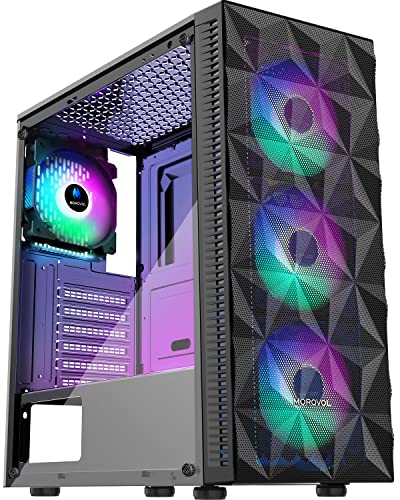
MOROVOL Mid Tower Case, 4 RGB Fans
The title advertises four pre-installed RGB fans, a diamond-mesh front, tempered glass and USB 3.0, then cuts off at the model number, so the full name is unclear. Check the listing for dimensions, radiator and GPU support, none of which appear here.
Pros
- Four fans included
- Mesh front for airflow
Cons
- Truncated title
- Clearance data absent
Who it’s for: Bargain builders who read the listing closely.
GAMDIAS ATX Mid Tower
Lists tempered glass, four built-in 120mm ARGB fans, front mesh, up to six 120mm fans, 340mm GPU, 360mm radiator and 160mm CPU cooler limits. The numbers are useful and easy to check against your parts. It appears very similar to the Rosewill entry below.
Pros
- Clearances stated
- Four ARGB fans
Cons
- 340mm GPU limit excludes longest cards
- Near-duplicate of Rosewill
Who it’s for: Mainstream builds with common parts.
Antec P30 AIR
Five PWM fans included, wood accents, a metal-mesh front, 360mm radiator support and a USB Type-C port. Five fans is the highest included count in the set, which saves a purchase. Titles do not state GPU length, so confirm that.
Pros
- Five PWM fans
- Mesh front and Type-C
Cons
- GPU length not stated
- Wood accents are cosmetic
Who it’s for: Buyers who want airflow out of the box.
MONTECH X3 Mesh
Six fixed RGB fans, a 305mm GPU limit, 240mm radiator support, swivel tempered glass, USB 3.0, three 140mm intake fans and dust filters. The 305mm limit rules out many long modern cards, so measure first.
Pros
- Six fans included
- Dust filters
Cons
- 305mm GPU limit
- Only 240mm radiator support
Who it’s for: Compact GPU builds that want lighting.
Fractal Design North
Charcoal black with a genuine walnut front, a glass side, two 140mm Aspect PWM fans, USB Type-C and an airflow-oriented ATX mid-tower layout. The wood look sets it apart, and large fans tend to run quietly at moderate speeds. Check the listing for GPU length, cooler height and radiator thickness, since the title lists none of them. Tool-less panels and a clean front mean fewer visible screws, though cable routing room still deserves a look.
Pros
- Distinct wood front
- Two 140mm fans
Cons
- Clearance data missing from title
- Likely premium pricing
Who it’s for: Builders who want a living-room-friendly case.
Rosewill ATX Mid Tower, RWGC1
The spec line repeats GAMDIAS almost word for word: four built-in 120mm PWM fans, front mesh, six fans maximum, 340mm GPU, 360mm radiator, 160mm CPU cooler. Treat the two as near-duplicates and compare return terms and listing detail.
Pros
- Clearances stated
- PWM fans
Cons
- Near-duplicate listing
- 340mm GPU limit
Who it’s for: Budget builders choosing between near-twin cases.
Geometric Future M5
Supports E-ATX and ATX, uses 1.2mm steel, Type-C, toolless panels, 420 and 360mm radiator support and five pre-installed 140mm ARGB PWM fans. Large radiators and big fans suit high-power builds. Brand recognition is lower than the big names here, so read the listing and manufacturer documentation, and look at how buyers describe fit and finish.
Pros
- 420mm radiator support
- Five 140mm fans
Cons
- Lesser-known brand
- Weight likely high
Who it’s for: High-airflow builds with large AIOs.
MUSETEX Y6
Four non-LED fans, ATX mid-tower, Type-C and 270-degree full view tempered glass. Non-LED fans suit a clean look. It also appears in a white variant elsewhere, so confirm the colour you are ordering. Clearance numbers are not in the title, so GPU and radiator limits need confirming. Fans without LEDs are also easy to swap later if you change your mind about lighting.
Pros
- No lighting on fans
- Panoramic glass
Cons
- Specs thin in title
- Panoramic glass shows clutter
Who it’s for: Showcase builds without RGB.
How we picked these
We sorted through listing titles, published specifications, manufacturer documentation and buyer reviews, and looked for stated clearances, radiator support and included fans. Nobody on the team used or measured these units. Capacity figures are seller claims, so we do not rank on them. Price tiers are relative to this set and carry no dollar figures. Entries that look duplicated or have unclear titles are marked as such. We also avoided inventing dimensions: where a title gives no GPU length or cooler height, we say the data is missing and point you to the full listing.
Mid-tower buying notes: what decides a good fit
Airflow versus silence
Mesh fronts move more air but let more fan noise out; solid or glass-heavy fronts hush the case and raise temperatures. Large 140mm fans spin slower for the same airflow, which is why a pair of them can feel quieter than four 120mm fans.
GPU length: do the sum
Take your card’s listed length and add roughly 30mm for cables and front fans. A 340mm card needs a case rated near 370mm if a radiator sits in the front. That estimate assumes standard 8-pin or 12-pin power cabling.
Radiator and CPU cooler limits
A 360mm front radiator is common in this set, but a top-mounted radiator can clash with tall RAM or a motherboard heatsink. Check the CPU cooler ceiling, such as the 160mm figure on two listings.
Front I/O
USB-C on the front panel needs a matching motherboard header. A Type-C port with no header is just decoration, so check your board manual.
Included fans and cable management
More fans saves money, but cable space and routing cutouts matter more for neat builds. ARGB fans need a 5V header or a controller to sync.
Planning your fan count
A simple rule of thumb is to keep intake and exhaust roughly balanced, with slightly more intake for a dust-filtered case. For example, three 120mm intakes and two exhaust fans is a sensible layout for a mid-range gaming build. That is a planning estimate, not a measured result. Cases that ship with one fan need two or three more, so add their cost to your budget before comparing.
Pre-purchase checklist
Write down your GPU length and thickness, the CPU cooler height, the radiator size you want, the motherboard form factor and the number of drives. Compare each against the listing’s stated limits, then add a margin of roughly 20 to 30mm for cables. If any figure is missing from the title, such as GPU length for the NZXT or Antec, open the full listing or the manufacturer page. Finally, check the return window, because a case is bulky to ship back.
Mistakes buyers make with mid-tower cases
- Counting fan mounts as fans. The DARKROCK has room for eight but includes one.
- Skipping GPU length. A 305mm limit rules out many long cards.
- Ignoring E-ATX width. E-ATX cases can be wider on the desk.
- Buying RGB without a header plan. Fixed-RGB fans cannot be recoloured in software.
- Forgetting the power supply. Cases that do not state PSU length or shroud layout need a check of the full listing if you own a long unit.
- Trusting a cut-off title. If a listing is truncated, read the full specs and return terms first.
Final recommendations
For a first airflow build, the NZXT H5 Flow and Corsair 4000D RS are straightforward starts. If you need big clearances, the Montech AIR 903 MAX and Geometric Future M5 are the roomiest on paper. For a quiet, furniture-like look the Fractal North stands out. Budget buyers can pick among the GAMDIAS, Rosewill and MOROVOL listings. Verify every clearance against your own parts. If you later outgrow a mid-tower, see our workstation case picks.
Related guides
- Replacement Cables For Gaming Mice And Headsets
- Indoor Security Cameras Without Subscription
- Nvidia Control Panel Best Settings For Gaming
Frequently asked questions
What size is a mid-tower PC case?
Mid-tower generally means a case for ATX motherboards, larger than a mini tower and smaller than a full tower. Exact dimensions vary by model, so use the listing’s stated clearances for your GPU and cooler rather than relying on the category name.
How many fans does a mid-tower need?
A common starting point is two or three intake fans and one exhaust, based on general build practice rather than any measurement here. Several listings here include four to six fans, which is plenty. A case with one fan, like the DARKROCK, will need extra fans for gaming loads.
Do I need a 360mm radiator mount?
Only if you plan a 360mm all-in-one cooler. A 240mm unit or a good air cooler suits many builds. Support is useful for future flexibility, but check the radiator thickness against your RAM and fans.
Is tempered glass worth it?
Glass shows off the build but traps more sound and can be fragile if handled carelessly. Lift the panel with care. If you prefer a quieter, plainer machine, look for solid panels.
Can these cases fit the latest graphics cards?
Some list support for large cards, and the DARKROCK mentions 50 Series cards. Check each card’s length, width and power-connector position, and confirm the case’s stated clearance in the listing before ordering.