- Top Pick: ASUS ROG Rapture GT6 (2-Pack)
- Runner-up: NETGEAR Orbi 770 Series (3-Pack)
- Also consider: ASUS ZenWiFi BT10 (2-Pack)
A single gaming router is the right answer when your PC sits in the same room as your modem. It is the wrong answer when your setup lives two floors away or behind brick and concrete. There, the problem is not raw speed but distance: signal drops, retransmissions climb, and ping spikes show up exactly when a match gets busy. A mesh system fixes that by placing a node near your gaming space, so your rig talks to a nearby access point instead of shouting across the house.
The five systems below were chosen for gaming first. Each offers a dedicated or high-band backhaul path, multi-gig wired ports so a node can feed your PC by Ethernet, and Wi-Fi 6 or Wi-Fi 7 radios — from premium flagships with 10-gigabit ports to simpler app-driven systems for players who never want to open an admin page.
As an Amazon Associate, we earn from qualifying purchases.
Top 3 picks at a glance
Table of Contents
- Quick Answer
- ASUS ROG Rapture GT6
- NETGEAR Orbi 770 Series
- ASUS ZenWiFi BT10
- Amazon eero Pro 7
- TP-Link Deco BE65
- How to Choose
- Who Should Skip
- FAQ
- Final Verdict
- Product and ASIN Reference
Quick Answer
For most gamers in larger homes, the TP-Link Deco BE65 3-pack is the sweet spot: Wi-Fi 7 speeds, four 2.5-gigabit ports per node, and coverage up to 7,600 square feet. Pick the ASUS ROG Rapture GT6 for gaming-specific traffic prioritization, the ASUS ZenWiFi BT10 for 10-gigabit wired headroom, the NETGEAR Orbi 770 for the biggest homes, and the eero Pro 7 for the simplest setup.
ASUS ROG Rapture GT6 (2-Pack)
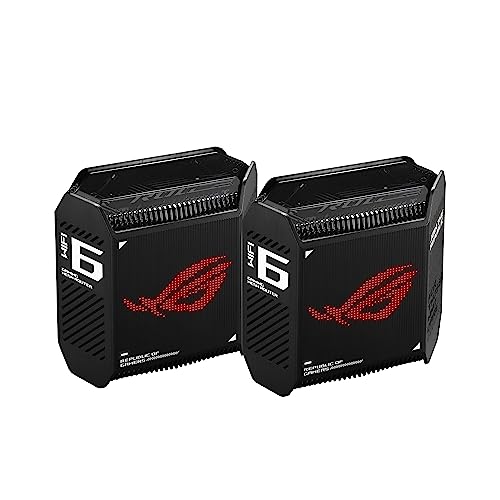
The GT6 is the only system here designed from the ground up for gaming. ASUS builds triple-level game acceleration into the firmware: a Game Boost mode that prioritizes game traffic, a dedicated gaming port on the main unit, and support for the Gamers Private Network powered by wtfast to optimize routing to game servers. That software stack is the headline feature.
Specs
- Wi-Fi standard: Wi-Fi 6 (802.11ax), tri-band AX10000
- Band speeds: up to 4,804 Mbps on each 5 GHz band, up to 574 Mbps on 2.4 GHz
- Coverage: up to 5,800 sq. ft. (2-pack)
- Ports (per unit): 1 x 2.5 Gbps WAN/LAN, 3 x 1 Gbps LAN, 1 x USB 3.2
- Backhaul: dedicated 5 GHz band with UNII-4 support
- Security: AiProtection Pro powered by Trend Micro, included for the life of the product
- Extras: AiMesh compatible, mobile game mode via app
Because it is a Wi-Fi 6 system, the GT6 gives up the 6 GHz band and the highest throughput of the Wi-Fi 7 picks. In return you get a mature platform, a 2.5-gigabit uplink, and gaming QoS the general-purpose systems below do not match. Wire your PC into the satellite node and the only wireless hop is the dedicated backhaul, which keeps latency steadier than a single distant router.
NETGEAR Orbi 770 Series (3-Pack)

The Orbi 770 is the coverage pick. NETGEAR rates the 3-pack for up to 8,000 square feet and 100 connected devices, the largest footprint in this roundup. Its enhanced backhaul uses Multi-Link Operation to combine bands for the node-to-node link — exactly the link your gaming traffic depends on when your PC connects through a satellite.
Specs
- Wi-Fi standard: Wi-Fi 7 (802.11be), tri-band BE11000
- Band speeds: up to 5,760 Mbps on 6 GHz, up to 4,320 Mbps on 5 GHz, up to 688 Mbps on 2.4 GHz
- Coverage: up to 8,000 sq. ft. (3-pack)
- Devices: up to 100
- Ports (router): 1 x 2.5 Gbps internet, 3 x 2.5 Gbps LAN
- Ports (each satellite): 2 x 2.5 Gbps LAN
- Security: NETGEAR Armor available after a trial period, WPA3
Setup is app-based, and every satellite gives you two 2.5-gigabit ports, enough for a PC and a console side by side. The trade-offs are a premium tier and a feature set aimed at coverage rather than gaming tuning: there is no game-prioritization mode comparable to the GT6, and Armor becomes a paid subscription after its trial. For a big house with several players under one roof, the coverage and backhaul capacity are hard to beat.
ASUS ZenWiFi BT10 (2-Pack)

The ZenWiFi BT10 is the wired-infrastructure pick. Each unit carries two 10-gigabit ports, suiting homes with multi-gig fiber today or a planned upgrade tomorrow, and enabling fast wired backhaul where rooms are cabled. It is also the fastest wireless system here on paper, with a BE18000 rating driven by a wide 6 GHz radio.
Specs
- Wi-Fi standard: Wi-Fi 7 (802.11be), tri-band BE18000
- Band speeds: up to 11,529 Mbps on 6 GHz, up to 5,764 Mbps on 5 GHz, up to 688 Mbps on 2.4 GHz
- Coverage: up to 6,000 sq. ft. (2-pack)
- Ports (per unit): 1 x 10 Gbps WAN/LAN, 1 x 10 Gbps LAN, 1 x 1 Gbps LAN, 1 x USB 3.0
- Security: AiProtection Pro powered by Trend Micro, included for the life of the product
- Extras: AiMesh, Smart Home Master SSIDs, 4G and 5G mobile tethering failover
ASUS includes its full feature set rather than locking tools behind a subscription: security and parental controls are free for the life of the product, and Smart Home Master lets you park smart-home gadgets on their own SSID so they never contend with gaming traffic. The BT10 sits in the premium tier, and two nodes cover less area than the 3-pack systems, so very large homes may need a third unit.
Amazon eero Pro 7 (3-Pack)

The eero Pro 7 is the set-and-forget pick. TrueMesh software handles channel selection and updates automatically through the app, making it the easiest system here for a household where one person games and everyone else just wants the Wi-Fi to work. The 3-pack covers up to 6,000 square feet and plans up to 5 Gbps.
Specs
- Wi-Fi standard: Wi-Fi 7 (802.11be), tri-band (2.4 GHz, 5 GHz, 6 GHz)
- Coverage: up to 6,000 sq. ft. (3-pack)
- Internet plans: up to 5 Gbps
- Ports (per unit): 2 x 5 Gbps Ethernet (auto-sensing)
- Devices: 200 or more (3-pack)
- Extras: built-in Thread, Zigbee and Matter smart home hub, Alexa integration
- Security: eero Plus subscription available for advanced security and parental controls
Each node has two 5-gigabit ports, so a satellite in the gaming room can wire in a PC and still leave a port for a console. The compromises are control and extras: no USB port, no gaming QoS mode, and advanced security sits behind the optional eero Plus subscription. If you value a self-managing network, those trade-offs are easy to accept.
TP-Link Deco BE65 (3-Pack)

The Deco BE65 is the value flagship here. It matches the Orbi 770’s BE11000 speed class, covers up to 7,600 square feet in 3-pack form per TP-Link, and gives every unit four 2.5-gigabit ports — the most wired flexibility per node in this roundup. A node behind your desk can feed a PC, console, and streaming box without a switch.
Specs
- Wi-Fi standard: Wi-Fi 7 (802.11be), tri-band BE11000
- Band speeds: up to 5,760 Mbps on 6 GHz, up to 4,320 Mbps on 5 GHz, up to 574 Mbps on 2.4 GHz
- Coverage: up to 7,600 sq. ft. (3-pack)
- Ports (per unit): 4 x 2.5 Gbps WAN/LAN (auto-sensing)
- Devices: 200 or more
- Wi-Fi 7 features: Multi-Link Operation, 320 MHz channels
- Security: TP-Link HomeShield included; HomeShield Pro subscription available for advanced features
TP-Link’s AI-driven mesh uses one network name, steers clients between nodes automatically, and can mix wired and wireless backhaul. Basic HomeShield security and QoS are included, though the Pro tier is a subscription. For its speed class, coverage, and ports, the BE65 lands in the mid-range tier while competing with premium systems on specifications.
How to Choose
Start with layout, not speed ratings. A 2-pack suits most two-story homes up to roughly 3,000 square feet; long ranch layouts, three floors, or masonry walls usually call for a 3-pack. Place one node near your gaming setup, because a wired PC-to-node connection removes the weakest link entirely.
Next, look at backhaul. Tri-band systems reserve or share a high-band radio for node-to-node traffic; Wi-Fi 7 systems add Multi-Link Operation, which can send backhaul over two bands at once for lower latency under load. If your home has Ethernet in the walls, use wired backhaul — all five systems here support it — since a cable is always the most stable option.
Then match ports to your plan and desk. A 2.5-gigabit port covers gigabit and faster fiber plans; choose the BT10’s 10-gigabit ports only if you expect faster multi-gig service. Count devices you want wired at the satellite: the BE65’s four ports per unit is the most generous, while the eero Pro 7’s two may push you toward a small switch.
Finally, check what is included versus subscribed. ASUS includes AiProtection Pro for the life of the GT6 and BT10. NETGEAR Armor and eero Plus move advanced security behind a subscription, and TP-Link splits HomeShield into included basics and a Pro tier — a long-term cost worth weighing.
Who Should Skip
Skip mesh entirely if your gaming PC is in the same room as your router or you can run one Ethernet cable to it; a standalone gaming router or a direct wire is simpler and cheaper. Skip these systems in a small apartment, where one node is plenty and extra satellites add cost without improving latency. Skip the premium Wi-Fi 7 flagships if your plan is a few hundred megabits and your devices are mostly Wi-Fi 6 — a mid-range system performs the same in practice. And skip app-only systems like the eero Pro 7 if you want deep manual control over channels, DNS, or QoS rules.
FAQ
Does a mesh system reduce ping for gaming?
It can, when the alternative is a weak connection to a distant router. A nearby node shortens the wireless hop and cuts retransmissions, which stabilizes latency. Wiring your PC into a satellite gives the most consistent result, since only the backhaul link stays wireless.
Is wired backhaul better than wireless backhaul?
Yes. An Ethernet cable between nodes removes backhaul traffic from the air entirely, leaving all wireless capacity for your devices. If your home is not wired, a tri-band system with dedicated or Multi-Link backhaul is the next best option.
Wi-Fi 6 or Wi-Fi 7 for a gaming mesh?
Wi-Fi 7 adds the 6 GHz band with 320 MHz channels and Multi-Link Operation, which helps in larger homes with many active devices. Wi-Fi 6 systems like the GT6 remain strong when gaming QoS matters more than peak throughput.
How many nodes do I need?
One node covers 2,000 square feet of open layout. Start with a 2-pack or 3-pack based on floor count and wall materials, place a node near the gaming room, and add a satellite if a dead zone remains.
Final Verdict
For gaming in a home where one router cannot reach, the TP-Link Deco BE65 3-pack is the best all-round choice: Wi-Fi 7 speed, generous coverage, and four 2.5-gigabit ports per node at a mid-range tier. Choose the GT6 for gaming traffic prioritization, the Orbi 770 for the largest homes, the ZenWiFi BT10 for 10-gigabit headroom, and the eero Pro 7 for a network that manages itself.
Related guides
More from Amazon
Programs that pair well with the guide above. Offers and eligibility are set by Amazon and may change.
A free business account with business pricing and bulk-buying tools for work, shop or home office.
Create a business accountFree shipping on eligible items, Prime Video and more. Eligible new members can start with a free trial.
Start a Prime free trialAudiobooks and podcasts to listen to on the go. Eligible new members can start with a free trial.
Try Audible freeAd-free music streaming. Eligible new subscribers can start with a free trial.
Try Music Unlimited freeAs an Amazon Associate we earn from qualifying purchases.


