
The Mac Pro 5,1 (the 2010-2012 cheese grater) is still usable in 2026, but only if you get the GPU right. The stock GT 120 or HD 5770 can’t run modern macOS properly, lack Metal support, and choke on 4K, Lightroom, Final Cut, or even a browser with hardware acceleration on.
The catch: this machine has old EFI firmware, two 6-pin power connectors rated for about 225-300W total, PCIe 2.0 slots, and no NVIDIA Web Drivers past High Sierra. Pick the wrong card and you get no boot screen, shutdowns under load, or a card that won’t initialize at all.
As an Amazon Associate we earn from qualifying purchases at no extra cost to you.


Our Top Picks
 GIGABYTE Radeon RX 9070 XT Gaming OC 16GRADEON9070XT11.34 x 5.2 x 2.2 Inches3.9 PoundsCheck on Amazon
Top 3 picks at a glance
What to check first
Before you buy anything, confirm three things. First, your macOS version. Anything newer than High Sierra 10.13 requires a Metal-capable AMD card. Mojave, Catalina (with dosdude patcher or OpenCore), and Monterey/Ventura via OpenCore Legacy Patcher all assume AMD GCN or RDNA. NVIDIA Kepler cards like the GTX 680 work but have no acceleration in Monterey and later.
Second, power. The Mac Pro 5,1 provides 75W from the slot plus 75W from each of the two mini 6-pin connectors. In practice, stay under 225W total unless you want to do the Pixlas mod (wiring directly to the PSU). Cards like the Vega 64, Radeon VII, and RX 6800 will shut the machine down or melt the backplane traces if you just use dual 6-pin to 8-pin adapters and run FurMark.
Third, boot screens. Stock Apple cards and flashed MVC cards show the Apple logo and let you pick a boot drive or enter Recovery. Standard PC AMD cards do not on the original firmware. That doesn’t matter for a single macOS install, but it matters a lot if you dual-boot, use FileVault, or troubleshoot with OpenCore. Most people in 2026 solve this with OpenCore + EnableGop, which restores boot screen support for most modern AMD cards.
The easiest safe pick: RX 580 8GB
If you just want the machine to work without mods, get an 8GB RX 580. It’s natively supported from High Sierra through Sonoma with OpenCore, needs only one 8-pin (or 6-pin on some Sapphire Pulse models), draws about 185W, and drives two to three displays including 4K at 60Hz over DisplayPort.
It’s not fast. Expect usable 1080p medium gaming in Windows via Boot Camp, smooth Photoshop, Lightroom, 4K YouTube with hardware decode, and basic Final Cut Pro / DaVinci Resolve timelines. It struggles with heavy noise reduction, 4K H.265 10-bit, or modern AAA games. But for an office machine, audio workstation, or light photo rig, the cheaper option is fine.
Buy a Sapphire Pulse RX 580 8GB if you can find it. Avoid XFX and PowerColor Red Dragon variants – we have seen more fan failures and VBIOS quirks that cause black screens on wake in a 5,1. Make sure it’s the true 2304-shader 8GB version, not the cut-down 2048SP RX 580 often sold in China.
Balanced upgrade: Vega 56 and RX 5700 XT
For video editing and 1440p gaming in Windows, the sweet spot is Vega 56 or RX 5700 XT. Both are big jumps over the RX 580 – roughly 45% and 80% faster respectively – and both retain native AMD drivers in macOS.
Vega 56 (Sapphire Pulse is the one to get) runs well on the stock PSU if you undervolt it. Out of the box it can spike over 230W and cause random shutdowns on dual 6-pin power. Drop power limit -20% in Windows or use VGTab in macOS and it stays stable with only a 5% performance loss. It runs hot and loud. If your Mac Pro lives in a bedroom or studio, the blower-style reference models are fatiguing.
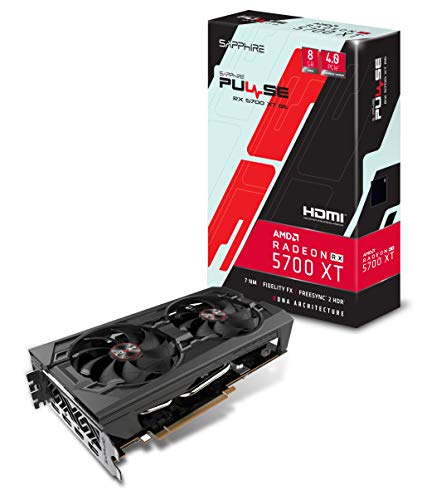
The RX 5700 XT 8GB is faster, cooler, and better for HEVC, but it officially wants 8+6 pin power. Most 5,1 owners run it with dual mini 6-pin to single 8-pin plus SATA power, or do the Pixlas mod. Don’t run it long-term on cheap adapter cables without checking connector temperatures. Failure mode here is melted mini 6-pin housings after months of sustained renders, not instant failure.
Max performance without a new computer
If you already use OpenCore Legacy Patcher and Ventura/Sonoma, an RX 6800 (non-XT) or Radeon VII makes sense. The RX 6800 is the fastest card you can practically run in a 5,1 – 16GB VRAM, excellent for DaVinci Resolve, Blender (in Windows), and 4K gaming in Boot Camp. But it requires Ventura 13.2+ with OCLP root patches, EnableGop for boot screens, and absolutely the Pixlas mod. It is also PCIe 4.0 x16 in a PCIe 2.0 slot, so you lose about 10-15% performance.
Radeon VII is the older alternative with 16GB HBM2 and great compute in Final Cut and Resolve. It’s EOL, runs very hot, and used cards often have dried-out thermal pads that cause 110C hotspot throttling. Only buy one if you edit heavy 4K and find a clean Sapphire reference model. For most people, it’s not worth the noise and power hassle over a 5700 XT.
Quick comparison
All power figures are typical gaming load, not brief spikes which can be 40-60W higher on Vega and RDNA.
| Card | VRAM | macOS Support | Power Needed | Needs Pixlas Mod? | Best For |
|---|---|---|---|---|---|
| RX 580 8GB | 8GB GDDR5 | 10.13 to Sonoma | ~185W, 1x 8-pin | No | Reliability, office, photo, boot without mods |
| Vega 56 | 8GB HBM2 | 10.13 to Sonoma | ~210W undervolted, 2x 8-pin | Recommended | Resolve, FCP, 1440p Windows gaming |
| RX 5700 XT | 8GB GDDR6 | 10.15.1 to Sonoma | ~225W, 8+6 pin | Yes for heavy loads | Best speed per dollar if you can wire power |
| RX 6800 | 16GB GDDR6 | Ventura 13.2+ with OCLP only | ~250W, 2x 8-pin | Yes | 4K video, 16GB VRAM, max lifespan |
| GTX 680 2GB flashed | 2GB GDDR5 | 10.8 to 10.13, Big Sur max | ~195W, 2x 6-pin | No | Boot screens on High Sierra only, avoid for new builds |
Power and flashing mistakes to avoid
Do not buy a card that needs 2x 8-pin and assume dual 6-pin to 8-pin adapters are safe for rendering. For web browsing they will hold. For a 30-minute export they heat up. If you smell hot plastic near the logic board or see random shutdowns under GPU load, stop and undervolt or do the Pixlas mod. That mod taps 12V directly from the PSU and bypasses the backplane limit, but it involves opening the PSU – don’t do it if you’re not comfortable with high-voltage safety.
Don’t pay extra for a pre-flashed MVC card in 2026 unless you specifically need native boot screens without OpenCore. Most sellers charge a $150+ premium for an RX 580 or Vega with Mac EFI. OpenCore with EnableGop gives you 90% of that functionality for free, and flashed cards often lag behind on VBIOS fixes and fan curves.
Avoid NVIDIA Pascal and Turing (GTX 1060/1080, RTX 2060/3060) for macOS. There are no Apple-approved drivers past High Sierra. They work in Windows Boot Camp only and show as a black screen in macOS. Same for Intel Arc – no macOS driver at all, Windows only, and the 5,1’s old BIOS emulation makes ReBAR impossible, so Arc performance tanks.
If you need both macOS acceleration and CUDA in Windows, the practical answer is two cheap cards or just committing to AMD. A used Sapphire Vega 56 with an undervolt remains the best compromise for editors who live in macOS but boot Windows for games.
FAQ
Do I need a flashed GPU for my Mac Pro 5,1?
No, unless you need the Apple boot picker without OpenCore. A standard PC RX 580 or Vega will accelerate macOS fine, you just won’t see video until macOS loads. Install OpenCore Legacy Patcher with EnableGop and you get boot screens on most AMD cards anyway.
Can I run two GPUs in a Mac Pro 5,1?
Yes, but watch total power and slot bandwidth. A common setup is RX 580 for macOS displays plus a second card for Windows compute. You will almost always need the Pixlas mod and extra PCIe power cables, and Slot 3-4 are only x4 electrically, so put the fast card in Slot 1.
Will an RX 580 handle 4K monitors?
Yes for desktop, browsing, and video playback. It drives 4K at 60Hz over DisplayPort without issue. It will not handle 4K gaming or heavy 4K effects work smoothly – for that step up to a 5700 XT or RX 6800 and budget for power mods.
What macOS version should I use after upgrading the GPU?
For plug-and-play stability, Mojave 10.14.6 with an RX 580 or Vega. For newer apps, use Monterey or Ventura via OpenCore Legacy Patcher. Don’t go to Sonoma unless you need it – Wi-Fi, DRM, and AMD patch maintenance add failure points on a 5,1.



