
If you want to train models locally instead of renting cloud GPUs, the buying decision comes down to two things: VRAM capacity and software support. Compute speed matters, but it means nothing if your model does not fit in memory or your framework does not recognize the card.
For most home labs in 2025-2026, that still points to NVIDIA. Not because AMD and Intel make bad hardware, but because PyTorch, CUDA, llama.cpp, Stable Diffusion trainers, and every tutorial you will follow assume CUDA first. That gap is closing, but it is still real day-to-day.
As an Amazon Associate we earn from qualifying purchases at no extra cost to you.


Our Top Picks
 GIGABYTE Radeon RX 9070 XT Gaming OC 16GRADEON9070XT11.34 x 5.2 x 2.2 Inches3.9 PoundsCheck on Amazon


Top 3 picks at a glance
What actually matters for AI training
1. VRAM is the hard limit. Training needs far more memory than inference. Optimizer states, gradients, and activations all live on the GPU. As a rough rule: you can fine-tune a 7B-parameter LLM in 4-bit with 12GB, comfortably train 7B-13B models with 24GB, and you need 48GB+ for larger full fine-tunes. Go under that and you get out-of-memory (OOM) errors no driver tweak will fix.
2. CUDA and libraries. NVIDIA’s Tensor Cores, CUDA, cuDNN, and NCCL are supported everywhere. AMD ROCm now works on Windows and on more Radeon cards, and Intel has PyTorch XPU support, but you will still hit missing kernels, Docker-only setups, or features that only work on Linux. If you want to spend time training, not debugging installs, NVIDIA saves hours.
3. Memory bandwidth and interconnect. Two 16GB cards do not equal one 32GB card for training. Most consumer cards cannot pool VRAM without complicated sharding. A single large-memory card is almost always simpler and faster than two smaller ones, unless you are specifically building for multi-GPU with NVLink or fast PCIe.
4. Power, cooling, and size. High-VRAM cards are triple-slot bricks that pull 350-450W sustained. Training pins them at 100% for hours, unlike gaming bursts. Check your PSU wattage, 12VHPWR cable, case clearance, and airflow. Thermal throttling during a 10-hour LoRA run is a common failure mode people blame on software.
Quick comparison
This covers the cards people actually buy for local training. Prices shift, but the VRAM hierarchy does not.
| GPU | VRAM | Best for | Watch out for |
|---|---|---|---|
| RTX 3060 12GB | 12GB | Learning, small LoRA, Stable Diffusion | Slow, narrow bus, not for 13B+ training |
| RTX 4070 Ti Super / 4080 Super | 16GB | Inference + light fine-tuning | 16GB hits OOM fast on LLMs |
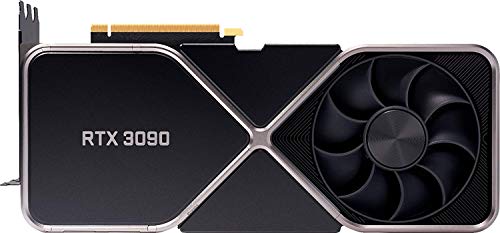
| RTX 3090 / 3090 Ti (used) | 24GB | Best value for 24GB training | Used mining cards, high power, no warranty |
| RTX 4090 | 24GB | Fastest consumer training | Price, size, 450W, melted connector if mis-seated |
| RX 7900 XTX | 24GB | Cheap 24GB if you run Linux / ROCm | ROCm bugs, weak Windows ML support |
| RTX 6000 Ada / Pro cards | 48GB | Serious local LLM work | 3-5x consumer price, overkill for beginners |
Best overall: 24GB NVIDIA cards
For most people, 24GB is the sweet spot. It lets you do Stable Diffusion XL fine-tuning, 7B full fine-tuning with quantization, and 13B LoRA / QLoRA without constant OOM juggling. You can offload to system RAM, but once you do, training slows to a crawl.
The RTX 4090 is the fastest consumer option by a clear margin. More Tensor throughput, more bandwidth, and strong efficiency for its class. It is overkill if you are only following tutorials, but if you run jobs daily, the time saved is real. Check current RTX 4090 24GB pricing and stock carefully – street prices often run well over MSRP.
The honest value pick is a used RTX 3090. It has the same 24GB, slightly slower training, but often costs half as much as a 4090. That is the card to buy if your budget is tight and you have a solid PSU. Ask for photos of the card running a stress test, check VRAM temperatures (not just core temp), and budget for new thermal pads if it was mined on. Many 3090s run hot on the backside memory.
Who should skip 24GB? If you only want to learn Python, run small CNNs, or fine-tune BERT-size models, you do not need it. A cheaper 12GB or 16GB card is fine and will save you $800+.
Budget and learning picks: 12GB to 16GB
The RTX 3060 12GB remains the cheapest sensible way to start. It is slow, but 12GB lets you actually load LoRA trainers, DreamBooth, and small LLM experiments that 8GB cards simply cannot. An 8GB RTX 4060 or similar will constantly OOM on modern tutorials, even with 8-bit optimizers. VRAM beats raw speed here.
The RTX 4070 Ti Super and 4080 Super are faster and more efficient, but both are 16GB cards. They are excellent for gaming plus AI experimentation, and fine for image models. For LLMs, 16GB is limiting – expect to use QLoRA, small batch sizes, gradient accumulation, and CPU offload. If LLM fine-tuning is your main goal, put the money toward 24GB instead.
Browse RTX 3060 12GB listings if you want the lowest entry cost that still runs current training code without major compromises.
Where do AMD and Intel fit?
On paper, the RX 7900 XTX looks great: 24GB for much less than NVIDIA. In practice, it is only a good training pick if you run Linux and are comfortable with ROCm. PyTorch ROCm support has improved a lot, and ComfyUI / Stable Diffusion now work, but bitsandbytes, FlashAttention, DeepSpeed, and many LLM trainer features are still CUDA-first or CUDA-only. Expect one tutorial in five to need a workaround.
That said, if your workload is inference, Stable Diffusion image generation, or ROCm-supported fine-tuning on Linux, it is a legitimate way to get 24GB cheaply. Do not buy it for a Windows-only training rig and expect plug-and-play.
Intel Arc, like the A770 16GB, is even more niche for training. The 16GB for the price is tempting, and Intel’s PyTorch XPU extensions can run basic training, but community guides, prebuilt Docker images, and performance tuning are far behind. Buy Arc to experiment, not as your primary training GPU. If you already own one, use it for inference and data prep while you save for NVIDIA.
When to go 48GB or to the cloud
If you need to full fine-tune 30B+ models locally, consumer cards will not do it alone. You need workstation cards like the RTX 6000 Ada 48GB, dual-GPU setups, or Apple unified memory as an alternative. These cards are quiet, efficient, and built for sustained loads, but they cost several times more per TFLOP than gaming cards.
For most people training a few times per month, the cloud is cheaper. A $1,600+ GPU buys a lot of RunPod, Lambda, or Colab hours. Local makes sense when you train daily, work with private data you cannot upload, or need instant iteration without queue times.
A practical middle path: learn locally on a 12GB or 24GB card, then burst large runs to the cloud. Look at used and renewed NVIDIA RTX 3090 options for local work and spend the savings on cloud credits for big jobs. Also budget for system RAM (64GB helps with offloading and datasets) and fast NVMe storage – slow data loading will starve even a midrange GPU.
FAQ
How much VRAM do I need for AI training?
12GB is minimum to learn, 24GB is the practical sweet spot for 7B-13B fine-tuning and image models, 48GB+ is for serious LLM work. If in doubt, buy more VRAM over a slightly faster chip.
Is the RTX 4090 worth it over a used RTX 3090 for AI?
For speed, yes – the 4090 trains 40-60% faster in many mixed-precision workloads and uses less power per step. For value, no – a good used 3090 gives you the same 24GB for far less if you can tolerate slower runs and higher power draw.
Can I train on AMD or Intel GPUs?
Yes, but expect extra setup. AMD ROCm on Linux is usable for many PyTorch workflows, Intel XPU covers basics. If you follow YouTube tutorials or need the latest LLM trainer features, NVIDIA will cause fewer headaches.
Can I use two smaller GPUs instead of one big one?
Usually no for beginners. VRAM does not add up automatically, and multi-GPU training needs code support, fast interconnects, and more debugging. One 24GB card beats two 12GB cards for simplicity.



