
Reddit discussions about the best GPU for 1440p usually come down to the same question: how much performance do you need, and how much are you willing to pay for it? The answer depends on the games you play, your monitor’s refresh rate, and whether you care about ray tracing. There isn’t one card that’s right for everyone, but a few performance tiers make the choice easier.
Our Top Picks
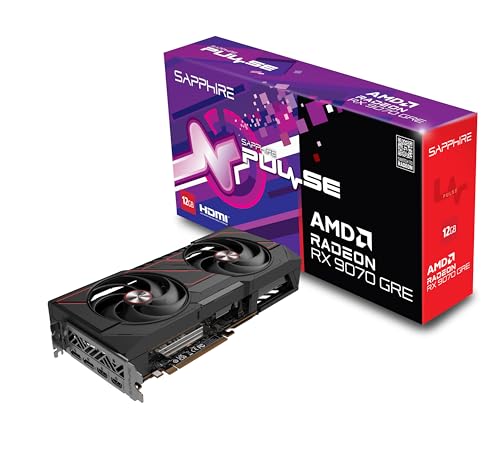

Quick picks by budget and priority
For most people, the sensible target is a current-generation midrange card with 12GB or more of VRAM. It can handle 1440p in a broad range of games without making you pay for premium performance you may not use. Check current prices before buying: a large discount can make a higher-tier card the better value, while an inflated midrange price can make a cheaper option more appealing.
- Best value for most: a midrange AMD card, especially if you mainly play rasterized games.
- Best for ray tracing and upscaling: a comparable NVIDIA card, if the price premium fits your budget.
- Best on a tight budget: an Intel Arc card, provided your games and system work well with it.
- Best for high refresh rates or demanding games: a faster upper-midrange card, if you’re comfortable spending more and your CPU can keep up.
What to compare before buying
| GPU tier | 1440p experience | Main trade-off | Best suited to |
|---|---|---|---|
| Budget | Good with adjusted settings; demanding games may need upscaling | Less headroom and fewer comfortable options for ray tracing | Value-focused buyers and modest refresh rates |
| Midrange | Strong all-around performance at high settings in many games | May not sustain very high frame rates in every new release | Most 1440p gamers |
| Upper-midrange | More room for high settings, high refresh rates, and demanding titles | Higher cost; gains can be limited by your CPU or monitor | Enthusiasts who want extra performance headroom |
These are broad categories, not guarantees. Performance varies by game, driver, and settings. Look for benchmarks in the specific games you play, ideally at 1440p and at settings close to what you’ll use.
AMD: strong value for conventional rendering
AMD is often a good fit if you want the most gaming performance for your money in games that use conventional, or rasterized, rendering. A midrange Radeon can be a sensible buy for 1440p if it costs less than a similarly fast alternative and has enough memory for the games you play. Browse current AMD Radeon graphics cards, then compare exact card prices with independent benchmarks before choosing.
The main compromise is ray tracing: performance can fall more sharply than on similarly priced NVIDIA cards, depending on the game. AMD’s upscaling options can help, but image quality and support vary by title. Choose AMD if you care most about regular gaming performance and value; think twice if ray tracing is a priority in the games you play.
NVIDIA: pay extra when its features matter to you
NVIDIA is worth considering if you play ray-traced games, use supported upscaling and frame-generation features, or need GPU software for work as well as games. Those advantages are not equally useful to everyone. If you mostly play esports or lighter games without ray tracing, paying a large premium may bring little practical benefit.
Compare cards at the same price and resolution rather than choosing by brand reputation. Check the card’s memory capacity, power requirements, and the performance of its specific model. For a starting point, browse NVIDIA GeForce cards for 1440p and verify current pricing against reviews.
Intel: the budget option with more homework
Intel Arc can make sense when its price is clearly below competing cards and the games you play benchmark well. Newer games and drivers have improved compatibility, but results can still vary more by title than buyers may expect. Older games, unusual software, or a system with an outdated motherboard BIOS can be more troublesome.
Before buying, check recent benchmarks for your game list, confirm your PC supports Resizable BAR, and make sure your power supply has the required connectors. Arc is most appealing to someone willing to troubleshoot or update drivers in exchange for a lower purchase price—not someone who wants the safest plug-and-play choice.
Common buying mistakes
Buying more GPU than your monitor can show: a premium card can be wasted on a basic 60Hz display, especially in lighter games. If you already have a high-refresh monitor, extra performance may be more valuable.
Ignoring VRAM and settings: a card with limited memory may require lower texture quality in some demanding games. More VRAM is useful headroom, not a promise of higher frame rates on its own.
Forgetting the rest of the PC: check card length, case clearance, power supply capacity, and connectors. A fast GPU can also be held back by an older CPU at high frame rates, particularly in competitive games.
Chasing one benchmark number: averages don’t show every hitch or demanding scene. Compare several games, look at frame-time results where available, and consider whether the card needs upscaling to meet your target.
How to make the final choice
Set a firm budget, then compare the best-priced cards in the tier you’re considering. If two options are close in price, weigh the games you actually play: AMD often makes more sense for value-focused rasterized gaming, NVIDIA for ray tracing and its supported features, and Intel when the discount is substantial and compatibility checks out. The cheaper card is fine if it already meets your frame-rate target; buying extra headroom only makes sense when you’ll use it.
FAQ
Is 12GB of VRAM enough for 1440p?
It’s enough for many games, but requirements vary. If you play demanding new releases and want high-resolution textures, compare recent benchmarks and consider a card with more memory if the price difference is reasonable.
Should I choose AMD or NVIDIA for 1440p?
Choose based on price and features, not the logo. AMD can offer strong value in rasterized games; NVIDIA is often a better fit if ray tracing or its supported software features matter to you.
Is an Intel Arc GPU good for 1440p?
It can be, particularly at a lower price, but check benchmarks for your games and confirm Resizable BAR support. Performance and compatibility can vary by title.
Do I need a high-refresh monitor for a faster GPU?
No, but a high-refresh monitor makes higher frame rates easier to see. With a 60Hz display, a faster card may still help in demanding games, but you may not benefit from all of its extra performance.



