
The Intel Core i5-13600K is still a capable gaming CPU, so it can support a broad range of graphics cards. The right pairing depends more on your monitor, games and budget than on a strict CPU-to-GPU ratio. For most buyers, an upper-midrange card is the practical sweet spot; faster cards make sense for high-refresh 1440p or 4K, while budget cards are a sensible choice for 1080p.
As an Amazon Associate we earn from qualifying purchases at no extra cost to you.


Our Top Picks
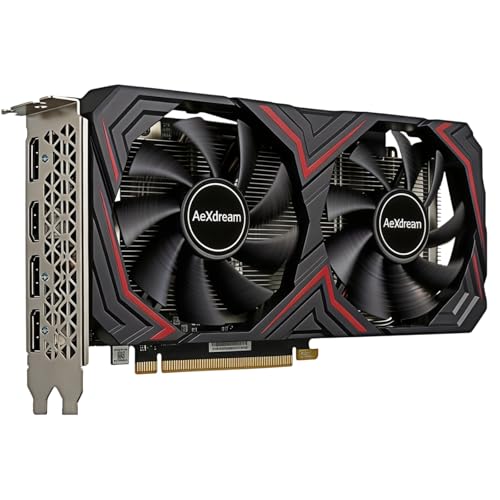
Quick picks by use
| Use | GPU class to target | Main trade-off |
|---|---|---|
| 1080p, value-focused | Current-generation entry or midrange | Great value, but less headroom for demanding games and ray tracing |
| 1440p, high settings | Upper-midrange | Strong balance; pricier models may have better ray tracing or upscaling |
| 4K or high-refresh 1440p | High-end | More performance, power draw and cost; diminishing returns at lower resolutions |
Prices and availability change quickly, so compare current benchmarks and street prices before buying. Useful starting points are 1440p gaming graphics cards and 4K gaming graphics cards.
Best fit for most: upper-midrange
For a 13600K paired with a 1440p monitor, an upper-midrange GPU is the best place to start. It can deliver high settings and smooth frame rates in many games without paying the premium for a flagship. At this resolution, the graphics card does most of the heavy lifting, and the 13600K is generally fast enough to keep it fed in demanding games.
Choose this tier if you play a mix of new releases and competitive games, want some headroom for the next few years, or are upgrading from an older card. Compare performance in the games you actually play: rasterized performance, ray tracing, and upscaling can produce different rankings. NVIDIA often has an advantage in ray tracing and supported creator or AI workloads; AMD cards can offer strong conventional rendering value. Intel Arc can be worth considering at a compelling price, but check game-specific results and feature support first.
The failure mode is buying a card based on one headline benchmark and expecting the same result everywhere. Heavy ray tracing, high-resolution textures and poorly optimized games can cut frame rates sharply. Check the card’s memory capacity as well as raw speed, especially if you expect to play at 1440p with high texture settings.
For 1080p: save money unless you need high refresh
If you play at 1080p and aim for ordinary 60–144Hz gaming, a more affordable GPU is often enough. The 13600K may be capable of pushing very high frame rates, but many games will hit a graphics limit before the CPU does. Spending heavily on a top-tier card for a basic 1080p display can leave performance unused.
A faster card becomes more reasonable if you have a 240Hz monitor, play demanding titles at maximum settings, or plan to move to 1440p soon. Even then, compare the GPU cost with the price of a monitor upgrade: resolution and refresh rate shape what you can actually see. For value-first shopping, browse budget 1080p graphics cards and check independent tests before choosing a specific model.
For 4K or high-refresh 1440p: go faster, but check the rest of the build
A high-end GPU suits 4K gaming, demanding ray-traced games, or high-refresh 1440p when you want to reduce settings compromises. The 13600K can pair well with this class, particularly at 4K, where the GPU is usually the main limit. At lower resolutions and very high frame rates, however, CPU performance can matter more; don’t assume a flagship card will scale equally in every game.
Before buying, check the card’s length, thickness, power connector and recommended power supply against your case and PSU. A powerful GPU that does not fit, triggers a PSU upgrade you did not budget for, or runs uncomfortably loud is a poor value. Also check whether your preferred games support the upscaling and frame-generation features you want. Those features can improve perceived smoothness, but they are not a substitute for native performance in every game.
Will the 13600K bottleneck the GPU?
There is no single GPU that the 13600K can “handle” and no fixed bottleneck threshold. At 4K, most games lean heavily on the graphics card. At 1080p with low settings and very high frame rates, the CPU can become the limit sooner. Strategy games, simulation titles and busy multiplayer matches can also be more CPU-sensitive than visually demanding single-player games.
That does not mean a faster GPU is wasted. It may let you raise image quality, improve ray tracing, or maintain higher frame rates in GPU-heavy games. But if your usage is mostly 1080p esports and your current card already meets your monitor’s refresh rate, a costly upgrade may produce little visible benefit. Check benchmarks at your target resolution, not just a CPU-focused test at low settings.
Check these details before ordering
Confirm your power supply has enough capacity and the right connectors, and leave room for the card’s cooler and airflow. Compare the exact card’s warranty, noise reviews and dimensions; two versions of the same GPU chip can differ substantially in size and cooling. If you use applications that rely on CUDA, verify software compatibility before choosing AMD or Intel. Conversely, for gaming alone, do not pay extra for a feature set you will not use.
For a 13600K gaming PC without a specific resolution in mind, start with the upper-midrange and adjust from there: step down for sensible 1080p value, or up for 4K and high-refresh 1440p. Buy based on measured performance in your games, the card’s fit and power needs, and the price you can actually get—not its launch positioning.
FAQ
Is the 13600K good enough for a high-end GPU?
Yes. It can pair well with high-end cards, especially at 1440p and 4K. Some CPU-limited games at 1080p may not use the card fully.
Should I choose AMD, Intel or NVIDIA?
Compare current prices and game benchmarks. NVIDIA is often attractive for ray tracing and CUDA-dependent software; AMD can be strong value for rasterized gaming, while Intel may suit buyers finding a good deal who have checked game support.
Do I need to upgrade my power supply?
Not necessarily. Check the GPU maker’s power guidance, your PSU’s capacity and connectors, and the rest of your system before deciding.
Is a high-end GPU overkill for 1080p?
Usually for 60–144Hz gaming, but not always for high-refresh esports or demanding games with maximum settings. Your monitor and target frame rate should guide the spend.



