
The best GPU for an Intel Core i5-12600K depends more on your monitor, games and budget than on the CPU itself. This 10-core processor can handle a broad range of current graphics cards, so you do not need to buy a top-tier GPU just to avoid a mismatch. For most 1440p gaming builds, a strong midrange card is the sensible target; at 1080p, a cheaper option may be enough.
As an Amazon Associate we earn from qualifying purchases at no extra cost to you.


Our Top Picks
 GIGABYTE GeForce RTX 3050 WINDFORCE OC V2 6GStandard7.5 x 4.4 x 0.1 Inches0.88 PoundsCheck on Amazon
 ASUS TUF Gaming GeForce RTX™ 5080 16GB GDDR7RTX5080|OC13.7 x 5.7 x 2.8 inches5 PoundsCheck on Amazon
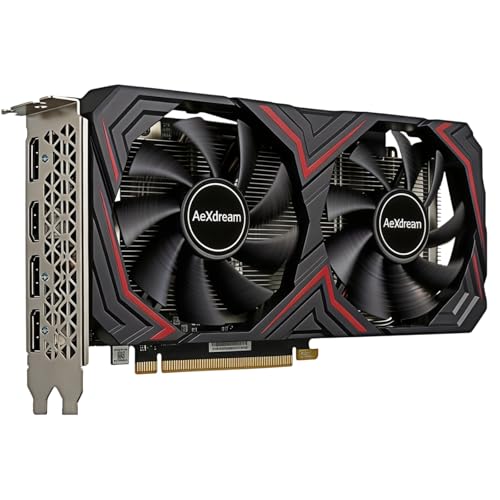
Top 3 picks at a glance
Quick picks by use
- 1080p on a budget: Choose a capable mainstream GPU, especially if you play esports or older games. Spending more can bring diminishing returns at high frame rates.
- 1440p gaming: A current midrange card is the best balance for most 12600K owners.
- Ray tracing, streaming or creative apps: Favor a card with strong ray-tracing performance and software support, even if it costs more per frame in traditional games.
- 4K: Buy the fastest GPU your budget allows. The graphics card, not the 12600K, will usually set performance in demanding 4K games.
Best balance: a midrange GPU for 1440p
For a general-purpose gaming PC, start by comparing current midrange AMD and NVIDIA cards. This tier is a good match for 1440p, where the GPU does substantial work and the 12600K is unlikely to hold back performance in most games. Look for enough video memory for the games and settings you use, a cooler that fits your case, and a price that makes sense against nearby alternatives.
Compare midrange gaming graphics cards across brands before buying. AMD often offers attractive conventional gaming performance for the money; NVIDIA can be worth paying extra for if you rely on ray tracing, DLSS or supported creator applications. The value changes with sales, so compare the actual cards available rather than choosing by brand alone.
The main failure mode at this tier is buying for a feature or benchmark you rarely use. If you mostly play competitive games at 1080p, a more expensive 1440p card may sit underused. Conversely, choosing a card with too little memory can mean lowering textures sooner in demanding newer games.
Cheaper choice: 1080p and esports
If your monitor is 1080p and your library is mostly esports, indie games or older releases, a lower-cost GPU is often the smarter buy. The 12600K can deliver high frame rates, but at very high refresh rates some games become limited by CPU performance, game settings or the engine itself. Paying substantially more for a GPU will not always translate into a visibly smoother experience.
Consider a budget 1080p gaming graphics card if it meets your target frame rate without relying on aggressive upscaling. Check independent benchmarks for the specific games you play: results can vary widely between titles. This is also where a used card may be tempting, but weigh the lower price against warranty coverage, unknown usage and the possibility of needing a power supply or cooling upgrade.
A budget card is a poor fit if you expect to move to 1440p soon, want high ray-tracing settings, or play graphically demanding games with maximum textures. In those cases, saving for the next tier can cost less than replacing the card early.
Pay extra for NVIDIA features only if you will use them
NVIDIA is a practical choice for buyers who prioritize ray tracing, DLSS support, or software workflows that benefit from CUDA. These advantages are application- and game-dependent; they do not make every NVIDIA card the best value. Compare native performance, upscaling quality, memory capacity and street price before deciding.
Browse NVIDIA RTX gaming cards if those features are important to you. A common mistake is buying a card mainly for ray tracing, then finding that the desired settings require upscaling or reduced detail to maintain a comfortable frame rate. Check benchmarks for your resolution and the games you actually play.
How the options compare
| Option | Best suited to | Main advantage | Trade-off |
|---|---|---|---|
| Budget GPU | 1080p, esports, older games | Lower upfront cost | Less headroom for demanding games and future upgrades |
| Midrange AMD or NVIDIA GPU | 1440p, mixed gaming | Strong all-round balance | Features and value differ by model and sale price |
| Higher-tier GPU | 4K, high settings, demanding ray tracing | More graphics performance and headroom | Higher cost, power draw and risk of diminishing returns |
Check these before you order
Power supply: Check the card maker’s recommended wattage, the connectors required and your PSU’s condition. A powerful card may need a suitable modern connector or adapters; do not assume an older power supply is adequate just because it turns on.
Case clearance: Compare card length, thickness and height with your case. Large coolers can block adjacent slots or conflict with front fans and radiators. Also confirm that your case has reasonable airflow.
Resolution and refresh rate: Match the GPU to the display you own or plan to buy. For 1080p esports, a high-end card can be wasted money; for 4K, a budget card may force compromises you did not expect.
Platform and workload: The 12600K uses a PCIe graphics slot and works with modern GPUs, but check motherboard space and power connections. For video editing or other GPU-accelerated work, verify support in the specific software rather than assuming gaming benchmarks predict performance.
FAQ
Will a high-end GPU bottleneck with the i5-12600K?
It can in some CPU-heavy games, especially at 1080p and very high frame rates. At 1440p or 4K, the GPU is more often the limit. The size of any gap depends on the game, settings and target frame rate.
Is AMD or NVIDIA better with the 12600K?
Both work. Compare current prices and game benchmarks: AMD can be strong value for conventional rendering, while NVIDIA may suit buyers who value ray tracing, DLSS or CUDA-dependent software.
Should I upgrade my power supply with the GPU?
Only if its wattage, connectors, age or quality are unsuitable for the card. Check the GPU maker’s power guidance and the PSU model before purchasing.
Is a used graphics card worth considering?
It can be, if the discount is substantial and you can verify the card works. A shorter or absent warranty, unknown history and limited return options make a used card riskier than a comparable new one.



