Our Short List of 3

- Best for: First-time buyers who play at 1080p and want a complete tower with keyboard and mouse in the box.
- AMD Ryzen 5 5500 CPU
- NVIDIA GeForce RTX 4060 8GB GPU
- 16GB DDR4 Non-RGB 3200MHz RAM
- 1TB NVMe SSD

- Best for: Buyers who want a DDR5 tower with an RTX 4060 Ti and a DIY-friendly design for later changes.
- Intel Core i5-14400F processor
- GeForce RTX 4060 Ti graphics
- 16GB DDR5 memory
- 1TB M.2 NVMe SSD

- Best for: Players moving to 1440p who want 32GB of DDR5 already installed rather than planned as an upgrade.
- AMD Ryzen 7 7700X 4.5 GHz processor
- NVIDIA GeForce RTX 4070 12GB GDDR6X graphics card
- 1TB NVMe SSD
- 32GB DDR5 RAM RGB
All 4 Picks at a Glance
| Product | Specs | Action |
|---|---|---|
| iBUYPOWER Slate Mesh SMA5N4601 |
| Check price on Amazon |
| MSI Codex R2 A14NUD5-213US |
| Check price on Amazon |
| Skytech Chronos ST-CHRONOS2-0990-B-AM |
| Check price on Amazon |
 CyberPowerPC Gamer Xtreme GXiVR8080A41 |
| Check price on Amazon |
Buying a tower is really a decision about which graphics card you will live with for the next few years, and whether the memory, storage and power supply around it leave room to grow. Two listings can share a case shape yet behave very differently at 1440p, and a stronger processor cannot rescue a weaker graphics card once a game becomes GPU-bound.
This guide is for first-time tower buyers replacing an ageing desktop, players moving up from 1080p to a higher-resolution monitor, and households that want one machine for gaming, schoolwork and streaming. The picks below were chosen from product names and specifications on the Amazon pages, with each model checked as a complete prebuilt tower rather than a bare case.
Our Top Picks
Top 3 picks at a glance
Quick Picks
As an Amazon Associate we earn from qualifying purchases
| Product | Best for | Key spec from title |
|---|---|---|
| iBUYPOWER Slate Mesh SMA5N4601 | A first tower for 1080p gaming on a DDR4 platform | NVIDIA GeForce RTX 4060 8GB GPU |
| MSI Codex R2 A14NUD5-213US | A DIY-friendly DDR5 tower with keyboard and mouse included | GeForce RTX 4060 Ti |
| Skytech Chronos ST-CHRONOS2-0990-B-AM | 1440p play with generous memory already fitted | NVIDIA RTX 4070 with 32GB DDR5 RAM |
| CyberPowerPC Gamer Xtreme GXiVR8080A41 | The strongest graphics and processor pairing in this group | GeForce RTX 5070 12GB with Ryzen 9 9900X |
How to Choose
Start With the Graphics Card, Not the Case Lighting
The graphics card sets the resolution and settings ceiling for the whole tower, so compare that part before anything decorative. An RTX 4060 listing suits 1080p play, an RTX 4060 Ti adds headroom within the same general class, an RTX 4070 is the step aimed more comfortably at 1440p, and the RTX 5070 in this guide is the highest tier listed. Also read the memory figure attached to the card where the title gives it, because two cards with similar names are not automatically the same configuration. If your monitor is the limiting factor, paying for a much higher GPU tier may change little until the display changes too.
Match the Processor and Memory Platform to the Job
A processor should support the graphics card without becoming the obvious bottleneck in strategy games, simulation titles or streaming while playing. The listings here span a Ryzen 5 5500 on DDR4, a Core i5-14400F and Ryzen 7 7700X on DDR5, and a Ryzen 9 9900X at the top. Memory matters in two ways: capacity now, and platform later. A 16GB DDR5 tower can usually accept more memory later, while a 16GB DDR4 tower belongs to an older platform with a different upgrade path. Buyers who keep many browser tabs, chat apps and a game open together should value 32GB from the start.
Count Storage by Library Size, Not by the Boot Drive Alone
Every tower in this guide lists a 1TB NVMe or PCIe solid-state drive, which sounds identical until you picture a real library. A handful of large modern games, plus Windows, launchers, recordings and school or work files, can fill that space faster than new buyers expect. Check whether the listing describes the drive as NVMe or PCIe 4.0, and think about where your overflow will go: an external drive, a second internal drive if the case and board allow it, or disciplined uninstalling. Storage is the easiest shortfall to predict, because you already know roughly how many games you keep installed at once.
Check the Power Supply, Cooling Clues and Included Extras
The power supply is rarely the headline, yet it decides whether a future graphics upgrade is straightforward or a rebuild. Where a listing states an 80 Plus Gold unit or a wattage, note it; where it stays silent, treat that as a question to resolve before ordering rather than a detail to assume. Cooling clues in titles, such as mesh panels or liquid cooling on other models, affect noise under load. Finally, note what arrives in the box. Several towers here include a keyboard and mouse, which matters for a first setup and matters far less if you already own peripherals you like.
The 4 Best Options
iBUYPOWER Slate Mesh SMA5N4601
- Best for: First-time buyers who play at 1080p and want a complete tower with keyboard and mouse in the box.
- AMD Ryzen 5 5500 CPU
- NVIDIA GeForce RTX 4060 8GB GPU
- 16GB DDR4 Non-RGB 3200MHz RAM
- 1TB NVMe SSD
First-time buyers who play at 1080p and want a complete tower with keyboard and mouse in the box.
The DDR4 platform and 16GB capacity; confirm that fits your upgrade plans before choosing it over a DDR5 model.
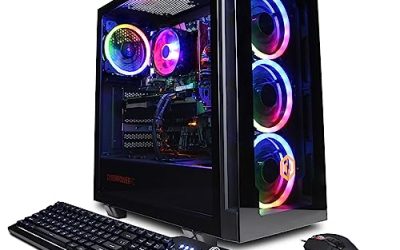
This is the entry point in the group, built around a Ryzen 5 5500 and an RTX 4060 8GB graphics card. That pairing is aimed at 1080p gaming rather than high-refresh 1440p, and the listing frames the machine for gaming, editing and streaming tasks. The DDR4 platform is the trade-off to accept knowingly: it keeps this configuration in an older memory generation, so its long-term upgrade story differs from the DDR5 towers below. For a first tower, though, the included gamer keyboard and mouse mean the box contains more of a complete starting setup.
MSI Codex R2 A14NUD5-213US
- Best for: Buyers who want a DDR5 tower with an RTX 4060 Ti and a DIY-friendly design for later changes.
- Intel Core i5-14400F processor
- GeForce RTX 4060 Ti graphics
- 16GB DDR5 memory
- 1TB M.2 NVMe SSD
Buyers who want a DDR5 tower with an RTX 4060 Ti and a DIY-friendly design for later changes.
Memory is listed at 16GB, so heavy multitaskers should plan whether an upgrade will be needed soon.
The Codex R2 steps onto DDR5 with a Core i5-14400F and a GeForce RTX 4060 Ti, a combination the listing presents as DIY friendly, which will appeal to owners who expect to open the case later. It keeps storage at 1TB, like the rest of this guide, but pairs it with a stated 80 Plus Gold power supply, a detail many listings leave out. Wi-Fi, a keyboard and mouse are also listed, so it works as a self-contained desk setup. This is the pick for someone who wants a mid-step graphics card now and a clearer path to tinkering afterwards.
Skytech Chronos ST-CHRONOS2-0990-B-AM
- Best for: Players moving to 1440p who want 32GB of DDR5 already installed rather than planned as an upgrade.
- AMD Ryzen 7 7700X 4.5 GHz processor
- NVIDIA GeForce RTX 4070 12GB GDDR6X graphics card
- 1TB NVMe SSD
- 32GB DDR5 RAM RGB
Players moving to 1440p who want 32GB of DDR5 already installed rather than planned as an upgrade.
The listing notes the graphics card brand may vary, so check the exact configuration shown on the page before ordering.
The Chronos moves the graphics tier up to an RTX 4070 and doubles the memory of the two towers above it. Its listing names a Ryzen 7 7700X at 4.5 GHz, 32GB of DDR5 RAM with RGB, and a 650W Gold power supply, so the specification reads balanced rather than focused on one headline part. That balance suits a buyer targeting 1440p who also records, streams or keeps creative apps open alongside a game. An RGB keyboard and mouse are listed as included, which completes the desk without a separate first purchase, although experienced players may still prefer their own peripherals.
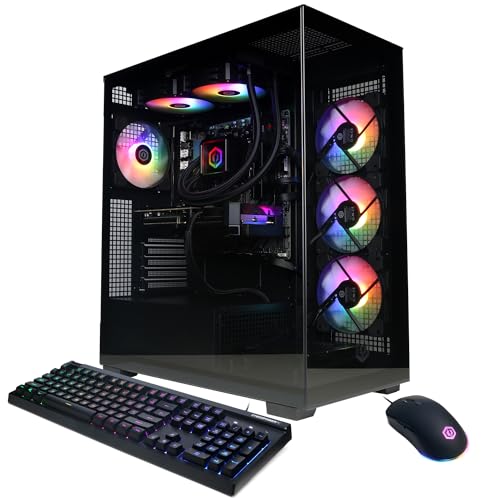
CyberPowerPC Gamer Xtreme GXiVR8080A41
- Best for: Enthusiasts with a high-refresh or high-resolution monitor who want the strongest CPU and GPU pairing in this guide.
- AMD Ryzen 9 9900X 4.4GHz processor
- GeForce RTX 5070 12GB graphics
- 32GB DDR5 memory
- 1TB PCIe 4.0 SSD
Enthusiasts with a high-refresh or high-resolution monitor who want the strongest CPU and GPU pairing in this guide.
Storage is still 1TB despite the higher tier; large libraries will need a plan for extra space.
This Gamer Xtreme is the top specification here, pairing a Ryzen 9 9900X at 4.4GHz with a GeForce RTX 5070 12GB and 32GB of DDR5. It is the tower for a buyer whose monitor and ambitions sit at high-refresh 1440p or beyond, and who also runs demanding background work such as video editing or virtual machines. Storage remains 1TB, the same as the other picks, so its advantage is processing and graphics headroom rather than library space. Buyers paying for this tier should already own, or be planning, a display that can actually show the extra performance.
Which One Fits Your Situation
You Are Replacing an Old Desktop for 1080p Play
Start with the iBUYPOWER Slate Mesh. Its RTX 4060 and Ryzen 5 5500 are listed for everyday gaming at the resolution most older monitors use, and the included keyboard and mouse reduce the number of separate purchases. Accept the DDR4 platform as a deliberate trade-off: this is a tower bought for what it does now, not for a long chain of platform upgrades later.
You Want a Tower You Can Open and Improve Later
Look at the MSI Codex R2. The listing calls the design DIY friendly, states an 80 Plus Gold power supply, and uses DDR5 memory, all of which make later changes easier to think through. Its RTX 4060 Ti gives more graphics headroom than the entry pick, while the 16GB memory figure is the one specification to revisit first if your workload grows after purchase.
You Play at 1440p and Multitask While Gaming
The Skytech Chronos fits this desk best. The RTX 4070 is the graphics step aimed at that resolution, and the 32GB of DDR5 listed removes the memory juggling that streaming, voice chat and browser tabs can cause on a 16GB machine. The Ryzen 7 7700X and 650W Gold power supply round out a specification that reads evenly matched rather than top-heavy in a single component.
You Have a Demanding Monitor and a Mixed Workload
Choose the CyberPowerPC Gamer Xtreme with the Ryzen 9 9900X and RTX 5070. It carries the most processor and graphics headroom here, which suits high-refresh play, editing timelines and other heavy tasks sharing one machine. Keep its 1TB drive in mind, though. At this performance level, running out of storage, not processing power, is the limit most owners will meet first in daily use.
Common Mistakes
- Choosing by case lighting or brand name before comparing the graphics card named in the title.
- Assuming every 1TB drive feels the same once a library of large games, recordings and work files is installed.
- Buying a DDR4 tower while planning a DDR5 upgrade path, or the reverse mistake of paying for headroom a basic monitor cannot display.
- Ignoring the power supply details, then discovering a future graphics upgrade needs more than the fitted unit was chosen for.
- Forgetting to check whether a keyboard and mouse are included, and double-buying peripherals that were already in the box.
Frequently Asked Questions
Is a prebuilt tower better than building for a first gaming PC?
For a first machine, a prebuilt removes compatibility decisions about the processor socket, memory generation, power supply and case clearance, because the builder has already matched those parts. The listings here show complete systems with Windows installed. Building can suit confident hobbyists, but a tower like the Codex R2 or Slate Mesh is the lower-risk route for someone who wants to play soon after delivery.
How much RAM should a gaming tower have in this group?
The listings split evenly between 16GB and 32GB. Sixteen gigabytes remains workable for gaming on its own, especially at 1080p, while 32GB gives more room for streaming software, voice chat, browsers and creative applications running at the same time. If you regularly multitask, choosing a 32GB configuration such as the Chronos or the Gamer Xtreme avoids making memory your first upgrade.
Does the processor matter if the graphics card is strong?
Yes, although the balance shifts by game type. Simulation, strategy and high-refresh competitive titles can lean harder on the processor, and tasks such as encoding a stream also use CPU resources. That is why this guide ranges from a Ryzen 5 5500 to a Ryzen 9 9900X. Match the processor to your games and background workload instead of treating it as an afterthought behind the graphics card.
What should I check on the listing right before ordering?
Confirm the exact graphics card and its memory figure, the processor model, whether memory is DDR4 or DDR5 and how much is fitted, and the drive capacity. Also check what the box includes, since some towers here list a keyboard and mouse and others do not state them. Configurations under one product name can vary, so the specification on the page at checkout is the one that counts.
Related guides
More from Amazon
Programs that pair well with the guide above. Offers and eligibility are set by Amazon and may change.
A free business account with business pricing and bulk-buying tools for work, shop or home office.
Create a business accountFree shipping on eligible items, Prime Video and more. Eligible new members can start with a free trial.
Start a Prime free trialAudiobooks and podcasts to listen to on the go. Eligible new members can start with a free trial.
Try Audible freeAd-free music streaming. Eligible new subscribers can start with a free trial.
Try Music Unlimited freeAs an Amazon Associate we earn from qualifying purchases.