- Top Pick: SteelSeries QcK Performance Speed XL
- Runner-up: X-Raypad Aqua Control 2
- Also consider: SteelSeries QcK Performance Balance L
The best gaming mouse pad for speed and control depends on where you sit on the friction spectrum. Glass and speed-woven cloth pads minimize resistance for fast flicks and wide tracking, while dense control cloth adds the stopping power that tactical shooter players rely on. The five pads below cover that full range, from the near-frictionless Pulsar Superglide Glass Pad v2 to the high-friction Logitech G640, with balanced hybrid options in between for players who have not yet committed to one extreme.
As an Amazon Associate, we earn from qualifying purchases.
Top 3 picks at a glance
Quick Answer
For pure speed, the Pulsar Superglide Glass Pad v2 is the fastest surface here, while the SteelSeries QcK Performance Speed XL brings a similar low-friction glide in cloth form. Players who value stopping power should pick the Logitech G640, and anyone in between should start with the X-Raypad Aqua Control 2 or the QcK Performance Balance.
Table of Contents
- Quick Answer
- Pulsar Superglide Glass Mouse Pad v2
- SteelSeries QcK Performance Speed XL
- X-Raypad Aqua Control 2
- SteelSeries QcK Performance Balance L
- Logitech G640 Large Cloth Gaming Mouse Pad
- How to Choose a Mouse Pad for Speed or Control
- Who Should Skip These Pads
- FAQ
- Final Verdict
- Product and ASIN Reference
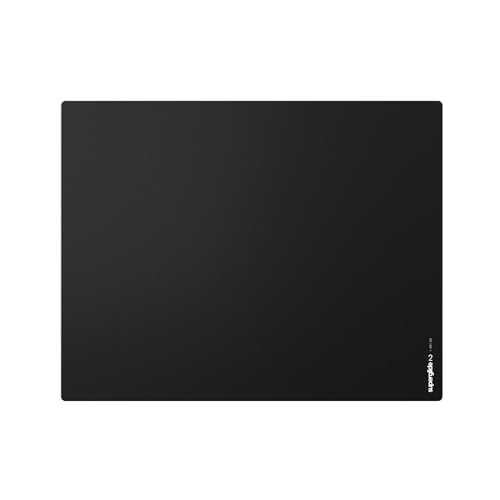
Pulsar Superglide Glass Mouse Pad v2
The Superglide v2 sits at the extreme speed end of this roundup. Its surface is alumino-silicate glass rather than cloth, so the mouse starts moving with almost no static friction and keeps gliding with minimal effort. That makes it a strong match for high-sensitivity players and tracking-heavy games where the crosshair rarely stops moving. The trade-off is stopping power: glass offers very little natural braking, so precise stops depend on your own hand control and mouse feet condition.
Pulsar molds the glass over a high-density silicone rubber base, which keeps the pad planted without a separate adhesive layer. The v2 revision is thinner and lighter than the original Superglide, and the L size gives low-sensitivity players enough room for full arm swipes without covering the whole desk. Because glass does not flex, it also stays perfectly flat and its glide does not change with humidity the way cloth can.
Specs:
- Surface: Alumino-silicate glass
- Glide type: Speed (lowest friction in this roundup)
- Size: 420 x 330 mm (L)
- Base: Fully molded high-density silicone rubber, anti-slip
- Model: Sgplb2
- Tier: Premium
SteelSeries QcK Performance Speed XL

SteelSeries built the QcK Performance line around exactly the question this guide asks, offering the same pad in Speed, Balance and Control surfaces. The Speed variant uses a smooth, low-friction weave over an extra-dense 3.5 mm neoprene base, so the mouse moves quickly but the pad still absorbs desk imperfections and stays put during aggressive swipes. It is the fastest cloth option here and the easiest recommendation for players who want speed without switching to glass or a hard pad.
The XL footprint covers the keyboard and mouse area in one surface, which suits low-DPI players who reset their mouse position often. Low-profile stitched edges sit flatter against the surface than the raised stitching on older pads, reducing the ridge your wrist crosses during long sessions. If you later decide you want more friction, the Balance and Control versions share the same dimensions and base, so the swap is predictable.
Specs:
- Surface: Low-friction speed cloth
- Glide type: Speed
- Size: 900 x 400 mm (XL); also available in L at 490 x 420 mm
- Thickness: 3.5 mm
- Base: Non-slip neoprene rubber
- Edges: Low-profile stitching
- Model: 63431
- Tier: Premium
X-Raypad Aqua Control 2

The Aqua Control 2 is the enthusiast pick in the middle of the spectrum. Its Amundsen fabric surface is engineered for a consistent glide in both the X and Y axes, which matters more than raw speed for most players: diagonal movements feel the same as straight ones, so muscle memory transfers cleanly between flicks and tracking. X-Raypad positions it for FPS players with low DPI settings who want speed they can still brake against, and the slightly textured weave delivers exactly that balance.
The natural rubber base is 4 mm thick in the XL size, giving a firmer, more uniform platform than thinner budget pads. Multiple sizes run from compact squares up to full desk width, and the surface is designed to hold its glide characteristics better in humid conditions than untreated cloth. For players who find pure speed pads slippery and pure control pads sluggish, this is the pad that splits the difference.
Specs:
- Surface: Amundsen fabric, consistent X and Y glide
- Glide type: Balanced, leaning control
- Size: 450 x 400 mm (XL); additional sizes up to 900 x 400 mm
- Thickness: 4 mm
- Base: Natural rubber, non-slip
- Tier: Mid-range
SteelSeries QcK Performance Balance L

The Balance version of the QcK Performance line targets the center of the friction range. Its surface adds noticeable texture compared with the Speed variant, which translates into more controlled starts and stops while keeping swipes smooth enough for tracking weapons and hero shooters. For players who split time between tactical FPS titles and faster arena games, a balance pad avoids relearning aim feel every time the game changes.
The L size is a mouse-only footprint at 490 x 420 mm, which fits desks where the keyboard sits on the bare surface or on a separate mat. It shares the Speed version’s dense 3.5 mm neoprene base and low-profile stitched edges, so the platform feels identical under the hand; only the glide changes. That consistency also makes it a sensible first premium pad if you are upgrading from a generic office mat and do not yet know your friction preference.
Specs:
- Surface: Balanced-weave cloth
- Glide type: Balance (mid friction)
- Size: 490 x 420 mm (L); also available in XL at 900 x 400 mm
- Thickness: 3.5 mm
- Base: Non-slip neoprene rubber
- Edges: Low-profile stitching
- Tier: Mid-range
Logitech G640 Large Cloth Gaming Mouse Pad

The G640 is the control anchor of this list and the longest-running design here. Logitech tunes its cloth for moderate surface friction, giving the mouse feet real resistance to push against when starting and stopping rapid movements. That planted feel is why the G640 has stayed popular with low-DPI tactical shooter players: small corrections stay small, and the crosshair settles where you stop the mouse instead of drifting past the target.
At 460 x 400 mm it is large enough for full arm aiming while still fitting standard desks, and the 3 mm rubber base keeps it stable without the extra height of thicker pads. The surface texture is consistent across the whole pad and is matched to gaming sensors, so tracking stays even from edge to edge. It lacks stitched edges, which keeps the profile low but means heavy use over years can fray the border sooner than stitched designs.
Specs:
- Surface: Cloth with moderate surface friction
- Glide type: Control
- Size: 460 x 400 mm
- Thickness: 3 mm
- Base: Rubber, non-slip
- Model: 943-000797
- Tier: Budget
How to Choose a Mouse Pad for Speed or Control
Start with your main game and sensitivity. Tactical shooters with low eDPI reward control surfaces, because most aiming is small corrections and hard stops. Tracking-heavy shooters, high-sensitivity play and MOBAs reward speed surfaces, because the mouse is in near-constant motion and extra friction only adds fatigue. If you play both, a balanced pad such as the Aqua Control 2 or QcK Performance Balance avoids the worst compromise in either direction.
Next, match size to your sensitivity. Low-DPI players need at least 450 mm of width to avoid lifting and resetting mid-fight; high-DPI players can use compact pads but still benefit from extra depth for vertical movement. Thickness affects feel more than performance: denser 3.5 to 4 mm bases smooth out uneven desks and add stopping confidence, while thin 3 mm pads feel firmer and more direct.
Finally, consider maintenance and environment. Glass wipes clean and ignores humidity but demands clean mouse feet and a careful hand. Cloth absorbs sweat, slowly changes glide as it wears, and needs occasional washing to restore its original friction. Choosing the material you will actually maintain matters more than chasing the last increment of glide speed.
Who Should Skip These Pads
Skip the glass Superglide if you play mostly tactical shooters at low sensitivity; its minimal friction makes micro-corrections harder to settle, and a control cloth will serve you better. Skip the XL sizes if your desk is shallow or shared with a large keyboard tray, since a pad hanging off the edge ruins the consistency you are paying for. Skip premium pads entirely if your current mouse has worn feet or an aging sensor, because fresh mouse feet on a mid-range pad will improve your aim more than an expensive surface under a worn mouse. And if you only play strategy or casual games at high sensitivity, a basic desk mat offers the same practical benefit for less.
FAQ
Is a speed or control mouse pad better for FPS games?
Neither is universally better. Control pads help low-sensitivity players make precise stops and small corrections, which suits tactical shooters. Speed pads reduce fatigue and friction during constant tracking, which suits faster shooters and high-sensitivity play. Your sensitivity and game choice should decide, and balanced pads exist for mixed play.
Does a glass mouse pad wear out mouse feet faster?
Glass surfaces are harder than cloth, so they can wear PTFE mouse feet faster, especially if dust or grit gets trapped between the feet and the pad. Keeping the surface wiped clean and replacing feet when they thin out keeps the glide consistent and protects the pad itself from scratches.
How large should a gaming mouse pad be for low DPI?
For low-DPI arm aiming, look for at least 450 mm of width and around 400 mm of depth, which covers a full swipe plus reset room. Extended XL pads at 900 x 400 mm add keyboard coverage and a uniform surface, but a large mouse-only pad delivers the same aiming space on a smaller desk.
How often should a cloth gaming mouse pad be replaced?
Replace a cloth pad when its glide becomes noticeably inconsistent, the surface pills or frays, or washing no longer restores its original feel. With regular play that is often somewhere in the one to two year range, though dense premium pads with stitched edges generally stay consistent longer than thin budget pads.
Final Verdict
Match the pad to your aim style and the choice makes itself. The Pulsar Superglide Glass Pad v2 is the speed ceiling, the SteelSeries QcK Performance Speed XL is the fastest cloth route, and the Logitech G640 remains the dependable control standard at the lowest tier here. Players who cannot decide should start with the X-Raypad Aqua Control 2 or the QcK Performance Balance L, because a balanced surface forgives both flick-heavy and tracking-heavy play while you learn what your aim actually prefers.
Related guides
More from Amazon
Programs that pair well with the guide above. Offers and eligibility are set by Amazon and may change.
A free business account with business pricing and bulk-buying tools for work, shop or home office.
Create a business accountFree shipping on eligible items, Prime Video and more. Eligible new members can start with a free trial.
Start a Prime free trialAudiobooks and podcasts to listen to on the go. Eligible new members can start with a free trial.
Try Audible freeAd-free music streaming. Eligible new subscribers can start with a free trial.
Try Music Unlimited freeAs an Amazon Associate we earn from qualifying purchases.


