- Top Pick: BenQ MOBIUZ EX2710U
- Runner-up: Sony INZONE M9
- Also consider: LG UltraGear 27GP950-B
The best gaming monitor for PS5 is a 4K model with HDMI 2.1, because that combination unlocks everything the console can output: 4K resolution at up to 120Hz, variable refresh rate, and auto low latency mode. The Gigabyte M28U leads this list as the value pick, the Sony INZONE M9 is the monitor built specifically around the PS5, and the ASUS ROG Swift PG32UCDM is the premium QD-OLED option for players who want the strongest picture quality available.
A monitor suits a PS5 setup when desk space is tight, when the same screen is shared with a PC, or when low input lag matters for competitive play. Every pick below accepts the console’s full 4K 120Hz signal over HDMI 2.1 and supports VRR, so frame rates stay smooth in performance modes. The five models span budget, mid-range, and premium tiers, and each one also works as a capable PC gaming display through DisplayPort.
As an Amazon Associate, we earn from qualifying purchases.
Top 3 picks at a glance
Quick Answer
For most PS5 players, the Gigabyte M28U is the pick: a 28-inch 4K IPS panel with HDMI 2.1, 120Hz console support, VRR, and a KVM switch at a budget-tier position. The Sony INZONE M9 adds full-array local dimming and PS5-specific picture features, while the ASUS ROG Swift PG32UCDM is the premium QD-OLED choice.
Table of Contents
- Gigabyte M28U
- BenQ MOBIUZ EX2710U
- Sony INZONE M9
- LG UltraGear 27GP950-B
- ASUS ROG Swift PG32UCDM
- How to Choose
- Who Should Skip
- FAQ
- Final Verdict
Gigabyte M28U
The Gigabyte M28U is the budget-tier entry point to 4K 120Hz console gaming. Its 28-inch Super Speed IPS panel runs at 144Hz over DisplayPort and accepts a 4K 120Hz signal from the PS5 over HDMI 2.1, with FreeSync Premium Pro covering variable refresh rate. A built-in KVM switch lets one keyboard and mouse control both a PC and a second machine, and the USB-C input carries video from a laptop, which makes the M28U an easy fit for a shared desk.
HDR is the compromise at this tier: the DisplayHDR 400 certification and edge-lit backlight deliver only a mild HDR effect. In return, the M28U covers the core PS5 checklist completely, adds built-in speakers that many rivals omit, and keeps text sharp at 4K for work between sessions.
Specs
- Screen size: 28 inches
- Panel type: Super Speed IPS
- Resolution: 3840 x 2160 (4K UHD)
- Refresh rate: 144Hz (120Hz over HDMI 2.1)
- Response time: 1ms GtG
- Variable refresh: AMD FreeSync Premium Pro
- HDR: VESA DisplayHDR 400
- Color gamut: 94 percent DCI-P3
- Inputs: 2 x HDMI 2.1, 1 x DisplayPort 1.4, USB-C with DisplayPort Alt Mode
- Extras: KVM switch, 2 x 3W speakers, height-adjustable stand
BenQ MOBIUZ EX2710U

The BenQ MOBIUZ EX2710U is the mid-range pick for players who do not want separate speakers on the desk. Its built-in 2.1-channel audio system pairs two 2W speakers with a 5W woofer, and the included remote control adjusts volume and picture settings from the couch or bed. The 27-inch IPS panel runs at 4K 144Hz, accepts 120Hz from the PS5 over HDMI 2.1, and supports FreeSync Premium Pro for tear-free variable refresh.
BenQ’s HDRi processing and DisplayHDR 600 certification give this monitor a stronger HDR presentation than entry-level 4K models, and local dimming helps dark scenes hold detail. A noise-cancelling microphone is built in for party chat when the monitor is connected to a PC over USB-C.
Specs
- Screen size: 27 inches
- Panel type: IPS
- Resolution: 3840 x 2160 (4K UHD)
- Refresh rate: 144Hz (120Hz over HDMI 2.1)
- Response time: 1ms GtG
- Variable refresh: AMD FreeSync Premium Pro
- HDR: VESA DisplayHDR 600 with HDRi
- Color gamut: 98 percent DCI-P3
- Inputs: 2 x HDMI 2.1, 1 x DisplayPort 1.4, USB-C
- Extras: 2.1-channel speakers with 5W woofer, noise-cancelling microphone, remote control
Sony INZONE M9

The Sony INZONE M9 is the monitor designed around the PS5 itself. When connected to the console, its Auto HDR Tone Mapping works with the PS5 to apply HDR settings automatically, and Auto Genre Picture Mode switches between low-latency and picture-focused profiles depending on whether a game or a video app is running. The styling also matches the console, which matters in a tidy living-room setup.
Picture quality is the other headline. The 27-inch IPS panel uses full-array local dimming with 96 zones, a feature rarely found at this size, and carries a DisplayHDR 600 certification with a 600-nit peak brightness. The result is deeper contrast than edge-lit rivals can manage, while the 144Hz panel, HDMI 2.1 VRR, and G-SYNC Compatible support keep motion smooth on console and PC alike.
Specs
- Screen size: 27 inches
- Panel type: IPS with full-array local dimming (96 zones)
- Resolution: 3840 x 2160 (4K UHD)
- Refresh rate: 144Hz (120Hz over HDMI 2.1)
- Response time: 1ms GtG
- Variable refresh: HDMI 2.1 VRR, NVIDIA G-SYNC Compatible
- HDR: VESA DisplayHDR 600
- Color gamut: 95 percent DCI-P3
- Inputs: 2 x HDMI 2.1, 1 x DisplayPort 1.4, USB-C
- Extras: Auto HDR Tone Mapping, Auto Genre Picture Mode, 2 x 2W speakers
LG UltraGear 27GP950-B
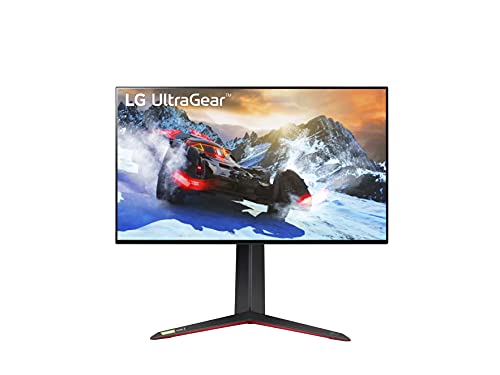
The LG UltraGear 27GP950-B is the premium IPS option for players who split time between the PS5 and a fast PC. Its 27-inch Nano IPS panel runs at 144Hz natively and overclocks to 160Hz over DisplayPort, while the HDMI 2.1 ports accept the console’s 4K 120Hz signal with VRR. A 1ms GtG response time and both G-SYNC Compatible and FreeSync Premium Pro support keep motion clean on either platform.
Color is a strength here, with 98 percent DCI-P3 coverage and a DisplayHDR 600 certification for HDR games and video. The stand adjusts for height, tilt, and pivot, and the near-borderless design suits multi-monitor desks. There are no built-in speakers, so a headset or external audio is part of the package with this one.
Specs
- Screen size: 27 inches
- Panel type: Nano IPS
- Resolution: 3840 x 2160 (4K UHD)
- Refresh rate: 144Hz, 160Hz overclock over DisplayPort (120Hz over HDMI 2.1)
- Response time: 1ms GtG
- Variable refresh: NVIDIA G-SYNC Compatible, AMD FreeSync Premium Pro
- HDR: VESA DisplayHDR 600
- Color gamut: 98 percent DCI-P3
- Inputs: 2 x HDMI 2.1, 1 x DisplayPort 1.4 with DSC, USB hub
- Extras: Height, tilt and pivot stand, no built-in speakers
ASUS ROG Swift PG32UCDM

The ASUS ROG Swift PG32UCDM is the premium flagship of this list and the pick for players who want the best possible picture from the PS5. Its 32-inch QD-OLED panel delivers true blacks, a 1,500,000:1 contrast ratio, and DisplayHDR True Black 400 certification, so HDR games gain the shadow detail and highlight punch that LCD panels cannot match. The panel runs at 240Hz over DisplayPort for PC play and accepts 4K 120Hz from the console over HDMI 2.1.
Response time is a near-instant 0.03ms GtG, color coverage reaches 99 percent DCI-P3 with true 10-bit color, and a custom heatsink with a graphene film helps manage panel heat during long sessions. USB-C with 90W Power Delivery and a USB hub round out a monitor that can anchor a full desk setup on its own.
Specs
- Screen size: 32 inches
- Panel type: QD-OLED
- Resolution: 3840 x 2160 (4K UHD)
- Refresh rate: 240Hz (120Hz over HDMI 2.1)
- Response time: 0.03ms GtG
- Variable refresh: NVIDIA G-SYNC Compatible
- HDR: VESA DisplayHDR True Black 400
- Color gamut: 99 percent DCI-P3, true 10-bit color
- Inputs: 2 x HDMI 2.1, 1 x DisplayPort 1.4, USB-C with 90W Power Delivery
- Extras: Custom heatsink with graphene film, OLED Care features, USB hub
How to Choose
Start with the connection. A monitor needs HDMI 2.1 to accept the PS5’s 4K 120Hz output and VRR at full resolution; HDMI 2.0 models cap the console at 4K 60Hz. All five picks here clear that bar, so the choice comes down to panel, size, and extras.
Panel type decides picture character. IPS models such as the M28U, EX2710U, INZONE M9, and 27GP950-B offer wide viewing angles and strong color, with the INZONE M9’s full-array local dimming adding real contrast. The PG32UCDM’s QD-OLED panel goes further with per-pixel light control and true blacks, at a premium-tier position and with the usual OLED care routine for static images.
Size is a desk decision: 27 and 28 inches suit close seating and shared PC use, while the 32-inch ASUS fills more of the view for solo play. Then check the extras that match the setup. The M28U’s KVM switch serves two-computer desks, the EX2710U’s speakers and remote suit a bedroom, the INZONE M9’s automatic PS5 picture features remove setup friction, and USB-C power delivery on the PG32UCDM keeps a laptop charged through the same screen.
Who Should Skip
Skip this entire category if a large TV already anchors the setup and couch distance is the priority, because even a 32-inch monitor feels small from across a room. Skip the 4K requirement if the library is mostly competitive shooters played at close range; a 1440p 120Hz monitor serves that use at a lower tier, and this site’s 1440p PS5 guide covers those picks. Finally, skip the premium OLED tier if the screen will show static PC desktops all day, since LCD models handle that duty without any burn-in considerations.
FAQ
Does the PS5 need an HDMI 2.1 monitor?
HDMI 2.1 is required for the console’s best output: 4K resolution at 120Hz and variable refresh rate. An HDMI 2.0 monitor still works, but the PS5 is limited to 4K at 60Hz without VRR, so fast-paced games lose their smoothest mode.
Is 4K or 1440p better for PS5 gaming?
Both work well. The PS5 renders many games internally above 1440p and downsamples cleanly, so a 4K monitor shows the sharpest image, especially at 27 inches and above. A 1440p monitor costs less and still supports 120Hz and VRR, which makes it the sensible pick for smaller desks and tighter budgets.
Does VRR work with the PS5 on these monitors?
Yes. The PS5 supports variable refresh rate over HDMI 2.1 within a 48Hz to 120Hz window, and every monitor in this list accepts that signal. VRR smooths out frame-rate dips in performance modes, so supported games feel steadier without screen tearing.
Can one monitor serve both a PS5 and a gaming PC?
Yes, and that is the main reason to choose a monitor over a TV. Connect the PS5 over HDMI 2.1 and the PC over DisplayPort, and each device gets its full refresh rate. Models with a KVM switch or USB-C input, such as the M28U and PG32UCDM, make swapping peripherals between the two systems simpler still.
Final Verdict
The Gigabyte M28U is the default recommendation: it covers the full PS5 feature set, adds a KVM switch and speakers, and sits at the budget tier. The Sony INZONE M9 is the upgrade for players who want local dimming and automatic PS5 picture setup, the BenQ MOBIUZ EX2710U suits anyone who needs real built-in sound, and the LG UltraGear 27GP950-B serves mixed console and PC desks. At the top, the ASUS ROG Swift PG32UCDM delivers the strongest picture quality of the five and earns its premium position.
Related guides
More from Amazon
Programs that pair well with the guide above. Offers and eligibility are set by Amazon and may change.
A free business account with business pricing and bulk-buying tools for work, shop or home office.
Create a business accountFree shipping on eligible items, Prime Video and more. Eligible new members can start with a free trial.
Start a Prime free trialAudiobooks and podcasts to listen to on the go. Eligible new members can start with a free trial.
Try Audible freeAd-free music streaming. Eligible new subscribers can start with a free trial.
Try Music Unlimited freeAs an Amazon Associate we earn from qualifying purchases.


